¶ Automatic translation - catalog translation via DeepL
Automatic translation in Hummerce is a module that translates the content of a multilanguage store - names and descriptions of items, categories, producers, static pages, canvases and contents - using the DeepL service. It fills in missing language versions in bulk, without manually retyping texts.
As of Hummerce 2.34 (2.34.1 or newer recommended for the module), updated 2026-09-28.
¶ Benefits and use cases
- Quick launch of a new store language version - the first pass of translations for the whole catalog in a single run.
- Filling in only missing translations - new items and categories are translated without touching texts already verified by a translator.
- Translating in batches - the store flags selected items (e.g. a new collection) and translates only those.
- Cost control - a monthly character limit and usage history in the panel.
- Descriptions with formatting (headings, lists, tables) keep their layout after translation.
- Lower translator cost - they review a finished text instead of translating from scratch.
¶ What it looks like
Screenshots from the Hummerce demo store panel.
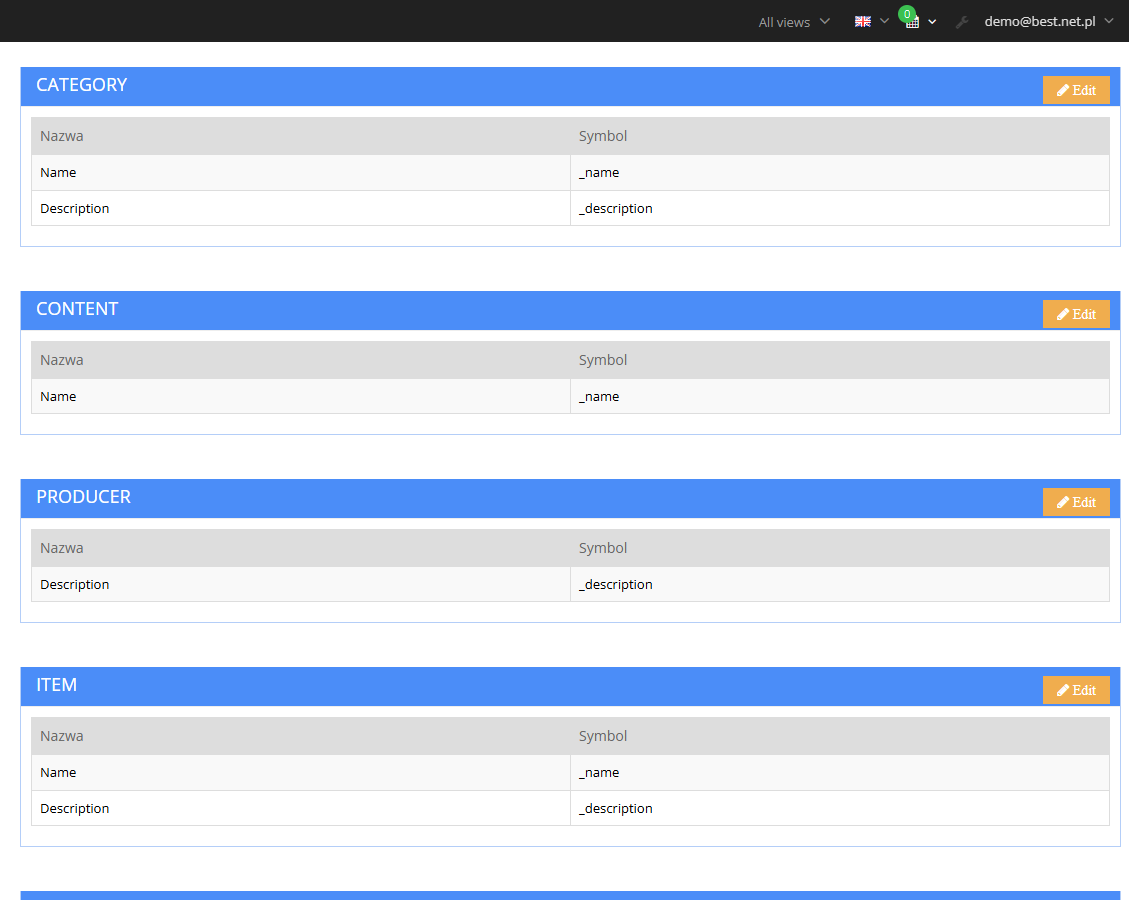
¶ Properties to translate
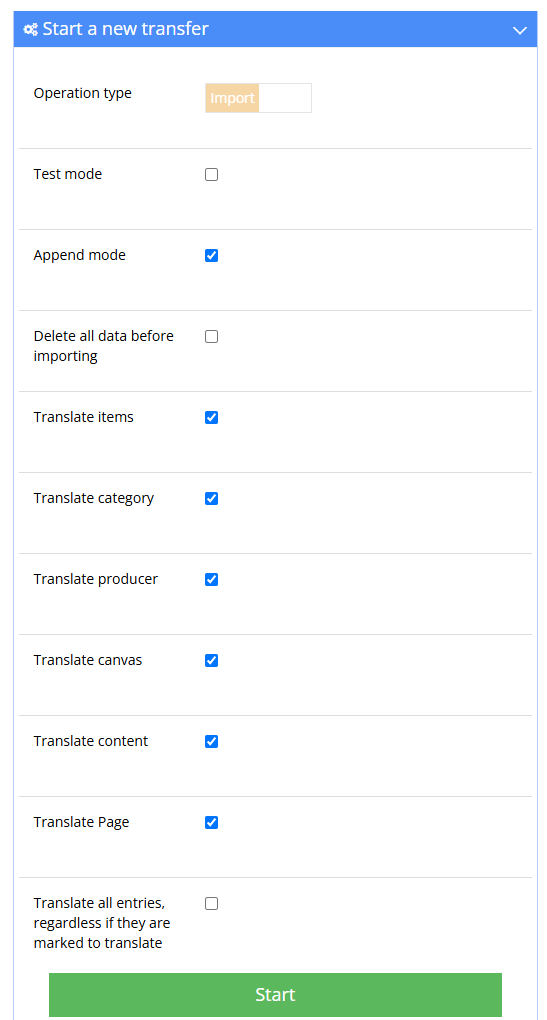
¶ Starting a translation in Data transfer
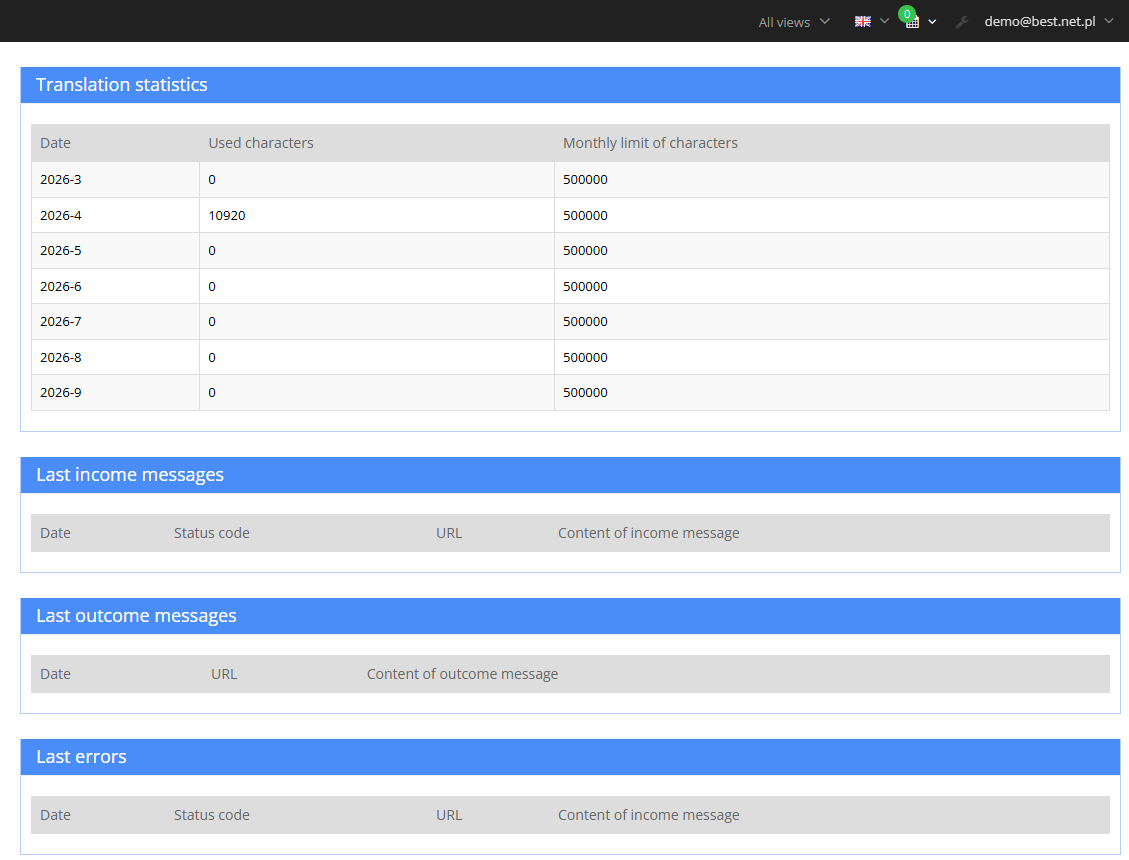
¶ Character usage in Diagnostics
¶ How it works
- The properties translated are multilanguage, single-value text properties. Default list:
- item - name, description,
- category - name, description,
- producer - description,
- static page - name, page content,
- canvas and content - name.
- The list can be extended with other text properties, e.g. an item's short description.
- Text is translated from the default language (usually Polish) into the store languages set in the configuration, e.g. English and German.
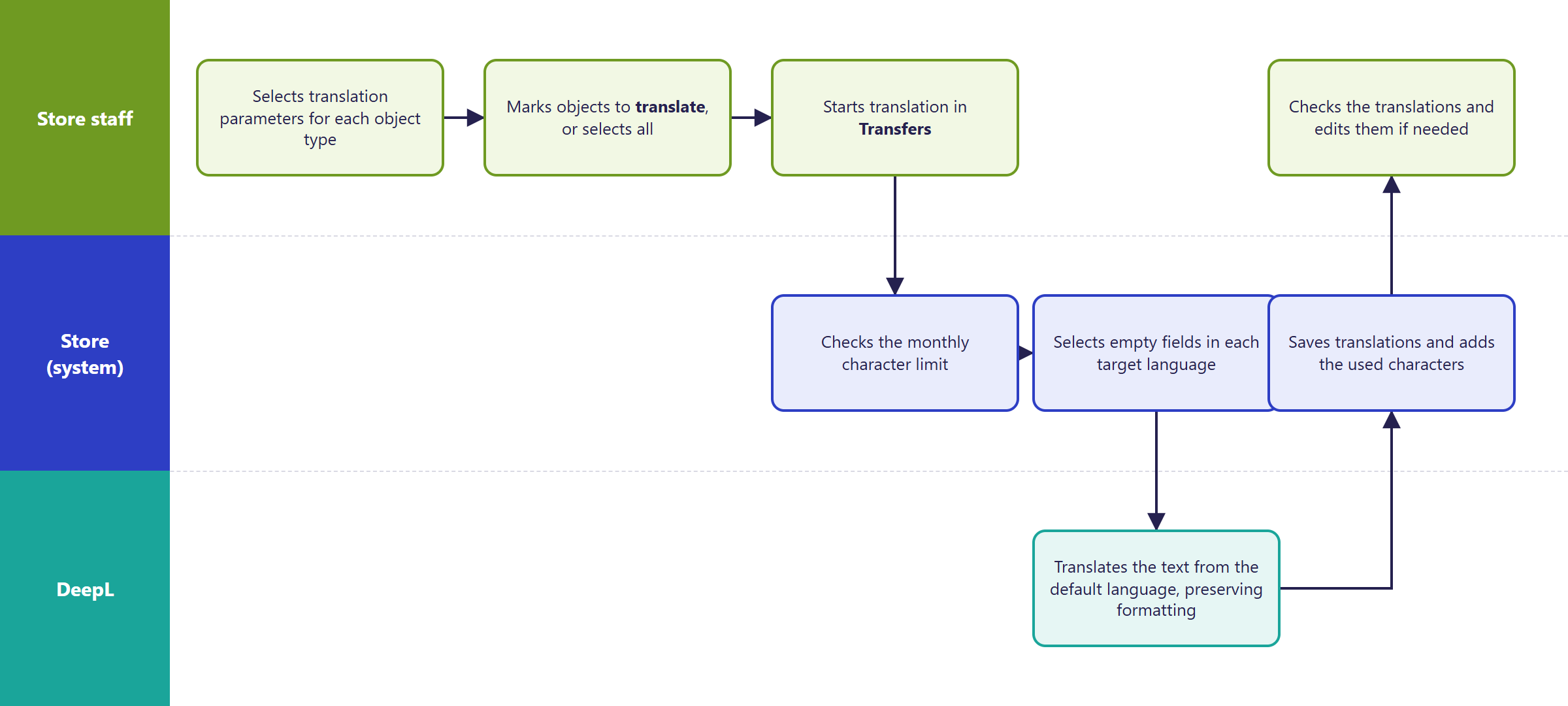
- Only empty fields in the target language are translated - translations entered earlier, including by hand, stay unchanged. Overwriting all translations requires enabling the Force translation of object properties option.
- Which objects are translated:
- by default, only those with the Translate object property set to "Yes",
- after enabling "Translate all entries, regardless of whether they're marked for translation" - all objects of the selected types.
- The Mark object as translated option clears the "Translate object" flag once translation is done. On the next run, those objects are skipped.
- HTML formatting in descriptions is preserved. Only text characters are counted, not HTML tags.
- A fragment that DeepL shouldn't translate (e.g. a brand name, a product code) can be wrapped in an ignore tag - this requires enabling the Use ignore tag option.
- The store counts characters used each month. Once the limit is used up, translation either doesn't start or stops at the current field. The default limit is 500,000 characters - the same as DeepL's free plan.
¶ Translation flow
¶ Version
- From version 2.34 - the module doesn't exist in older versions.
- Latest changes in the module: version 2.34.1.
¶ Dependencies
- A multilanguage store - configured language versions and multilanguage properties (Multilanguage).
- A DeepL API account and API key - set up and paid for by the store:
- the free plan - up to 500,000 characters per month,
- the paid plan (Pro) - a monthly fee plus a charge per million characters; current pricing on the DeepL website,
- according to DeepL, only the paid plan guarantees that texts aren't stored after translation.
- Target languages must be supported by DeepL.
- Verifying translations (especially descriptions) - on the store's or the translator's side.
¶ Implementation
- Requires implementation - the module doesn't turn itself on after an update. Scope:
- enabling the module in the store,
- configuration: API key, DeepL plan, target languages, source language, character limit,
- deciding the list of translated properties, possibly adding custom text properties,
- a trial translation of a few objects on a test environment and checking the result,
- production rollout.
- Minimum estimated time: from 3 h. The module runs in the panel, so the store template (BS5, BS4) doesn't affect the time.
- The time for a specific implementation depends on its scope - we quote it individually.
- What the time depends on:
- whether the store already has language versions configured - setting up multilanguage is quoted separately,
- the number of languages and the number of extra properties to translate,
- whether the first translation of the whole catalog and its review is done by us or by the store,
- the store version - a store on a version older than 2.34 needs an update first (quoted separately).
¶ Limitations
- Translation only starts manually and in bulk, from Data transfer. There's no translating a single field from item editing, and no automatic translation on save.
- Items added through import (Excel, ERP, integrations) aren't translated automatically - a translation transfer has to be run.
- Only single-value multilanguage text properties are translated. Multi-value properties are skipped.
- The module doesn't translate variants and combinations, friendly URLs, meta tags, store messages, email templates, or text on images.
- A producer's name isn't translated, only its description. DeepL usually leaves proper names in descriptions unchanged, but only the ignore tag guarantees it.
- One source language for the whole store.
- No custom term dictionaries and no choice of formal or informal tone.
- The transfer doesn't show progress. For a large catalog, translation takes a long time, so it's worth translating in batches by flagging selected objects.
- Character usage and reaching the limit are visible in Diagnostics, in recent errors.
- Machine translation can contain errors - especially in descriptions, industry terminology and marketing content, it needs review before publishing.
- We do not verify translations for factual accuracy or legal compliance (e.g. product descriptions, terms of service, labeling), nor DeepL's terms for processing content - that's the store's responsibility.
¶ Future development
- Translating a single field or object directly from editing.
- Automatic translation after adding an item or after import (Excel, ERP, integrations).
- Periodic background translation of new content.
- Brand and industry term dictionaries, and a choice of formal or informal tone.
- Translating further elements: variants, meta tags, store messages, email templates.
- A progress view and a translation run report.
- API and MCP support, e.g. translating from the AI assistant.
- Other translation engines, e.g. AI language models.
¶ Frequently asked questions
Does Hummerce translate the whole catalog in one run?
Yes. The Automatic translation transfer fills in missing translations for items, categories, producers, static pages, canvases and contents in a single pass.
Will automatic translation overwrite texts entered by hand?
No, by default only empty fields in the target language are translated. Overwriting all translations requires enabling the Force translation of object properties option.
How many characters per month can be translated for free?
Up to 500,000 characters on DeepL's free plan - that's also the default limit counted by the store, changeable in the configuration.
How long does it take to set up the translation module?
From 3 h - the module requires implementation: a DeepL API key, languages, the list of translated properties, and a trial translation.
Does the module translate item variants and email templates?
No. It only translates selected text properties of items, categories, producers, pages, canvases and contents - variants, meta tags, messages and email templates are out of scope.
Do you need your own DeepL account?
Yes. The store sets up and pays for the DeepL account and API key - the free plan covers up to 500,000 characters per month.
¶ Related
- Multilanguage - the language versions the module can't work without.
- Properties and locations - the list of translated properties and locations.
- On hummerce.com: Multilanguage (in Polish).
Want to see how automatic translation could work in your store? Contact the Hummerce team (in Polish).
¶ Configuration details
¶ Access in the admin panel
- Translations menu:
- Properties to translate - the list of translated properties for each object type, changeable,
- Diagnostics - character usage across months, the latest DeepL requests, and recent errors (e.g. limit reached, invalid key),
- Translation billing - monthly entries with the limit and character usage. You can change the limit for the current month only here.
- Data transfer: Automatic translation - starts a translation run. Options: Translate items, Translate categories, Translate producers, Translate canvases, Translate contents, Translate static pages, Translate all entries, regardless of whether they're marked for translation.
- Panel configuration: the Automatic translation group:
- API key - the DeepL account key,
- Use paid DeepL version - the paid (Pro) plan instead of the free one, off by default,
- Languages to translate - target language codes,
enby default, - Default language - the source language,
plby default, - Force translation of object properties - overwrites existing translations, off by default,
- Mark object as translated - clears the "Translate object" flag after translation, off by default,
- Track monthly character limit and Monthly character limit - the limit counted by the store, on by default, 500,000 characters,
- Use ignore tag and Ignore tag section name - fragments excluded from translation, off by default,
- Use tag handling and Tag handling type - preserving formatting, on by default.
- Item, category, producer, static page, canvas, content: the "Translate object" property.
- Tasks: creating a monthly translation billing entry - runs once a day, creating a billing entry for the current month.
¶ REST API and MCP
- No dedicated operations - translation only starts from the panel.
¶ Parameters
¶ Property locations
| Symbol | Object | Purpose |
|---|---|---|
itemAdminTranslation |
item | properties translated on items |
categoryAdminTranslation |
category | properties translated on categories |
producerAdminTranslation |
producer | properties translated on producers |
pageAdminTranslation |
static page | properties translated on static pages |
canvasAdminTranslation |
canvas | properties translated on canvases |
contentAdminTranslation |
content | properties translated on contents |
propertyCategoryAdminTranslation |
property category | properties translated on property categories |
¶ Object parameters
| Symbol | Object | Label |
|---|---|---|
_translatorTranslateObject |
item, category, producer, static page, canvas, content | Translate object |
_translatorMonthlyCharacterLimit |
Translation billing entry | Monthly character limit for translation |
_translatorUsedCharacterInMonth |
Translation billing entry | Characters used this month |