¶ Friendly URLs - SEO-friendly page addresses
Friendly URLs in Hummerce turn technical store page addresses into readable ones, e.g. turning /do/item/B001/product-name into /product-name.html - for items, categories, static pages and producers. This makes addresses look better in search results, in links shared with customers, and in campaigns.
As of Hummerce 2.33 (latest changes in the module: 2.33.199), updated 2026-09-28.
¶ Benefits and use cases
- Keyword-rich addresses in Google results and in sponsored links.
- Readable links in newsletters, social media and printed materials.
- Safe renaming and restructuring of categories - old addresses redirect to the new ones, so Google rankings aren't lost.
- Custom addresses for campaign pages and special categories, e.g.
/promotions.html,/new-arrivals.html. - Separate addresses for each store language version.
- Moving a store from another platform while keeping its existing addresses (addresses and redirects can be loaded via a transfer).
¶ What it looks like
Screenshots from the Hummerce demo store panel.
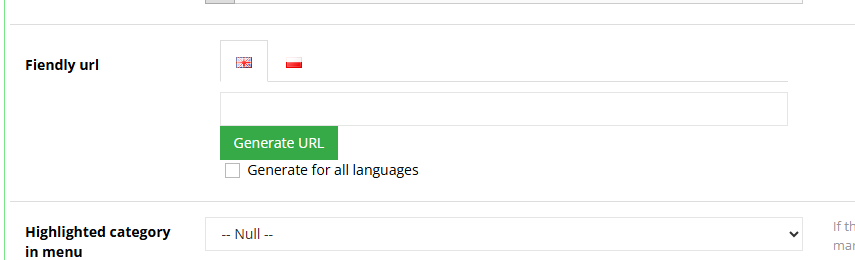
¶ Friendly URL field in category editing
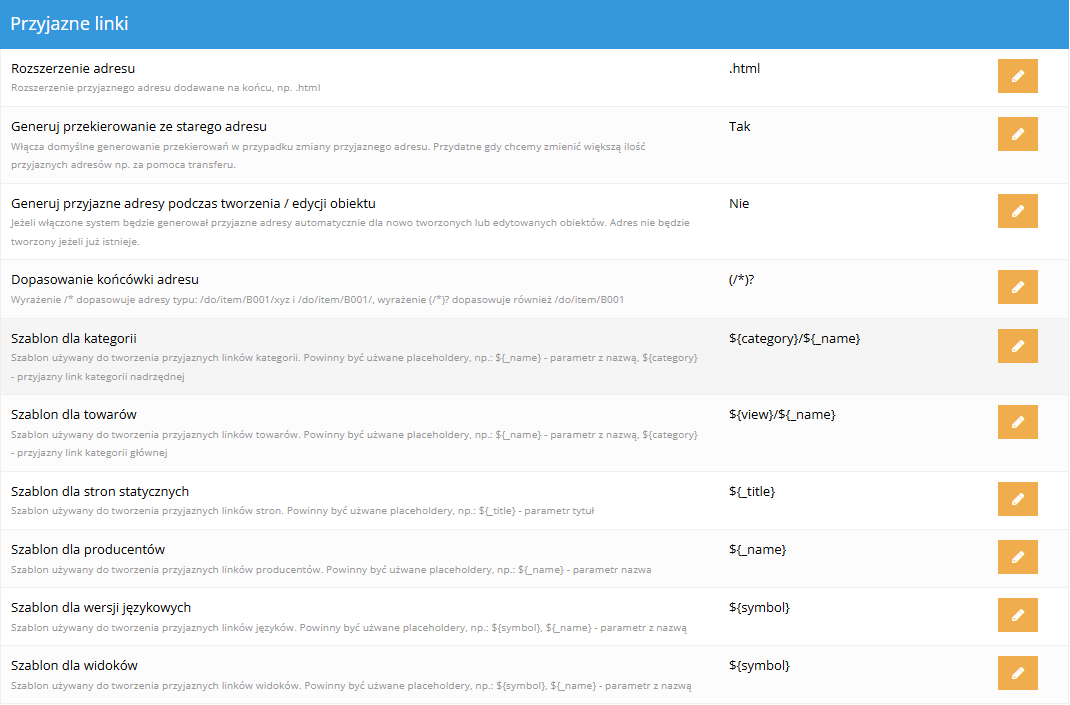
¶ Friendly URL settings
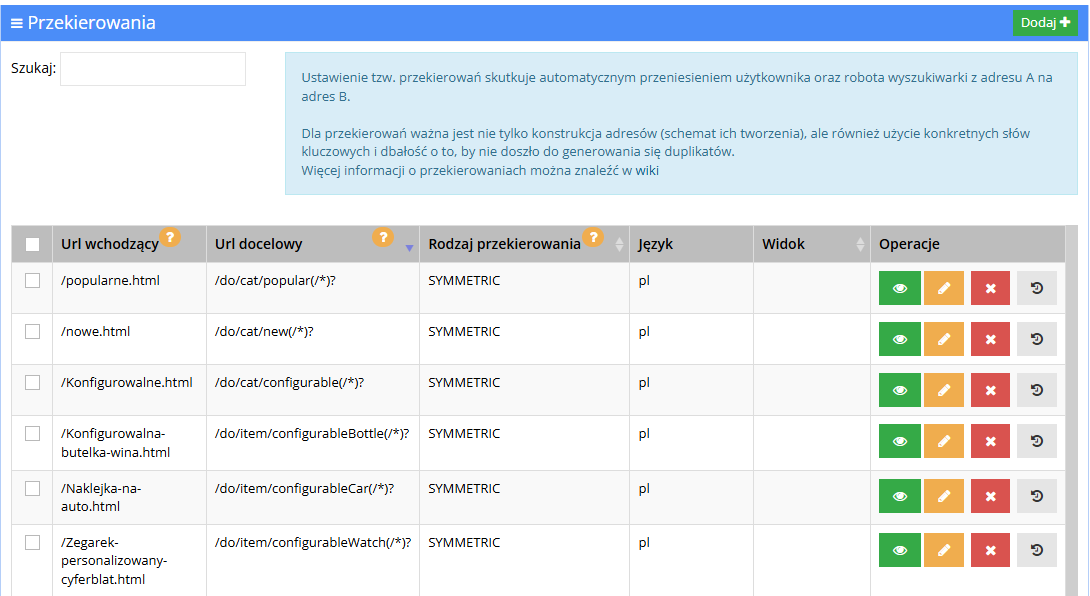
¶ Friendly URLs on the redirect list
¶ How it works
- Friendly URLs are available for: items, categories, static pages, producers, as well as language versions and views (as part of the address).
- The address is built from a template set separately for each object type - by default:
- item - the item name, prefixed with the view symbol,
- category - the parent category's address plus the category name,
- static page - the page title,
- producer - the producer's name,
- ending with the
.htmlextension.
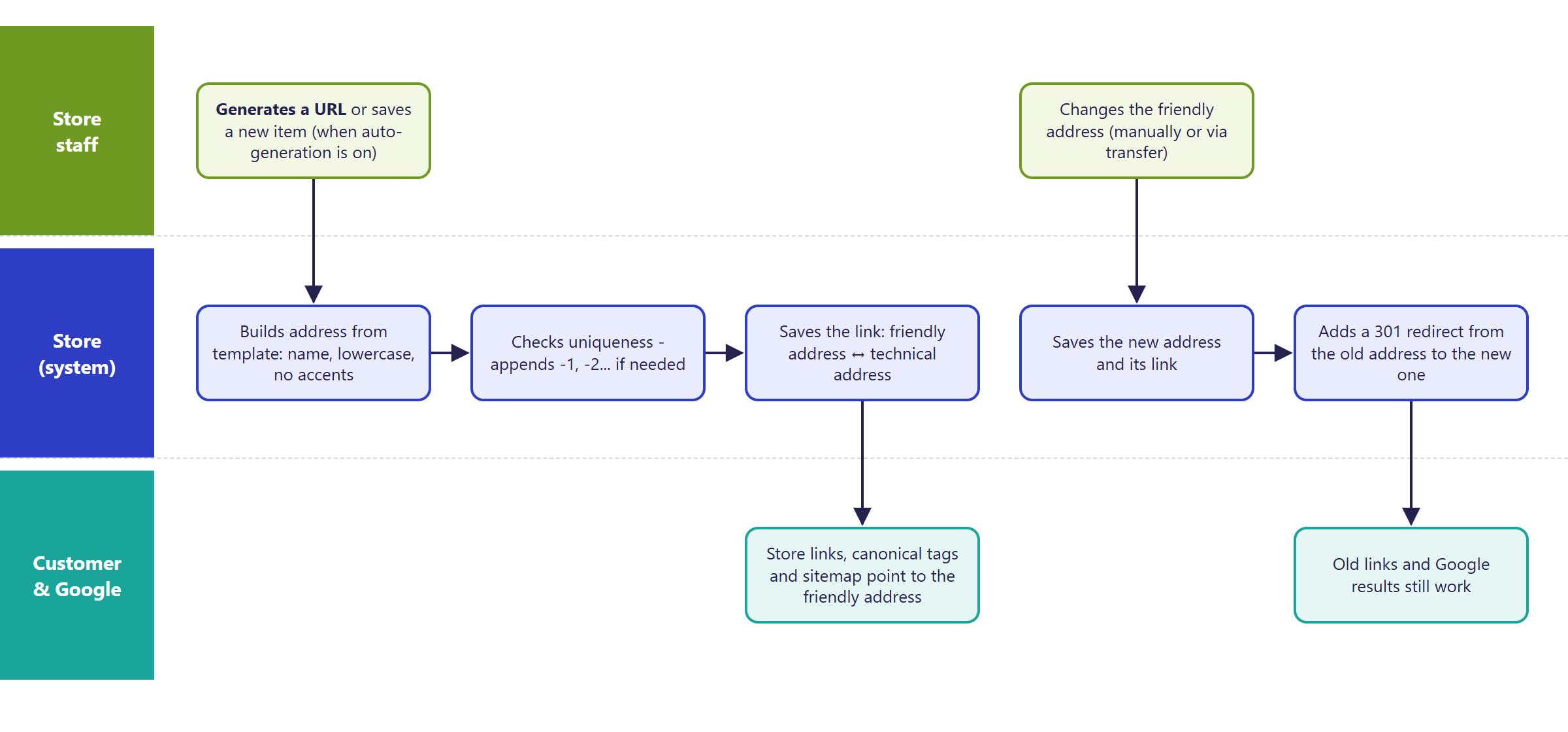
- When building the address, the store:
- replaces Polish and other national characters with plain letters (also German, Czech, French, Cyrillic),
- replaces spaces and characters not allowed in a URL with a hyphen, and converts uppercase to lowercase,
- shortens the name to 50 characters,
- checks uniqueness across the whole store - if the address is taken, it appends
-1,-2and so on.
- The address is assigned:
- manually - the Friendly URL field and Generate URL in object editing (for items, the SEO tab); the address can also be typed in by hand,
- automatically - with Generate friendly url on object create/edit enabled, the address is created when saving an object that doesn't have one yet.
- Once assigned, an address doesn't change on its own, e.g. after renaming an item - the change has to be made manually or via a transfer.
- When an address changes, the store creates a 301 redirect from the old address to the new one (the Generate redirect from previous address setting, enabled by default).
- In the default configuration, each store language has its own friendly URL (a separate field per language; Generate for all languages). You can also set one address for all languages, or separate addresses per view.
- Friendly URLs are used by links in the store, the canonical address, and the sitemap.
- Addresses are stored as redirects - they show up on the Rewrites list as symmetric redirects (the friendly URL shows the page, and the technical address redirects to the friendly one) - see Redirects.
¶ Assigning and changing an address
¶ Version
- A core platform feature - available in all supported versions.
- From version 2.30 - template items no longer get friendly URLs (so they don't get duplicated once an item is created from a template).
- From version 2.33 - a copied item no longer inherits the original's address; fixed language switching on pages with a friendly URL.
- Latest changes in the module: version 2.33.199.
¶ Dependencies
- The store server must pass addresses to the application without the
/do/prefix - a hosting-side setting, standard on new stores. - Redirects - the mechanism friendly URLs run on.
- Sitemap - uses friendly URLs.
- The object must have a name (title) at the moment the address is generated - without one, no address is created.
¶ Implementation
- New store - the feature works from launch; settings (address templates, automatic generation) are chosen as part of setting up the store.
- A running store without friendly URLs - requires implementation. Scope:
- server and module configuration,
- deciding on address templates and per-language addresses,
- generating addresses for existing items, categories, pages and producers,
- redirects from previous addresses, if the store used different addresses before (e.g. after a migration),
- checking address-based settings (e.g. goals and reports in Google Analytics),
- testing on a test environment and production rollout.
- Minimum estimated time:
- new store - included in the store launch, no extra time,
- enabling it on a running store (one language) - from 6 h,
- separate addresses for further languages - from 8 h.
- The time for a specific implementation depends on its scope - we quote it individually.
- What the time depends on:
- the number of objects and languages,
- whether addresses need to be carried over from a previous platform,
- extra scripts and pages outside the store application (e.g. separate files on the server),
- the store version - an update is quoted separately.
¶ Limitations
- Name-based friendly URLs only cover items, categories, static pages and producers. Blog posts and categories have readable addresses with a symbol (
/blog/post/...,/blog/cat/...), not the title; campaign pages and the customer account have technical addresses (these can be handled with a manual redirect). - Further list pages (pagination) use the category's address with the page number as a parameter, without a separate friendly URL.
- The address doesn't update on its own after the object's name changes.
- Automatic generation doesn't report failures - an object without a name is left without an address.
- Bulk-generating addresses for the whole catalog is a technical operation, carried out by us as part of an implementation.
- We don't create redirect chains (A -> B -> C) - it's worth checking the redirect list after further address changes.
- The platform doesn't add hreflang tags for language versions.
- After enabling friendly URLs on a running store, address-based Google Analytics reports and goals need adjusting.
- Changing the per-language or per-view address setting on a running store requires migrating existing addresses - this is implementation work.
- We do not verify the configuration for legal compliance - the choice of addresses, keywords and page content is decided by the store.
¶ Future development
- Title-based friendly URLs for blog posts and for campaign pages.
- Friendly URLs for further list pages.
- Automatic address update after a name change (with a redirect from the old one).
- Hreflang tags for language versions.
- Bulk address generation from the panel, with a preview of the changes.
- Friendly URLs and redirects handled through REST API and the AI assistant (MCP).
- A report of objects without a friendly URL.
¶ Frequently asked questions
Do friendly URLs improve a store's visibility in Google?
Yes. A keyword-rich address instead of a technical identifier is easier to read for search engines and for customers sharing a link.
Does renaming an item change its address?
Not automatically. The address stays as it was first assigned - the change has to be made manually or via a transfer, to avoid unnecessary redirects.
Does the old address stop working after it changes to a new one?
No. The store creates a 301 redirect from the old address to the new one by default, so old links and Google rankings aren't lost.
Can each store language have a different address for the same page?
Yes, in the default configuration each language has its own friendly URL. You can also set one shared address for all languages.
How long does it take to enable friendly URLs on a running store?
In a new store the feature works from launch, at no extra time. In a running store, for one language - from 6 h; further languages - from 8 h.
Do friendly URLs cover every page of the store?
No. They cover items, categories, static pages and producers. Blog posts have addresses with the post symbol (Blog and news), and campaign pages and customer account pages have technical addresses.
¶ Related
- Redirects - the mechanism friendly URLs run on.
- Sitemap, Multilanguage.
- SEO and SEM optimization (in Polish) on hummerce.com.
Want to check how friendly URLs could improve your store's visibility? Contact the Hummerce team (in Polish).
¶ Configuration details
¶ Access in the admin panel
- Object editing: the Friendly URL field with Generate URL and Generate for all languages:
- item - the SEO tab,
- category, static page, producer - object editing.
- Panel configuration: Configuration -> Settings, the Friendly URLs group:
- Address extension -
.htmlby default, - Generate redirect from previous address - Yes by default,
- Generate friendly url on object create/edit - No by default,
- Trailing slash matching - whether a technical address with and without a trailing slash redirects the same way (Yes by default),
- Template for categories, Template for items, Template for static pages, Template for producers, Template for language versions, Template for views - address patterns using object fields, e.g.
${_name}(name),${category}(category address),${view}(view),${_title}(page title).
- Address extension -
- Redirect list: Configuration -> Rewrites - all friendly URLs and redirects, with manual entry.
- Data transfer: bulk address changes - with Generate redirect from previous address enabled, redirects from the old addresses are created.
¶ REST API and MCP
No dedicated operations for friendly URLs and redirects in REST API or in the AI assistant (MCP) - addresses are managed in the panel.
¶ Store messages
The module has no store messages or email templates of its own.
¶ Parameters
The address is stored in the "Friendly URL" property of the item, category, static page and producer. The property symbol depends on whether addresses are separate per language and view - this is decided when the module is set up:
| Symbol | Address |
|---|---|
_friendlyUrlMultiLocale |
separate for each language (default configuration) |
_friendlyUrl |
one for all languages and views |
_friendlyUrlMultiView |
separate for each view |
_friendlyUrlMulti |
separate for each language and view |
The symbol is needed, among other things, for bulk address changes via a transfer.