¶ AI assistant - MCP server
The Hummerce AI assistant, through the MCP server, connects artificial intelligence (e.g. Claude) directly to the store. Staff write a request in plain language - "show orders from the last week that are waiting for payment" - and the assistant retrieves data or makes changes on its own, with the permissions of the account it's connected with. This turns tasks that take many steps in the panel into a single conversation.
As of Hummerce 2.34-2.35 (latest module changes: 2.35.79), updated 2026-10-16.
¶ Benefits and use cases
- Order handling - finding orders by status, customer, email or phone number in any format; changing status, payment and delivery; adding a note to an order; editing lines and addresses; placing an order on the customer's behalf.
- Customer service - one question searches customers, orders, complaints and returns by email or phone - a quick answer to a customer's call with no need to search in several places.
- Customer offers - pricing a cart for a specific customer (with their prices and promotions) and a link the customer uses to load the ready cart in the store.
- Sales reports - a sales summary for a period, bestsellers, top customers, customer segments, abandoned carts, a stock depletion forecast - with no export to a spreadsheet.
- Diagnosing "why" - why an item isn't visible or can't be bought (the assistant gives every reason at once), where a specific customer's price comes from and which pricing rules might be responsible for it.
- Catalog changes - editing items, bulk changes matching a symbol pattern, properties, variants, category descriptions, assignment to categories and views, photos, new items.
- Prices and promotions - prices in price lists, pricing rules, cart promotions, coupons.
- Content - a content audit (e.g. categories without a description, hidden pages), reading pages, content blocks and canvases.
- Change control - who changed what and when, on a single object or across the whole store.
- Implementation and maintenance - reading and changing configuration, the module list, the store's deployment status, scheduled tasks, clearing cache, moving items, properties and configurators between a test and production store (with a prior check of what the target store lacks), changing store texts (messages) and reviewing admin accounts.
- Automation - the same server can also serve automation tools that use MCP (e.g. an AI agent in n8n) - for example a daily sales report or a first pass at handling returns.
¶ What it looks like
Screenshots from the Hummerce demo store (admin panel).
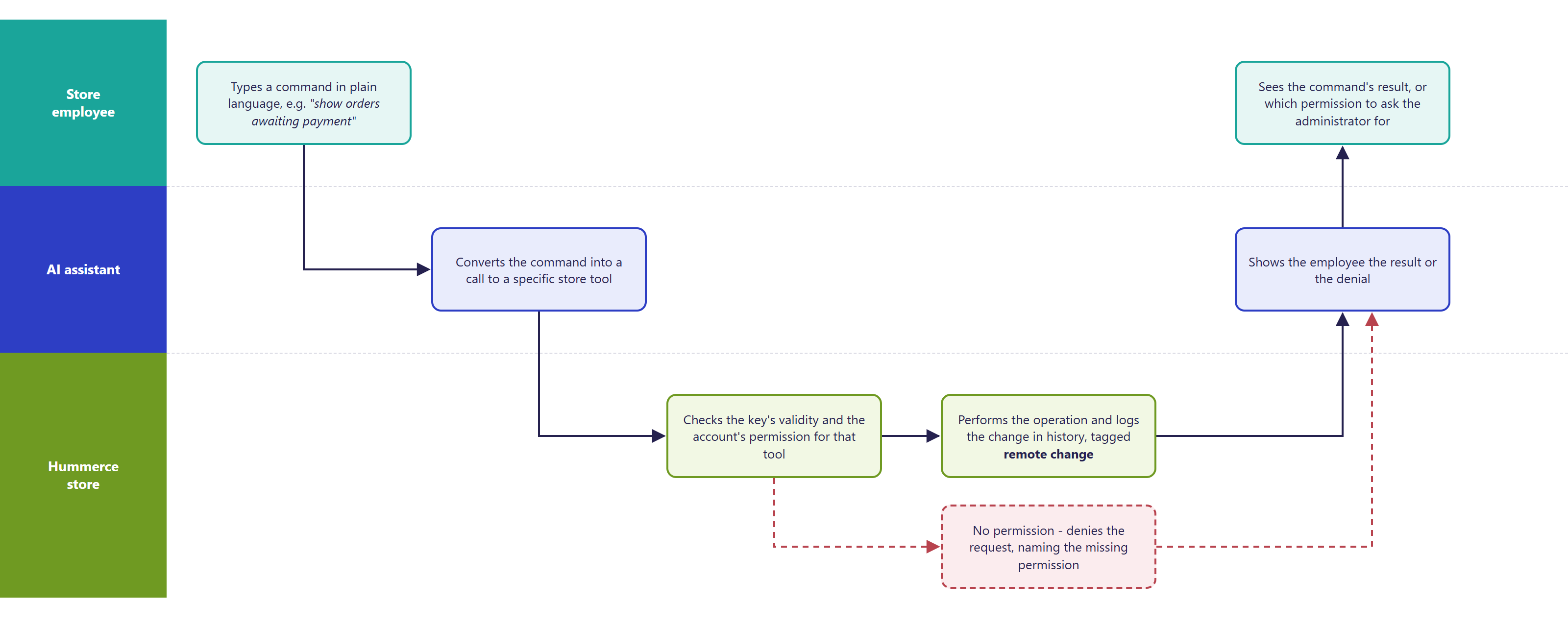
¶ Command flow
¶ MCP API Key on the admin's profile

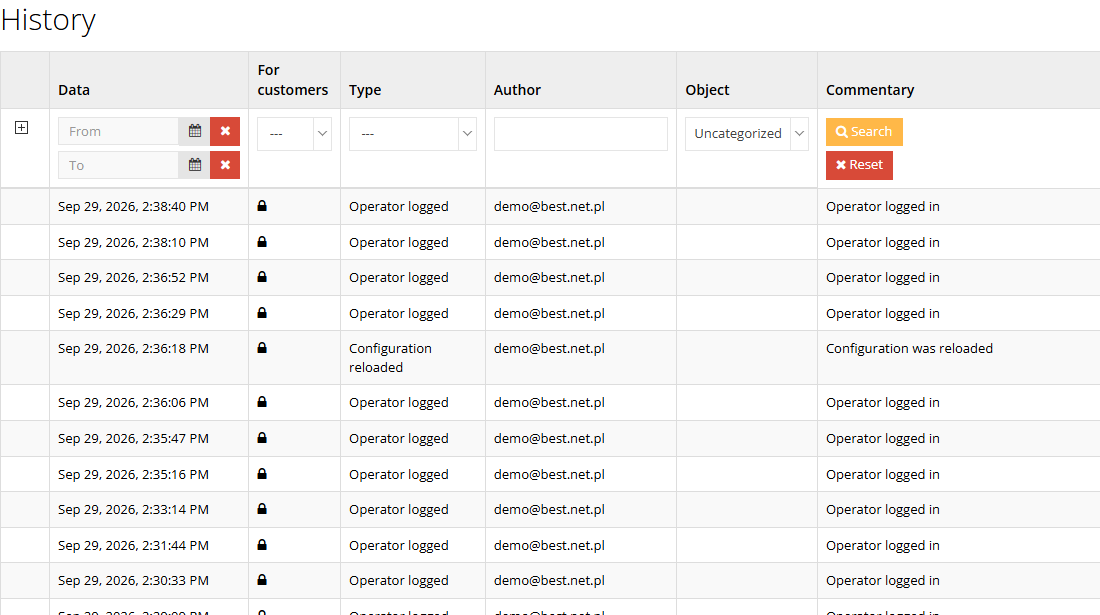
¶ Change history after an assistant operation
¶ How it works
- The assistant connects to the store's MCP server address and identifies itself with an API key generated on a panel admin's account.
- The assistant turns every request into a call to a specific store tool. On every call, the store checks whether the key is valid and whether the account has the permission that tool requires - the same permission the panel requires for the matching screen.
- The assistant only sees the tools the account has permission for. An order-handling staff member will see a dozen or so tools; an administrator - all of them.
- A refusal states the name of the missing permission - so you know exactly what to ask the administrator for. A granted permission works right away, once the assistant refreshes its tool list.
- Changes made by the assistant go into the object's change history just like changes from the panel, marked as having arrived remotely - you can see what the assistant changed and what a person changed.
- Riskier operations have extra safeguards: deleting a category, payment method, delivery method or configurator component, and saving or importing configuration, require explicit confirmation in the call; importing item bundles and property files, and changing a virtual category's filter, only preview the change by default; deleting an item marks it as deleted (as in the panel) - reversible.
- Pricing a cart for a customer uses the same pricing mechanism as the store's cart and doesn't save anything.
- From version 2.35.61, when creating items, categories, properties, price lists and configurator components, the assistant enforces a uniform symbol format (camelCase, e.g.
kolorGlowny). It rejects a symbol in any other form and suggests the correct one, because symbols are used by integrations and templates, and the store treats different variants as separate objects. The exception is an item symbol that is an external catalog code (e.g. from an ERP): it starts with a digit and may then contain letters, digits and the characters.,_,/,-(e.g.800.ABC.01) - such a code passes unchanged, because it has to match the code in the source system. In categories, properties, price lists and components, codes starting with a digit are not allowed. See also Unique symbols. - Tools for add-on modules (e.g. Allegro, InPost Buy) only appear in stores where those modules are enabled.
¶ Key and account security
- One key per account - every panel user generates their own key, on their own profile. The key isn't visible on other people's profiles - an administrator can't generate a key on someone else's behalf.
- One key per account - generating a new key immediately invalidates the previous one.
- The key is equivalent to a password - whoever has it acts in the store as the account owner. Don't send it by email or chat.
- Permissions match the panel - the scope of the assistant's work is set by the account's roles and permissions (Configuration -> Roles, Configuration -> Admins, see Admin permissions). There are no "MCP-only" permissions - granting a permission grants it in the panel too.
- Service account - for automation, we recommend a separate account with a minimal set of permissions, so the change history clearly shows what the automation did.
- Store customer accounts have no access to MCP tools, regardless of settings.
- Write operations require permission to change the relevant area. Extra care is needed for: sending emails (can go to any address), bulk changes to items and prices, and saving or importing configuration or bundles into the production store.
- The connection is protected by an HTTPS requirement, a limit on requests per minute and - recommended - key expiry after a set number of days.
- Sensitive values (e.g. passwords, tokens) are masked in the change history - the assistant can't read them from there.
¶ How to connect the assistant
You need:
- a store with the MCP server running (see Implementation),
- a panel admin account with a role covering the assistant's scope of work,
- an API key generated on that account (account profile, MCP API Key section),
- the store's MCP server address - we provide it when the server is deployed,
- an AI assistant or tool that supports remote MCP servers over HTTP, with the ability to add a custom header carrying the key (e.g. Claude Code, Claude Desktop, an AI agent in n8n). Assistants that connect to MCP servers only through OAuth login won't connect directly.
Once connected, a good first command is to ask for information about the store - it confirms the address and key are correct.
¶ Version
- The MCP server has worked since version 2.34 - it isn't present in older versions.
- We recommend version 2.35.55 or newer - permissions are checked separately for each tool, just like in the panel.
- Symbol checks when creating objects - from version 2.35.61.
- Tools for store messages and for configurator export and import - from version 2.35.62.
- Tools for admin accounts, checking data-transfer readiness and copying photos between items - from version 2.35.63.
- Latest changes to the module: version 2.35.63.
¶ Dependencies
- The panel's admin permissions module - we always deploy the MCP server together with it.
- An HTTPS connection for the store.
- Tools for specific areas require the relevant modules to be enabled (e.g. returns, coupons, Allegro, InPost Buy, saving carts for a cart link).
- The AI assistant and its subscription - on the store's side, outside Hummerce.
¶ Implementation
- Requires implementation - the MCP server doesn't turn itself on after an update. Scope:
- enabling the MCP server in the store configuration and setting up safeguards (HTTPS, request limit, key expiry),
- preparing roles covering the assistant's scope of work (e.g. order handling, catalog, content) and assigning them to people,
- helping connect the AI assistant and testing the connection on an account with limited permissions,
- optionally: setting parameters for orders created by the assistant (e.g. marking the order's source).
- Minimum estimated time:
- deployment with one role and a connection test - from 2 h,
- preparing several roles and connecting the whole team - from 4 h.
- The time for a specific implementation depends on its scope - we quote it individually.
- What the time depends on:
- the store's version - an older release needs an update first (quoted separately),
- the number of roles and people who will work with the assistant,
- whether the store already has the admin permissions module enabled,
- extra work, e.g. automation in n8n, team training, custom tools for individual store modules (quoted separately).
¶ Limitations
- The assistant works strictly within the account's permissions - it can't get around them, but it also can't tell an accidental request from an intended one. The account owner the assistant is connected with is responsible for the changes.
- The server only accepts the key in a request header - assistants that connect only through OAuth login won't connect directly.
- One key per account - several devices or assistants on one account share the same key, and replacing it means swapping it everywhere.
- Price diagnostics points to rules that might be responsible for a price, but doesn't identify with certainty which rule actually applied.
- Not every panel area has tools - the assistant won't handle, for example, a store's individual custom modules until tools are added for them.
- After a permission is granted, the assistant only sees the new tools once the session is refreshed.
- The quality of answers and how well requests are interpreted depend on the AI assistant and its model - Hummerce is responsible for the store's data and operations, not for how the assistant behaves.
- Store data, including customers' personal data, passed to the assistant reaches the AI provider. We do not verify the configuration for legal compliance - choosing the AI provider, the data processing agreement and GDPR compliance are the store's responsibility.
¶ Future development
- Assistant login via OAuth, without manually copying the key.
- Several keys per account (a separate key for each device or automation).
- Tools for further modules and integrations (e.g. ERP, couriers, complaints, loyalty program).
- Ready-made role sets for typical tasks (order handling, catalog, content, prices) available right after deployment.
- Reports and automation built on the assistant (e.g. a daily sales summary, low-stock alerts).
¶ Frequently asked questions
Does customer data the assistant sees go anywhere outside the store?
Yes. Store data, including customers' personal data, passed to the assistant reaches the AI provider. Choosing the provider, the data processing agreement and GDPR compliance are the store's responsibility.
How long does deploying the AI assistant in Hummerce take?
Deployment with one role and a connection test - from 2 h. Preparing several roles and connecting the whole team - from 4 h.
Can the assistant do more than the account it connects with allows?
No. The assistant works strictly within the permissions of the account it's connected with - the same ones as in the panel.
Can you see what the assistant changed versus what a staff member changed?
Yes. Changes made by the assistant go into the change history marked as having arrived remotely.
Can store customers use the AI assistant?
No. Store customer accounts have no access to MCP tools, regardless of settings.
Can any AI assistant be connected?
Partly. The MCP server accepts the key in a request header - it works with assistants that support this kind of login (e.g. Claude Code, Claude Desktop). Assistants that connect only through OAuth login won't connect directly.
¶ Related
- Allegro - direct integration, REST API - other ways to connect the store with external systems.
- Admin permissions - the roles and permissions the AI assistant also relies on.
- On hummerce.com: AI assistant (MCP) (in Polish).
Want to see how the AI assistant could work in your store? Contact the Hummerce team (in Polish).
¶ Configuration details
¶ Access in the admin panel
- API key: Configuration -> Admins -> your own profile, MCP API Key section (Generate MCP key, Regenerate).
- Permissions: Configuration -> Roles and Configuration -> Admins - the permission tree and the Advanced section.
- Panel configuration: the MCP server group:
- Enable MCP server,
- Require HTTPS - on by default,
- Maximum requests per minute,
- Default MCP key validity (days),
- Enable MCP key expiry - we recommend enabling it,
- Object resolution strategy (symbol / ID) - Symbol only (recommended) by default,
- Order properties for MCP - additional order parameters visible to the assistant and accepted when creating an order,
- Default values of MCP order properties - values set on orders created by the assistant,
- MCP server base path - a technical setting, don't change it without reason.
- Change history: the assistant's changes are visible in objects' change history in the panel, marked as remote changes.
¶ REST API and MCP
The MCP server is independent of the store's REST API - system integrations (ERP, wholesalers) still use the REST API. Checking a menu item in the role's permission tree gives full access to that area (read and changes); read-only access is granted by entering the permission manually in the Advanced section.
Groups of tools available through MCP:
| Area | What you can do | Example tools |
|---|---|---|
| Orders | overview, status, lines and order data; changing statuses, notes, editing, creating | ec2_orders_recent, ec2_orders_status, ec2_orders_update_status, ec2_orders_add_note, ec2_orders_edit, ec2_orders_create |
| Customers | customer data, purchase history, top and new customers, segmentation, searching by email and phone | ec2_customers_details, ec2_customers_order_history, ec2_customers_segment, ec2_search_by_email, ec2_search_by_phone |
| Returns | list, details, returns for an order, changing status | ec2_returns_list, ec2_returns_get_by_order, ec2_returns_update_status |
| Sales and analytics | sales summary, bestsellers, abandoned carts, stock forecast | ec2_analytics_sales_summary, ec2_analytics_best_sellers, ec2_abandoned_carts, ec2_inventory_forecast |
| Cart | pricing a cart for a customer, saving a cart with a link for the customer | ec2_cart_price_preview, ec2_cart_save_and_link |
| Diagnostics | reasons an item isn't visible, where a price comes from; latest REST API requests, responses and errors, and search in the saved request files (since 2.35.74) | ec2_diagnose_item_visibility, ec2_diagnose_price, ec2_restapi_diagnostics, ec2_restapi_logs_search, ec2_restapi_logs_check |
| Items | search, details, editing, bulk changes, properties, variants, creating, deleting | ec2_products_search, ec2_products_update, ec2_products_bulk_update, ec2_products_set_property, ec2_products_create |
| Categories | category tree, descriptions, creating, moving, virtual categories and their filters | ec2_categories_list, ec2_category_description_set, ec2_category_move, ec2_virtual_category_criteria_set |
| Prices and promotions | price lists and item prices, price for a customer, pricing rules, promotions, coupons | ec2_pricelist_entry_set, ec2_price_for_customer, ec2_price_rules_list, ec2_promotions_list, ec2_coupons_create |
| Warehouse | item stock, stock correction, low-stock report, warehouse overview | ec2_inventory_check_stock, ec2_inventory_update_stock, ec2_inventory_low_stock_report, ec2_warehouse_stock_overview |
| Content and photos | pages, content blocks, canvases, content audit, uploading photos | ec2_pages_list, ec2_content_audit, ec2_canvas_details, ec2_image_upload |
| Properties and dictionaries | properties and their locations, producers, tax rates, currencies, units, item groups, views, payments, deliveries, product configurators | ec2_property_create, ec2_property_location_add, ec2_producers_list, ec2_payment_methods, ec2_delivery_methods, ec2_combinations_get_slots |
| Emails | sending messages and order/customer notifications from the store's templates | ec2_email_send, ec2_email_send_order_notification, ec2_email_send_customer_notification |
| Change history | object history, searching changes (who, when, what), dictionary of entry types | ec2_history_list, ec2_history_search, ec2_history_vocabulary |
| Configuration and maintenance | module settings, module list, deployment status, scheduled tasks, cache; database migration status - read only (since 2.35.79) | ec2_config_get, ec2_config_set, ec2_modules_list, ec2_deployment_status, ec2_task_run, ec2_cache_clear, ec2_db_migrations |
| Data transfer | item bundles and property files between a test and production store; a configurator's whole component set as one document (an import without confirmation only reports, with confirmation it writes everything in one transaction); checking the target store's readiness without writing - the source store lists what a set of items uses (component types and their properties, property definitions, categories from criteria, items, tax rates, units, views, languages, photo files, the number of price list entries), and the target store reports what is missing; copying photos and property files from one item to others (without confirmation only a report, which points out values whose file is missing) | ec2_item_bundle_export, ec2_item_bundle_import, ec2_changeset_plan, ec2_combination_export, ec2_combination_import, ec2_transfer_readiness, ec2_item_media_copy |
| Store messages | reading and writing the store's text overrides, like the Contents -> Messages screen; batch writing as a list and removing an override (return to the factory text) | ec2_messages_get, ec2_messages_set, ec2_messages_delete |
| Admin accounts | a list of accounts with roles, the last login date and whether password login is closed; account properties. The tools do not change passwords, MCP keys, two-factor settings, roles or permissions, and protected properties (e.g. the login date) are read-only; only the admin role changes the login-disabled flag |
ec2_users_list, ec2_users_get_properties, ec2_users_set_property, ec2_users_delete_property |
| Integrations | Allegro integration and offer status, InPost Buy status - when the module is enabled in the store | ec2_allegro_status, ec2_allegro_offers, ec2_inpostbuy_status |
| System information | store version and data, setup guide, current date | ec2_system_info, ec2_setup_guide, ec2_utils_now |
The server always provides the current, full list of tools available to a given account.
The permissions required by individual tools - for example for a read-only account - are listed on Admin permissions.