¶ Unique symbols in Hummerce - rules and space trimming
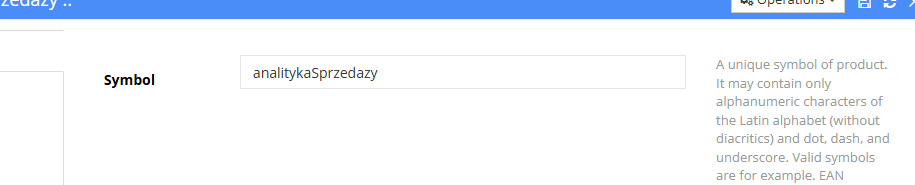
Unique symbols in Hummerce uniquely identify items, articles, categories, customers and many other objects in the store - shown in the admin panel as the Symbol field. Hummerce also keeps this data tidy automatically: it removes stray spaces at the start and end of entered values, so customers don't run into login problems, and property and location configuration is always saved correctly.
Last updated: 2026-10-07.
¶ Benefits and use cases
- Unambiguous object identification - items, customers, categories and other store elements have a unique symbol, e.g. an EAN number or an IBAN.
- Fewer customer login problems - the system automatically removes a stray space at the start or end of an entered login, so the customer logs in without trouble.
- Correct configuration data - property and location symbols are always saved without extra spaces, which reduces hard-to-diagnose configuration errors.
- No extra configuration needed - both rules work automatically, as a standard part of the store.
¶ What it looks like
¶ How it works
¶ What has a unique symbol
- Items, articles, categories, groups (item groups, customer groups) and promotions, along with many other objects in Hummerce - all shown in the admin panel as the Symbol field.
¶ Allowed characters
- Only alphanumeric characters from the Latin alphabet (no Polish diacritics), plus a period (
.), hyphen (-) and underscore (_). - Valid symbols include EAN numbers, IBANs or your own catalog codes.
- A symbol must be unique - in most cases the store enforces uniqueness itself, but it's still worth being careful when assigning symbols manually.
- When the AI assistant creates objects in the store, it enforces a uniform symbol format (camelCase), except for items' external catalog codes - see AI assistant - MCP server.
¶ Editing an existing symbol
- The admin panel technically allows editing an already-assigned symbol - e.g. to fix a typo right after creating an item.
- Recommended rule: don't edit a symbol once it's been assigned. Changing the symbol of an object that already has history (sales, warehouse operations, database relations) can cause the store to malfunction and lead to data inconsistency. It's best to only edit symbols on newly created objects with no history yet.
¶ Automatic space removal (trimming)
- The system automatically removes stray spaces at the start and end of a value entered in a form field - on both the storefront and the admin panel - with no configuration needed.
- This includes, among others: the customer login (registration, login), property and location symbols, and other text fields holding codes and identifiers.
- Spaces inside a value, between words (e.g. in descriptions), are not removed - trimming only applies to the start and end of the field.
¶ Limitations
- A symbol may only contain alphanumeric characters from the Latin alphabet plus
.,-,_- other characters, including Polish diacritics, are not allowed. - Editing an existing symbol is technically possible but discouraged for objects with an operation history - it may disrupt how the store works.
- Trimming currently covers the fields listed in How it works - extending it to the remaining forms is planned; see Future development.
- We do not verify the configuration for legal compliance.
¶ Future development
- Extending automatic trimming to all remaining forms on the storefront and in the admin panel.
¶ Frequently asked questions
Can an item's symbol contain Polish characters, e.g. ą or ę?
No. Only alphanumeric characters from the Latin alphabet, plus a period, hyphen and underscore, are allowed.
Can an item's symbol be changed after it's created?
Technically yes, but we advise against it for objects with history - changing the symbol of an item with sales or warehouse-operation history can disrupt how the store works.
Do you need to manually fix a stray space typed into a customer's login?
No. The system automatically removes spaces at the start and end of the field - on both the storefront and the panel.
Does automatic space removal need to be turned on or configured?
No. It works automatically, as a Hummerce standard, with no extra settings.
Are spaces inside an item's name or description also removed?
No. Trimming only applies to spaces at the start and end of the entered value, not spaces between words.
¶ Related
- Properties and locations - flexible fields in Hummerce - property and location symbols.
- Customer Registration - How Customers Create an Account - the customer login field, where automatic trimming applies.
Want to check the data hygiene in your Hummerce store? Book a free demo (in Polish).
¶ Configuration details
¶ Access in the admin panel
- The Symbol field - when editing an item, article, category, item group or customer group, promotion, and other objects with a unique symbol.
- Customer login - a field edited in customer details in the admin panel, and in the storefront's registration and login forms.