¶ Customer registration - how customers create an account
Customer registration in Hummerce offers several paths to creating an account - from a full form, through simplified registration and an automatic account at checkout, to guest checkout. The store combines these paths so customers can create an account as quickly as possible and fill in data only when it's actually needed.
As of Hummerce: registration, account at checkout, and guest checkout - a core platform mechanism (all current versions); simplified registration since version 2.34 (last module update: 2.35.27), updated 2026-09-28.
¶ Benefits and use cases
- Several account creation paths to choose and combine - full registration, account at checkout, registration after checkout, guest checkout.
- Registration in a few seconds (simplified registration) - the customer doesn't fill in an address before deciding to buy.
- More registered accounts, and so more customers you can reach with an offer.
- Address data collected only when it's needed - at checkout.
- Different buyer data for a single order (e.g. a purchase billed to a company) without changing the profile data.
- Store-side control of account data - useful for B2B stores that want to manage business customer data themselves.
- A newsletter account turns into a full account when a customer registers with the same email address - without losing the newsletter consent.
- A guest order can be linked to an account created after the purchase or at the next login.
¶ What it looks like
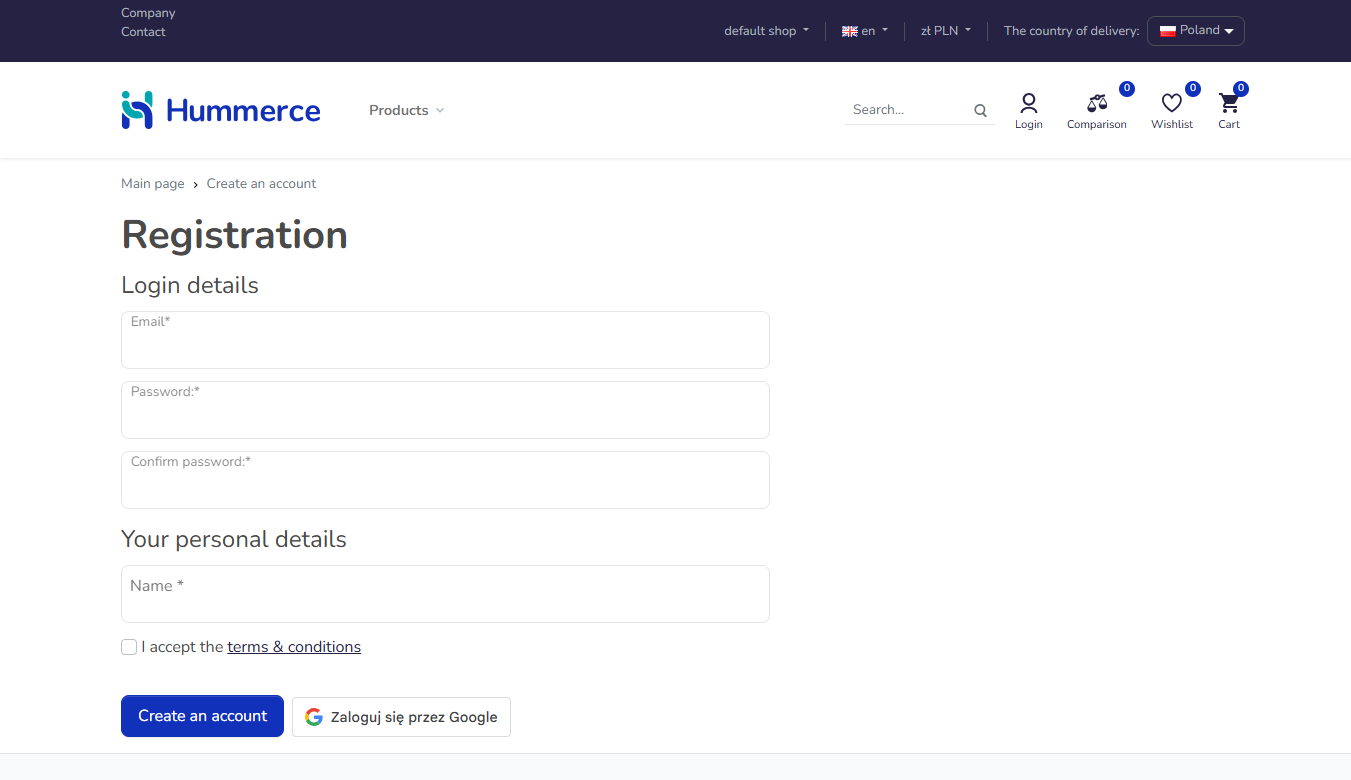
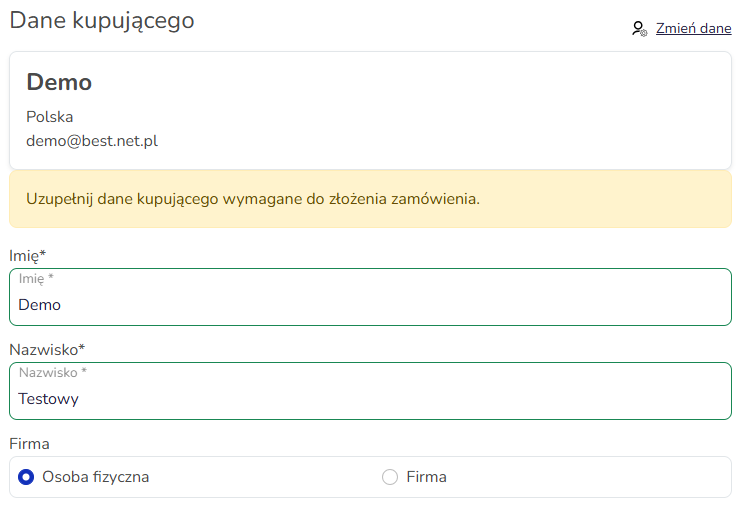
Screenshots from the Hummerce demo store (Bootstrap 5 template).
¶ Registration form
¶ Filling in data at checkout
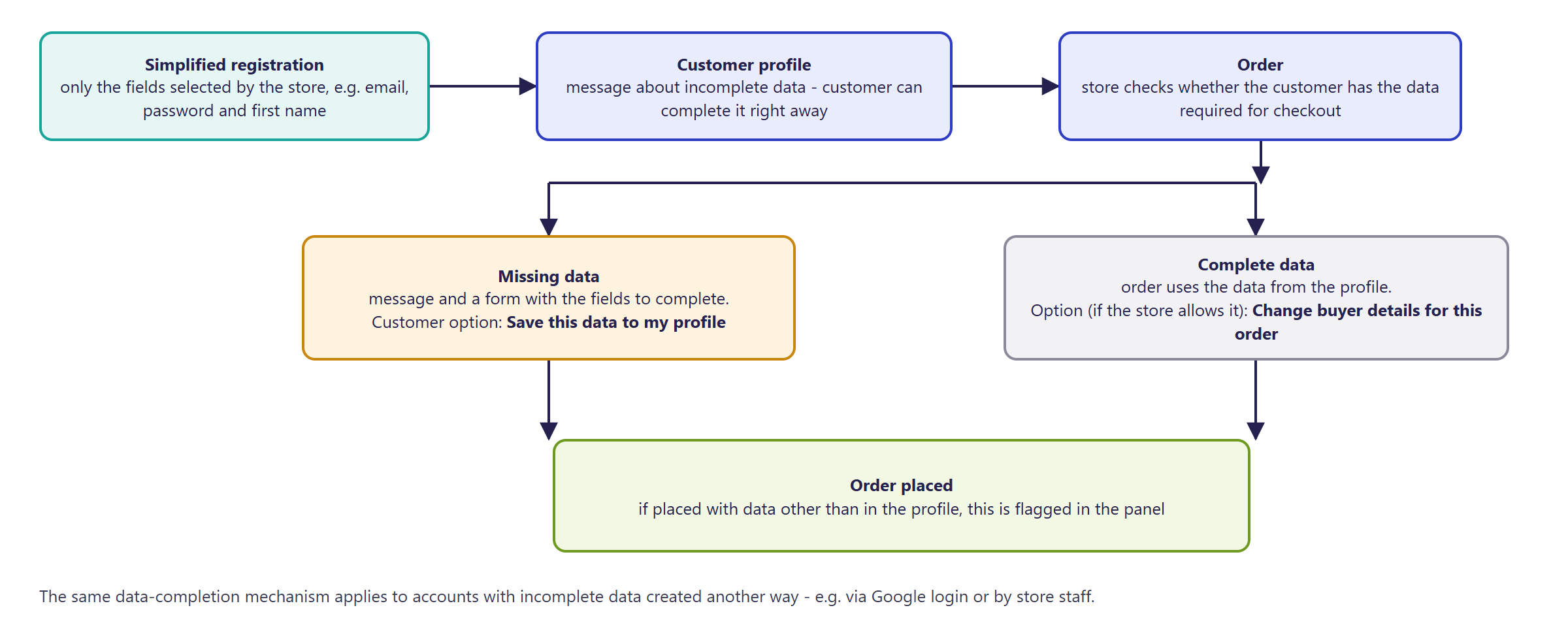
¶ Data completion flow
¶ How it works
¶ Registration paths - overview
| Path | When it applies | What the customer provides |
|---|---|---|
| Standard registration | Customer goes to the registration page on their own | Full form: personal data, password, consents |
| Registration during checkout | Customer checks Automatically create an account in the order form | Only a password and consents - the rest of the data comes from the order |
| Registration after the order | Customer clicks Signup on the order confirmation page | Only a password - the rest is pre-filled from the order |
| Guest checkout | Customer places an order without registering | Only order data (no password) |
| Newsletter account conversion | A newsletter subscriber registers in the store with the same email | Standard registration form |
| Company (B2B) registration | Customer registers, providing the company's NIP (Polish company tax ID) | Personal data and NIP - details: Company accounts and roles |
| Simplified registration | Customer creates an account with a short form (e.g. email, password, first name) | Only the fields chosen by the store - the rest later |
¶ Standard registration
- The customer fills in the registration form (personal data, email or login, password, consents) available on the store page.
- Once filled in correctly, the account is created. The customer is logged in automatically if the store doesn't require email confirmation.
- The store can require email confirmation before activating the account, set password strength requirements (Admin panel and store security), and add ReCaptcha protection.
- The email address can act as the customer's login - depending on store configuration.
¶ Registration during and after checkout
- A customer placing an order as a guest can check Automatically create an account and enter only a password - the store takes the rest of the data from the order form. The option is only visible to customers who aren't logged in.
- A customer who placed an order as a guest gets a Signup link on the confirmation page - the form is pre-filled with the order data, so only a password needs to be entered. The link is secured with the order's hash - it can't be used to fill the form with someone else's order data.
- After registration in either path, the order is automatically linked to the new customer account.
¶ Guest checkout
- A customer can place an order without registering or creating an account - only shipping and payment data are required.
- The store decides whether guest checkout is allowed at all, and whether to show an extra question before the order form: log in / sign up / continue as a guest.
- A guest order can later be linked to an account - after registration, or at the next login with the same email address.
¶ Newsletter account conversion
- A customer who had previously only signed up for the newsletter (Newsletter) doesn't get a second account when registering with the same email - the existing newsletter account is upgraded to a full customer account, keeping the newsletter consent.
- Works automatically both for standard registration and for registration during checkout.
- If a customer with that email already has a full account (not just a newsletter one), the store shows the standard "user already exists" error.
¶ Company (B2B) registration
- In stores with the company accounts module active, a customer can register as a company representative by providing their NIP.
- Full description of roles, joining an existing company, and managing the company account: Company accounts and roles.
¶ Simplified registration
- The registration form only contains the fields chosen by the store - e.g. email, password, and first name.
- After registering, the customer sees a note in their profile that their data is incomplete, and can fill it in right away.
- At checkout, the store checks whether the customer has the data required for a purchase:
- data missing - the customer sees a message and a form with the fields to fill in; they can save it to their profile,
- data complete - the order goes out with the profile data; where the store allows it, the customer can enter different data for that order only.
- An order placed with different data than the profile is flagged in the panel. An account created via simplified registration is flagged too.
- The store can disable profile editing - the customer then can't change their data on their own.
- The same data-completion mechanism also handles accounts created another way - including via Google login or by store staff in the panel.
¶ Version
- Standard registration, registration during/after checkout, guest checkout, and newsletter account conversion - a core mechanism of the Hummerce platform, works in all current versions.
- Simplified registration - since version 2.34. Last module update: version 2.35.27.
- Company (B2B) registration - module versions described on the Company accounts and roles page.
¶ Dependencies
- Bootstrap 5 or Bootstrap 4 store template - both support all the described registration paths.
- Registration form protection - ReCaptcha (Admin panel and store security), optional.
- Password strength requirements - password security settings (Admin panel and store security).
- Email notifications after registration - active alerts and email templates.
- Newsletter account conversion - the Newsletter module.
- Company registration - the company accounts module (Company accounts and roles).
- Simplified registration: the list of fields required for a purchase is agreed with the store during implementation.
¶ Implementation
- Standard registration, guest checkout, and registration during/after checkout work after an update - this is a core platform mechanism. The store only sets registration parameters and adjusts form fields in the panel.
- Simplified registration requires implementation - the feature doesn't turn on by itself after an update. Scope:
- enabling the module and configuring it in the panel,
- choosing the registration form fields and the fields required for a purchase,
- adapting dedicated (custom) registration, profile, and order templates, if the store uses them,
- testing in a test environment and production rollout.
- Minimum estimated time (simplified registration):
- standard Bootstrap 5 or Bootstrap 4 templates - from 2 h,
- dedicated registration, profile, and order templates - from 4 h.
- The exact time depends on the scope - we quote it individually.
- What the time depends on:
- whether the store has its own registration, profile, and checkout templates,
- the number of fields and language versions,
- the store version - a store on a version older than 2.34 needs an update first before enabling simplified registration (quoted separately).
¶ Limitations
- The automatic switch to data completion after attempting to place an order (simplified registration) works in the Bootstrap 5 template.
- At checkout (Bootstrap 5), a fixed set of fields is checked: first name, last name, street, postal code, city, and phone - regardless of the field list required in the profile.
- Company registration doesn't automatically assign a company account manager - see Company accounts and roles.
- We do not verify the configuration for legal compliance - the store sets the scope of collected data, consents, and terms of service.
¶ Future development
- A single, configurable list of fields required for a purchase - shared between the profile and the order.
- Turning a newsletter account into a full account with password setup directly from the email link.
- Live form field validation, without reloading the page.
- Google Analytics events for tracking registrations.
¶ Frequently asked questions
Can I disable registration in my store?
Yes. The store can disable the registration page - customers can then still place orders as guests, if the store allows it.
Can I require registration or login before checkout?
Yes. The store can require login or registration before proceeding to the order form.
What happens when a customer registers with the same email as a newsletter subscriber?
The newsletter account is automatically upgraded to a full customer account, without losing the newsletter consent.
Can an order placed as a guest be linked to an account later?
Yes - if the customer registers after the order or logs in to an existing account, their most recent guest order can be linked automatically.
What does simplified registration involve?
The customer creates an account by providing only a few fields (e.g. email, password, and first name) - filling in the rest later, in the profile or at the first order.
How long does implementing simplified registration take?
From 2 h with the standard Bootstrap 5 or Bootstrap 4 template, from 4 h with dedicated templates - the exact time depends on the scope. Standard registration works without extra implementation.
¶ Related
- Company accounts and roles - registration and management of a company (B2B) account.
- Sign in with Google - registration and login without a form and password.
- Admin panel and store security, Newsletter, Checkout process - default delivery and payment.
- B2C sales in Hummerce: /en/sales/b2c. For company registration: /en/sales/b2b-b2c.
Want to see how registration could work in your store? Contact the Hummerce team (in Polish).
¶ Configuration details
¶ Access in the admin panel
- Basic registration configuration: Configuration -> Settings, the Customers group - key options:
| Setting | Effect | Default value |
|---|---|---|
shop.allowRegister |
Turns the store's registration page on/off | true |
shop.needRegister |
Requires login or registration before placing an order (without it, guest checkout is possible) | false |
show.order.ask.register |
Shows a question before the order form: log in / sign up / continue as a guest | false |
shop.customer.emailAsLogin |
The email address acts as the customer's login | depends on the store |
shop.customers.allow.unconfirmed |
Logs the customer in automatically after registration, without email confirmation | depends on the store |
shop.customer.defaultActive |
Newly registered customers are active by default | true |
shop.customers.registration.confirmation |
Shows a data confirmation page before creating the account | false |
shop.order.linkLast.registration |
Links the guest's last order to the newly registered account | true |
shop.order.linkLast.login |
Links the guest's last order to the customer after login | true |
- Standard registration form fields: Properties and locations, location
customerShopRegister- adding, removing, and reordering fields. - Simplified registration form fields: location
customerShopRegisterSimplified- adding or removing a property changes the form. - Simplified registration - panel settings:
- Simplified registration - turns on the short registration form (off by default),
- Different data in the order - whether the customer can enter different data in the order than in the profile (on by default),
- Profile editing allowed - whether the customer can edit their own profile data (on by default).
- Customer in the panel: the Simplified registration property.
- Order in the panel: the Buyer data changed at order property.
¶ Store messages
Content is changed in the message editor, form fields and properties - in Properties and locations.
Simplified registration - default values:
| Key | Default value |
|---|---|
msg.profile.customerDataIncomplete |
Your profile data is incomplete. Please fill in the missing fields. |
msg.profile.editDisabled |
Profile editing is disabled. |
msg.order.customerDataIncomplete |
Please fill in the buyer data required to place the order. |
msg.order.saveCustomerData |
Save this data to my profile |
msg.order.changeCustomerDataForOrder |
Change buyer data for this order |
msg.order.missingFields |
Please fill in all required fields |
The standard registration welcome message is sent via the customerRegisteredAlert alert (email templates).
¶ Parameters
| Symbol | Object | Label |
|---|---|---|
_simplifiedRegistration |
customer | Simplified registration |
_customerDataChanged |
order | Buyer data changed at order |
¶ Email templates
| Alert | Recipient | When |
|---|---|---|
customerRegisteredAlert |
customer | welcome / registration confirmation |
The email confirmation is sent when the store requires verification before activating the account (corresponds to the setting shop.customers.allow.unconfirmed = false).