¶ Product templates - fast creation of similar items
Product templates in Hummerce let you create a new product from a previously saved template instead of filling in every product card from scratch. A template carries over the category, price and property values to the new item, and additionally lets you hide the product card tabs that a given store doesn't need in the panel.
As of Hummerce version from 2.12 (latest module changes: 2.35.62), updated 2026-10-07.
¶ Benefits and use cases
- Faster creation of similar items - a new product inherits the category, price and property values from the template instead of them being typed in by hand.
- A tidy catalog - templates don't appear on the item list in the panel by default, and are neither visible nor purchasable in the store.
- Easy to find templates when you do need them - the item type filter can show only templates.
- Control over the product card - a template lets you set which product card tabs (description, properties, photos, SEO and others) are visible in the panel.
¶ What it looks like
Screenshots from the Hummerce admin panel.
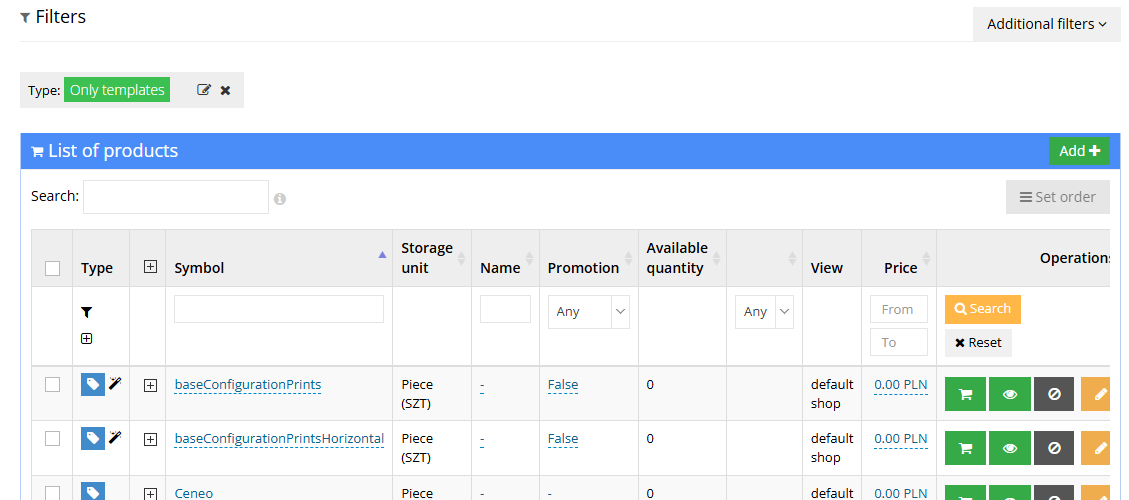
¶ Template label on the item list
¶ Filtering by item type


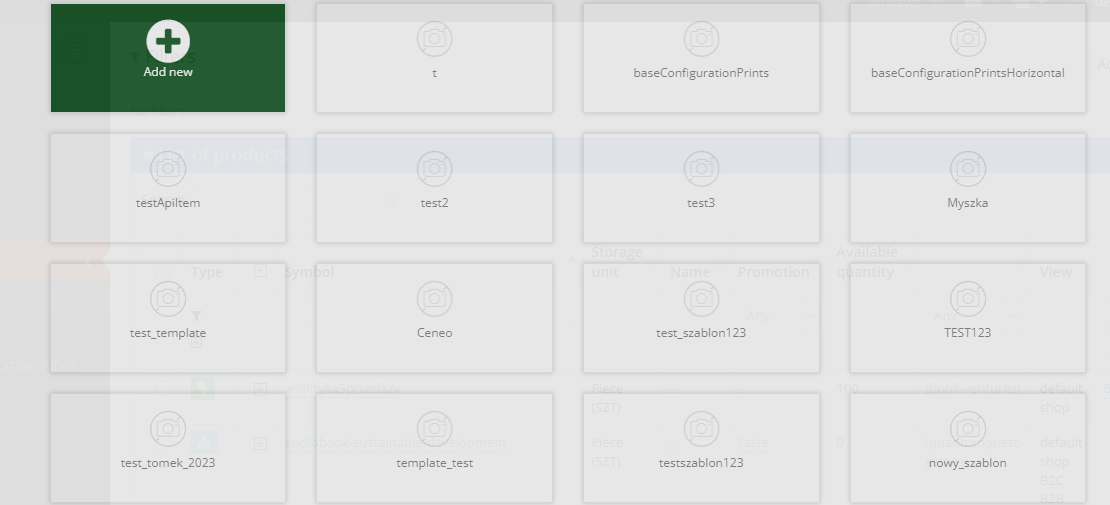
¶ Adding a new item
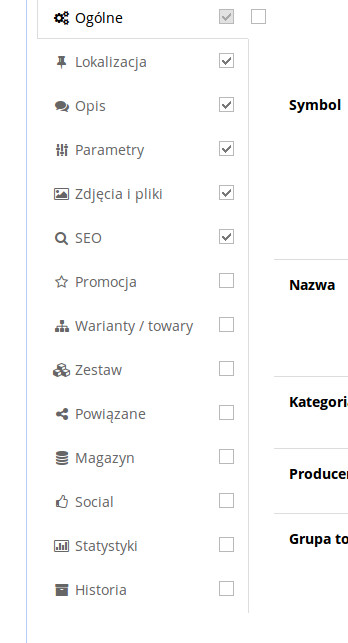
¶ Visibility of product card tabs
¶ How it works
- A template is a specific kind of item, marked in the panel with a Template label.
- Templates are not shown on the item list by default - they can still be found with the additional Type filter set to Only templates.
- Templates are not visible to store customers and cannot be purchased.
- When adding a new item, the panel offers a choice of one of three options: an item without a template, a new template (after entering its symbol), or an item created from an existing template.
- Creating an item from a template copies all the template's data into it, e.g. category, price and property values.
- When editing a template you can select which product card tabs should be visible (e.g. Basic, Location, Description, Properties, Photos and files, SEO, Promotion, Variants / items, Configurable set, Related, Warehouse, Social, Statistics, History).
¶ Version
- Product templates have been part of the Hummerce platform since version 2.12.
- Template support through the AI assistant (MCP) - since version 2.35.45; copying components from a template through MCP - since version 2.35.62.
¶ Limitations
- Configurable set (combination) values are not copied together with the template - see Configurable product - kinds and structure.
- Images from the template are assigned to the new item, but no copy of them is created - the new item shares the same files.
- Linking a template through the AI assistant only sets the link between the item and the template - it doesn't copy the category, properties or set components. Components are copied by a separate operation (the equivalent of Copy from template), which replaces the item's components.
- Only an item marked as a template can be a template; the AI assistant refuses to link an item without that mark.
- We do not verify the task for legal compliance (e.g. licenses of supplied materials, GDPR, store terms and conditions).
¶ Future development
- Copying configurable set (combination) values together with the rest of the template's data into the new item.
¶ Frequently asked questions
Can a new item be created based on an already existing product?
Yes. Just save it as a template, then choose the "item from an existing template" option when adding a new item.
Are templates visible to store customers?
No. Templates do not appear in the store and cannot be purchased.
Does an item template also copy photos?
Partially. Photos from the template are assigned to the new item, but no separate copy of them is created - the items share the same files.
Can selected product card tabs be hidden for a given template?
Yes, when editing a template you can select which product card tabs should be visible in the panel.
Are configurable set (combination) values copied from the template to the new item?
No, they are currently not copied.
Can the AI assistant link a template to an item?
Yes. The AI assistant (MCP) reads the template and item type, links a template to an existing item or when creating a new one, and detaches it with an empty value. Linking alone copies nothing from the template.
¶ Related
- Items - overview - product card, visibility, copying.
- Configurable product - kinds and structure - configurable sets (combinations) and their values.
Want to see how product templates could speed up work in your catalog? Book a free demo (in Polish).
¶ Configuration details
¶ Access in the admin panel
- Adding an item: Assortment -> Items -> Add item - choice of: item without a template, new template (symbol), or item from an existing template.
- Filtering templates: item list, Additional filters -> Type, choose the Only templates item group.
- Product card tab visibility: set when editing the template, by checking the boxes for individual tabs (Basic, Location, Description, Properties, Photos and files, SEO, Promotion, Variants / items, Configurable set, Related, Warehouse, Social, Statistics, History).
¶ REST API and MCP
- MCP (AI assistant - MCP server), since version 2.35.45:
ec2_products_details- shows the item type, article, template and whether the item is itself a template,ec2_products_update- thetemplate_symbolparameter links a template (symbol or ID of an item marked as a template); an empty value detaches the template; an unknown symbol ends the call with an error; also theis_template(the Template mark) andtype(singleortemplate) parameters,ec2_products_createandec2_combinations_create-template_symbollinks a template when the item is created;ec2_products_createalso takesis_templateandtype,- linking doesn't copy components -
ec2_combinations_copy_slotsdoes (since 2.35.62; without confirmation it only reports).