¶ Configurable product - types and structure
A configurable product (configurable set) in Hummerce is an item the customer assembles from components: choosing items from lists and filling in properties, such as text, a photo or a dimension. This page describes how such a product is built in the panel. Overview of the whole area: Product configurators.
As of Hummerce 2.35 (latest module changes: 2.35.65), updated 2026-10-16.
¶ Benefits and use cases
- A catalog without a variant explosion - one configurable product instead of a separate item for every combination.
- One product in the catalog instead of hundreds of variants - the customer creates the combinations, and the store enforces the rules and the price.
- Components with a criterion update the choice list on their own - a new item in the category shows up in the configurator right away.
- A component as a separate cart line - the warehouse and ERP see the elements actually sold.
- Templates - dozens of products with the same structure (e.g. a family of window sills, mugs, frames) maintained from one place.
- The AI assistant builds and adjusts configurable products on request, without manual clicking in the panel.
- A whole configurator moves between stores as one document (components, property values, dependency rules) through the AI assistant - no rebuilding components by hand.
- The same building blocks (components and their types) power every kind of configurator - from a simple engraving to a set with dozens of elements.
- The customer can't submit a configuration that can't be made - dependency rules hide, lock or narrow the options that don't fit the earlier choices.
- Fewer enquiries and complaints - the sales team doesn't fix orders with an incomplete or inconsistent set.
- The configurator calculates for the customer - length from the number of packs, the number of segments from a dimension, cartons and pieces from the ordered quantity.
¶ How it works
¶ Kinds of configurable products
All kinds come from the same mechanism - they differ in their components and the configurator's appearance.
| Kind | What it's made of | Example |
|---|---|---|
| Product set | "items"-type components - each component is a choice of one item from a list | board + mast + sail, headphones + ear pads + case, suit |
| Made-to-order product | "properties"-type components with numeric values, often together with item components (material, accessories) | window sill, molding, curtain, furniture piece |
| Personalization | "properties"-type components with text and photo, a work area with a preview | mug, bottle, sticker, watch dial |
| Engraving, add-on, service | a product with one or a few components added to the price | text engraving, a gift card, gift wrapping |
| Technical configuration | a set of items with dependency rules - choosing one element narrows down or sets the next ones | a lighting system, fittings, handles |
- A configurable product can be a standalone item or a variant. An article (an item with variants) can't be a set.
- A component can hold an item that is itself a configurable product - configurations can be nested.
- If a component contains an article, the customer chooses among its variants.
- A configurable product vs. other mechanisms:
- variants (article and sub-items) - separate items with their own symbol, price and stock; good for a few traits with a finite number of values (Variants - article and sub-items),
- item add-ons - a separate mechanism based on an add-on category (Add-ons); in a configurable product, add-ons are built as a component.
¶ Structure
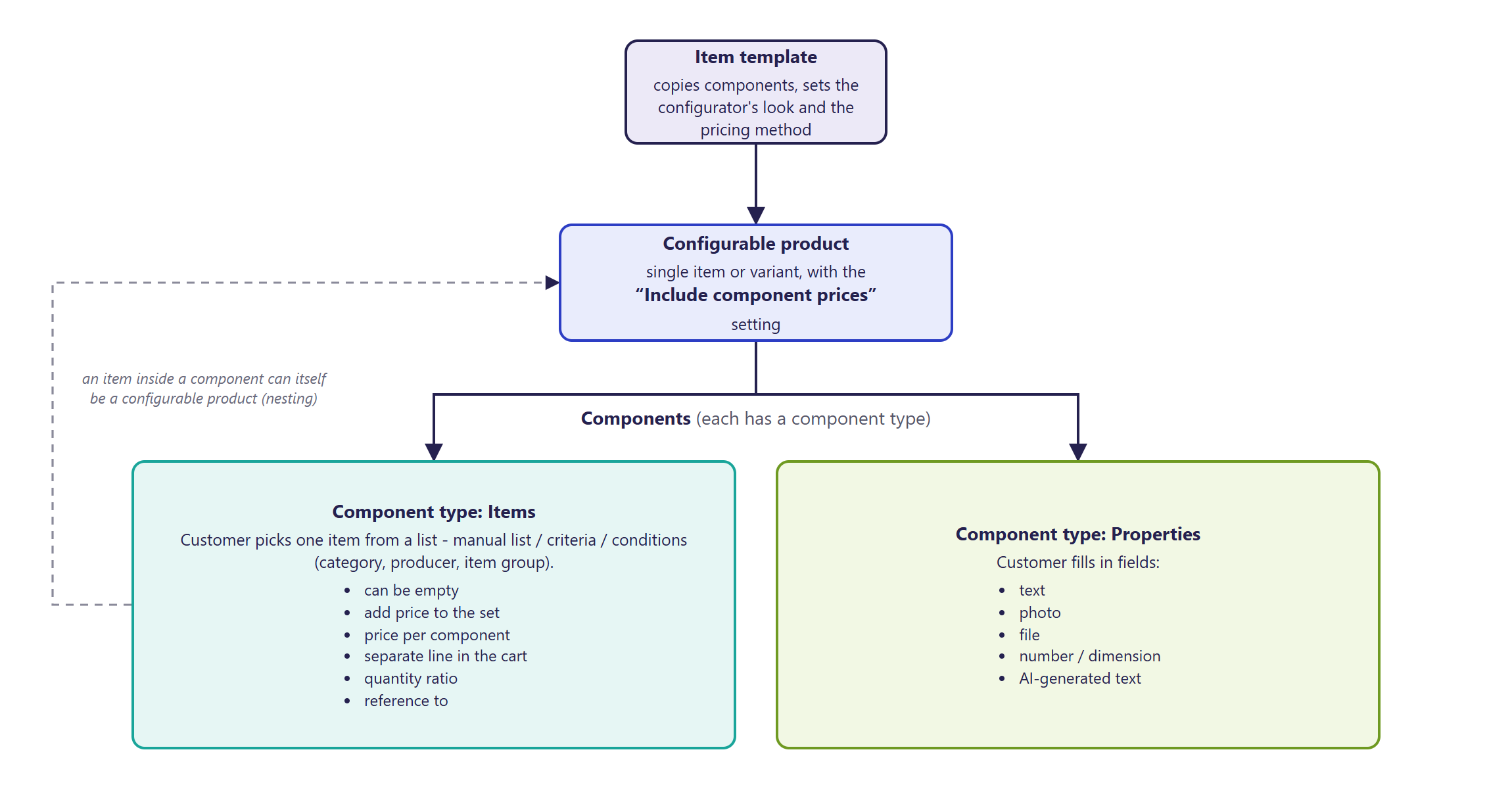
¶ Components
- Every component has a Symbol (unique within the product) and a Type (component type).
- An "items"-type component - the customer picks one item. The item list source:
- One item from a given list - a manually specified list, in a set order,
- One item matching a criterion - a list from an item criterion; the criterion can reference the product's and the component's properties, e.g. so the item's color in the component matches the product's color,
- One item matching conditions - a category (with subcategories), a producer or an item group.
- In a component's item list, the customer only sees items that are visible and available to buy.
- Component settings:
- Can be empty - the customer can choose nothing (e.g. no packaging),
- Add price to set - the component's price adds to the product's price,
- Price per slot - a fixed component price, used instead of the chosen item's price,
- Add to basket as other positions - the chosen item goes into the cart as a sub-line of the product (and further into the order, warehouse and ERP),
- Rate of amounts - how many component units correspond to one product unit (e.g. 4 wheels per 1 cart),
- Allow customers to set quantity - the customer enters the component's quantity themselves,
- Default item in slot - the item chosen by default,
- Disable auto items list load - the component's item list isn't loaded automatically (for long lists, when the configurator picks the item on its own),
- Pin to - the component is a copy of another component and uses its item list,
- a percentage discount on the component - reduces the component's price (e.g. a discount for buying the set).
- The Quantity slots to add field creates several copies of the component right away, pinned to the first one - e.g. 3 identical add-on choices.
- A component's name, description and other properties depend on the component type - e.g. minimum and maximum values, unit of measure, list view (dropdown, checkboxes, tiles), allowed file extensions.
¶ Component types
- A component type is a ready-made, pre-configured kind of component used in the store - e.g. items, text, photo, engraving, packaging, add-ons.
- A type determines:
- Content - Items or Properties,
- Configuration properties - set by store staff on the component (e.g. maximum text length),
- Configurable properties - filled in by the customer (e.g. the text content, a photo).
- The component's appearance and behavior in the configurator also depend on its type - e.g. an upload field, text with an AI generator, a variant choice, information for the customer.
- A type that's in use by components can't be deleted.
¶ Templates
- A product's structure (components and set properties) can be prepared on an item template and carried over to products:
- when creating an item from a template,
- through Copy from template in the product's Configurable set tab,
- in bulk - Overwrite configurations on the template opens an item list with the Assign to template operation, letting you choose whether to overwrite only the configurable set data or all data defined by the template.
- A template copies its components to the product - it isn't inherited. Changing the template doesn't change existing products until staff overwrite their configuration.
- The template also determines:
- the configurator's appearance on the product page - the Template type parameter (Configurator on the product page),
- how the price is calculated, if the implementation has custom price rules for that template (Configuration pricing),
- how the print file is prepared,
- the list of set properties and tabs shown on the product page.
¶ Dependencies between configurator elements
A dependency (rule) is a record of "if the customer chose or entered X, do Y". Rules run in the BS5 configurator on the product page immediately after every change, without reloading the page. They show the customer only what fits their earlier choices. Rules are assigned to the configurable product, so each product can have its own set of rules.
¶ What a rule can do
| Kind | What happens | Example |
|---|---|---|
| Show or hide | a component or field appears or disappears | a connector appears only above a length of 2.5 m; premium options after the basic data is filled in |
| Enable or disable | a component or field is visible but locked | a choice field locked until the customer gives a dimension |
| Narrow the item list | unsuitable items disappear from the component's item list, or only the listed ones stay | after choosing a track, the power supply list keeps only the matching ones |
| Change the values to choose from | a choice field shows different options | other colors for plastic, other for metal |
| Limit a value | set the largest or smallest allowed value of a field | width at most 200 cm when the height exceeds 100 cm |
| Set a value | a field gets a fixed value, a value calculated from another field, or is cleared | warranty "2 years" for premium products; length = number of packs times 50 |
| Synchronize two fields | changing one field recalculates the other and the other way round | number of rolls and length, rounded to a step |
| Required or optional field | a field becomes mandatory or stops being so | a notes field required only with a selected option |
| Item quantity in a component | quantity set to a constant, calculated from another field or split into units | 30 ordered pieces as 2 cartons of 14 and 2 loose pieces |
| Automatic choice | the configurator picks the first available item or variant itself | variant "pole" at maximum length, cut-length variant at a smaller one |
| Field depending on variants | a choice field appears when the variants of the chosen item differ in a given attribute | handle color choice only when handles are available in several colors |
| Component copies | the number of component copies follows a field value; the sum of copies can flow back to the main field | a dimension divided into 2.5 m segments, each with its own length |
¶ When a rule runs
- A rule has one condition or several combined (all must be met, or one is enough).
- You can compare: equal, different, empty, not empty, greater, smaller, contains, does not contain, is in the list, is not in the list, and "changed" (the rule runs the moment the customer changes the given field).
- A condition can concern a field value, the state of a whole component, the chosen item, the chosen variant, or the quantity entered in the quantity field on the product page.
- Each rule has a Name, an Active switch (turn it off without deleting) and a Priority. For conflicting rules, the one with the higher priority wins - it runs later and overwrites the earlier effects.
¶ Default values and saved configurations
- The configurator starts from the saved value (when the customer returns to their configuration), then the component's default value, and finally recalculates everything with the rules.
- So the rules have the last word - they can change a default or a saved value, also when a saved configuration is opened and when the variant changes. Set rules and default values together and test them on the finished product.
¶ Messages for the customer
- Rules don't display messages of their own - the effect shows in how the configurator behaves (a field disappears, a list narrows, a value is recalculated). An explanation of why an option is unavailable can be given as a component with an information text that a rule shows or hides (Configurator on the product page).
¶ Where to set it
- Rules are added on the configurable product's page, in the set properties, in the field with the Generator zależności button. The generator builds a rule from choice lists (component, property, action, condition), and the AI: Opis → JSON helper prepares a proposed rule from a plain-language description - the proposal has to be checked and applied.
- The available actions and conditions are described in the "Dependency rule details" section at the end of this page.
¶ Version
- A core platform feature - available in all supported versions.
- Since version 2.33 - components without automatic item list loading, and pagination of long item lists in a component.
- Since version 2.34 - component properties for new BS5 configurators (units of measure, minimum and maximum values, list view, AI), dependency rules between components in BS5 configurators, building configurable products through the AI assistant (MCP).
- Since version 2.35 - reading and writing component properties through MCP.
- Since version 2.35.61 - "Properties"-type components (no item list) created through MCP.
- Since version 2.35.62 - component types, copying components from the template, component order, and export and import of a whole component set through MCP.
- Since version 2.35.63 - the configurator's dependency rules travel with the export document.
- Since version 2.35.65 - MCP sets and reads the Include components prices option.
- Latest module changes: version 2.35.65.
¶ Dependencies
- The configurable set module enabled in the store configuration.
- Component types prepared for the store - a new store only has the "items" type; the others (text, photo, etc.) are added during implementation.
- Component items with prices and visibility in the relevant store view.
- The configurator on the product page - Configurator on the product page.
- Dependency rules work only in configurators in the Bootstrap 5 template (since version 2.34).
¶ Implementation
- Requires implementation - the module doesn't turn on by itself after an update. Scope:
- turning on the module and settings in the Sets group,
- preparing component types,
- building the product or template with components,
- choosing the component item lists (manual list, criterion, conditions),
- testing the configuration and prices,
- dependency rules between components (if the product needs them).
- Minimum estimated time:
- a configurable product with a few components, on ready-made component types - from 4 h,
- preparing component types for a new kind of configurator - from 4 h,
- a few simple dependency rules (show or hide a component, narrow an item list, limit a value) - from 8 h,
- complex rules (calculations between fields, component copies, automatic variant choice) - from 24 h.
- We quote the configurator's appearance on the product page separately - see Configurator on the product page. The time for a specific implementation depends on its scope - we quote it individually.
- What the time depends on:
- the number of components and products,
- whether products share a common template,
- whether item lists can be described with a criterion or have to be arranged manually,
- the number and complexity of dependency rules and testing them on the finished product,
- moving existing configurators from another store - components don't go through the standard item export and import; the configurator export and import through MCP carries them, and the component types and their properties have to be prepared in the target store (quoted separately).
¶ Limitations
- In an "items"-type component, the customer picks one item. Several different choices of the same kind require several components (copies).
- The template isn't inherited - after changing the template, the products' configuration has to be overwritten. Copy from template replaces all of the product's existing components.
- Component copies (Quantity slots to add) don't take over the first component's name and properties - they have to be filled in.
- Dependency rules work in the configurator on the product page - the server checks required components and allowed items when adding to the cart, but not the dependency rules. Set rules the store must enforce absolutely in the component itself too (a required component, an item list, minimum and maximum values).
- Rules are read by the configurator in the Bootstrap 5 template; previous-generation configurators (Bootstrap 4) don't run them.
- Rules control choices and fields, not the price - the store calculates the price (Configuration pricing).
- A rule pointing at a component, property or item that doesn't exist simply doesn't work and reports no error - after every change to component names or composition, the rules have to be checked.
- Numeric values in conditions and actions are given in the unit in which the store keeps the value, not the one the customer sees (e.g. 2.5 when stored in meters, although the customer sees 2500 mm).
- Two-way recalculation (e.g. number of packs and length) needs two rules with a well-chosen rounding - badly chosen ones make values jump.
- The panel's rule generator requires knowing the symbols of components and properties, and its labels are in Polish only. The AI helper gives a proposal to check, not a finished rule.
- The standard item export and import, and moving items between stores through MCP, don't carry components - only the set flag carries over. Components are carried by the separate configurator export and import through MCP (since version 2.35.62); the component types and property definitions they refer to must exist in the target store.
- Importing a configurator replaces the item's existing components and refuses to write when a dependency rule points to a component or item that is missing from the set or the store.
- REST API doesn't support component types or customers' saved configurations.
- MCP doesn't set a component's price or pin to another component - these settings are changed in the panel. A "Properties"-type component is created without an item list from the start; an existing component with a list can't be changed to one without a list through MCP - the field is cleared in the panel.
¶ Future development
- Inheriting the structure from the template (a template change applied to products immediately).
- Moving configurable products with their components between stores from the panel (today through the AI assistant).
- Full configurator building through the AI assistant, including component prices and pinning components.
- A clearer Configurable set tab for large products.
¶ Frequently asked questions
Can a product with variants (an article) also be a configurable set?
No. A configurable product can be a standalone item or a variant, but an article with sub-items can't be a set.
Can an "items"-type component let you choose several units of different items?
Not directly. A component gives a choice of one item - several different choices of the same kind require several components.
Do components carry over with the item during XML export or between stores through MCP?
Partially. The standard export and moving items carry only the configurable set flag. Components with their property values and dependency rules are carried by the separate configurator export and import through the AI assistant (since version 2.35.62).
Will the AI assistant (MCP) build a whole configurable product on its own?
Partially. MCP creates and changes component types, components, their items and properties, copies components from the template, sets their order and sets the Include components prices option. A component's price and pinning to another component are changed in the panel.
Can the customer choose options that don't fit their earlier choices?
No, if the store has set dependency rules - the configurator hides, locks or narrows such options. Rules run in the customer's browser, so whatever must be forbidden absolutely is also set in the component itself.
Are dependency rules set up without a developer?
Partially. The panel has a rule generator with choice lists, and the AI helper proposes a rule from a plain-language description. You still need to know the product's components and check each rule in the finished configurator, so implementation usually does it.
Do dependency rules work in every configurator?
No. They are run by the configurator in the Bootstrap 5 template (since version 2.34). Previous-generation configurators (Bootstrap 4) don't read them.
How long does preparing a simple configurable product take?
A product with a few components, on ready-made component types - from 4 h. Preparing a new component type for a different kind of configurator - also from 4 h.
¶ Related
- Product configurators - overview - the whole configuration cycle and the area's other pages.
- Configurator on the product page - the appearance and behavior of a configurator built from these components.
- Variants - article and sub-items, Add-ons, Properties and locations.
- On hummerce.com: Configurators (in Polish).
Want to see how to build a product like this in your store? Book a free demo (in Polish).
¶ Configuration details
¶ Access in the admin panel
- Item page: the Configurable set tab - Create set, Remove set feature, Include components prices, Components, Add component, Set parameters, Copy from template; on a template - Overwrite configurations.
- Item list: the Configurable set marker, the Sets filter; in item criteria, the Configurable sets and Item assigned to a slot conditions.
- Component types: Configuration -> Slot types - symbol, content, configuration and configurable properties.
- Panel configuration: the Sets group - including Tab share configurable, Hide static slots in cart, Show components in the order set in the set configuration; default settings for new items: Set, Add prices of components.
- Dependency rules: the item page, set properties - the rules field with the Generator zależności button (Odśwież sloty, Dodaj zależność, Wczytaj z textarea, Zapisz do textarea, AI: Opis → JSON, Generuj (AI), Zastosuj propozycję, Wyczyść, Usuń zależność) - the generator's labels are in Polish only.
- Item: set properties - including Ignore base set price, Two-sided configurator, work area dimensions and print parameters (for personalization).
¶ REST API and MCP
- REST API: product components - list, read, add, change, delete; on the item, the set flag, Include components prices and the template (REST API).
- MCP (AI assistant - MCP server):
- reading:
ec2_combinations_list_slot_types(component types),ec2_slot_type_get(one component type in full, also as data forec2_slot_type_create),ec2_combinations_get_slots(a product's components),ec2_combinations_get_slot_items(a component's items),ec2_combinations_get_slot_properties(a component's properties),ec2_combination_export(a whole component set as one document, with the dependency rules), - creating:
ec2_combinations_create(a new configurable product),ec2_combinations_create_slot(a component),ec2_slot_type_create(a component type), - changing:
ec2_combinations_update_slot,ec2_slot_type_update,ec2_combinations_set_slot_items,ec2_combinations_add_slot_items,ec2_combinations_set_combination_flag,ec2_combinations_set_slot_property,ec2_combinations_delete_slot_property,ec2_combinations_delete_slot(deletion requires confirmation),ec2_combinations_copy_slots(the equivalent of Copy from template: replaces the target items' components; without confirmation it only reports),ec2_combinations_reorder_slots(component order - needs the full list),ec2_combination_import(writes a set from an export document in one transaction, checked after writing; withoutapply=trueit only reports what is missing;include_rules=falseskips the dependency rules), - the Include components prices option on an item: the
add_prices_of_componentsparameter inec2_products_updateandec2_products_bulk_update(since 2.35.65), read inec2_products_details, - a "Properties"-type component without an item list:
items_list_type=Noneinec2_combinations_create_slot(since 2.35.61); changing an existing component toNoneis refused, - dependency rules:
ec2_combination_exportwrites them into the document,ec2_combination_importrestores them (include_rules=falseskips them, and the import refuses to write when a rule points at a missing component or item); there is no tool for changing a single rule, - permissions: reading, creating and changing configurable sets and component types.
- reading:
¶ Store messages
Component names and descriptions are component properties - they're translated like other properties, in Properties and locations.
¶ Property locations
| Symbol | Object | Purpose |
|---|---|---|
itemAdminSet |
item | set properties on the product page |
itemAdminSet_<template symbol> |
item | set properties for products of that template |
configurationPropertyLocation_<type> |
component | properties set by staff for that component type |
configurablePropertyLocation_<type> |
component | properties filled in by the customer for that component type |
Locations for a component type are created automatically when the type is added.
¶ Parameters
| Symbol | Object | Label |
|---|---|---|
_name, _description |
component | name, description |
_category, _producer, _itemGroup |
component | Category, Producer, Item group (item list conditions) |
_discount |
component | percentage discount on the component |
_ignoreBaseSetPrice |
item | Ignore base set price |
_twoSidedCombination |
item | Two-sided configurator |
_templateType |
item template | Template type |
_combination |
cart line, item | Configured set |
_jsonCombination |
cart line and order line | Set configuration |
_slotDependencies |
item | the configurator's dependency rules (a list of rules stored as text) |
¶ Dependency rule details
Information for the implementer. The rules are a list stored in the item's _slotDependencies property; the BS5 configurator loads it together with the product structure and runs it after every change. No value means no rules.
Each rule has four parts: information (Name, Active, Priority, identifier), a target (a component and optionally a property, and for quantities also the item within the component), an action and conditions.
Example of the rule "show the connector above a length of 2.5 m" (length stored in meters):
{
  "id": "show_connector",
  "name": "Show connector above 2.5 m",
  "active": true,
  "priority": 1,
  "target": { "type": "slot", "slotSymbol": "CONNECTOR" },
  "action": { "type": "SHOW" },
  "conditions": [ { "type": "AND", "rules": [
    { "source": { "type": "parameter", "slotSymbol": "_length", "propertySymbol": "_length" },
      "operator": "MATCH_GT", "value": 2.5 } ] } ]
}
¶ Actions in the generator
| Label in the generator (Polish) | Type | Effect |
|---|---|---|
| Pokaż, Ukryj, Pokaż gdy spełnione | SHOW, HIDE, SHOW_WHEN |
visibility of a component or field |
| Włącz, Wyłącz | ENABLE, DISABLE |
ability to edit or choose |
| Ustal maksymalną wartość, Ustal minimalną wartość | LIMIT_MAX, LIMIT_MIN |
limits of a field value |
| Ustaw wartość, Wyczyść wartość | SET_VALUE, CLEAR_VALUE |
a fixed value or an empty field |
| Ustaw wartość (z innego pola) | SET_VALUE_FROM |
calculation: multiplier, addend, step and rounding (none, round, up, down), optionally a sum from component copies |
| Synchronizuj parametry | SYNC_PARAMETERS |
two fields recalculated both ways, direction follows the fields' step |
| Ustaw mnożnik (kopie slota) z pola | SET_MULTIPLY_FROM |
number of component copies = value divided by the step, rounded up; split strategies: one-off, full steps with remainder, equal, directional |
| Agreguj (suma) do pola | SET_AGGREGATE_FROM |
sum of values from several fields or copies |
| Modyfikuj opcje | MODIFY_OPTIONS |
change the values of a choice field |
| Wyklucz pozycje, Tylko wskazane pozycje | EXCLUDE, INCLUDE_ONLY |
narrow the items in a component |
| Ustaw jako wymagane, Ustaw jako opcjonalne | SET_REQUIRED, SET_OPTIONAL |
whether a field is mandatory |
| Ustaw ilość itemu, Ustaw ilość itemu (obliczona) | SET_ITEM_QUANTITY, SET_ITEM_QUANTITY_COMPUTED |
item quantity in a component, also split into units (integer division, remainder) |
| Ustaw item z filtrów | SET_ITEM_FROM_FILTER |
the component's item from the currently selected variant filters |
| Wybierz wariant według storageUnit | SELECT_VARIANT_BY_STORAGE_UNIT |
automatic variant choice by storage unit |
| (no label in the generator - entered manually) | SHOW_WHEN_SUBITEMS_HAVE_VARIATION, SHOW_IF_SUBITEM_MATCHES |
field visibility depending on variant attributes (AND / OR conditions) |
| (no label in the generator - entered manually) | SELECT_FIRST_AVAILABLE_ITEM |
picks the first visible and enabled item, respecting "Can be empty" and the default item |
¶ Conditions
| Label in the generator (Polish) | Operator |
|---|---|
| Równe, Różne | MATCH_EQUALS, MATCH_DIFFERENT |
| Puste, Niepuste | MATCH_EMPTY, MATCH_NOT_EMPTY |
| Większe niż, Większe/równe, Mniejsze niż, Mniejsze/równe | MATCH_GT, MATCH_GTE, MATCH_LT, MATCH_LTE |
| Zawiera, Nie zawiera | MATCH_CONTAINS, MATCH_NOT_CONTAINS |
| Jest w liście, Nie jest w liście | MATCH_IN, MATCH_NOT_IN |
| Zmieniono | CHANGE |
Condition value source: a property, a whole component, an item, a variant (subitems), or the quantity field on the product page (quantityInput).
- Values in conditions and actions are in the component's storage unit (
_storageUnit), not the unit shown to the customer (_displayUnit). - Component copies are created after the rules are recalculated; their symbols are the component symbol with a
__2,__3suffix, and the copies inherit the value limits. - The generator's labels in the panel are in Polish only.
- Moving rules to another store: configurator export and import through MCP (see REST API and MCP above).