¶ Virtual categories - automatic item grouping
Virtual categories in Hummerce automatically collect items matching a saved criterion - e.g. "gifts under $50", "new arrivals", "everything from producer X" - and automatically update their contents as prices, properties or the assortment change. Store staff don't have to manually pin every item to a category, and the catalog keeps up with changes coming from an import or an ERP.
As of Hummerce 2.35 (latest module changes: 2.35.55), updated 2026-09-28.
¶ Benefits and use cases
- Price ranges - e.g. "Gifts under $50", "Under $100"; the category automatically accounts for price changes.
- Categories from properties - new arrivals, bestsellers, deals, color, material, vehicle model; even a whole category tree built from properties.
- Producer or brand categories - all of a given producer's items in one place.
- Merging categories - e.g. "For summer" from items across several main categories.
- Bulk assignment to a regular category - create a virtual category, wait for it to recalculate, then turn off Virtual category; you're left with a regular category with the items assigned, to which you can keep adding manually.
- A filter in the panel - a hidden virtual category (e.g. items on promotion) works as a ready-made item list filter for store staff.
- Less work on ERP imports - the import just has to set the properties, and items land in the right categories on their own.
¶ What it looks like
Screenshots from the Hummerce demo store's admin panel.
¶ Virtual category and criterion in category editing
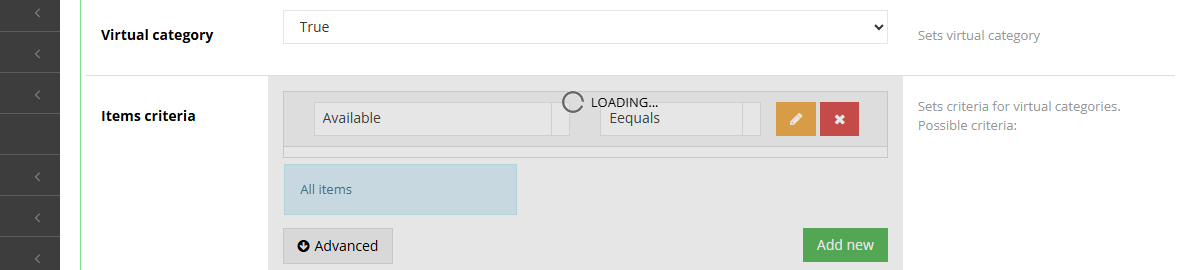
¶ Criterion in advanced mode

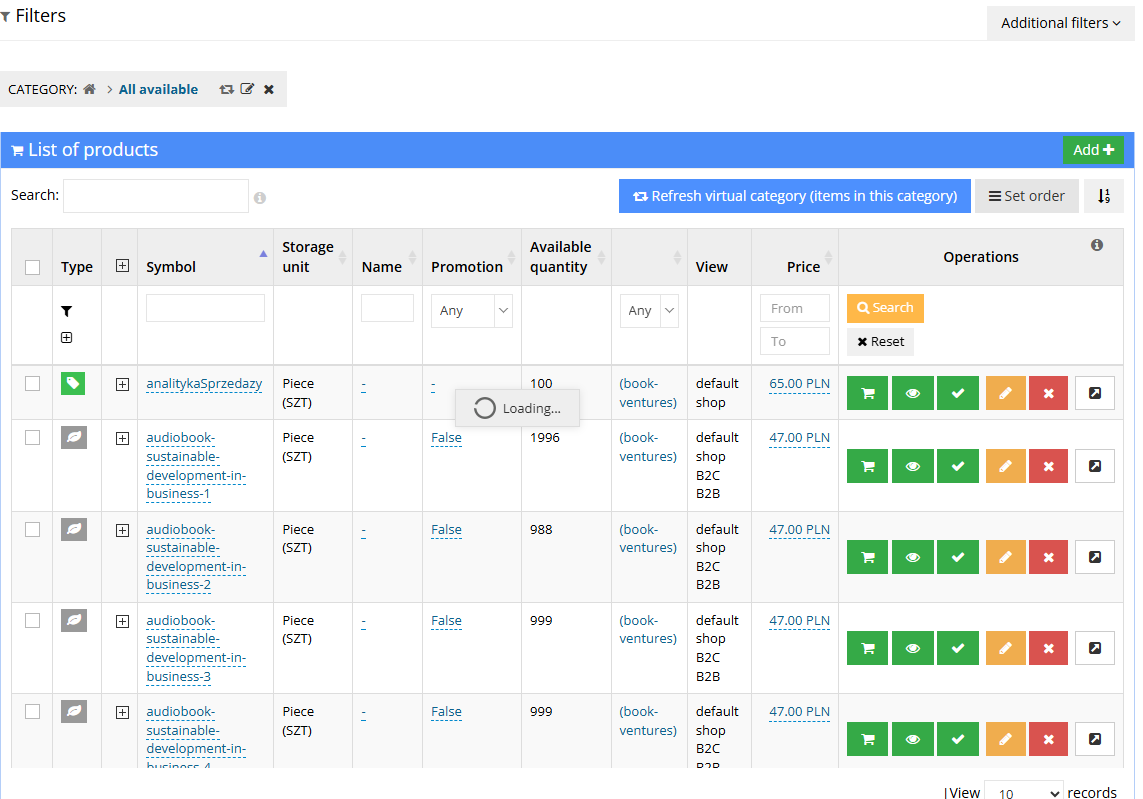
¶ Category item list - refresh and order
¶ How it works
- Any category can be virtual - this is decided by the Virtual category field in category editing.
- The Item criteria field determines which items land in the category. Several conditions in a criterion must all be met at once.
¶ How an item ends up in a virtual category
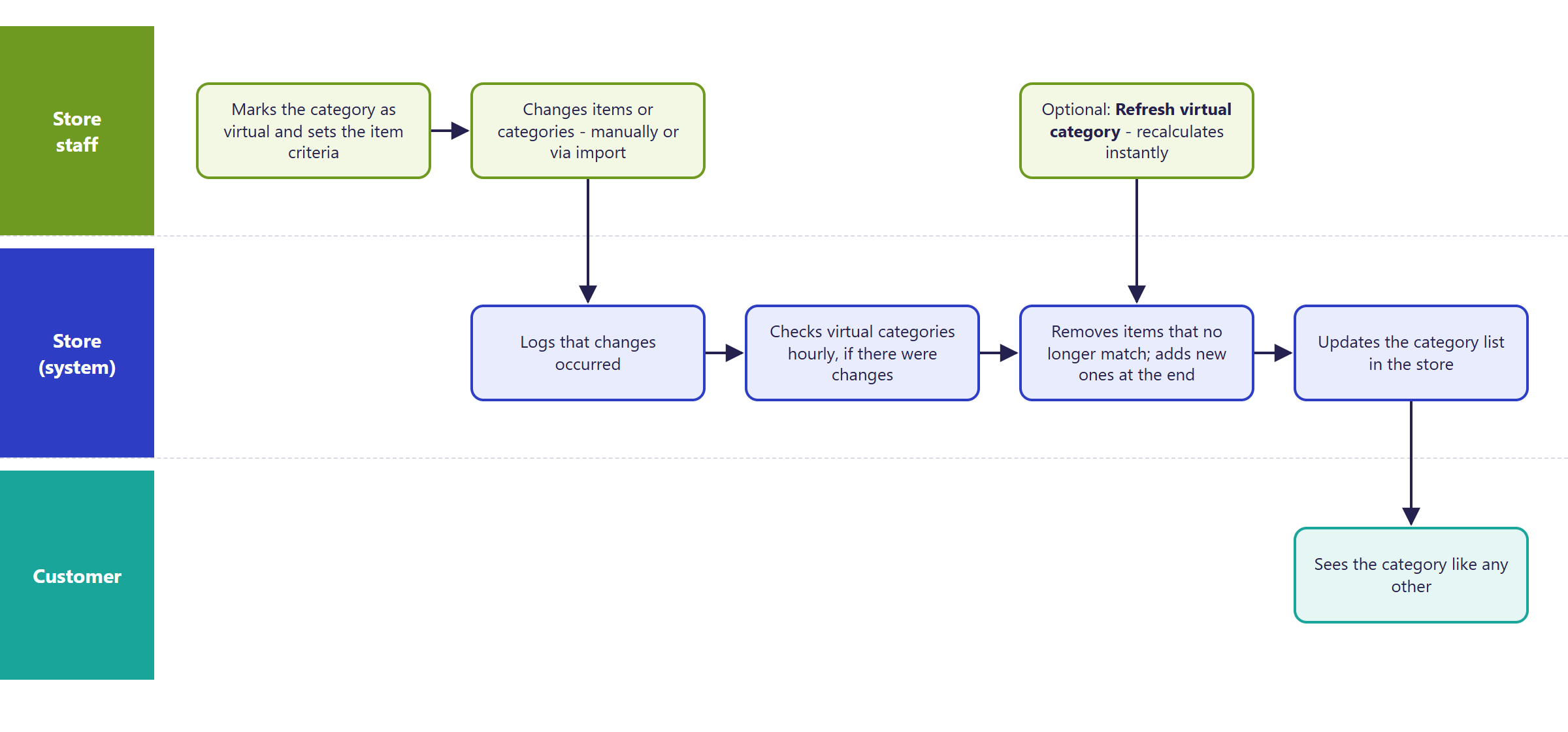
- Recalculation:
- automatically every hour - the Virtual category update task; it only recalculates categories where items or categories have changed since the last run,
- on demand - Refresh virtual category (items in this category) on the category's item list.
- On recalculation:
- items that no longer meet the criterion are removed from the category,
- new items are appended to the end of the list,
- the remaining items keep their set order - it can be changed just like in a regular category.
- Items added to a virtual category manually will disappear at the next recalculation if they don't meet the criterion.
- A virtual category without a criterion is emptied at the next recalculation.
- The criterion doesn't exclude anything by itself: invisible, unavailable or out-of-stock items will land in the category if the criterion doesn't forbid it (conditions like "Visible", "Available", "Buyable").
- Variants and articles land in the category according to the store's Variants on the lists and Articles on the lists settings (Web store navigation group). With variants on lists turned off, its article lands in the category instead of the variant.
- Turning off Virtual category stops the updates - the most recently assigned items stay, and the category keeps working like a regular one.
- For the store's customer, a virtual category is no different from a regular one - it has its own address, description, filters and sorting.
¶ Example criteria (Advanced mode)
Conditions are separated with a semicolon ;. Store property symbols - Configuration -> Properties -> Items. Category and producer IDs are visible in the panel, on the list or in the address of the edit page.
| Goal | Criterion |
|---|---|
| Items from $0.01 to $50.00 gross | taxedPriceMin=0.01;taxedPriceMax=50.00 |
| Only visible and available | visible=true;available=true |
| Items with a property (e.g. new arrival) | [property_symbol]=true |
| Name contains a word | [_name]*marketing |
| Items from one producer | producerId=3 |
| Items from several main categories | mainCategoryIds=[302, 281] |
| Items from a category and its subcategories | ancestorId=302 |
| No variants / no articles | notSubitem=true / notArticle=true |
¶ Version
- Virtual categories are a core platform feature - available in all supported versions.
- Since version 2.34 - improved stability and performance when recalculating on large catalogs.
- Since version 2.35 - support through the AI assistant (MCP).
- Latest module changes: version 2.35.55.
¶ Dependencies
- Item properties the criterion is meant to use (e.g. "New arrival") must exist and be filled in - Properties and locations.
- The store's search engine (Solr) - in stores where category lists come from the search engine, changes to category contents become visible after the index updates (Search and filters).
- The Virtual category update task must be enabled (it is by default).
¶ Implementation
- Works after the update - the feature is part of the platform and doesn't require deployment or template changes (BS5 and BS4). Store staff create and configure virtual categories in the panel.
- Minimum estimated time:
- self-service configuration by the store - 0 h,
- us configuring categories (criteria, checking contents) - from 1 h.
- The time for a specific implementation depends on its scope - we quote it individually.
- What the time depends on:
- the number of categories and the complexity of the criteria,
- whether item properties first need to be created or filled in (e.g. through an import),
- the size of the catalog and the store's search engine configuration,
- the store's version - an update is quoted separately.
¶ Limitations
- Automatic recalculation only runs every hour - for an immediate change, use Refresh virtual category (items in this category).
- In stores with the Solr search engine, new items in a category may appear in the store with a delay, in extreme cases only after the nightly index rebuild.
- Removing a criterion and recalculating empties the category without a warning in the panel.
- You cannot permanently add a single item "outside the criterion" to a virtual category, or exclude a single item other than through a condition in the criterion.
- New items always land at the end of the list - with a manually set order, they have to be moved by hand.
- Criterion conditions only combine with "and" (all at once); an "or" alternative for values is achieved with a regular expression or a list of values (e.g. several categories).
- The text form of a criterion isn't validated on save - an error in the criterion (e.g. an empty category list) can cause the category not to recalculate correctly. It's safer to build the criterion in the condition editor.
- Virtual categories are not available through REST API.
- We do not verify the task for legal compliance (e.g. licenses of supplied materials, GDPR, store terms and conditions).
¶ Future development
- Immediate list updates in the search engine after a category recalculates.
- A panel warning before saving an empty or invalid criterion, with a preview of the number of matching items (available today through MCP).
- Choosing where new items go (start / end of list / by sort order).
- Exceptions: manually added or excluded items, kept through recalculations.
- Virtual category support in REST API.
¶ Frequently asked questions
Can an item be added to a virtual category manually?
Not permanently. An item added manually will disappear at the next recalculation if it doesn't meet the saved criterion.
Does a category's content update immediately after an item changes?
Partially. Automatic recalculation runs every hour, and only when there were changes since the last run. The Refresh virtual category (items in this category) button gives an immediate update.
Does removing the criterion remove the items from the category?
Yes. A virtual category without a criterion is emptied at the next recalculation, and the panel doesn't warn about it before saving.
Are virtual categories available through REST API?
No. Virtual categories are managed in the panel or through the AI assistant (MCP) - REST API has no operations on their settings.
How long does setting up a virtual category take?
Self-service configuration in the panel doesn't need our involvement. With our help building criteria - from 1 h.
Can a virtual category combine items from several main categories?
Yes, the mainCategoryIds=[...] criterion collects items from several selected main categories into one list.
¶ Related
- Properties and locations - virtual category criteria most often use item properties.
- Search and filters - virtual categories can pull their item list from the search index.
- On hummerce.com: Unlimited parameterization (in Polish).
Want to see how virtual categories could work in your store? Book a free demo (in Polish).
¶ Configuration details
¶ Access in the admin panel
- Editing a category: Assortment -> Categories - fields:
- Virtual category - Yes / No,
- Item criteria - a condition editor (Add new) or the text form in Advanced mode (syntax described).
- Category's item list: Assortment -> Items with the category selected - Refresh virtual category (items in this category) (recalculate now) and Set order.
- Scheduled task: Status -> Tasks - Virtual category update (hourly).
- Store settings: the Web store navigation group - Variants on the lists, Articles on the lists.
¶ REST API and MCP
- REST API: categories can be read, created and changed (REST API), but without the virtual category settings and without recalculation.
- MCP (AI assistant - MCP server):
ec2_virtual_categories_list- list of virtual categories and whether they have a criterion,ec2_virtual_category_criteria_get- the category's saved criterion,ec2_virtual_category_criteria_set- setting a criterion from a description (producer, category, price, visibility, availability, properties); by default only a preview of the count and a sample of items, saved after confirmation; an empty criterion is rejected,ec2_virtual_category_refresh- recalculates the category; refuses if the category has no criterion,ec2_criteria_fields,ec2_criteria_build,ec2_criteria_explain- the store's criterion fields, building and explaining the text form.
¶ Store messages
The module has no messages of its own in the store or email templates. A virtual category's name, description, SEO and translations are set like for any category - in the message editor and in the category's own data.
¶ Parameters
| Symbol | Object | Label |
|---|---|---|
_virtualCategory |
category | Virtual category |
_itemCriteria |
category | Item criteria |