¶ Search and filters - fast way to find an item
Search in Hummerce helps the customer find an item by name, code, description, category, producer or properties, and filters narrow down the category list and search results to the items the customer is looking for. Both features run on a shared Apache SOLR search index, which the store updates automatically, so a large catalog doesn't slow down customer service.
As of Hummerce version 2.35 (latest changes in the module: 2.35.55), updated 2026-10-16.
¶ Benefits and use cases
- The customer finds an item faster: results and filters appear while typing, without a page reload.
- Filter counters show right away how many items are in each variant - the customer doesn't land on an empty list.
- A fast category list even with a large catalog and many filters - queries don't load the store's database.
- The store improves relevance on its own, without a developer: field weights, synonyms (including common typos and everyday names) and stop words are set in the panel.
- Technical and B2B assortment: searching by symbol, producer code and technical properties, filters by value ranges (e.g. power, diameter).
- Multi-language store: one weight configuration for all languages, separate synonyms and stop words for each language.
- Popular searches and content in the search window suggest seasonal campaigns and bestsellers to the customer before they start typing.
- An AI-assisted optimization panel speeds up choosing search settings: instead of trial and error, store staff get a proposed set of weights with a justification.
- A filtered list (e.g. "textbooks up to 100 PLN") can be linked in a newsletter or a banner.
¶ What it looks like
Screenshots from the Hummerce demo store (Bootstrap 5 template).
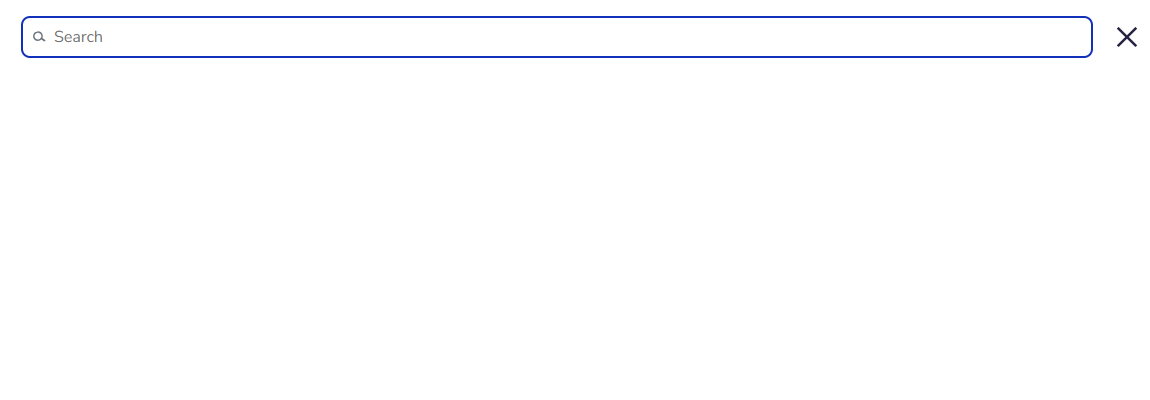
¶ Search window - results and filters while typing
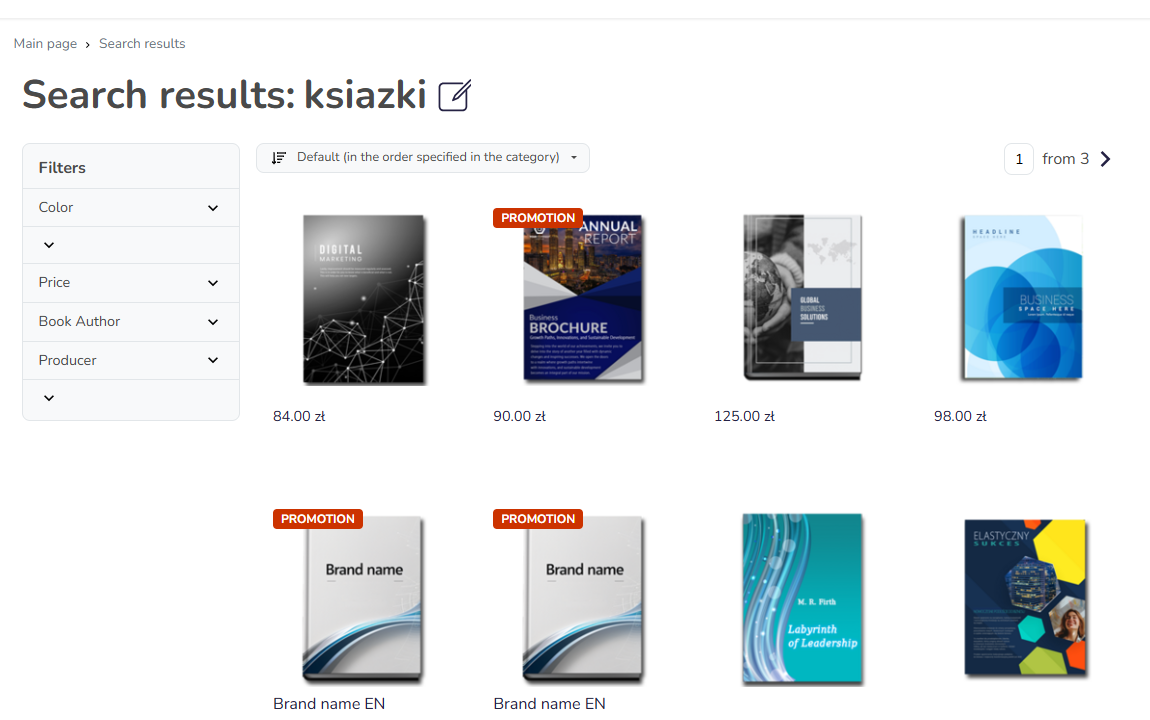
¶ Search results with a selected filter
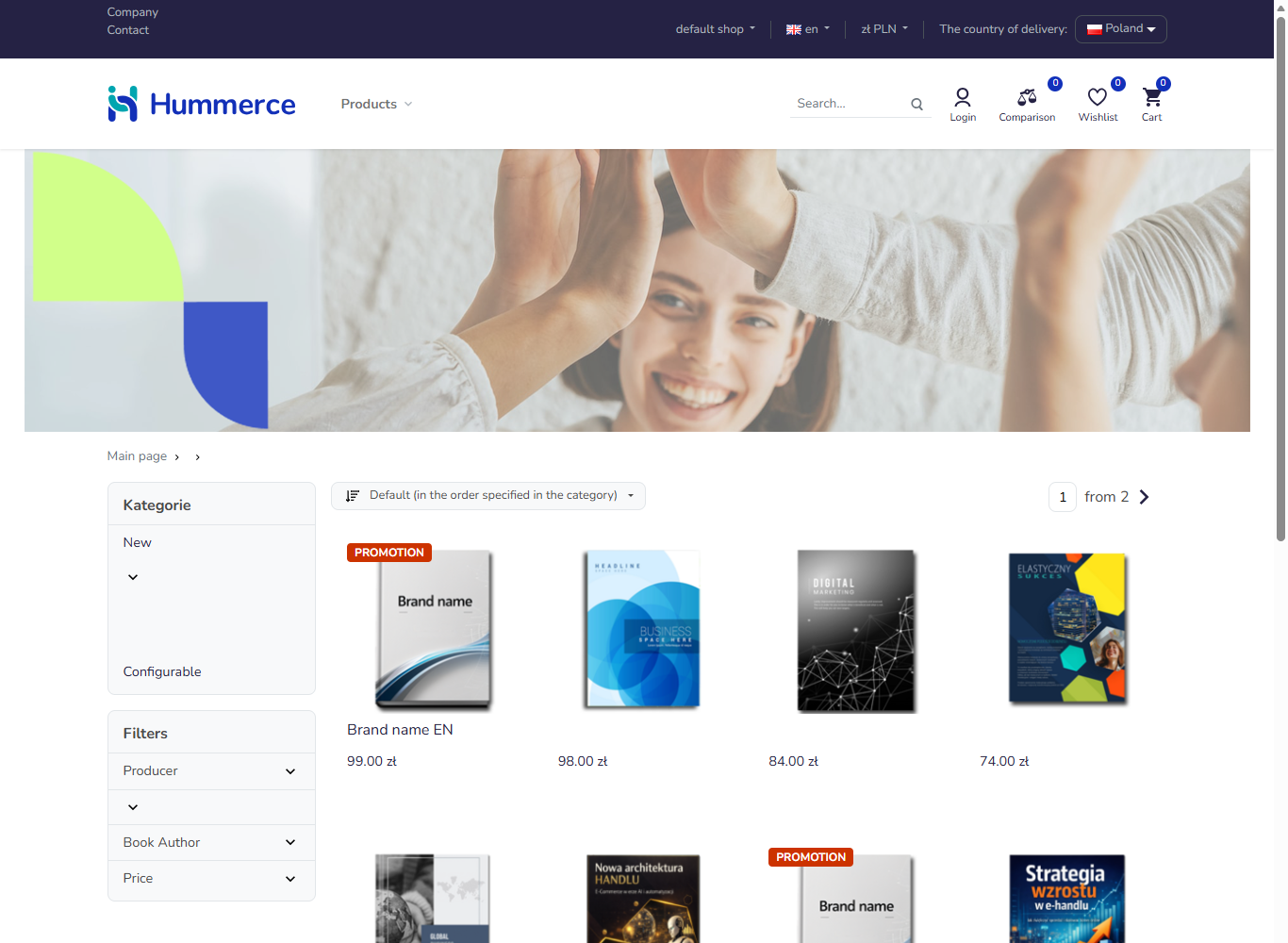
¶ Filters on a category list
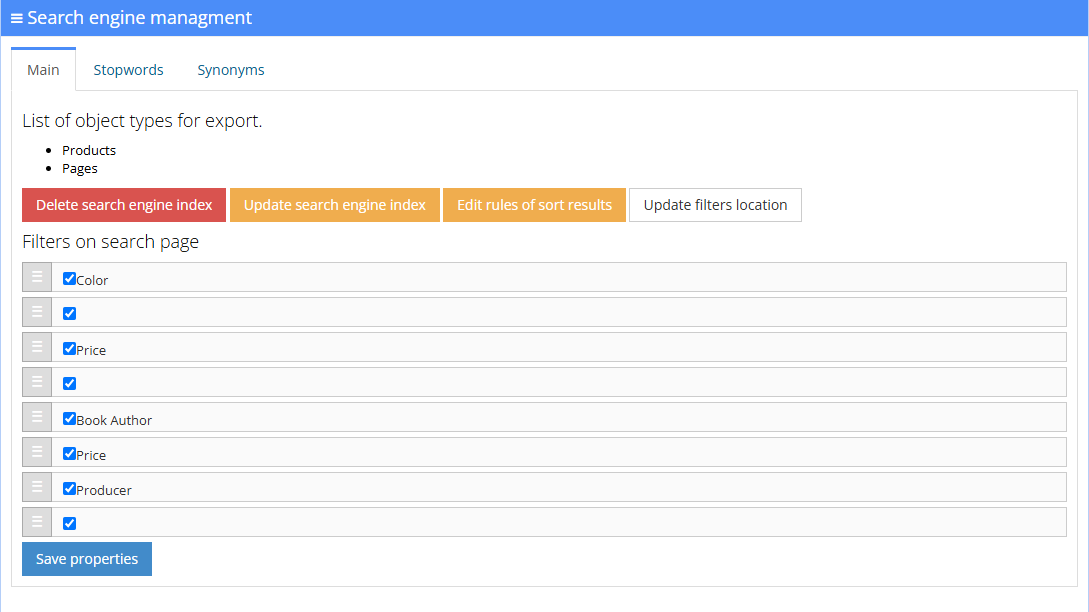
¶ Managing search in the panel
¶ How it works
¶ From the customer's phrase to results
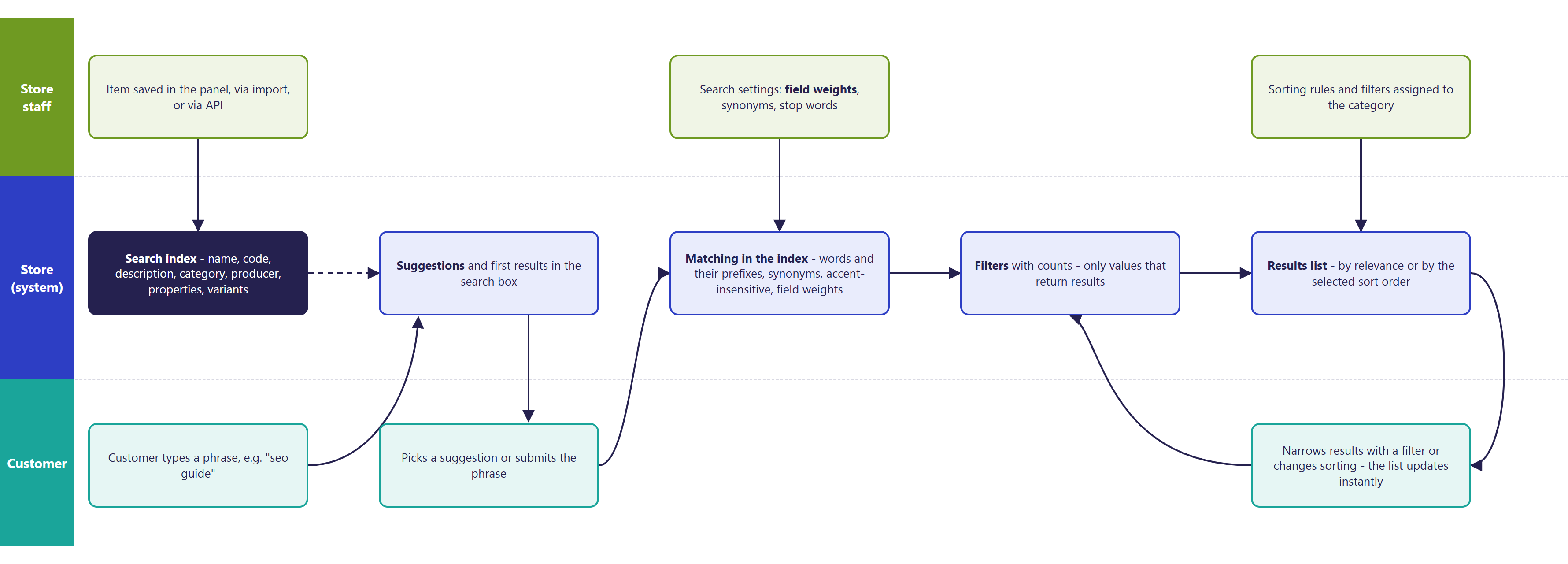
¶ What gets searched
- Search covers items and static pages (e.g. terms and conditions, "How to buy").
- By default, an item's searched fields are: name, symbol (item code), short and long description, category name, producer name and tags.
- Item properties (e.g. author, EAN code, material) are included in search once they are added to the list of properties sent to the search engine (Status -> Search engine -> Update filters location). The store decides which properties are searchable.
- Variants (e.g. sizes, cover types) are attached to their article - a phrase matching a variant finds the article.
- Categories and producers are not separate search results. The phrase "Strategy Press" will find that publisher's books, not the producer's page.
- An item or page with the Skip in search index property does not appear in search or on category lists.
¶ Field weights, sorting and relevance
- A field's weight says how much a match in that field boosts an item's position in the results. By default the name matters most, then category, then description, symbol and the remaining fields.
- Weights are set in Configuration -> Settings, Solr group, qfParameter field.
- Multi-word phrases: by default an item must contain at least 75% of the phrase's words. For the phrase "marketing guide store" two out of three words are enough.
- In a multi-language store, weights can be set once for all languages - the search engine searches the fields in the language the customer chose on its own.
- The order of results is decided by the rules in Configuration -> Items sort: each rule states whether it is Used in categories and Used in search results. Standard rules: relevance, order set manually in the category, name A-Z and Z-A, lowest price first, highest price first. Item popularity (the number of orders from the last 90 days plus a manual modifier) is calculated by the store itself and sent to the search engine, so category lists and search results can be sorted by it - see Items sort. New rules by other criteria are prepared as part of an implementation.
- Second sort sets the order of items with the same relevance (e.g. alphabetically).
¶ Typos, inflection, synonyms
- Search matches the start of words - "market" finds "marketing", and "guid" finds "guide".
- Polish diacritics are normalized - "sprzedaz" finds "sprzedaż".
- Synonyms (e.g. "laptop" = "notebook", common misspellings, diminutives) and stop words (e.g. conjunctions) are set by the store separately for each language in Status -> Search engine, Synonyms and Stopwords tabs.
- Search does not recognize the inflection of Polish words - "książce" will not find "książka" unless the store adds such a synonym.
- Suggestions in the search window tolerate small typos, if suggestions are enabled and configured on the search server.
¶ The search window and suggestions
- In the Bootstrap 5 template, search opens in a full-page window. While typing, the customer sees the first results together with filters, without moving to a separate page.
- Before the customer starts typing, the window can show:
- the customer's recent searches - remembered in the customer's browser (up to 10 phrases), not in the store,
- popular searches - a list of phrases prepared by store staff in Status -> Popular searches,
- any content (e.g. a banner, featured categories) from a content area in the search window (Areas and content).
- After the phrase is entered, the window can show phrase suggestions from the search engine.
- Each element is switched on separately in the Solr group. Both are off by default.
- Submitting the phrase opens the search results page at its own address - it can be sent by email or added to the menu.
¶ Phrases with no results
- When nothing matches, the store shows the message "There are no search results for phrase" (changeable in the message editor).
- The store has no report of phrases with no results in the panel. Customer-typed phrases are best tracked in Google Analytics 4 (search event, see Google Analytics 4).
¶ When an item change becomes visible in search
- Saving an item in the panel, in an import, or through the API sends the change to the search engine right away. On the store's list, the change may appear with a delay of a few minutes (cache).
- The item order within a category (manually set position) is sent every 5 minutes.
- Once a day, at night, the store rebuilds the whole index. The job's schedule is visible in Status -> Tasks.
- In Status -> Search engine you can send changes without clearing the index (the store keeps working normally), or clear the whole index - until the list is rebuilt, categories are empty, and for a large catalog the rebuild can take several hours, so this is only done on the explicit instruction of the implementation engineer.
- Changing field weights, synonyms and stop words applies immediately to new queries. Changing the list of searched properties requires an index update - the panel reminds you of this.
- When the search engine doesn't respond within 30 seconds, the category list loads from the store's database - without filters or sorting. What to do when items briefly disappear from categories while the index is being rebuilt - Items suddenly disappeared from the store.
¶ AI-assisted tuning of search settings
- In Configuration -> Settings, Solr group, there is an AI-assisted weight optimization panel (since version 2.35).
- Store staff describe the expected behavior in words, e.g. "name matters most, then producer code, then description; searching by EAN code should return an exact match".
- The AI model receives: the description of expectations, the current weights and matching rules, the store's language, and that store's index structure. It does not receive items, descriptions, prices, customer phrases or customer data.
- In response, the panel shows the current and proposed settings side by side: field weights, the multi-word matching threshold, additional parameters, a justification and a confidence rating for the proposal.
- The proposal is not saved automatically. Store staff copy it into the configuration fields and check the results on typical phrases. The feature uses the best.net.pl automation service, through which the request reaches the AI model.
¶ Filters on category lists and search results
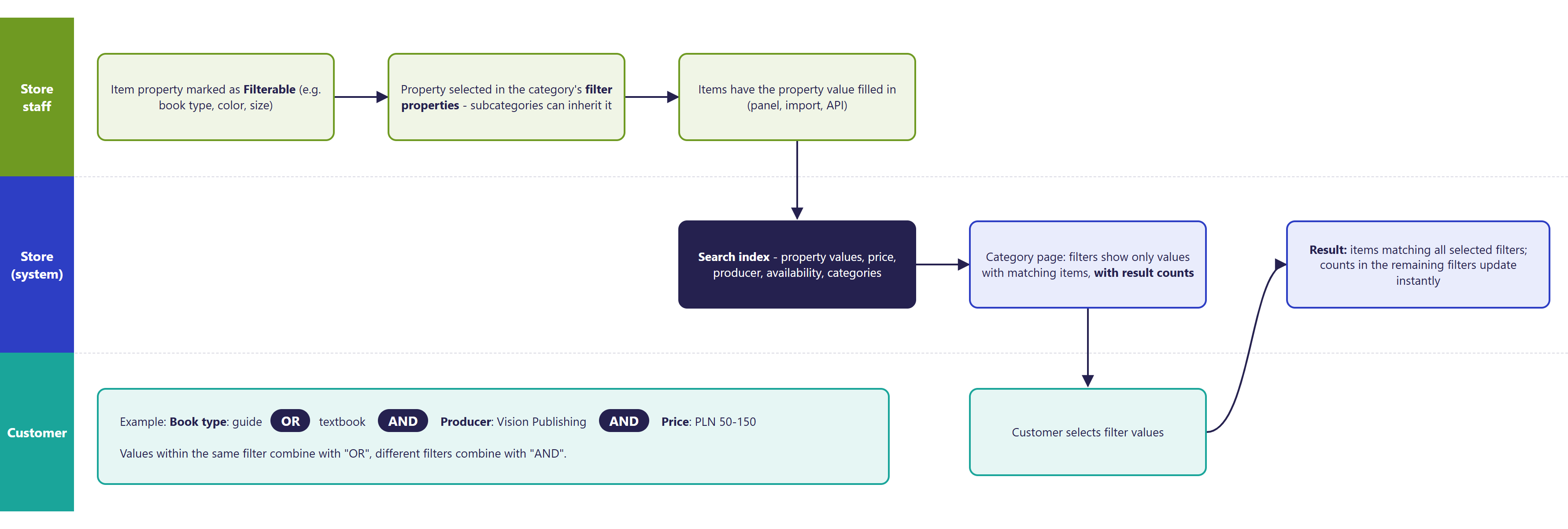
- A filter can be an item property of type: number (a from-to range), a list of values and a list of multiple values (checkboxes), text (checkboxes with the values found in items), yes/no (a single checkbox). The property must have Property used in filtering checked (see Properties and locations).
- Special filters:
- price - a from-to slider or a list of price brackets, gross or net matching the prices shown in the store,
- producer,
- availability - a single "available only" checkbox, useful when the lists also include unavailable or pre-sale items,
- category - in categories that gather items from different categories (e.g. Virtual categories).
- Category filters are chosen when editing the category (Properties for filtering) - together with their order. A new subcategory inherits the parent category's filters.
- Filters in search results are shared across all phrases and are set in Status -> Search engine, Filters on search page list (choice and order).
- Every filter value shows the number of items. Values with no items are hidden, and a filter with no values doesn't appear at all.
- Filters depend on each other: after selecting a value, the remaining filters and their counters are recalculated against the narrowed list. Within one filter, values are combined with "or"; different filters are combined with "and".
- Selected filters are shown above the list as "Selected filters" - each can be removed with one click.
- The list recalculates without a page reload. Moving to a different category resets the filters.
¶ Filters and Google ranking (SEO)
- Selected filters are saved in the page address, so a filtered list can be sent or bookmarked.
- A category page with filters points Google to the plain category address as canonical. Filtered variants therefore don't compete with the category in Google's results.
- The sitemap contains only category addresses, without filter combinations.
- Subsequent list pages have addresses with a page number, following Google's recommendations.
- The store doesn't create separate pages for popular filter combinations (e.g. "marketing guides") - such a page is better built as a separate category or a virtual category with its own description.
¶ Version
- The current search and filter mechanism has been running since version 2.28. Earlier versions used an older search engine, with fewer panel settings.
- Full-page search window (suggestions, recent and popular searches, filters in the window) - since version 2.30.
- Availability filter - since version 2.29.
- Field weights set separately for each store language - since version 2.33.
- New addresses for subsequent list pages, following Google's recommendations - since version 2.34.
- AI-assisted search settings optimization panel - since version 2.35.
- Latest changes in the module: version 2.35.55.
¶ Dependencies
- The Apache SOLR search engine server - we provide it as part of store hosting. A store on the client's own server needs its own SOLR installation.
- Store template:
- Bootstrap 5 - full-page search window, filters with counters, "Selected filters", filters in a separate window on mobile,
- Bootstrap 4 - filters with counters, colors as color swatches, no full-page search window in the standard version (to be prepared as part of implementation).
- Filter properties and their values on items - the store fills them in on its own (panel, import, API), see Properties and locations.
- Phrase suggestions - require enabling and preparing the search server's configuration for the store's languages.
- The AI-assisted optimization panel - a module connecting to the automation service and access to the AI model.
- Tracking search phrases - Google Analytics 4.
¶ Implementation
- Works after the update - search, filters with counters, synonyms, stop words and sorting rules work in every store on version 2.28 or newer. Filters, weights, synonyms and popular searches are set by the store itself in the panel. Implementation work is needed in these cases:
- first-time filter setup: preparing properties, assigning filters to the category tree, filters in search results, testing,
- full-page search window: enabling it, phrase suggestions, matching the store's graphics, testing on mobile,
- non-standard filters (e.g. colors as swatches, a filter by category within a collective category) and new sorting rules,
- AI-assisted setting selection: setting up the connection to the automation service, choosing and checking weights on the store's phrases,
- moving a store from the old search engine to the current one,
- testing on a test environment and going live on production.
- Minimum estimated time:
- Bootstrap 5 template, filter and weight configuration in the panel by the store - 0 h; with our involvement (first-time filter setup and testing) - from 2 h,
- search window with suggestions in the Bootstrap 5 template - from 4 h,
- search window in the Bootstrap 4 template or a custom one - from 40 h,
- AI-assisted setting selection - from 3 h,
- moving from the old search engine (a store predating version 2.28) - from 30 h, on top of the store version update.
- The time for a specific implementation depends on its scope - we quote it individually.
- What the time depends on:
- the store template - in Bootstrap 5 the search window and filters are standard, in Bootstrap 4 and custom templates they need to be adapted,
- the number of properties and categories where filters are set, and the quality of the data on items,
- the number of languages (suggestions, synonyms and stop words for each language),
- dedicated changes to the search server configuration in a given store,
- the store version - a store predating version 2.28 needs an update first (quoted separately),
- non-standard filters, sorting rules and integrations (quoted separately).
¶ Search engine version update
- Hummerce search runs on the Apache SOLR engine. We update search servers to new engine versions gradually, server by server.
- The update keeps the existing search and filter functionality, with no changes to the store's look or the panel, and gives a supported, up-to-date engine version with security and performance fixes.
- After the move we rebuild the whole index - during this time the category list may be temporarily incomplete, so we do this during the quietest traffic hours.
- Minimum estimated time: from 2 h for a store with a standard search configuration, from 6 h for a store with dedicated changes to the search configuration (e.g. custom fields, suggestions, extra languages). We agree on the date with the store's account manager.
- Stores still running the old search engine (predating version 2.28) need to move to the current mechanism - quoted individually, usually together with a store version update.
¶ Limitations
- No recognition of Polish word inflection - inflected forms and spelling variants need to be added as synonyms.
- Categories, producers and blog posts are not separate search results - the search window suggests phrases and items.
- No report of searched phrases or phrases with no results in the panel - Google Analytics 4 or another analytics tool is needed.
- The price filter works on the prices shown in the store to all customers (including promotional prices), not on the individual prices and discounts of a logged-in B2B customer - a customer with a discount may see a different bracket in the filter than in the cart.
- Filters in search results are shared across all phrases - it's not possible to set different filters for phrases from different categories.
- The choice of filters doesn't carry over between categories - filters reset after changing category.
- No separate, indexed pages for filter combinations, and no automatic marking of pages with filters as non-indexed.
- Color swatches in the color filter exist only in the Bootstrap 4 template - in Bootstrap 5, color is a plain list of values.
- Recent searches are remembered in the customer's browser - they don't carry over to another device and are not visible to the store.
- Changes in virtual categories may only become visible on the list after the nightly index rebuild.
- A full index rebuild after clearing it takes from a few minutes to a few hours - during this time category lists are incomplete.
- The AI-assisted optimization panel gives a proposal that has to be copied over and checked - it does not change settings on its own, and the proposal may differ the next time it runs. It does not tune weights separately for each customer phrase - settings are shared across all searches.
- Through MCP and the REST API there is no full-text search with relevance and filter counters - the tools search by name and criteria on the store's data.
- Most search and filter messages have only a Polish version.
¶ Future development
- AI-assisted search in real time: weight selection matched to the nature of the phrase (item code vs. a description of a need), understanding customer intent, correcting typos, help with phrases that return no results.
- A synonym dictionary prepared by AI based on customer phrases and the store's catalog.
- Category suggestions in the search window, alongside item suggestions.
- A price filter that takes into account a logged-in B2B customer's individual prices.
- A report of searched phrases and phrases with no results in the panel.
- Recognition of Polish word inflection.
- Color swatches in the color filter in the Bootstrap 5 template.
- Pages for popular filter combinations with their own title and description (SEO).
- Full-text search and filters through the REST API and MCP.
¶ Frequently asked questions
Does Hummerce search understand typos?
Partly. Search matches the start of words and normalizes Polish diacritics, and suggestions in the search window tolerate small typos if they are enabled and configured on the server. It does not recognize the inflection of Polish words without adding a synonym.
Do filters show the number of matching items?
Yes. Every filter value shows the number of items, and values with no items are hidden.
Does AI-assisted weight selection for search work today?
Yes, as a panel in the store configuration (since version 2.35): store staff describe their expectations, and the AI model proposes weights to check and save manually. Live weight tuning for a single customer phrase is not yet available.
Does the price filter take a B2B customer's individual prices into account?
No. The price filter works on the prices shown to all customers - a customer with a discount may see a different bracket in the filter than in the cart.
How long does it take to set up the search window?
In the Bootstrap 5 template the base solution is standard - enabling suggestions and testing takes from 4 h. In the Bootstrap 4 template or a custom one - from 40 h.
Does the store itself see which phrases customers search for with no results?
There is no such report in the panel - customer phrases are best tracked through Google Analytics 4.
¶ Related
- Virtual categories - categories that gather items automatically based on a criterion, and can pull their list from the search index.
- Properties and locations - properties as search and filter fields.
- Google Analytics 4 - tracking search phrases.
- Items suddenly disappeared from the store - what to do about a temporarily incomplete category list.
- On hummerce.com: Full-screen search and filtering (in Polish).
Want to see how search and filters could work in your store? Book a free demo (in Polish).
¶ Configuration details
¶ Access in the admin panel
- Status -> Search engine (Managing the search module):
- General tab - list of indexed objects (Products, Static pages), Update search index, Clear search index, a link to the sorting rules, Update filters location, the Filters on search page list,
- Stopwords and Synonyms tabs - separately for each language.
- Status -> Popular searches - phrases shown in the search window (name, priority, visibility).
- Status -> Tasks - index update and index-position jobs.
- Configuration -> Items sort - sorting rules (Sort direction, Used in categories, Used in search results); the default sort is also set in the category.
- Configuration -> Settings, Solr group:
- qfParameter - searched fields and their weights,
- Additional parameters - among others the multi-word phrase matching threshold (default
mm=75%), - Second sort - order of items with the same relevance,
- AI Optimizer instructions - description of expectations for the AI panel,
- Show recent searches, Show suggestions - off by default,
- Items in category from SOLR - on by default; turning it off disables filters and sorting on category lists,
- Timeout category - 30 s by default.
- Configuration -> Settings, Web store navigation group: Propagate changes in category filters to subcategories, Param page in URL.
- Property (property type): Property used in filtering.
- Category: Properties for filtering (choice and order of filters).
- Item, page: the Skip in search index property.
¶ REST API and MCP
- REST API: list of items with criteria and sorting, on the store's data, without full-text search and without filter counters (REST API).
- MCP: search settings, index jobs, properties and their locations (including the filter list and category filters), criteria, and item search by name - permissions the same as in the panel, settings changes for administrators only (AI assistant - MCP server).
¶ Store messages
Default values are in Polish. Only the basic search window messages and older filter messages have an English version - the rest need to be translated when implementing a foreign-language store. There is no German version. Messages are changed in the message editor.
¶ Search window and results
| Key | Default value |
|---|---|
msg.topMenu.search |
Search |
msg.search.title |
Search results |
msg.search.found |
found |
msg.search.results |
results |
msg.search.notFound |
There are no search results for phrase |
msg.shopFullPageSearch.recentSearches |
Recent searches |
msg.shopFullPageSearch.popularSearches |
Popular searches |
¶ Filters and sorting
| Key | Default value |
|---|---|
msg.search.filters |
Filters |
msg.filters.selected |
Selected filters |
msg.filters.clearAll |
Clear all |
msg.filters.filter.category |
Category |
msg.filters.filter.price |
Price |
msg.filters.filter.producer |
Producer |
msg.filters.title |
Sort by: |
msg.filters.order.default |
Default |
Filter names are property names (e.g. "Book type"), and sorting rule names come from Items sort. They are translated in the properties and rules themselves, not in the messages.
¶ Parameters
| Symbol | Object | Label |
|---|---|---|
skipFromSolr |
item, page | Skip in search index |
_producer, filterProducer |
item | Producer (producer filter) |
_filterAvailable |
item | availability filter |
filterCategory |
item | category filter in collective categories |