¶ Google Analytics 4 - full sales funnel, no code
Google Analytics 4 (GA4) in Hummerce collects data on customer behavior and sales - from a product view, through the cart and order, to purchase, cancellation and refund. The store passes data through Google Tag Manager (GTM), respecting the customer's cookie consent, so the store gets a full sales funnel with no code changes.
As of Hummerce 2.30 (last module changes: 2.35.62), updated 2026-10-07.
¶ Benefits and use cases
- A full sales funnel in GA4 with no development work: from the product list, through the cart and order, to purchase.
- Analysis of how well lists and store placements perform - which list (category, search, homepage, recommendations) a customer picked a product from, and at which position.
- Slider banner performance - impressions and clicks.
- Revenue reduced by cancellations and refunds - the real value of a campaign, with no manual corrections.
- Segmentation by customer group, view, domain, language - e.g. separate B2B and B2C reports, language versions and domains.
- Compliance with Google Consent Mode v2 requirements - Google Ads campaigns keep conversion data.
- One GTM container for all marketing tools - adding a new tag (e.g. a partner's pixel) with no development request.
- Data for further analytics: GA4 export to BigQuery, reports in Google Looker Studio, Personalized recommendations.
¶ What it looks like
¶ Data flow
¶ How it works
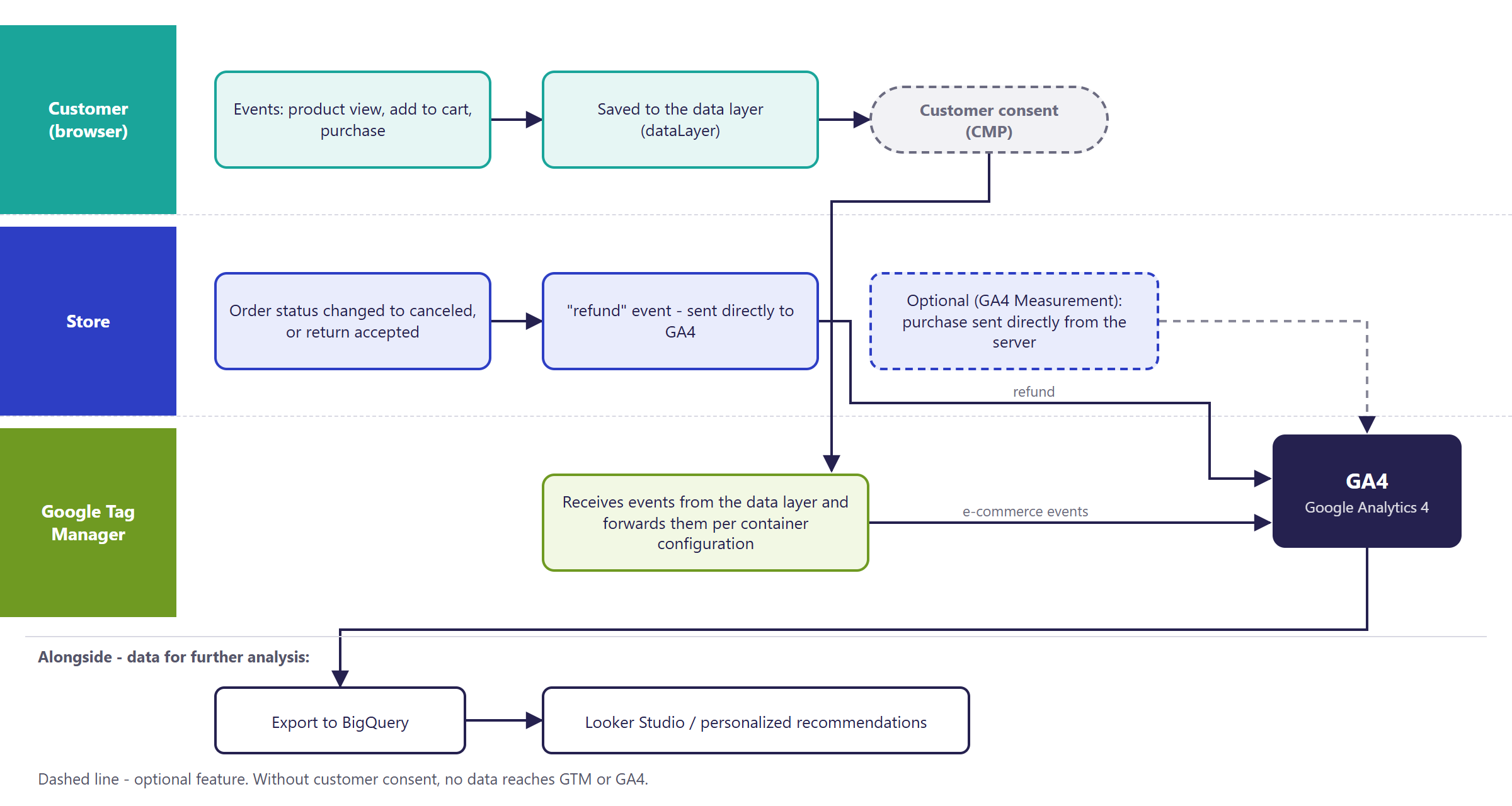
- The store doesn't send data to GA4 directly. It places it in the so-called data layer (dataLayer), and GTM - according to the container's configuration - passes it on to GA4 and other tools.
- Data is sent in GA4 format once DataLayer version is set to "Google Analytics 4". In the BS5 template this is the only supported format - without this setting, GTM isn't loaded at all.
- Cancellations and refunds are sent to GA4 by the store server (without the customer's browser involved) - so they arrive even if the customer never returns to the store.
¶ What the store sends to GA4
| GA4 event | When |
|---|---|
view_item_list |
products shown on a list: category, search, homepage lists |
select_item |
clicking a product on a list |
view_item |
viewing a product page |
add_to_cart, remove_from_cart |
adding to the cart and removing from the cart |
add_to_wishlist, remove_from_wishlist |
adding to and removing from the wishlist |
view_cart |
viewing the cart |
begin_checkout |
starting to place an order |
add_shipping_info, add_payment_info |
the chosen delivery and payment (sent together with the purchase) |
purchase |
placing an order - the confirmation page or the page moving to payment |
view_promotion, select_promotion |
viewing and clicking a slider banner |
refund |
canceling an order or accepting a return - sent by the store server |
- For every product: symbol, name, customer price, discount, manufacturer, categories (up to 5 levels), variant, quantity, the list the product came from, and its position on the list.
- On purchase: order number, gross value, tax, delivery cost, currency, coupons used.
- On every page, additional context: page type, customer group, domain, traffic source, store view, A/B test variant, language, and the logged-in customer's identifier (cross-device reports).
- In the BS5 template, during checkout the store additionally passes an encrypted (SHA-256) customer email and phone - for Google Ads enhanced conversions. The email address never reaches GA4 in plain text.
- Form validation errors (e.g. an invalid postal code) are passed as an event - this helps identify fields where customers give up.
¶ Customer consent (Consent Mode v2)
- GA4 and Google ads can only store cookies after the customer's consent. Google is informed of consent by a consent management platform (CMP, e.g. Cookiebot, OneTrust), usually connected in GTM.
- BS4 and BS5 templates: the store can send the default consent state to Google before the tags load - the values are set in the panel, and sending is turned on by the Send consent event setting (disabled by default). In BS5 this works from version 2.35.62. The default state can also be set in GTM (CMP template).
- The consent update after the customer's choice is always sent by the CMP, not the store.
- The Cookie Consent and Consent Mode Banner module is a simple information banner - it doesn't collect consent and doesn't pass it to Google, and it doesn't replace a CMP.
¶ Cancellations and refunds (the refund event)
- Order cancellation: when an order's status changes to one of the selected ones (Canceled, Canceled with link, Return by default), the store sends a refund for the whole order - all items and the full value.
- Partial product return: when store staff accept a return in the Returns - contract withdrawal module, the store sends a refund only for the returned items and their value. Each return reaches GA4 at most once.
- In GA4, the transaction stays counted among purchases, and its value appears in the refunds column - net revenue is reduced by refunds.
¶ Purchase sent from the server (GA4 Measurement) - optional
- The GA4 Measurement module sends purchases to GA4 from the store server, independent of the browser - it fills in data otherwise lost to ad blockers or the customer closing the page before confirmation.
- Purchases are sent periodically (every 5 minutes by default), with the customer's GA session identifier recorded on the order.
¶ Why the transaction count in GA4 differs from the store
A discrepancy of a few to a dozen percent is typical. The most common causes:
- No consent to analytics cookies - GA4 either doesn't record the purchase directly or estimates it through modeling.
- Ad blockers and privacy-focused browsers - the GTM script doesn't load.
- Orders placed outside the customer's browser - placed in the panel, through the API, from an ERP, from marketplaces - they don't go through the confirmation page, so they don't reach GA4 (unless GA4 Measurement is running).
- Canceled orders - they disappear from the store's order count, but stay in GA4 as a purchase with a full refund.
- The customer didn't return from the payment gateway - the purchase is already recorded on the page moving to payment, but closing the tab before it loads means the purchase is never sent.
- Differences in date and time zone - GA4 data is completed up to 24-48 hours later.
- Filters and service settings - excluded internal traffic, the wrong currency, an incomplete list of excluded referrers (payment gateways).
¶ Version
- Since version 2.30 - in older versions, the store only works with Universal Analytics, which is now discontinued.
- Last module changes: version 2.35.0.
¶ Dependencies
- The Google Tag Manager module with the data layer version set to "Google Analytics 4".
- A BS5 or BS4 store template with data layer calls in the list, product, cart and order views - present in the base template; individual views need to be checked.
- Sending cancellations and refunds - the GA4 order cancellation module; partial refunds additionally need the Returns - contract withdrawal module (version 2.35 or newer).
- Consent Mode v2 - store version 2.32 or newer plus a consent management platform (CMP), chosen and paid for by the store.
- Order statuses - sending cancellations depends on them.
¶ What the store must set up on Google's side
- Create or share a Google account with admin permissions to the GA4 property and the GTM container - ideally on the company domain, not a personal account.
- Create a GA4 property and a data stream for the store's domain - pass the measurement ID (G-...) to the implementation developer.
- Create a Measurement Protocol API secret in the data stream - needed to send cancellations and refunds.
- Set the property's currency and time zone to match the store.
- Add payment gateways to the list of unwanted referrers (e.g. PayU, Przelewy24, PayPal, banks) - otherwise returning from payment starts a new session and attributes the purchase to the gateway.
- Register the custom dimensions that should be visible in reports: customer group, view, domain, source, A/B test, language, page type.
- Extend GA4 data retention to 14 months (2 months by default) - this affects exploration reports.
- Connect GA4 with Google Ads and Google Merchant Center, if the store runs campaigns.
- Optionally: connect GA4 with BigQuery - export of raw events, unlimited data retention, joining with store data (reports).
- Deploy and configure a CMP (consent banner) and describe the analytics tools in the cookie policy.
¶ Implementation
- Requires implementation - the integration doesn't switch on by itself after an update. Scope:
- enabling the Google Tag Manager and GA4 order cancellation modules and configuring them in the panel (container ID, data layer version, keys for sending refunds, statuses),
- configuring the GTM container: the Google GA4 tag, e-commerce events, data layer variables (most often by importing a ready-made workspace),
- connecting the CMP in GTM and setting consent for the tags,
- checking data layer calls in the store's custom views,
- reviewing existing GTM tags that use the previous data layer format (Universal Analytics) - they'll stop working after the switch,
- testing in GTM preview mode and GA4 DebugView on the test environment, then a production rollout.
- Minimum estimated time:
- BS5 template - from 6 h,
- BS4 template - from 8 h.
- The time for a specific implementation depends on its scope - we quote it individually.
- What the time depends on:
- the store template and how customized the list, product, cart and order views are,
- the state of the GTM container - a new container is simplest, cleaning up many old tags takes more work,
- choosing and deploying a CMP (e.g. Cookiebot, OneTrust) - configuring the consent platform itself is quoted separately,
- additional GTM tools (Google Ads, Meta, other pixels) - quoted separately,
- GA4 Measurement (server-side purchase), server-side GTM, BigQuery export - quoted separately,
- the store version - a store older than 2.30 (2.32 for Consent Mode v2) needs an update first (quoted separately).
¶ Limitations
- The store has no integration of its own with the GA4 script - without a correctly configured GTM container, no data reaches GA4.
- The store doesn't fetch data from GA4 - reports are viewed in GA4 or Looker Studio, not in the store panel.
- The store sends the default consent state only when Send consent event is turned on (disabled by default, all categories "Denied"). Without it, in both templates, Consent Mode v2 must be configured in GTM (CMP template). The consent update after the customer's choice is always sent by the CMP.
- The BS5 template doesn't mark the 404 page as a separate page type and doesn't use its own GTM load address.
- In BS5, list names are passed for categories, search and homepage lists. Recommendations, recently viewed, related products, wishlist and cart don't have a list name.
- Cancellation sends a refund for the whole order value. If a partial product return was already accepted, and the order then gets a "Return" or "Canceled" status, GA4 will receive a refund larger than the real one - the triggering statuses should be matched to how returns are handled.
- A partial return doesn't cover the delivery cost or set components - only products at the top level of the cart.
- In a store showing net prices, the refund is sent in net values, while the purchase is sent in gross values.
- Refunds and cancellations aren't visible in GA4 DebugView or traffic-source reports - they appear in e-commerce reports with a delay of up to 48 hours.
- Orders placed in the panel, through the API, from an ERP and from marketplaces aren't sent to GA4 as a purchase (except through the GA4 Measurement module).
- Switching the data layer version to GA4 disables the previous format - GTM tags based on the Universal Analytics format need to be rebuilt.
- We do not verify the configuration for legal compliance - the consent banner's content, cookie categories, the privacy policy and the default consent state are up to the store.
¶ Future development
- Reporting the 404 page and the names of all product lists (recommendations, recently viewed, related, wishlist) in BS5.
- A partial refund on order cancellation when returns were already accepted, plus protection against sending a cancellation twice.
- Sending purchases placed outside the browser (panel, API, marketplace) with source information.
- Server-side GTM as a standard part of implementation - more accurate data despite blockers, shorter page load time.
- Ready-made e-commerce report templates in Looker Studio combining GA4 and store data.
- The store's own events (e.g. newsletter signup, RFQ, login) in the standard event set.
¶ Frequently asked questions
Does Hummerce work with Google Analytics 4?
Yes, since version 2.30. The store passes e-commerce events through Google Tag Manager - older versions only work with the discontinued Universal Analytics.
Does the GA4 integration work right after a store update?
No. It requires implementation: configuring the GTM container, e-commerce events and a consent management platform.
Do cancellations and refunds reduce revenue in GA4?
Yes. A cancellation sends a refund for the whole order, and accepting a partial product return sends a refund only for the returned items.
Does the store send data to GA4 without the customer's cookie consent?
No. GA4 only stores data after the customer's consent, passed by a consent management platform (CMP) under Consent Mode v2.
How long does a GA4 integration take?
From 6 h for the BS5 template, from 8 h for the BS4 template - depending on the state of the GTM container and how customized the views are.
Do the number of orders in the store and the number of transactions in GA4 always match?
No. A discrepancy of a few to a dozen percent is typical - most often due to the customer's lack of cookie consent, ad blockers, or orders placed outside the browser (panel, API, marketplace).
¶ Related
- Returns - contract withdrawal, Cookie Consent and Consent Mode Banner, Order statuses.
- Google Looker Studio - reports, Personalized recommendations.
- On hummerce.com: Google Tag Manager integration (in Polish), Looker Studio data analysis (in Polish).
Want to check what your store's sales data looks like in GA4? Contact the Hummerce team (in Polish).
¶ Configuration details
¶ Access in the admin panel
- Panel configuration: group Google Tag Manager (detailed configuration):
- Turn on Google Tag Manager - enabled by default,
- Client ID - the GTM container ID (GTM-...),
- DataLayer version - "Universal Analytics" or "Google Analytics 4"; always "Google Analytics 4" for GA4,
- GTM script URL - a custom GTM load address (e.g. server-side GTM); works in the BS4 template,
- Track Internal Promotions - banner tracking in the BS4 template; in BS5, slider banners are always tracked,
- Send consent event - sending the default consent state (BS4 and BS5 templates; in BS5 from version 2.35.62), disabled by default,
- the consent set (advertising, analytics, functional, personalization, security) - "Denied" by default, except for consent to security purposes,
- Wait for update - 500 ms by default.
- Panel configuration: group GA4 order cancellation:
- URL the event is sent to - Google's Measurement Protocol address by default; a debug address can be set for testing,
- API key for sending the event - the Measurement Protocol secret from GA4,
- Data stream ID - the measurement ID (G-...),
- Send order cancellation event - enabled by default; disabling it also stops refunds from being sent,
- Statuses that trigger the event - order status symbols separated by commas,
canceled,return,canceledByLinkby default.
- Panel configuration: group GA4 Measurement (optional module): GA4 Measurement URL, API secret, Measurement ID, Run task, Use test mode; the GA4 Measurement task on the task list.
- Panel configuration: group Cookies information - the information banner (Cookie Consent and Consent Mode Banner).
- GA4 and GTM: reports, tag and consent configuration - in the Google tools, outside the store panel.
¶ REST API and MCP
GA4 and GTM configuration has no separate REST API or AI assistant (MCP) operations - settings are changed in the store panel, and reports are viewed in the Google tools.
¶ Store messages
Product list names sent to GA4 are changed in the Message Editor - Store Text and Translations. Renaming splits GA4 report data into "before" and "after" - it's worth deciding on names before launch. Default values are in Polish and English. The list name reaches GA4 in the language the customer is browsing the store in - with several languages, the same list has several names in reports.
| Key | Default value |
|---|---|
msg.dataLayer.listName.category |
Category: |
msg.dataLayer.listName.searchResults |
Search results: |
msg.dataLayer.listName.recomendations |
Recommendations: {0} (BS4 only) |
msg.dataLayer.listName.lastViewed |
Last viewed: {0} (BS4 only) |
msg.dataLayer.listName.related |
Related: {0} (BS4 only) |
msg.dataLayer.listName.wishlist |
Wishlist (BS4 only) |
msg.dataLayer.listName.cart |
Cart (BS4 only) |
¶ Parameters
| Symbol | Object | Purpose |
|---|---|---|
_ga4RefundSent |
refund | marks that the refund has already been sent to GA4 (guards against sending it twice) |
_ga4MeasurementCode |
order | the customer's GA session identifier (GA4 Measurement) |
_ga4MeasurementSent |
order | whether the purchase was sent from the server (GA4 Measurement) |
_ga4MeasurementErrorCounter, _ga4MeasurementErrorMessage |
order | the count and text of sending errors (GA4 Measurement) |
¶ Google Tag Manager configuration - for the implementation developer
- A Google Tag tag (measurement ID G-...) fired on initialization of every page.
- One GA4 Event tag with the event name taken from the built-in Event variable and the Send Ecommerce Data option (source: data layer), fired by a custom event matching the e-commerce event set from the table above. An alternative that follows Google's documentation: a separate tag and trigger for each event.
- Data layer variables for custom dimensions and user parameters: page type, customer group, domain, source, view, A/B test, language, customer identifier.
- Google Ads enhanced conversions (BS5): variables with an encrypted (SHA-256) email and phone - sent once both values are entered in the order form.
- Form validation errors: the
field.invalidevent, with the field and message in thegtm.elementandgtm.errorMessagevariables. - Before every e-commerce event, the store clears the
ecommerceobject (ecommerce: null) - this doesn't need to be done in GTM. - Exporting the container to another store: don't copy the Google tag with the measurement ID or the event tag without changing the ID.
- Page types (
pageType): homepage, category, product, static page, blog, manufacturer, comparison site, search results, cart, order, wishlist, 404 page (BS4 only). - Consent Mode v2: in BS4 and BS5 (BS5 from version 2.35.62), with Send consent event enabled, the store sends the default consent state from the panel settings before GTM loads; alternatively the default state is set by the CMP template in GTM (e.g. Cookiebot, OneTrust, or Google's Consent Mode tag template). The consent update is always sent by the CMP. Testing: the Consent tab in Tag Assistant, and the consent parameters in requests to GA4.
- Refunds: a
refundevent with the order number, value, currency and item list, sent asynchronously after an order status change or a return acceptance - requires cancellation sending to be enabled and the data layer version set to "Google Analytics 4". The sending result is in the store log, and verification is in the GA4 transaction report (refund column) or the BigQuery export. - Most common problems: duplicated purchases or product lists on the confirmation page (remove the unnecessary data layer call from the confirmation view); missing events in custom views (compare with the base template, check the data layer call).