¶ Returns - withdrawal from the contract in an online store
Returns in Hummerce let a customer file a withdrawal from the contract and a product return directly from their order, while store staff handle every submission in one place, with a change history and email notifications. A solution for B2C stores where the customer should be able to file a return themselves, without emails and phone calls to support.
As of Hummerce 2.35 (last changes to the module: 2.35.40), updated 2026-10-07.
¶ Benefits and use cases
- A standardized return process - without building your own solution from scratch.
- The customer files the return themselves, with a complete set of data - fewer emails and calls to support.
- All returns in one place, with history and notifications.
- Partial and multi-step returns without manually calculating what has already come back.
- Reliable GA4 data - revenue reduced by accepted returns.
- Excluding selected products from returns (e.g. made-to-order items) - by flagging the item.
- Automation through the API and MCP - e.g. passing returns to an ERP, reporting, handling returns through an AI assistant.
¶ What it looks like
Screenshots from the Hummerce demo store (Bootstrap 5 template).
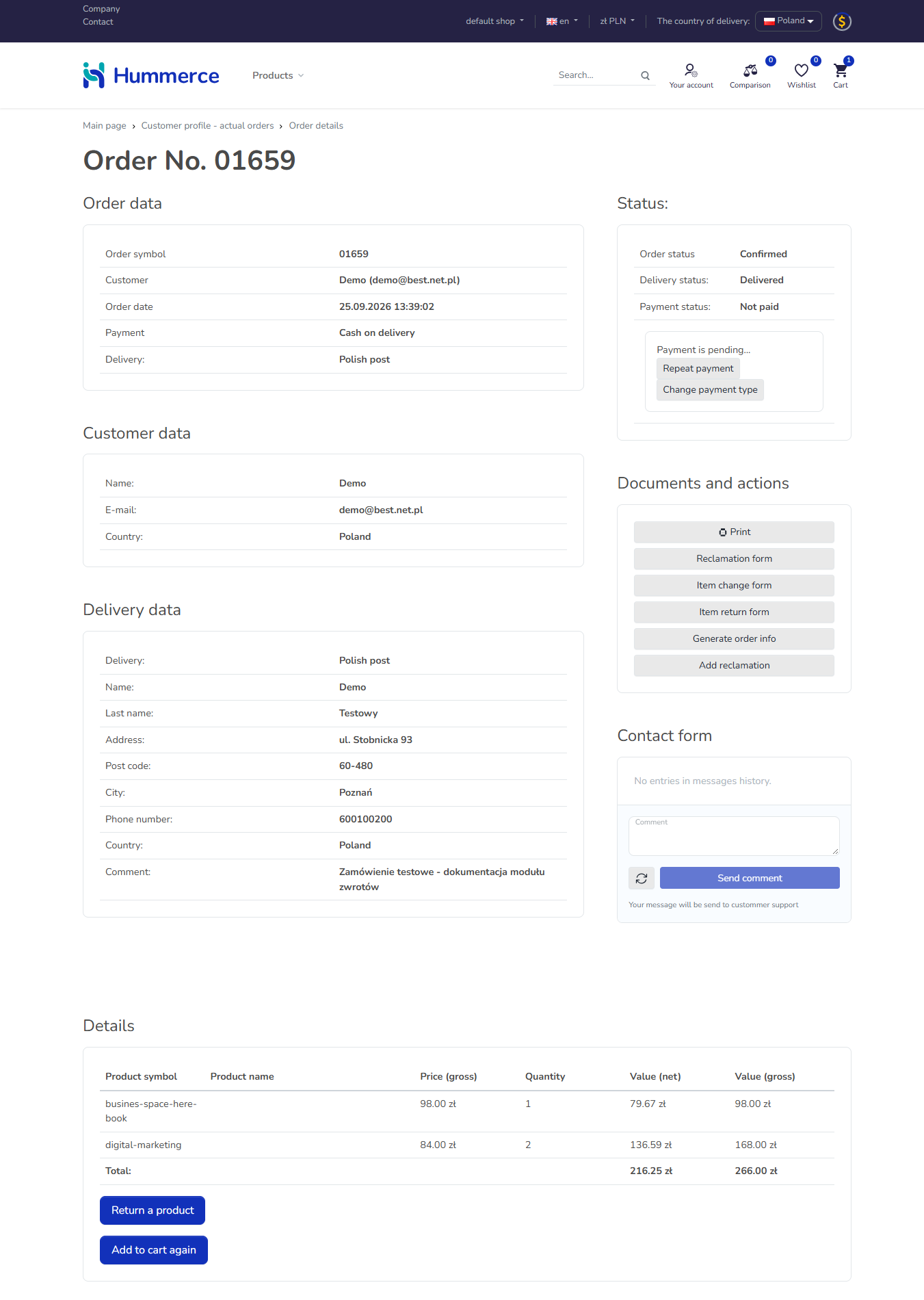
¶ The order in the customer account
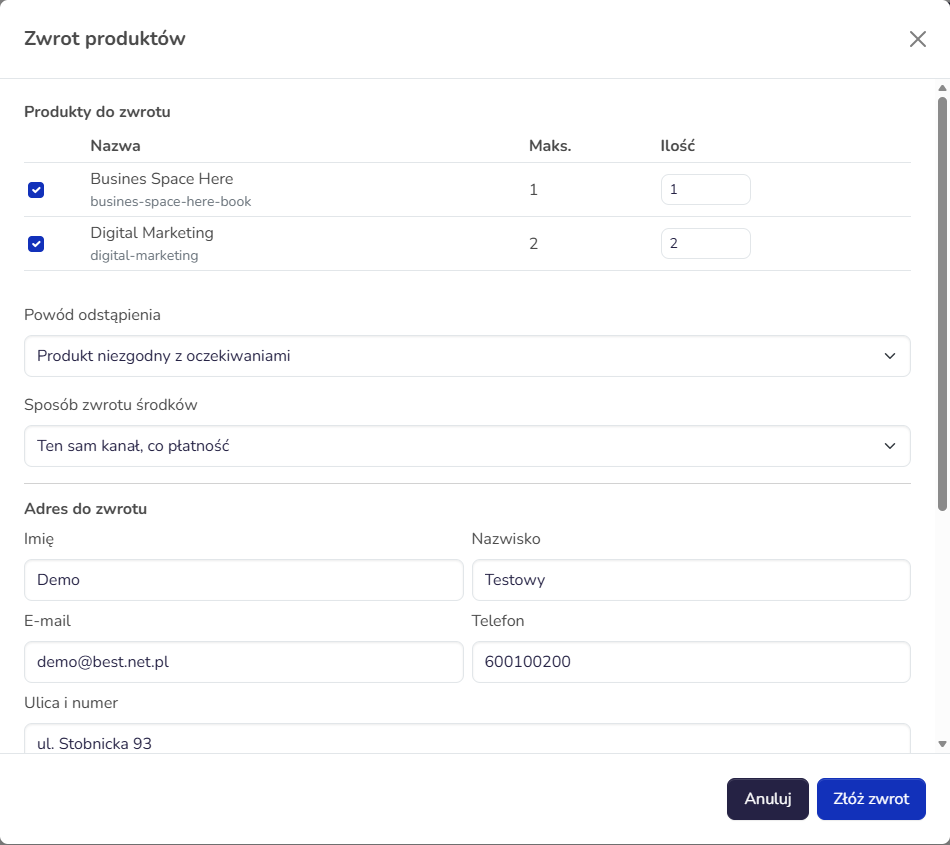
¶ The return form
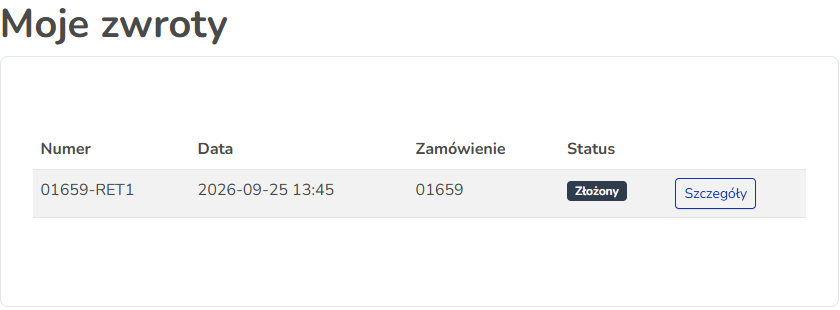
¶ Returns in the customer account
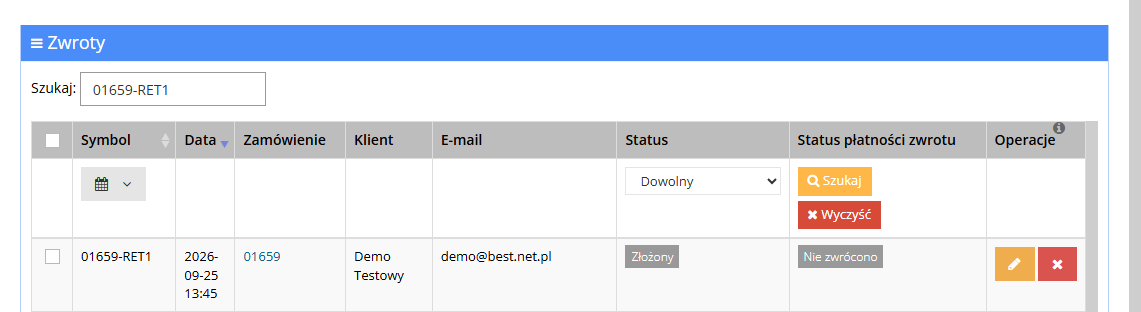
¶ The returns list in the panel
¶ How it works
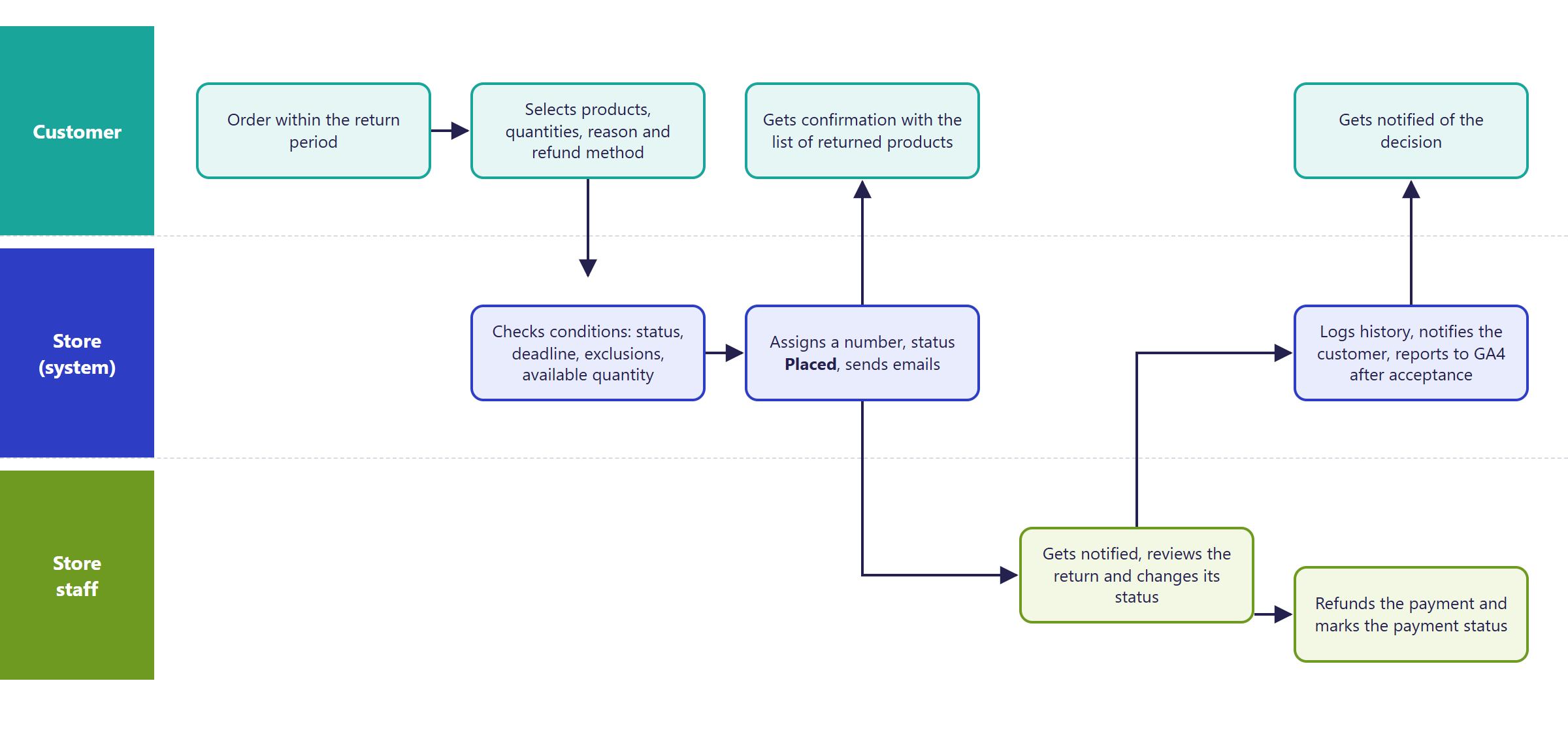
- A return always concerns a specific order. A logged-in customer files it from their account, a guest - through the order link in an email.
- A return can be filed when:
- the order has a status that qualifies for a return (by default: ready to send, sent, delivered),
- the withdrawal deadline hasn't passed - by default 14 days, counted from when the order was placed, and after the delivery is marked as delivered - from the delivery date,
- the product isn't flagged as Not returnable,
- there are still units left to return - the customer can return partially and in several submissions, but never more than they bought.
- The customer indicates how the money should be refunded: the same channel as the payment, a bank transfer to a given account, or as store credit. The form is pre-filled with data from the order.
- For a refund by bank transfer, the customer enters the account number with the country prefix (IBAN). On the store's request, the implementation can be set so that a domestic number without the prefix is enough, e.g. 26 digits for Poland - it is then checked for the store's default country.
¶ Order link reminder for guests
- A guest who no longer has the email with the order link can use a separate Remind me of my order link page to enter the order number and the email address used for the order. If the details match, the store sends an email with the link to that address.
- The message shown after the form is submitted is always the same, whether or not the details matched - it does not reveal whether a given order exists.
- The feature is a separate module, independent of returns, and is turned on during implementation - it does not work on its own after an update. The content and recipient of the email are set in the panel. reCAPTCHA on this page is off by default and is turned on during implementation.
- Version: from 2.35.26.
¶ The return process
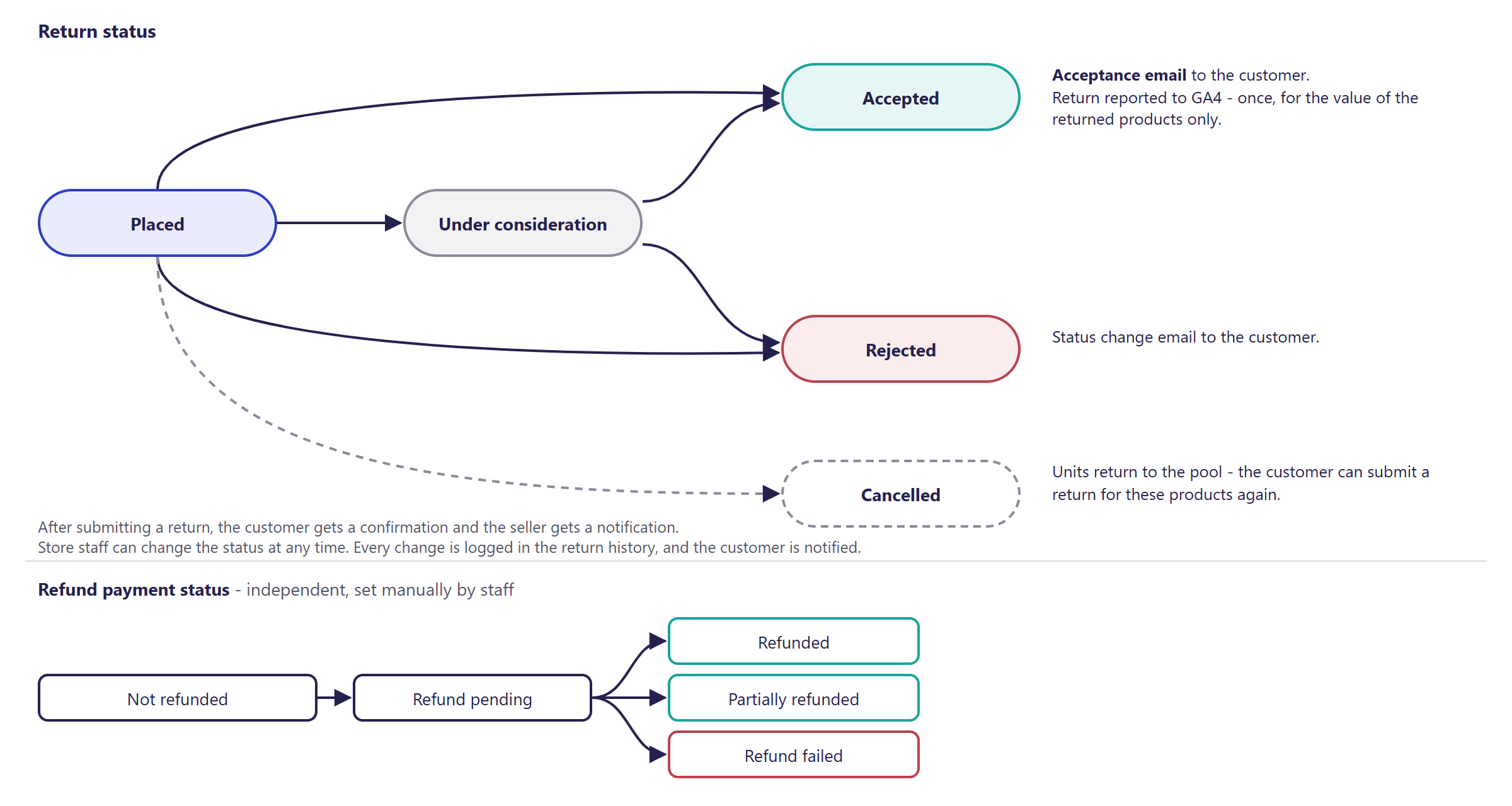
¶ Return and refund statuses
¶ Version
- From version 2.35 - the module doesn't exist in older versions.
- Last changes to the module: version 2.35.40.
- Order link reminder for guests: from version 2.35.26.
- Returns section in the order details in the panel: from version 2.35.19.
- Returns list filters in the panel (creation date range, status): from version 2.35.38.
- Entering a bank account number without the country prefix (implementation setting): from version 2.35.40.
¶ Dependencies
- The Bootstrap 5 or Bootstrap 4 store template.
- Delivery statuses: the return deadline is counted from when an order is marked as delivered. Without this, the deadline runs from the order date.
- Email notifications: active alerts and email templates for returns.
- reCAPTCHA on the return form - optional, requires a configured ReCaptcha module (Admin panel and store security).
- Reporting to GA4 - requires the Google Tag Manager module in its GA4 version (Google Analytics 4).
- Terms of service and the withdrawal notice - kept up to date by the store on its own.
¶ Implementation
- Requires implementation - the module doesn't turn itself on after an update. Scope:
- turning on the module and setting its parameters (deadline, statuses, seller's email address),
- adapting the form, customer account and order page to the store's look,
- adjusting the content and look of return emails, including adding the list of returned products,
- translating messages, if the store runs in languages other than Polish,
- flagging products that aren't eligible for return,
- if the store is to offer the order link reminder for guests - turning on that module, filling in the email content and adapting the page to the store's look,
- if customers are to enter an account number without the country prefix - changing the returns module setting,
- testing on a test environment and going live in production.
- Minimum estimated time:
- Bootstrap 5 template - from 8 h,
- Bootstrap 4 template - from 16 h.
- The time for a specific implementation depends on its scope - we quote it individually.
- What the time depends on:
- the store template - implementation is simplest in Bootstrap 5, Bootstrap 4 needs more adjustments,
- how much the order page and customer account are customized,
- the number of languages and email templates to adapt,
- the store version - a store on a version older than 2.35 needs an update first (quoted separately),
- extra requirements, e.g. passing returns to an ERP (quoted separately).
¶ Limitations
- Returns only through an order - there's no form without an order number.
- Only products from the first level of the cart are returned. Elements of sets and configurators come back together with the parent product.
- No automatic refund through payment gateways - staff issue the refund manually and mark the payment status.
- "Store credit" is only a choice offered to the customer - the module doesn't top up any balance.
- A return doesn't change stock levels and isn't automatically sent to an ERP.
- No automatic order status change once a return is accepted.
- No courier return labels and no integration with return-handling services.
- The API doesn't let you create returns - only read and change status.
- No return reports in the panel beyond the filtered list - the data is available through the API and MCP.
- Some module messages have no English version and must be translated in the message editor.
- Default email templates don't include the list of returned products - it has to be added to the template.
- The withdrawal statement in the form doesn't include a link to the terms of service or a withdrawal notice.
- Complaints work separately (Complaints - Reporting a Faulty Product) - a return is withdrawal from the contract, not a complaint.
- We do not verify the configuration for legal compliance - the deadline, product exclusions and terms of service are set by the store.
¶ Future development
- Courier return labels.
- Integration with external return-handling services.
- Passing returns to an ERP and correcting stock levels.
- Automatic payment refunds in gateways (e.g. PayU, Przelewy24 - Polish payment gateways).
- Support for store credit or vouchers.
- A link opening the return form directly from the shipping email.
- Reminders about pending returns.
- Return reports (reasons, products, values) in the panel or in Google Looker Studio.
¶ Frequently asked questions
Does the customer need an account to file a return?
No. A logged-in customer files the return from their account, and a guest - through the order link in an email. A guest who lost that email can ask for the link to be sent again by entering the order number and email address - provided the store turned this on during implementation.
Can only part of an order be returned?
Yes. The customer can return partially and in several submissions, but never more than they bought.
Does the store automatically refund the customer's money?
No. Store staff issue the refund manually and mark the payment status in the panel - the module has no automatic refund through payment gateways.
Can selected products be excluded from returns?
Yes, by flagging the item as "Not returnable" - e.g. for made-to-order products.
Are a return and a complaint the same thing?
No. A return is withdrawal from the contract without giving a reason (within the set deadline); complaints are handled by a separate module.
How long does implementing the returns module take?
From 8 h with the Bootstrap 5 template, from 16 h with Bootstrap 4 - the exact time depends on the implementation's scope.
¶ Related
- Complaints - Reporting a Faulty Product - a separate process for products that don't conform to the contract.
- Google Analytics 4, Admin panel and store security, AI assistant - MCP server.
- B2C sales in Hummerce: /en/sales/b2c.
- On hummerce.com: Returns and complaints (in Polish).
Want to see how returns could work in your store? Contact the Hummerce team (in Polish).
¶ Configuration details
¶ Access in the admin panel
- Returns list in the panel: CRM -> Returns - list with filters, details, status changes, an internal staff comment, order preview. The list can be narrowed by symbol, return creation date range (a picker with ready-made ranges: Today, Yesterday, Last 7 days, Last 30 days, This month, Previous month, plus a custom range) and return status; the Search and Reset buttons apply and clear the filters.
- Order details in the panel: a Returns section listing the returns for that order (symbol, date, status, refund payment status) with a link to edit the return - shown only when the order has returns.
- Configuration in the panel: Returns (withdrawal) group:
- Withdrawal window (days) - 14 by default,
0disables the limit, - Order statuses qualifying for a return,
- Statuses resetting the return window - delivery by default,
- Order property with the reference date - for orders placed before the module went live,
- Return statuses counted as already refunded - by default all except canceled,
- Notify seller of a new return, Notify customer of a new return, Notify customer of a return status change,
- Seller's email address,
- Always show the comment field - by default the comment only shows for the "Other" reason.
- Withdrawal window (days) - 14 by default,
- Item: the Not returnable parameter.
- Order: the Return window start date parameter (can be changed manually) and Return deadline date parameter (calculated automatically).
- Customer account: a "Returns" section - list and details of returns.
- Implementation setting (not in the panel, set in the returns module configuration):
requireIbanCountryPrefix-trueby default (the full IBAN with the country prefix is required). Set tofalse, the customer can enter a domestic number without the prefix (e.g. 26 digits for Poland); it is checksum-validated for the store's default country. Theerror.return.ibanInvalidmessage is unchanged. - Order link reminder: the
remindOrderDetailsLinkpage (titled Remind me of my order link) and theorderDetailsLinkAlertalert, whose content and recipient are set in the panel - the recipient is the email address from the order, and the body contains the order link. The module is independent of returns and is turned on in the store configuration during implementation.
¶ REST API and MCP
- REST API: filtered return list, return details, an order's returns, status change (REST API).
- MCP (AI assistant - MCP server):
ec2_returns_list,ec2_returns_get,ec2_returns_get_by_order,ec2_returns_update_status(status change only from an admin account).
¶ Store messages
Text is changed in the message editor, fields and parameters - in properties and locations. The values below combine the store's actual English messages, where one exists, with a natural translation for the remaining keys that only ship with a Polish default.
Return form:
| Key | Default value |
|---|---|
msg.return.button.returnProduct |
Return a product |
msg.return.modal.title |
Return products |
msg.return.modal.items |
Products to return |
msg.return.modal.address |
Return address |
msg.return.modal.submit |
Submit return |
msg.return.field.reason |
Reason for withdrawal |
msg.return.field.refundMethod |
Refund method |
msg.return.field.iban |
IBAN |
msg.return.field.agreement |
I confirm I want to withdraw from the contract for the selected products. |
Return reasons and refund methods:
| Key | Default value |
|---|---|
msg.return.reason.0 - 5 |
Product doesn't match expectations, Changed my mind, Ordered by mistake, Different from photo/description, Withdrawal without giving a reason, Other |
msg.return.refundMethod.sameAsPayment |
Same channel as payment |
msg.return.refundMethod.bankTransfer |
Bank transfer to provided account |
msg.return.refundMethod.storeCredit |
Store credit |
Return and refund statuses:
| Key | Default value |
|---|---|
msg.return.status.0 - 4 |
Placed, Under consideration, Accepted, Rejected, Canceled |
msg.return.refundPaymentStatus.0 - 4 |
Not refunded, Refund pending, Refunded, Refund failed, Partially refunded |
Customer account:
| Key | Default value |
|---|---|
msg.profileMenu.returns |
Returns |
msg.profileReturnsList.title |
My returns |
msg.returnsList.empty |
You have no returns yet. |
msg.returnConfirmation.heading |
Your return has been submitted |
Order link reminder (default values in Polish and English):
| Key | Default value |
|---|---|
msg.remindOrderDetailsLink.title |
Remind me of my order link |
msg.remindOrderDetailsLink.orderNumber |
Order number |
msg.remindOrderDetailsLink.email |
E-mail used for the order |
msg.remindOrderDetailsLink.submit |
Continue |
msg.remindOrderDetailsLink.confirmation |
Thank you for completing the form. If the provided data is correct, we will send you an e-mail. If you have any questions, please contact Customer Service |
Errors:
| Key | Default value |
|---|---|
error.return.notEligible |
This order is not eligible for return. |
error.return.quantityExceeded |
The requested quantity exceeds what can still be returned for item {0}. |
error.return.ibanInvalid |
The IBAN provided is not valid. |
error.return.agreementRequired |
You must accept the withdrawal agreement. |
¶ Property locations
| Symbol | Object | Purpose |
|---|---|---|
returnAdminList |
return | extra columns on the returns list in the panel |
returnAdminDetails |
return | extra fields in the return details in the panel (a staff comment, by default) |
returnFormShop |
order | return form settings in the store - adding _reCaptcha enables reCAPTCHA |
remindOrderDetailsLinkShop |
order | settings of the order link reminder page - adding _reCaptcha enables reCAPTCHA (off by default) |
¶ Parameters
| Symbol | Object | Label |
|---|---|---|
_notReturnable |
item | Not returnable |
_returnWindowStartDate |
order | Return window start date |
_returnDeadlineDate |
order | Return deadline date (calculated, not manually editable) |
_returnAdminComment |
return | Return handler's comment (internal only) |
¶ Email templates
| Alert | Recipient | When |
|---|---|---|
returnPlaced |
customer | a return is filed |
returnPlacedOwner |
seller (the store's order address or Seller's email address) | a return is filed |
returnStatusUpdated |
customer | a status change (other than acceptance) |
returnAccepted |
customer | the return is accepted |
orderDetailsLinkAlert |
customer (the email address from the order) | a guest entered an order number and a matching email address on the order link reminder page |
Variables in templates: $return - the return (number, customer data, reason, comment, refund method), $order - the order, $returnItems - the returned products (itemName, itemSymbol, quantity), $returnUrl - the customer's link to the order with returns, $returnAdminUrl - the link to the return in the panel, $newStatusLabel - the new status. Default templates don't include the list of returned products - it's added with a loop over $returnItems in the template content.