¶ Reorder - quick return to past purchases
Reordering in Hummerce lets a customer add a whole past, completed order back to their cart, or just selected items from it - in one click, without manually searching for products again. This is especially useful in B2B stores, where companies regularly order the same items.
Last updated: 2026-09-28.
¶ Benefits and use cases
- Fast reordering of the same items without searching the catalog again - useful for recurring business purchases.
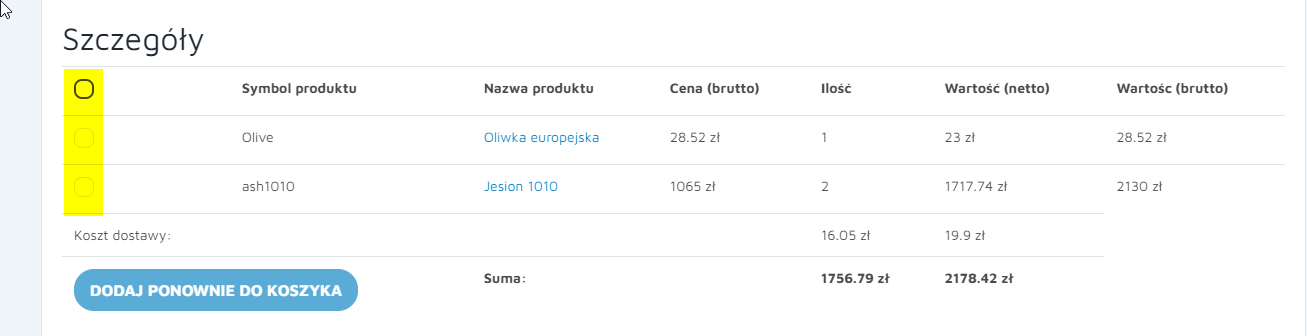
- Choice of the whole order or selected items - the customer picks individual items (large, clear toggles) or the whole cart, with a select all/deselect all option.
- Current price and availability - price and availability are checked again at the moment of adding, not copied from the old order.
- Restoring configured products - sets from the configurator return to the cart with their saved configuration, including elements added by the customer (see Saved Configurations - Save, Edit and Reorder).
- Works together with the existing cart - items can be added to the customer's cart or can overwrite it (see Carts - Cart Memory and Multiple Carts per Order).
¶ What it looks like
¶ Choosing items to reorder
¶ Summary after adding to the cart
¶ How it works
¶ Choosing items to reorder
- In the customer account, in the order preview, the customer selects items to add again (a toggle next to each item, with a select all/deselect all option), or adds the whole order.
- The Add to cart again button is disabled until the customer selects at least one item, with the hint "Select the products you want to add to your cart again."
¶ Recalculating prices and availability
- Lines are recalculated on the spot - the price, the customer's price list, promotions or the store view may have changed since the original order.
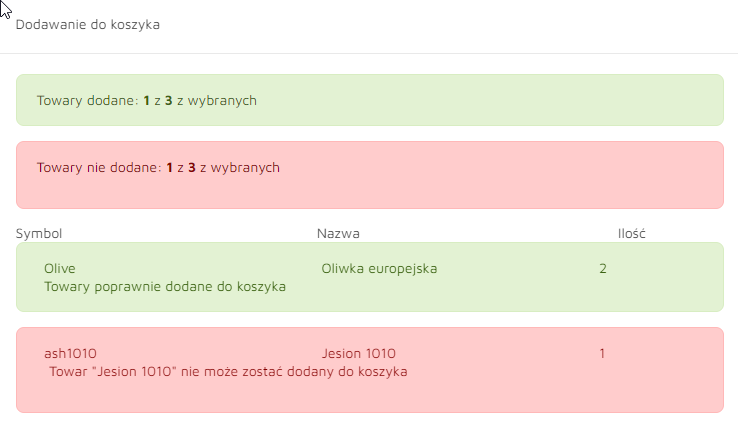
- Each item's availability is checked. An unavailable item (out of stock, not in the current view or price list) is not added, and the customer sees the message "Product [name] cannot be added to the cart."
- An item is added in the same quantity and configuration as in the original order, with the same availability constraints as a regular purchase.
- After adding, the customer sees a summary: how many items were added, how many were not, or that all items were added successfully.
¶ Configurable sets
- The set's configuration is restored from the data saved with the order, including elements added by the customer (e.g. their own photo for a personalized product). Such a set can then be edited in the cart.
- When elements added by the customer can no longer be used (e.g. a file was deleted), the store offers to reconfigure the set instead of adding it unchanged.
¶ Working with the cart
- Reordered items go into the customer's existing cart, or overwrite it - depending on a panel setting.
- The same item already in the cart and in the reordered order adds up the quantity instead of creating a separate line.
¶ Dependencies
- Configurable sets require a saved configuration (JSON) on the order to be restored correctly - see Saved Configurations - Save, Edit and Reorder.
- Overwriting or adding to the existing cart - a setting that works together with Carts.
¶ Limitations
- Adding configurable sets only works in stores that keep the customer's configuration data (JSON) with the order.
- An item no longer in the store can't be added to the cart through reordering.
- We do not verify the configuration for legal compliance - the terms of sale and informing the customer of a price change are set by the store.
¶ Frequently asked questions
Does a reordered purchase have the same price as before?
Not always. Prices and availability are recalculated at the moment of adding to the cart - the price, the customer's price list, promotions or the store view may have changed.
Can only selected items from an order be reordered, not the whole order?
Yes. The customer selects specific items (or all of them) and adds only those to the cart.
What happens if one of the items is no longer in the store?
An unavailable item is not added to the cart - the customer gets a message that it can't be added, while the remaining items are added normally.
Does the feature also restore configured products from the configurator?
Yes, if the store keeps the customer's configuration data with the order - the configuration is restored from the order, and the customer can correct it in the cart if needed.
¶ Related
- Saved Configurations - Save, Edit and Reorder - "Reorder" restores a product's saved configuration.
- Carts - Cart Memory and Multiple Carts per Order - working together with the customer's existing cart.
- Order Management in the Hummerce Panel - where the reordered order comes from.
- On hummerce.com: Reordering (in Polish), B2B Platform (in Polish).
Want to see how reordering could work in your store? Contact the Hummerce team (in Polish).
¶ Configuration details
¶ Access in the admin panel
- Customer account: order preview - selecting items and the Add to cart again button, a window summarizing added/not-added items.
- Admin panel: a setting deciding whether reordered items overwrite the customer's cart or are added to it.