¶ Carts - cart memory and multiple carts per order
Carts in Hummerce remember the customer's cart contents, let it be restored on another device or shared through a link, and, in stores with several views, decide whether the cart is shared or separate per view. Store staff see customers' saved carts in the panel. The store engine also supports several carts in one order - each with its own address and delivery method - but this mechanism requires a custom cart view implementation and isn't a ready-made feature in the base templates.
As of Hummerce 2.35 (latest module changes: 2.35.30), updated 2026-09-28.
¶ Benefits and use cases
- Fewer abandoned carts - the customer resumes shopping on their phone, a work computer, or after a few weeks.
- Assisted selling - a salesperson or consultant builds a cart and sends the customer a link, and the customer only pays.
- Helping the customer - staff can see what's in a saved cart before calling or replying to the customer.
- Multi-view stores - a shared cart across language versions, or a separate cart for a B2B wholesale view, without mixing prices (see Views).
- After implementing multiple carts: a B2B customer with branches can place one order with deliveries to several branches or sites, each with its own delivery cost; items from different warehouses or suppliers (item groups) are automatically split into separate carts and shipments.
¶ What it looks like
Screenshots from the Hummerce demo store (BS5 template).
¶ Prompt to merge carts after login

¶ Customer's saved carts in the panel
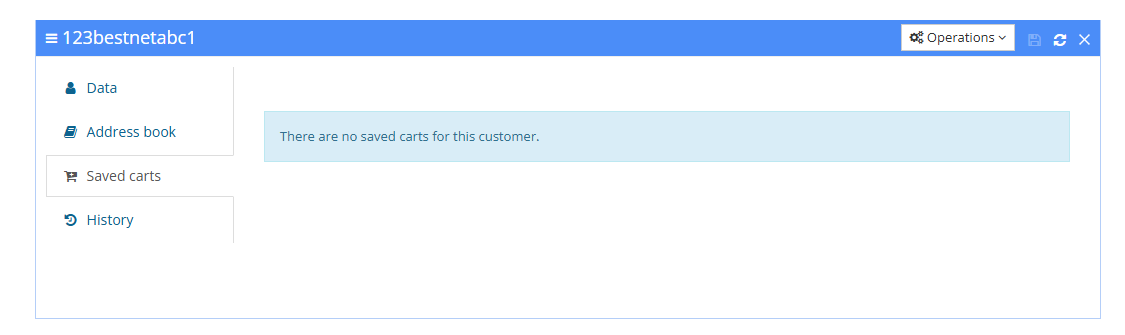
¶ Preview of a saved cart

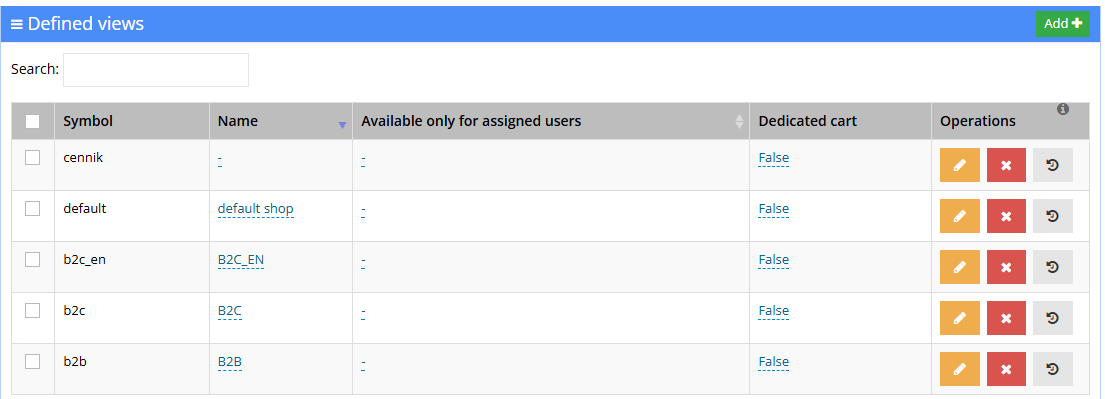
¶ Individual cart per view
¶ How it works
¶ Remembering and restoring the cart
- The store saves the cart in the background after every change. The customer doesn't wait for the save.
- The cart is linked to the customer's account (restored on login on any device) or to the browser via a cookie (also for a customer without an account, in the same browser).
- When restored, prices are recalculated using current prices and promotions.
- After login, if the customer has items both in the current cart and in a previously saved cart, the store asks whether to add the saved items to the current cart (the Restore cart only on confirmation setting). Without this option, the carts merge automatically.
- After login, the customer's most recently saved cart is restored; older ones are deleted.
- A saved cart is deleted after the order is placed, after all items are removed, and after the Cart storage time elapses (default 186 days).
¶ Cart link
- Store staff copy the link to a saved cart in the panel and send it to the customer.
- The link adds the items from the saved cart to the cart of whoever opens it. With Additional confirmation enabled, the store first asks whether to import the items.
- A separate edit link lets store staff change the saved cart itself in the store, without creating a new one.
- A cart link can also be created by the AI assistant (MCP) from a list of items.
¶ Shared and individual cart per view
- Every store view has a cart: shared - the same cart across all views that have it (moving to another view recalculates the cart and shows only items available in that view), or individual (the Individual cart setting) - a separate cart just for that view, which doesn't carry over to other views and doesn't clear the shared cart.
- Items not available in the current view disappear from the shared cart and don't come back when returning to the previous view.
- Cart memory works separately for each view.
¶ Multiple carts in one order
Available in the store engine, but without a view in the base templates (BS5 and BS4) - a customer can only use it once a custom cart view has been implemented.
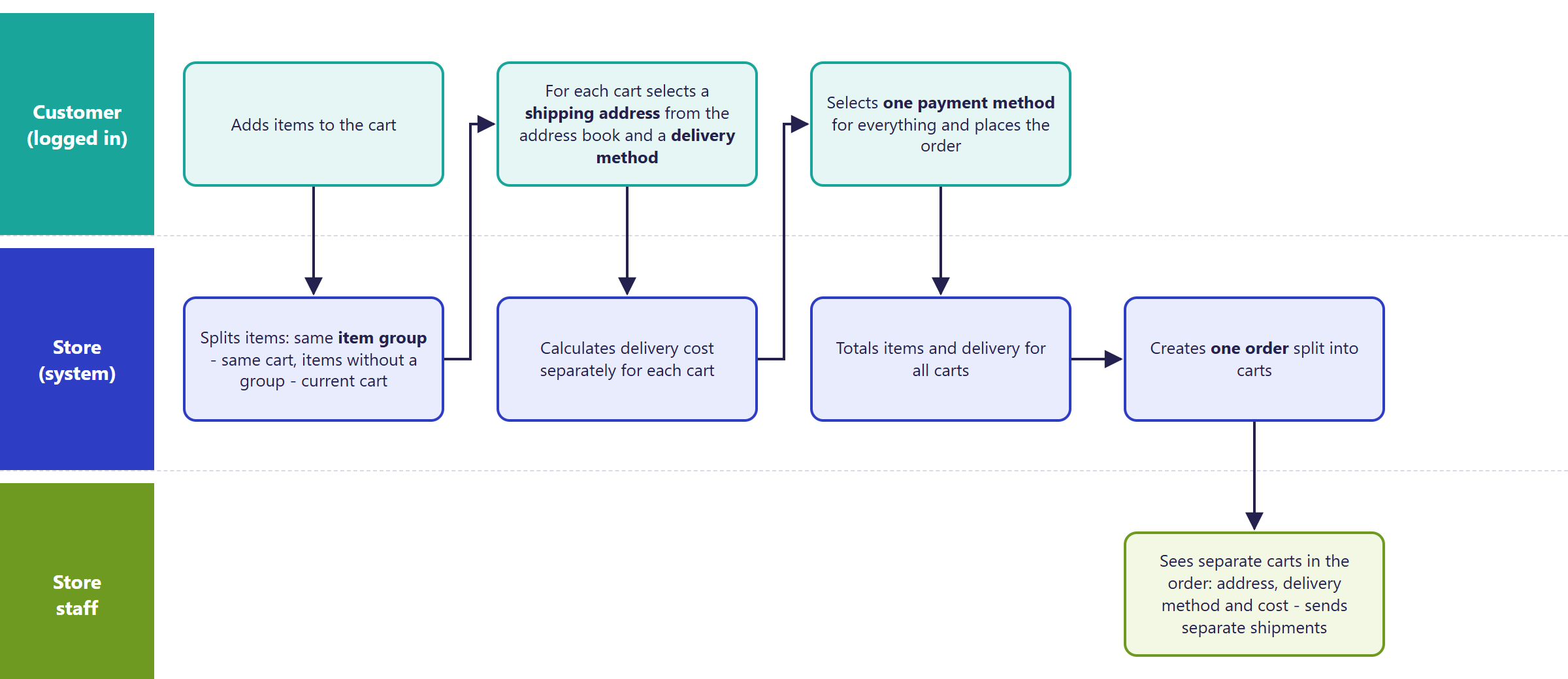
- A logged-in customer has several carts in one order. Each cart has its own delivery address from the new address book, its own delivery method and its own delivery cost.
- An item goes into a cart based on its item group: items in the same group always go into one, automatically created cart. Items without a group go into the current cart.
- There's a single payment for the whole order. The order value is the sum of items and deliveries across all carts.
- One order is created. In the order details in the panel, each cart has its own tab: items, delivery, delivery address, delivery cost and summary.
- Cart promotions check conditions and calculate the discount for the whole order, not for a single cart (exception: the free delivery threshold) - see Cart promotions.
- With multiple carts enabled, cart memory and restoration don't work.
- An address from the address book can only be assigned to a cart after logging in.
¶ Multiple carts vs. order splitting
| Multiple carts | Order splitting | |
|---|---|---|
| Who splits | the customer, in the cart, before placing the order | store staff, in the panel, after the order is placed |
| Result | one order with several carts | a new, separate order from selected items, linked to the original |
| Address and delivery | separate for each cart | the new order inherits the original's data |
| When | an order to several addresses | e.g. part of the goods unavailable, shipment in two batches |
| Ready in the base templates | no - requires a custom cart view | yes - in the panel |
- Order splitting is described on the Order splitting page.
¶ Version
- Cart memory and restoration - an old feature, extended in later versions; saved cart preview in the panel, shared and individual carts per view, confirmation before merging carts after login.
- Multiple carts in one order - a store-engine mechanism since version 2.34, without a view in the base templates.
- Latest module changes: version 2.35.30.
¶ Dependencies
- Cart memory - a module in the store's standard configuration.
- Shared and individual cart - a store with several views.
- Multiple carts requires: a custom cart view with address and delivery selection for each cart (see Implementation), the new address book, logged-in customers with saved addresses, and item groups if items should go into carts automatically.
- Order splitting - a separate module, independent of multiple carts.
¶ Implementation
- Cart memory, panel preview, cart link, carts per view - work right after an update. Settings are changed in the panel.
- Multiple carts requires implementing a custom cart view - the base templates (BS5 and BS4) have no multi-cart view, and the module isn't enabled in the standard configuration. Scope:
- enabling the module and the new address book (see Address book),
- building the cart view: list of carts, address and delivery method selection for each cart, summary; adjusting the checkout form and confirmation page,
- translating the new view's messages,
- assigning item groups,
- checking delivery methods, cart promotions, the order confirmation email and ERP integrations,
- testing in a test environment and going live.
- Minimum estimated time:
- cart memory, cart link, carts per view - 0 h (panel settings),
- multiple carts with a custom cart view - from 40 h, regardless of the template, excluding the new address book (quoted separately, see Address book).
- The time for a specific implementation depends on its scope - we quote it individually.
- What the time depends on: how much the cart and checkout form are customized, the delivery methods used in the store (parcel lockers, delivery groups) and cart promotions, ERP and courier integrations that must handle several addresses in one order (quoted separately), the number of languages, the store version (older than 2.34 needs an update first - quoted separately).
¶ Limitations
- Multiple carts has no view in the base templates (BS5 and BS4) - without a custom cart view implementation, a customer can't split an order into carts.
- With multiple carts enabled, cart memory, restoration and the cart link don't work.
- Multiple carts only works for logged-in customers with saved addresses - a guest can't assign an address to a cart.
- Cart promotions are calculated for the whole order: if one cart meets a promotion's condition, the discount can apply to the whole order.
- A single payment for the whole order - there's no way to pay separately for each cart.
- Addresses and deliveries of individual carts aren't available through the REST API or in ERP integrations - they require adapting the integration.
- Multiple carts working together with parcel lockers, delivery groups and shipment tracking needs to be checked and adapted during implementation.
- After login, only the most recently saved cart is restored - there's no way to pick one of several.
- There's only one shared cart per store - you can't build several view groups, each with its own shared cart.
- Items removed from the shared cart when moving to a view without them don't come back when returning.
- We do not verify the configuration for legal compliance - cart storage time and cookie information are set by the store (GDPR, privacy policy).
¶ Future development
- A multiple-carts view in the BS5 base template, with cart names and manual cart creation by the customer.
- Cart promotions calculated for a single cart.
- Restoring and sharing carts by link with multiple carts enabled.
- Cart addresses and deliveries in the REST API, ERP integrations and with couriers, with a separate shipment number for each cart.
- Choosing which of several saved carts to restore after login.
¶ Frequently asked questions
Does Hummerce remember a customer's cart on another device?
Yes. A cart linked to a customer account is restored on login on any device, with current prices and promotions.
Can one order have several carts with different delivery addresses?
Yes, the mechanism is available in the store engine since version 2.34, but it requires implementing a custom cart view - the BS5 and BS4 base templates don't have one.
Is multiple carts a ready-made store feature right after an update?
No. The module isn't enabled in the standard configuration, and the cart view has to be built individually - it's a separate implementation, not a panel setting.
How long does implementing multiple carts in an order take?
From 40 h, regardless of the template, excluding the new address book (quoted separately) - the exact time depends on the scope of integration and customization.
Can a store with several views have a separate cart for each view?
Yes, with the Individual cart setting on a view. Without this setting, views share a common cart.
Does cart memory still work with multiple carts enabled?
No. Cart memory, restoration and the cart link don't work when the store has multiple carts in one order enabled.
¶ Related
- Address book - the addresses carts use, including with multiple carts in one order.
- Order splitting - splitting an already placed order by store staff.
- Views - several stores in one panel - shared and individual carts per view.
- B2B and B2C sales in one store - where carts fit into serving business and individual customers.
- On hummerce.com: Cart memory (in Polish).
Want to check whether multiple carts in an order make sense for your store? Contact the Hummerce team (in Polish).
¶ Configuration details
¶ Access in the admin panel
- Saved carts: Marketing -> Customer saved carts - list of carts (Symbol, Customer or Not logged in, Creation date) with preview, a sharing link (Share cart link), editing in the store and deletion.
- Customer: CRM -> Customers, customer card - Saved carts tab.
- Customer sessions: preview of customers' current sessions in the store.
- Views: Configuration -> Views - the Individual cart column and field.
- Panel configuration: Configuration -> Settings, Cart memory group:
- Save carts - yes by default,
- Cart storage time - in seconds, default 186 days,
- Cookie lifetime - in seconds, default about 672 days,
- Clear existing cart - whether the restored cart replaces the current one; default no (items are added),
- Additional confirmation - a prompt before importing items from a link; default yes,
- Restore cart only on confirmation - a prompt after login; yes in the standard configuration.
- Order: order details - separate cart tabs with address and delivery (with multiple carts); Split order.
¶ REST API and MCP
- REST API: no operations on saved carts or on order carts (address and delivery per cart) - see REST API.
- MCP:
ec2_cart_save_and_link(saves a cart from a list of items and returns a link - permission to customers' saved carts, admin only),ec2_cart_price_preview(cart price preview),ec2_abandoned_carts(saved carts of customers who haven't ordered recently). See AI assistant - MCP server.
¶ Store messages
Messages are changed in the message editor. Default values are in Polish and English; the cart-restore prompts also have a German version.
| Key | Default value |
|---|---|
msg.cartRestoreAfterLogin.confirm |
You have items in a cart from a previous session. Do you want to add them to your current cart? |
msg.cartRestore.confirm |
Import items into the current cart? |
msg.cartRestore.succedd |
Your basket was restored successfully |
msg.cartRestore.someSuccedd |
Your basket was restored with some exceptions |
error.cartRestore.cartCannotBeRestored |
Your basket cannot be restored |
error.cartRestore.cartDoesNotExist |
Cart with this symbol does not exist |