¶ Product configurators - overview
Product configurators in Hummerce let you sell products that can't be described with plain variants: sets made up of several products, made-to-order products, prints, engravings and designs with the customer's own photo. The store calculates the price, checks the configuration is valid, and handles the rest of the order - the sales team doesn't have to do it by hand. It's a single platform mechanism for both retail (B2C) and business (B2B) sales, working together with individual prices, quotes and offers.
This page is an overview of the whole area. Each part has its own page:
- Configurable product - types and structure - what a configurable product is made of and how to build one in the panel, including dependencies between its elements.
- Configurator on the product page - ready-made configurators in the store template, technologies, external configurators, sharing.
- External configurator integration - importing the supplier's catalog, the supplier's configurator in the store and taking the finished configuration into the cart, quote and ERP.
- Saved configurations - saving, editing, ready-made configurations (presets), restoring.
- Configuration in the cart and order - cart, order, warehouse, ERP, print files, returns.
- Configuration pricing - how the price is calculated, price lists, promotions, quotes and offers.
- Configurations and purchases - how a configuration translates into a component purchase list.
As of Hummerce 2.35 (latest module changes: 2.35.55), updated 2026-09-28.
¶ Benefits and use cases
- Less work for the sales team: typical "how much would it cost in this size" questions are answered by the customer themselves, freeing up salespeople for non-standard cases.
- Fewer order mistakes: the store won't accept a configuration that breaks the rules (a required element missing, an item outside the allowed list, an unavailable component).
- The price always matches the price list - including a B2B customer's individual prices and promotions.
- Can be extended with a 3D preview and a preview in the customer's own space (augmented reality) as an implementation for a specific product - see Configurator on the product page.
- Complete information for production: the chosen components, entered values, uploaded files, and for personalization - a print-ready file.
- One platform instead of a separate configuration tool and a separate store - cart, payments, warehouse, ERP and offers work for configurations just like for regular products.
- A mechanism developed since the platform's early days and proven across many industries - from sweets and prints to window sills, lighting systems and curtain sewing.
- Example uses:
- sets made of several products - sports gear, home theater sets with accessories, suits, gift sets,
- made-to-order products - window sills, moldings cut to length, curtains, furniture, blinds, fencing,
- personalization - prints on mugs, pillows, bottles, stickers, engravings, chocolates and boxes with the customer's own photo or text,
- technical B2B configurations - lighting systems, fittings and mounting accessories, where choosing one element determines the rest.
¶ How it works
- A configurable product is a regular store item with the configurable set feature turned on and a list of components - elements the customer chooses or fills in.
- A component is one of two kinds:
- items - the customer picks one item from a list (e.g. a case, a board, a fabric, a handle),
- properties - the customer fills in fields (text, photo, file, dimension, number).
- All kinds of configurators are built from these two building blocks - details on the Configurable product - types and structure page.
- The configurator's appearance on the product page is chosen by the item's template. One template can serve many products with a similar structure.
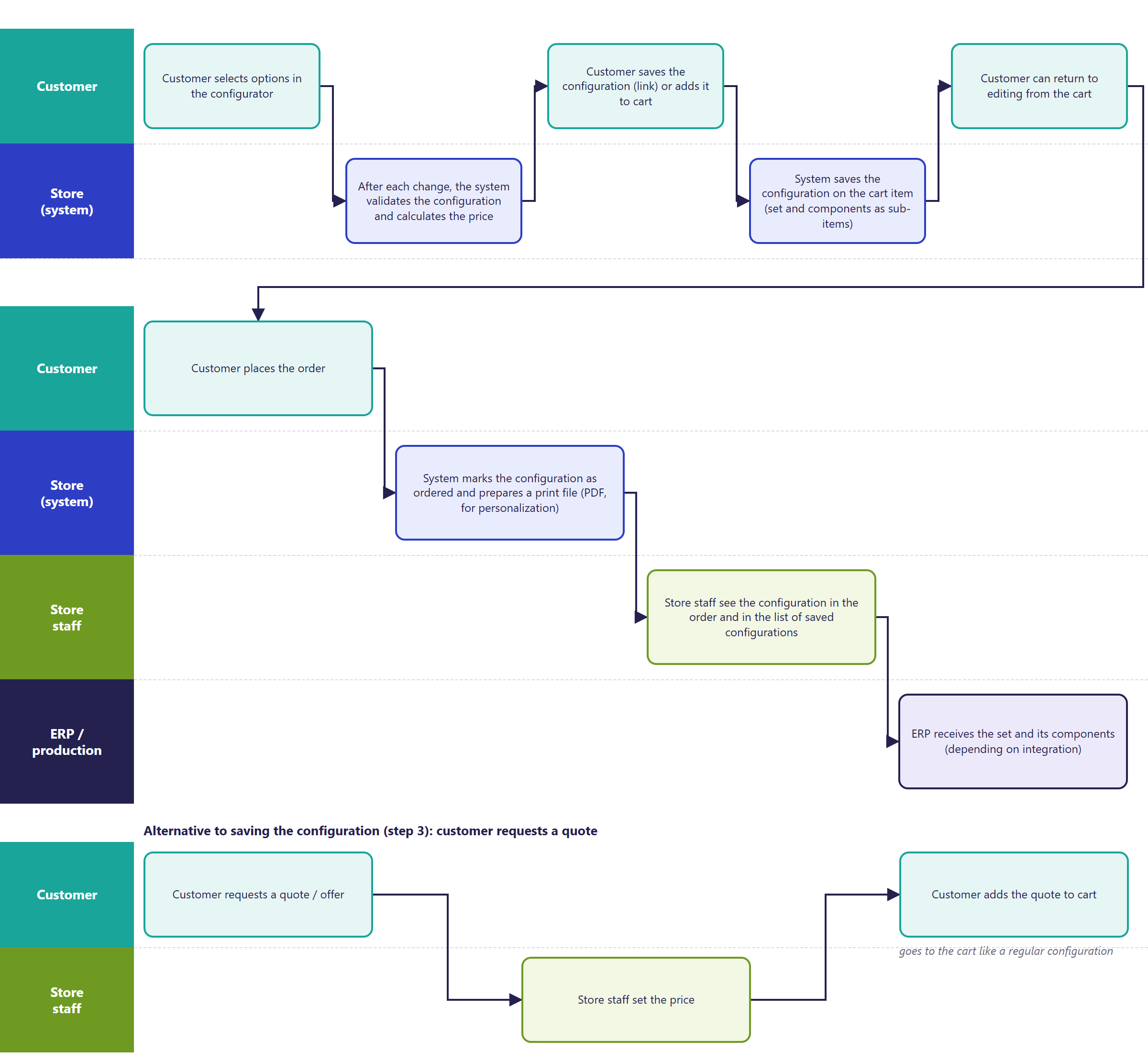
- After every change in the configurator, the store validates the configuration and calculates the price server-side - the customer sees the current price, and an invalid configuration, or one with a price altered in the browser, never reaches the cart.
- The configuration is saved in full (every choice and entered value) with the cart line and order line. Store staff see it in the panel, and integrations can pass it on to ERP and production.
¶ Configuration cycle
¶ Dependencies
- The Bootstrap 5 store template (new configurators) or Bootstrap 4 (previous-generation configurators) - compared on the Configurator on the product page page.
- Items meant to be components must exist in the store (with prices and stock, if the store manages them).
- Item templates - when the store has many products with the same structure.
- AI text and image generation - requires an n8n automation server with prepared processes.
- Passing the configuration to ERP - depends on the integration, details on the Configuration in the cart and order page.
¶ Implementation
- Requires implementation - the configurable set module is turned on in the store configuration, and every configurator needs the product, components and appearance prepared. Typical scope:
- product analysis - components, rules, how the price is calculated,
- turning on the module and component types,
- preparing the product or template and components in the panel,
- fitting the configurator to the store's look and message content,
- custom price rules, if the price depends on dimensions or calculations (e.g. running meters, area),
- testing on a test environment and going live.
- Minimum estimated time:
- a set configurator on a ready-made BS5 configurator (a few components, no custom graphics) - from 8 h,
- a personalization configurator on a ready-made BS5 visual configurator (text, photo, preview, print file) - from 16 h,
- a configurator with custom logic (dependencies between options, price from dimensions) - from 40 h,
- a configurator in the BS4 template - from 16 h,
- embedding an external configurator on the store page without passing to the cart - from 8 h, with passing chosen products to the cart - from 60 h.
- The time for a specific implementation depends on its scope - we quote it individually. Complex B2B configurators with visualization are projects of several hundred hours.
- What the time depends on:
- the number of components and the rules between them,
- how the price is calculated - from a component price list or from calculations (dimensions, material usage),
- visualization - none, 2D preview, 3D, augmented-reality preview (delivered as an implementation),
- the store template and the degree of visual customization,
- the number of languages and currencies,
- passing the configuration to ERP, production or an external system (quoted separately),
- the store's version - new configurators require version 2.34 or newer (an update is quoted separately).
¶ Limitations
- Every configurator requires implementation - there's no wizard that builds a configurator on its own from a product description.
- In an "items" component, the customer picks one item. Choosing several units of different items requires several components.
- A price from calculations (dimensions, area, character count) requires a custom price rule in the implementation - by default the price is the sum of the product price and component prices.
- BS5 and BS4 configurators differ in capabilities - e.g. 3D preview and a two-sided configurator only exist in previous-generation configurators.
- Configurations aren't tied to the customer's account - the customer has no "my configurations" list in their account (access is through a link, the cart and orders).
- We do not verify the configuration for legal compliance - including rights to graphics and photos uploaded by customers, personalization content and the store's terms of service.
¶ Future development
- Configurable products in the new offers module - configuring an offer line by a salesperson and previewing the configuration in the offer.
- A "my configurations" list in the customer's account.
- A ready-made mode for embedding the configurator on partner and distributor pages, passing back to their cart.
- A 3D configurator in the BS5 template.
- AI-suggested next choices based on earlier configurations.
- Purchases through an AI assistant on the store customer's side (customer-facing MCP), including for configurable products.
¶ Frequently asked questions
Do Hummerce configurators support B2B and B2C sales in one store?
Yes. The same configuration mechanism works with a B2B customer's individual prices, quotes and offers, as well as with standard retail sales.
Can a configured product be passed to ERP and production?
Yes. The configuration is saved in full with the cart line and order line, and the ERP integration passes it on further - depending on the scope of the integration.
Are 3D and augmented-reality previews a ready-made feature?
Not out of the box. 3D preview is available in previous-generation (BS4) configurators, and a preview in the customer's own space (augmented reality) has been validated in a prototype and is delivered as an implementation for a specific product.
Can the store build a configurator on its own, without implementation?
No. Every configurator requires the product, components and appearance to be prepared as an implementation - there's no wizard that builds a configurator automatically from a product description.
How long does setting up a simple set configurator take?
A set configurator on a ready-made BS5 configurator, with a few components and no custom graphics - from 8 h. A configurator with custom logic (dependencies between options, price from dimensions) - from 40 h.
¶ Related
- B2B and B2C sales in one store - how configurators connect with company accounts, individual prices and offers.
- Configurator projects on hummerce.com: Window sill producer (in Polish), Chocolissimo (in Polish), Choc Play (in Polish).
- On hummerce.com: Configurators (in Polish).
Want to see how a configurator could work in your store? Book a free demo (in Polish).
¶ Configuration details
¶ Access in the admin panel
- Configurable product: the item page, Configurable set tab.
- Component types: Configuration -> Slot types.
- Customers' saved configurations: Assortment -> Prepared combinations.
- Module configuration: the Sets group.
¶ REST API and MCP
- REST API: reading, adding, changing and deleting product components (REST API).
- MCP: building configurable products and components through the AI assistant - the
ec2_combinations_*tools (AI assistant - MCP server). Details on the Configurable product - types and structure page.