¶ Configuration pricing - price lists, promotions, B2B quotes
The price of a configuration in Hummerce is always calculated by the store server - from the product price and the prices of the selected components, according to the customer's price list and promotions. The same price applies to the customer in the configurator, in the cart and in the order, and individual B2B prices, price lists and promotions work for configurations exactly as they do for regular products. Configurations that can't be priced automatically go through a quote or an offer from a salesperson, without leaving the store.
As of Hummerce 2.35 (latest module changes: 2.35.65), updated 2026-10-07.
¶ Benefits and use cases
- One price list for all channels - changing the price of a fabric, a handle or packaging instantly changes the price of every configuration that uses it.
- B2B prices without separate configurators - a business customer sees their own prices in the same configurator.
- Flexible pricing model: fixed product price, price built from components, or product price plus added components.
- Set discount - a percentage discount on a component, or a promotion on set components.
- Non-standard configurations aren't lost - they go to a quote or an inquiry, and once priced they return to the cart.
¶ What it looks like
¶ How the price is calculated
¶ How it works
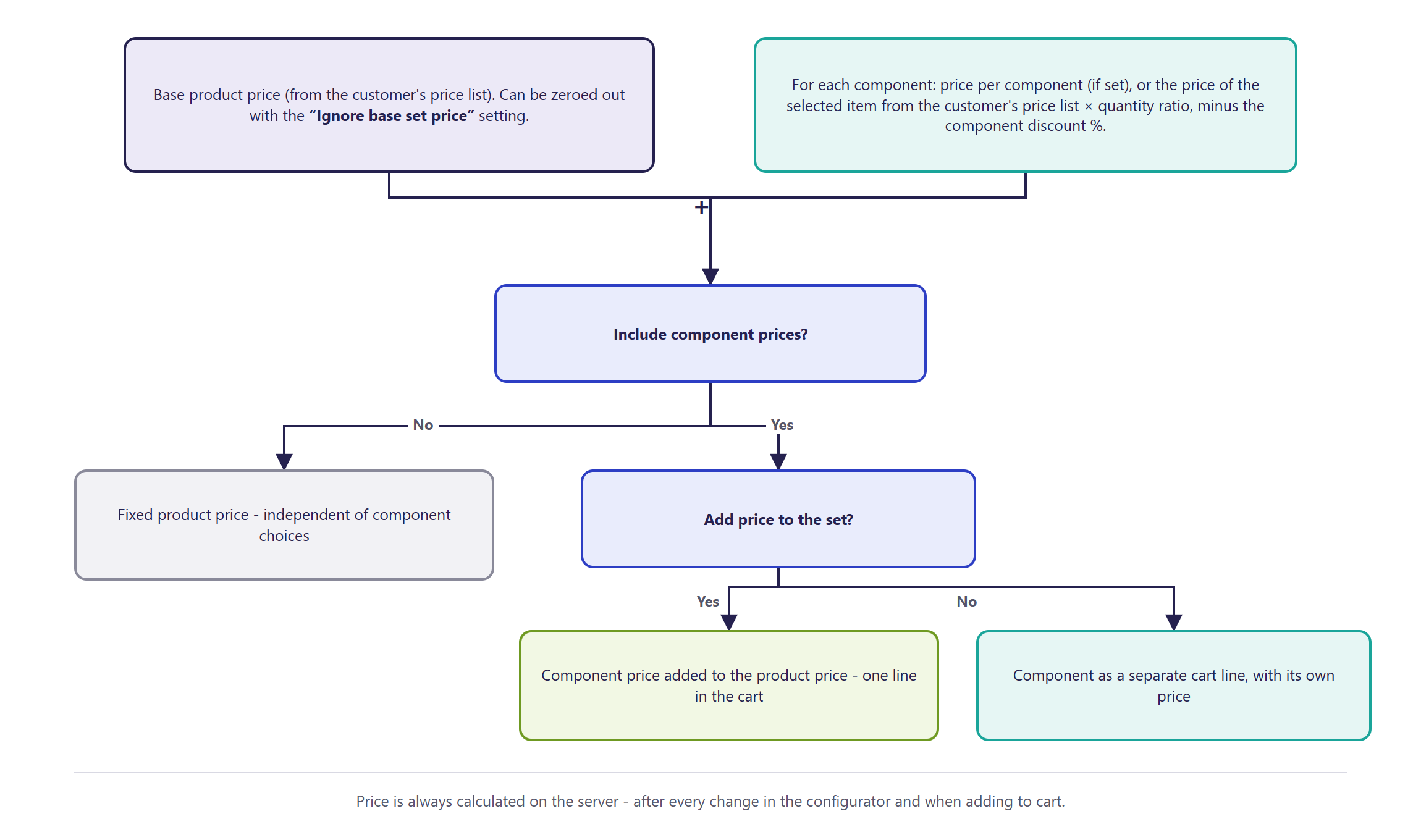
¶ How the price is calculated
- The price is calculated on the server after every change in the configurator, on save, on adding to cart, and when editing from the cart. The price shown in the customer's browser doesn't matter.
- Base price - the price of the configurable product for the given customer and quantity (from the price list, price rules and promotions). The Ignore base set price parameter zeroes it - the price is then just the sum of the components.
- Component price:
- Price per component, if set - a fixed component price,
- otherwise the price of the selected item for the customer, for the component's quantity (product quantity times the quantity ratio),
- reduced by the component's percentage discount, if set,
- a component that is itself a configurable product has its price calculated the same way.
- The product setting Include component prices:
- No - the product price is fixed (from the product); components don't change the price,
- Yes with the component's Add price to the set on - the component price adds to the product price; the component has a price of 0 in the cart,
- Yes without Add price to the set - the component has its own price in the cart and is counted separately in the cart total.
- Currency - prices are converted to the customer's currency.
- The VAT rate is set per component with its own price in the cart. A component's price added to the product price becomes part of the product's price.
¶ Price lists, customer prices, promotions
- The product and its components take prices from the standard pricing policy: price lists, customer and group discounts, property-based prices, quantity-based prices - for the quantity at the time of pricing.
- Cart promotions have an item scope: all, single items and combinations, or combination components - e.g. a discount only on the extras in a set.
- A preset combination has a price calculated for the preset product - it can have its own price and promotions (Saved configurations).
¶ Calculated prices
- The standard price is the sum of the product price and the component prices. Prices dependent on calculations - dimensions, area, running metres, number of characters, material use - require a custom price rule built during implementation.
- Price rules are chosen per product template - different product families in the same store can use different pricing methods.
- The set price update task (calculating set prices in the background for selected templates) also requires a rule prepared during implementation.
¶ Quotes
- The customer adds the configuration to a quote instead of the cart - e.g. for a non-standard configuration, a large quantity, or when the price needs a salesperson's decision.
- The customer can change the configuration in the quote as long as the quote is new or requires explanations, and the item doesn't have a price yet.
- Store staff set the item's price and can change the configuration.
- The customer adds the quote to the cart - the configuration goes to the cart with the quote's price, within the quote's validity period and at the right status.
¶ Offers
- An offer created from a cart keeps the item configurations.
- Adding the offer to the cart restores the configurations - checked and priced at the time they're added.
- Items added to an offer manually don't have a configuration - a configurable product is added to an offer through the cart.
¶ Ask for an offer
- A configurable product can have an Ask for an offer button instead of (or next to) adding to cart. The inquiry contains the configuration number, a preview and the preferred quantity, and is sent to the email address set for the store view (Offers).
¶ Version
- A core platform feature - available in all supported versions (including the component discount, Ignore base set price, promotions for sets and components, offers with a configuration).
- From version 2.29 - quotes with a configuration, and adding a quote to the cart.
- Since version 2.35.65 - the Include components prices setting is also changed by the AI assistant (MCP).
- Latest changes in the module: version 2.35.65.
¶ Dependencies
- The store's pricing policy - price lists, Cart promotions.
- A configurable product with component price settings (Configurable product - types and structure).
- Quotes (Quotes); offers and inquiries (Offers).
¶ Implementation
- Works right after configurable products go live - standard pricing from the product and its components requires no work. Implementation is required for:
- custom price rules (dimensions, area, calculations),
- the background set-price update task,
- setting up quotes, offers, or Ask for a quote for configurable products.
- Minimum estimated time:
- product and component pricing - 0 h (panel settings),
- a custom price rule for one product family - from 8 h,
- Ask for a quote on a configurable product - from 4 h.
- The time for a specific implementation depends on its scope - we quote it individually.
- What the time depends on:
¶ Limitations
- By default the price is the sum of the product price and the components - formulas (dimensions, area, number of characters) require implementation.
- A configuration restored from an order, cart or offer gets current prices, not historical ones.
- A salesperson can't configure a product directly inside an offer - a configuration reaches an offer through the cart.
- Changing the configuration in a quote through staff handling doesn't recalculate the price - staff set the item's price.
- We do not verify the task for legal compliance (e.g. licenses of submitted materials, GDPR, store terms of service).
¶ Future development
- Ready-made price rules based on dimensions (running metres, area) with no coding.
- Configurable items in the new offers module - adding and editing a configuration by a salesperson, a configuration preview in the offer.
- Summing prices of nested configurations into the price of the parent product.
¶ Frequently asked questions
Where does Hummerce calculate the configuration price?
On the store server - after every change in the configurator, on save, on adding to cart, and when editing from the cart, according to the customer's price list and promotions.
Does a B2B customer see their individual prices in the configurator?
Yes. The product and its components take prices from the store's standard pricing policy - price lists, customer and group discounts, and quantity-based prices.
What happens to a configuration that can't be priced automatically?
It goes to a quote, or through the Ask for an offer button to a salesperson - the customer gets it back in the cart once the price is set, without leaving the store.
Do prices based on dimensions or area work right after configurable products go live?
No. The standard price is the sum of the product and component prices - formulas calculated from dimensions, area or number of characters require a custom price rule built during implementation, from 8 h.
Can cart promotions apply only to set components?
Yes. A cart promotion has an item scope - all, single items and combinations, or only set components.
How long does it take to set up the Ask for an offer button on a configurable product?
From 4 h. Standard pricing from the product and components requires no implementation work - it's a panel setting.
¶ Related
- Product configurators - overview - the full product configuration cycle in Hummerce.
- Configurable product - types and structure, Saved configurations.
- Price lists and individual prices, Cart promotions, Quotes - request for quote (RFQ), Offers.
- On hummerce.com: Product configurators (in Polish), B2B platform (in Polish).
Want to see how configuration pricing could work in your store? Contact the Hummerce team (in Polish).
¶ Configuration details
¶ Access in the admin panel
- Product: Configurable set tab - Include component prices; set parameters - Ignore base set price, the Ask for an offer button.
- Component: Add price to the set, Price per component, Rate of amounts, percentage discount.
- Cart promotions: the rule's item scope - single items and combinations / combination components.
- Quotes in the panel: price and configuration of the quote item.
- Panel configuration: the default setting for new items, Add prices of components.
¶ REST API and MCP
- MCP (AI assistant - MCP server):
ec2_cart_price_preview- cart pricing preview;ec2_price_for_customer,ec2_diagnose_price- product and component prices for a customer (price lists). The item's Include components prices setting is set and read by the AI assistant (theadd_prices_of_componentsparameter inec2_products_updateandec2_products_bulk_update, read inec2_products_details, since 2.35.65). Prices of the components themselves can't be set through the AI assistant.
¶ Parameters
| Symbol | Object | Label |
|---|---|---|
_ignoreBaseSetPrice |
item | Ignore base set price |
_discount |
component | component percentage discount |
_isAskForOfferForm |
item | Ask for an offer button |
_combinationSymbol |
quote request | Set symbol |