¶ Bootstrap 5 store template - modern Hummerce frontend
The Bootstrap 5 store template is the base Hummerce frontend that the storefront runs on: the homepage, category, product page, cart and checkout. It replaced the older template based on Bootstrap 4 - it's faster, doesn't require the jQuery library, and uses components built in Svelte, including product configurators. A store can launch on this template right away, or move to it through a migration implementation.
As of Hummerce 2.33 (introduction of the Bootstrap 5 template), updated 2026-09-29.
¶ Benefits and use cases
- A more modern, faster frontend - no dependency on the jQuery library, built on a current version of Bootstrap.
- Built-in digital accessibility elements ("Skip to content" link, screen-reader descriptions) built into the template - in Bootstrap 4 they need to be added during implementation.
- More thorough browser form validation - an invalid field is also marked for screen readers, and password confirmation is checked as you type.
- Newer product configurators (form-based, visual, with AI recommendations) built in Svelte.
- An actively developed template - new platform features (2.34, 2.35) land first, or only, in Bootstrap 5.
¶ What it looks like
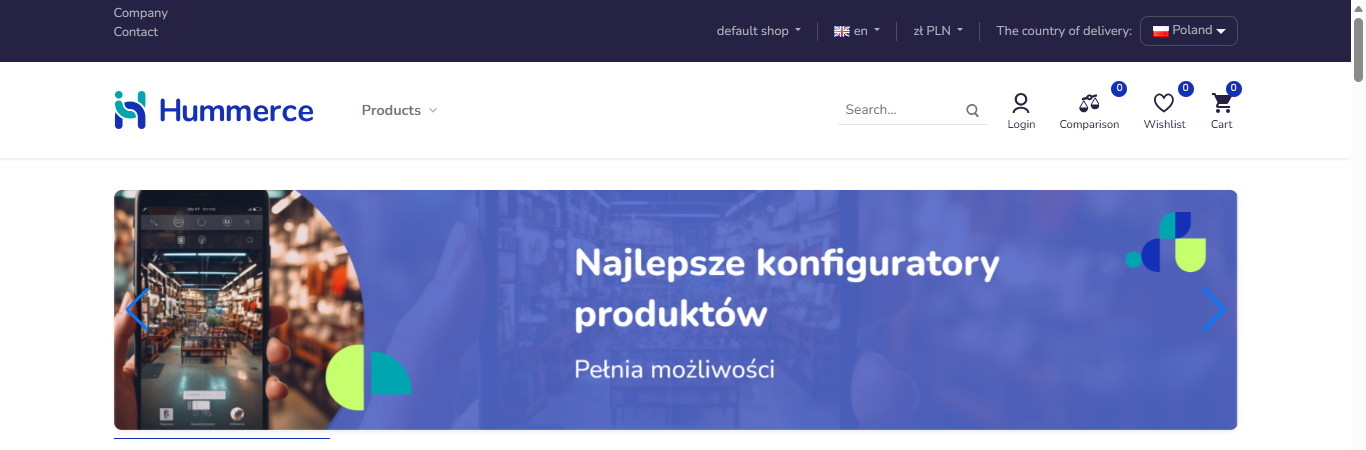
Screenshot from the Hummerce demo store.
¶ Homepage in the Bootstrap 5 template
¶ How it works
¶ What is a base template
- A base template is a ready-made storefront (pages, styles, scripts) that a new store launches on, or that an existing store uses - as a starting point for further customization (graphics, content, feature scope).
- Bootstrap 5 replaced the earlier Bootstrap 4-based base template (available since 2021) starting with version 2.33 - both templates are still maintained, and a store on the older template can move to the new one through a migration implementation.
¶ Bootstrap 5 vs. Bootstrap 4 - what shows up in the code
- Interface elements (buttons, forms, dialogs) in Bootstrap 5 are recognized by
data-bs-*attributes (e.g.data-bs-toggle) - in Bootstrap 4 the same mechanisms use attributes without thebsprefix (data-toggle). - Bootstrap 5 doesn't require the jQuery library; Bootstrap 4 usually does.
- Product configurators and other interactive template components in Bootstrap 5 are built with Svelte and TypeScript - in Bootstrap 4, older configurators (the previous generation) are used instead. See Product configurator on the storefront.
¶ Confirmed differences between the templates
| Area | Bootstrap 5 | Bootstrap 4 |
|---|---|---|
| Digital accessibility ("Skip to content" link, screen-reader landmarks, field and mini-cart error marking) | present | missing - must be added during implementation |
| Browser field checking (invalid field for screen readers, live password confirmation, delivery email) | more thorough | basic checking only |
| Form-based configurator and configurator with AI recommendations | present (from versions 2.34 and 2.35) | missing |
| Visual configurator (personalization) | present | present (older version) |
| Previous-generation configurators: two-sided mode, 3D preview, image gallery | missing | present |
| Multi-cart view in the base template | missing - requires a custom implementation | missing - requires a custom implementation |
| Dependency on the jQuery library | no | usually yes |
Details of each difference - in the description of that feature: Digital accessibility, Form validation, Carts, Product configurator on the storefront.
¶ Version
- The Bootstrap 5 template - available from version 2.33.
- The form-based and visual configurator in Bootstrap 5 - from version 2.34, the configurator with AI recommendations - from version 2.35.
- The older Bootstrap 4 template - available since 2021, still maintained.
¶ Dependencies
- Graphic and content customization of the template - matching the store's look, implementation work.
- Configurators and other Svelte-based components - require the Bootstrap 5 template, don't work in Bootstrap 4.
- Features released from versions 2.34-2.35 (some configurators, some accessibility and login fixes) require store version 2.34 or newer - an older version needs an update first.
¶ Implementation
- A new store can launch on the Bootstrap 5 template right away - the implementation scope is graphic and content customization, as with any template.
- Moving from Bootstrap 4 to Bootstrap 5 for an existing store is a separate template migration implementation - it covers moving graphic and content customization and template integrations (e.g. views, banners, custom cart or configurator views) to the new template, plus testing the whole storefront.
- Minimum estimated migration time: depends entirely on the scope of customization of the existing Bootstrap 4 template - roughly from several dozen hours for a store with standard customization, more for extensive custom templates, configurators or template integrations. We quote a migration individually after reviewing the specific store.
- What the time depends on:
- the number and complexity of custom template views (homepage, category, product page, cart),
- the number of languages,
- the scope of graphic customization,
- the presence of configurators or other components that need rebuilding,
- the store version before migration - an older version needs a platform update first (quoted separately).
¶ Limitations
- Migrating from Bootstrap 4 to Bootstrap 5 isn't automatic - it's an implementation, not a switch in the panel.
- Some platform features (including the form-based configurator and the configurator with AI recommendations) only work in the Bootstrap 5 template - a store on Bootstrap 4 doesn't have them.
- Some features of the older configurators (two-sided mode, 3D preview, image gallery) are only available in the previous-generation configurators (Bootstrap 4) - the Bootstrap 5 configurators don't have them yet.
- The multi-cart view has no ready-made interface in either base template - it requires a custom implementation regardless of the chosen template.
- We do not verify the task for legal compliance (e.g. licenses of submitted materials, GDPR, store terms of service).
¶ Future development
- Adding the features available today only in the previous-generation configurators (two-sided mode, 3D preview, image gallery) to the Bootstrap 5 configurators.
- A ready-made multi-cart view in the base template.
¶ Frequently asked questions
How does the Bootstrap 5 template differ from the older Bootstrap 4?
Bootstrap 5 is newer, doesn't require the jQuery library, and has more extensive digital accessibility and browser form validation; it also uses newer product configurators built in Svelte. See the comparison table above for the full picture.
Can an existing store be moved from Bootstrap 4 to Bootstrap 5?
Yes, that's a separate template migration implementation, covering the move of graphic and content customization plus testing the storefront.
Does a new store have to start on Bootstrap 4?
No - a new store can launch on the Bootstrap 5 template right away.
Do all platform features work in both templates?
Not fully. Some new features (e.g. some configurators) only work in Bootstrap 5, and some features of the older configurators only in Bootstrap 4 - see Limitations.
How long does migrating from Bootstrap 4 to Bootstrap 5 take?
It depends on the scope of customization of the existing template - we quote it individually after reviewing the specific store, roughly from several dozen hours upward.
Does a template migration also require a platform update?
If the store is on a version older than 2.33, a platform update is a precondition for migrating to Bootstrap 5 - quoted separately.
¶ Related
- Digital accessibility, Form validation, Carts, Product configurator on the storefront.
- Views - several stores in one panel - the view switcher is part of both base templates.
- On hummerce.com: Implementation (in Polish).
Want to check whether it's worth moving to the Bootstrap 5 template? Contact the Hummerce team (in Polish).
¶ Configuration details
¶ Access in the admin panel
- Choosing and customizing the template is implementation work (project files), not a panel setting. The panel is used to set the content and parameters the template displays (e.g. multi-view parameters, banners, messages).
¶ REST API and MCP
- None - the template and its version (Bootstrap 5 or Bootstrap 4) are not an object of the REST API or MCP tools.