¶ Digital accessibility (WCAG, EAA) in the Hummerce store
Digital accessibility in Hummerce covers what the store template provides for people using a keyboard, screen readers and zoom, and what the store has to do itself to get closer to accessibility requirements. The platform doesn't declare compliance with WCAG or the European Accessibility Act (EAA) - whether a specific store meets the requirements is only shown by an accessibility audit of that store.
As of Hummerce 2.33 (accessibility elements in the BS5 template; minor BS4 fixes in 2.34), updated 2026-09-28.
¶ Benefits and use cases
- Customers with disabilities, older customers, and keyboard-only users can complete the whole purchase path - from finding an item to placing an order.
- Implementation on the BS5 template starts from a ready-made foundation (page regions, button descriptions, error markers), so the audit and fixes mainly cover the store's graphics and content, not building the template from scratch.
- Image descriptions and correct headings also help with search engines (SEO).
- Contrast and clear error messages reduce the number of abandoned forms for all customers, including on a phone in bright sunlight.
¶ What it looks like
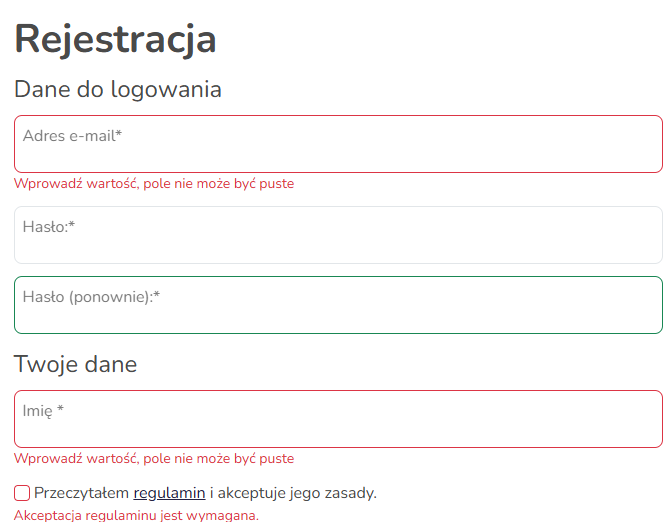
Screenshots from the Hummerce demo store (BS5 template).
¶ The "Skip to content" link after pressing Tab

¶ A form with error messages next to the fields
¶ How it works
¶ What the BS5 template provides
- "Skip to content" link - the first element on every page. It's invisible until the customer presses Tab, and then it lets them skip the header and menu.
- Page split into regions - the header, navigation, main content and footer are marked so a screen reader can jump between them.
- Page language - the page has its language set to match the language the customer is browsing the store in. The screen reader reads the content with the correct pronunciation.
- Zooming - the store doesn't block zooming the page on a phone or in the browser.
- Descriptions for icon-only buttons - buttons with just an icon have a description for screen readers, e.g. changing quantity ("Increase quantity", "Decrease quantity"), adding to favorites and comparison, scrolling to top, the store logo.
- Menus and windows - dropdown menus, the filter panel, the mini-cart and windows (login, reviews) tell the screen reader whether they're open and what they're about.
- Add-to-cart confirmation - the message is read out immediately by the screen reader.
- Forms - registration, login and address fields have labels linked to the field. After an error, the message appears next to the field, and the field is also marked as invalid for the screen reader.
- Image descriptions - an item photo on a list or in the gallery has a description entered in the panel, or, if missing, the item name. A homepage banner has a description entered next to the image, or, if missing, the banner name. The logo has the store name.
- Keyboard support - navigation, search, the product page and forms can all be operated with the Tab key. The active element (focus) is highlighted with an outline - weakly on some buttons, see Limitations.
¶ BS5 and BS4
| Element | BS5 | BS4 |
|---|---|---|
| "Skip to content" link | present | missing |
| Page split into regions for screen readers | present | missing |
| Page language matches the store language | present | present |
| Page zooming isn't blocked | present | present |
| Item photo description on lists (name, if no description) | present | only the description entered in the panel |
| Banner description (name, if none) | present | only the description entered in the panel |
| Field error marked for screen readers | present | missing |
| Add-to-cart confirmation for screen readers | present | missing |
| Descriptions in the mini-cart | present | missing |
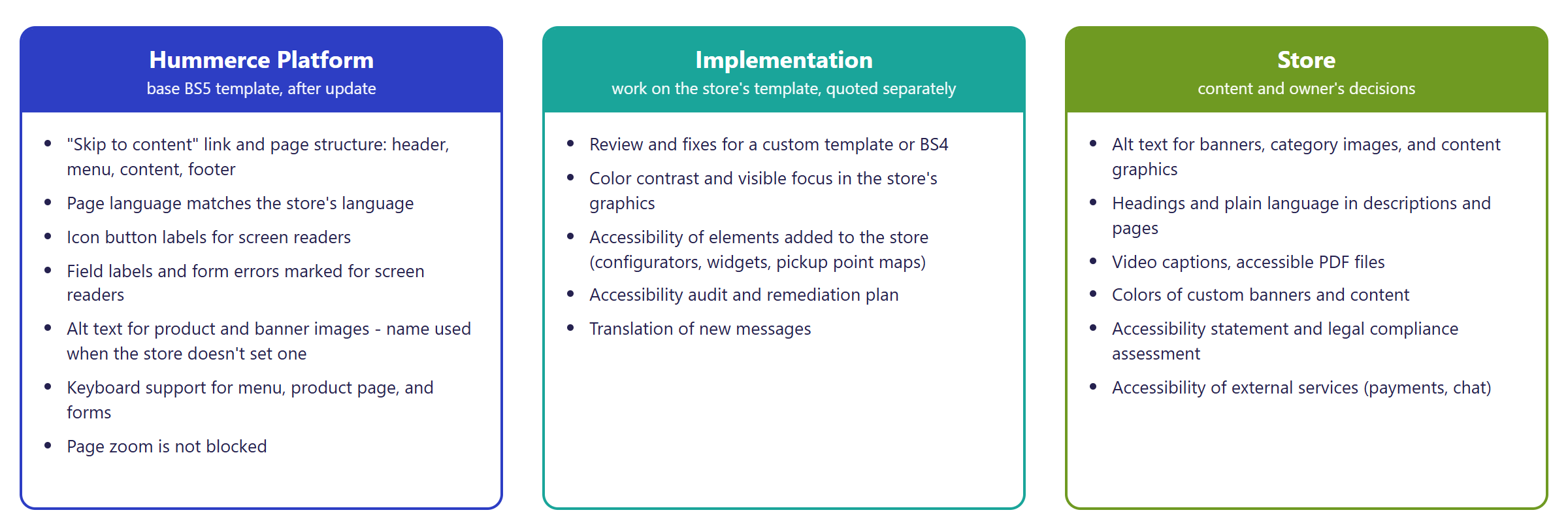
¶ Split of responsibility
¶ Version
- The accessibility elements described above are in the BS5 template from version 2.33, together with the template itself.
- Version 2.34 added minor fixes to the BS4 template (the search button description, the "scroll to top" button icon).
- Most of these elements are missing in the older BS4 template - see the comparison above.
¶ Dependencies
- The current version of the BS5 template. A store with the BS4 or a custom template needs work on the template - see Implementation.
- Image descriptions (alt text) are entered by the store in the panel: on an item, in the photos section (Common ALT description, Specific ALT description), and for images such as banners, in the Description (alt): field (Banners, File and image manager).
- Page content, item and category descriptions are created by the store (Static pages, WYSIWYG property editor).
- External services embedded in the store (payment gateways, pickup point maps, chats, review widgets) are responsible for their own accessibility.
¶ Implementation
- Works right after updating to the BS5 template - the elements described above are part of the template. Full compliance with the requirements, however, needs an accessibility audit and work on the specific store, and that's a service. Scope:
- an accessibility audit - automated and manual tests (keyboard, screen reader, zoom) on key pages and the purchase path, a prioritized list of issues,
- fixes in the store template - contrast, highlighting the active element, button and link descriptions, elements added in the store (configurators, widgets),
- in BS4 or a custom template - adding the missing basics: the "Skip to content" link, page regions, image descriptions, marking form errors,
- guidance for the store - what to fill in in content and image descriptions,
- translating new messages.
- Minimum estimated time:
- the BS5 template - from 16 h,
- the BS4 template - from 32 h.
- The time for a specific implementation depends on its scope - we quote it individually.
- What the time depends on:
- the template (BS5, BS4, custom) and how customized the graphics are,
- the number of pages and elements covered by the audit (configurators, widgets, maps),
- the scope of color changes - contrast changes need to be planned with whoever owns the graphics,
- the number of languages,
- the store version - an update is quoted separately.
¶ Limitations
- The platform doesn't provide automatic compliance with WCAG or accessibility regulations. The template contains the elements described above, but hasn't passed a compliance audit. An accessibility audit of a specific store is outside the scope of an update and is quoted separately.
- After a form error, the cursor doesn't move automatically to the first invalid field.
- The contact form has labels that aren't linked to their fields.
- The close button on some windows only has an English screen reader description ("Close").
- The BS4 template is missing the basics: the "Skip to content" link, the page split into regions, marking form errors for screen readers. Image descriptions only exist where the store entered them.
- An image with no description in the panel and no fallback name has no description at all. This applies to, among others, images in content and part of the BS4 templates.
- The platform isn't responsible for the store's content accessibility: descriptions, headings in content, PDF files, videos (captions, transcripts), or the colors of the store's own banners and graphics.
- External services (payment gateways, pickup point maps, reCAPTCHA, chats) have their own accessibility limitations, which the store has limited control over.
- The admin panel isn't covered by this page - the requirements apply to the consumer-facing service, i.e. the storefront.
- We do not verify the configuration for legal compliance - it's up to the store to assess whether it's covered by the regulations (e.g. the micro-enterprise exemption), to prepare an accessibility statement, and to take responsibility for content.
¶ Future development
- Better contrast and active-element highlighting in the base BS5 template.
- Moving the cursor to the first invalid field after submitting a form.
- Translated descriptions for window close buttons and linked labels in the contact form.
- A template page for an accessibility statement for the store to fill in.
- Larger clickable elements on a phone (footer, icons).
¶ Frequently asked questions
Does Hummerce meet WCAG and EAA requirements?
We don't declare compliance. The BS5 template contains elements that support accessibility (the "Skip to content" link, screen reader descriptions, keyboard support), but full compliance is only confirmed by an audit of the specific store.
Does the BS4 template have the same features as BS5?
Partly. BS4 doesn't have the "Skip to content" link, the page split into regions, or form error marking for screen readers - these elements have to be added during implementation.
Is an accessibility audit part of the platform standard?
No. An audit and fixes for a specific store are a service quoted separately, outside an update.
How long does an accessibility implementation take?
From 16 h for the BS5 template, from 32 h for the BS4 template - the scope depends on how customized the graphics are and the number of pages.
Is the admin panel covered by accessibility requirements?
No. The EAA requirements apply to the consumer-facing service, i.e. the storefront, not the panel.
Who is responsible for the store's content and accessibility statement?
The store. Descriptions, headings, PDF files, video captions, the colors of its own graphics, and the accessibility statement are its responsibility - the platform doesn't create a ready-made statement page.
¶ Related
- Banners - alt descriptions for banner images.
- File and image manager - alt descriptions for item photos.
- Static pages, WYSIWYG property editor - content the store is responsible for.
- B2C sales - overview - the storefront for individual customers.
Want to check how digital accessibility looks in your store? Contact the Hummerce team (in Polish).
¶ Configuration details
¶ Access in the admin panel
- Item: the photos section - Common ALT description and Specific ALT description.
- Images: the Description (alt): field next to an image, e.g. a banner.
- Content: static pages, contents and canvases - this is where the store publishes its own accessibility statement.
- The panel has no accessibility settings (contrast mode, font size, accessibility overlays).
¶ Store messages
Button descriptions and the "Skip to content" link are store messages - change them in the message editor; image descriptions are in the panel, on the item and the image. Default values are in Polish and English.
| Key | Default value |
|---|---|
msg.layout.skipToMainContent |
Skip to main content |
msg.item.quantity.plus |
Increase quantity |
msg.item.quantity.minus |
Decrease quantity |
msg.item.quantity.input |
Quantity |
msg.all.pages.scrollToTop |
Scroll to Top |
msg.topMenu.navToggle |
Toggle navigation |
msg.topMenu.search |
Search |
msg.filters.titleModal |
Filters |
msg.indexSlider.bannerLabel |
Banner |