¶ Form validation - instant errors, fewer abandoned orders
Form validation in Hummerce checks the data a customer enters when registering, managing their account, entering an address, placing an order, using the contact form, signing up for the newsletter, or filing a return - first live in the browser, then again in the store after submission. This way the customer fixes a mistake right where they made it, and the store receives data it can actually work with: a valid email, phone number, postal code, or an accepted terms-of-service checkbox.
As of Hummerce 2.35 (latest module changes: 2.35.21), updated 2026-09-28.
¶ Benefits and use cases
- The customer fixes an error immediately, right where they made it - with no page reload and no loss of entered data.
- Fewer orders with a wrong phone number or postal code - fewer calls to customers and fewer returned shipments.
- The store itself marks a field as required or adds a simple rule (length, pattern) in the parameter settings - with no development request.
- The store changes message content itself in the message editor, e.g. to match the brand's tone.
- Errors are also marked for screen readers, which helps meet form accessibility requirements - see Digital accessibility.
¶ What it looks like
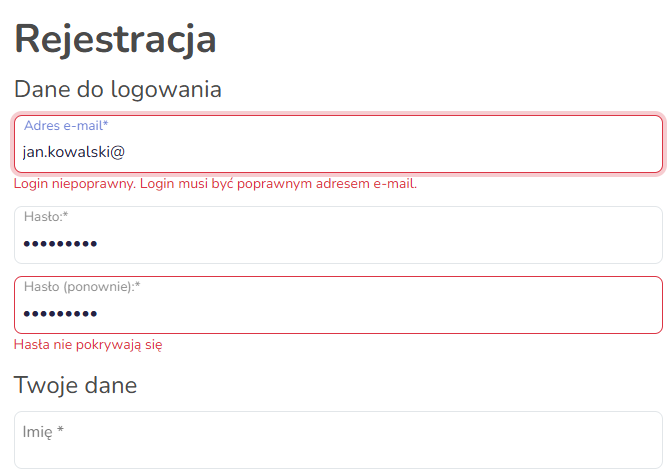
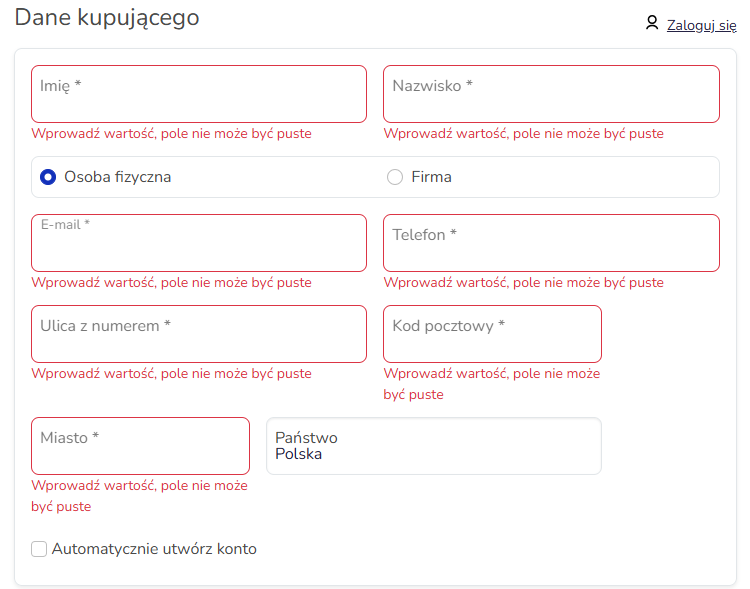
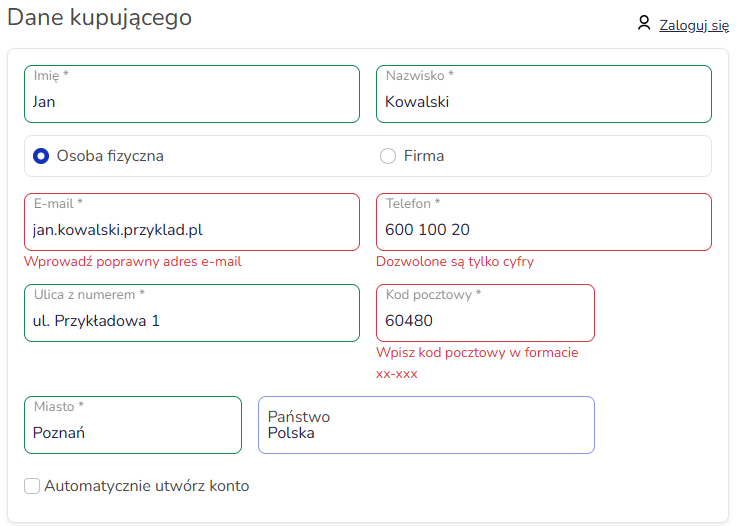
Screenshots from the Hummerce demo store (Bootstrap 5 template).
¶ Registration - errors while typing
¶ Order - submitting an empty form
¶ Order - invalid email, phone and postal code
¶ How it works
¶ When and where a field is checked
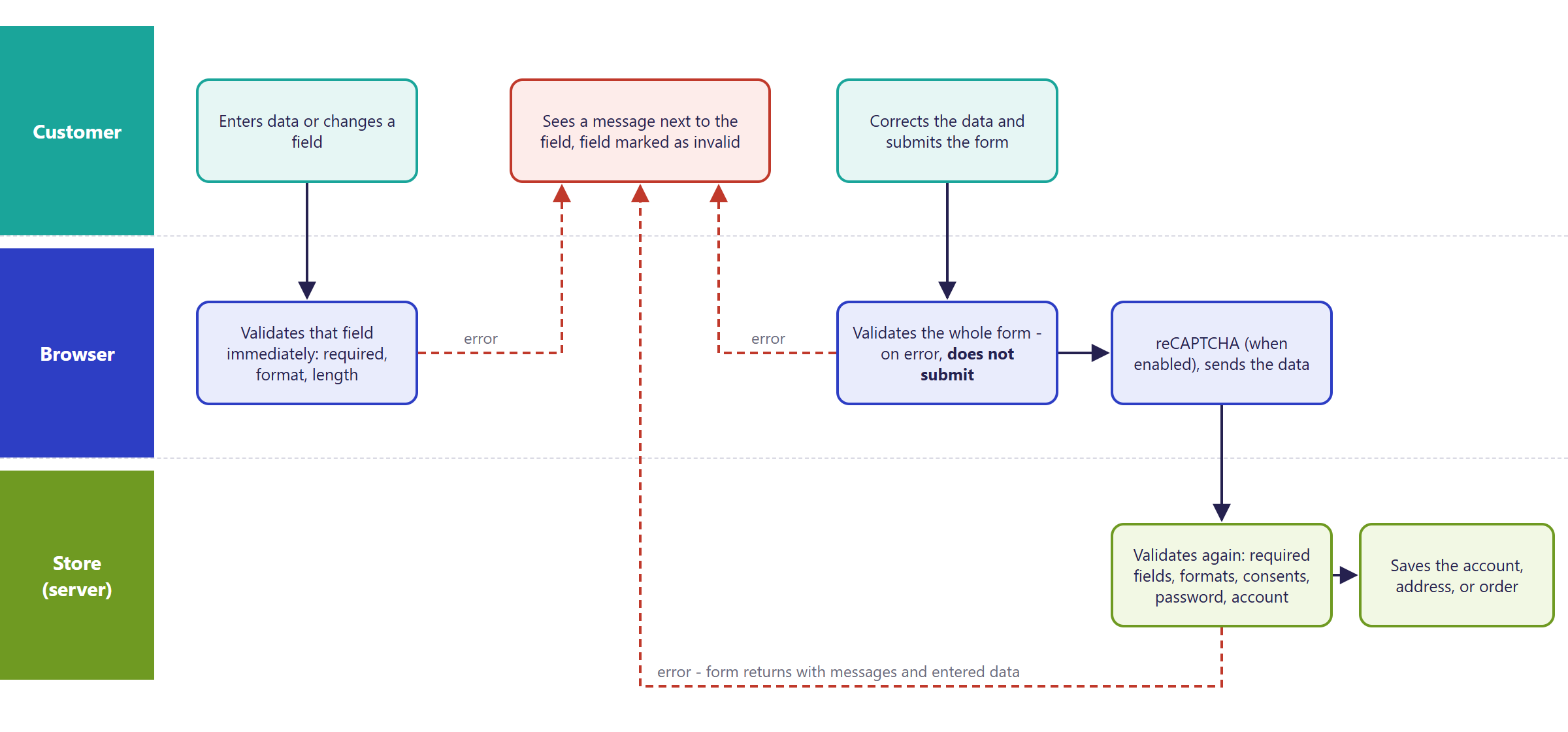
¶ In the browser (Bootstrap 5 template)
- A field is checked on every change - while typing. Choice fields (consents, lists) - after being checked or changed.
- After clicking the submit button, the form checks every visible field. On error, the form isn't submitted.
- A message appears below the field, and the field gets a red border. A correctly filled field gets a green border.
- An invalid field is also marked for screen readers, and the message is linked to the field - a screen reader reads it together with the field name (see Digital accessibility).
- When required fields are left empty, the submit button stays inactive until the customer fills them in.
- The store doesn't scroll the page or move the cursor to the first invalid field - the customer sees the markers next to the fields.
- Company fields (company name, tax ID) are only checked when the customer picks a Company purchase or account.
¶ Rules in the browser
| Field | What's checked |
|---|---|
| Required fields (marked with *) | can't be empty |
| Email, login | valid email address format |
| Password and its confirmation | both passwords match |
| Phone (buyer's and delivery) | digits only, no spaces or a + sign; exactly 9 digits for Poland |
| Postal code (buyer's and delivery) | 00-000 format for Poland; for other countries, only that it's filled in |
| Terms of service and mandatory consents | must be checked |
| Fields with a custom rule in the parameter | length, pattern, range - see below |
| reCAPTCHA (when enabled) | required before submitting |
¶ Where the rules come from
- Field parameter - in the panel, in the parameter settings:
- Mandatory field - the field gets an asterisk and must be filled in on the form,
- Validation - an extra rule entered as field attributes, e.g.
minlength="6" maxlength="30"orpattern="[0-9]{2}-[0-9]{3}", - Data format - a placeholder hint in the empty field, e.g. for a postal code.
- Store template - shared form rules: email, password, phone and postal code by country, terms of service. Changing them requires implementation.
- Field type - an email field checks the address format.
- Which fields are on the form, and in what order - determined by parameter locations (Properties and locations).
¶ After submission - in the store (server)
- The store checks the data again, independently of the browser. When something doesn't match, the form comes back with a message next to the field (or above the form) and the data the customer already entered.
- In the standard configuration the store checks, among other things:
- registration and account data - first name, last name, phone, street, postal code, city; the format of the email, phone, postal code and tax ID; that both passwords match and meet a minimum strength; whether an account with that login already exists; for a company account - the company name and tax ID together,
- the order - buyer data and the delivery address, the guest's email, that the delivery and payment method match the cart and country, available item quantities, the delivery date (when the store uses one),
- the address book - first name, last name, street, postal code, city and country of the address (see Address book),
- the contact form - first name, last name, email and attachments (whether required, size), when the form has them,
- the newsletter - email address and consent,
- a return - the selected items and quantities, the withdrawal statement, the IBAN for a bank transfer refund (see Returns - withdrawal from the contract).
- Tax ID - the store checks its format. Company data by tax ID is fetched from GUS (Statistics Poland company registry), and the EU VAT number is checked in VIES - see Company data from GUS and VIES and B2B company accounts.
- The browser and server rules are set to complement each other: the browser suggests, the server has the final say. When a field's requirement changes, both places need to change.
¶ reCAPTCHA
Registration, login, order, contact, newsletter and return forms can be protected with Google reCAPTCHA (version 2 or 3). reCAPTCHA is checked in the browser before submission and again in the store - configured in the security settings.
¶ Bootstrap 5 and Bootstrap 4
| Element | BS5 | BS4 |
|---|---|---|
| Checking while typing and before submission | yes | yes |
| Message below the field, border color | yes | yes |
| Invalid field marked for screen readers | yes | no |
| Scroll to the first error when the form returns with errors | no | yes |
| Password confirmation checked in the browser | yes | no - only after submission |
| Delivery address email required in the browser | yes | no |
| Rule from a parameter (Mandatory field, Validation) | yes | yes |
¶ Version
- Validation in the Bootstrap 5 template has worked since version 2.33, together with the template itself.
- Checking data after submission (on the server) is part of the platform in every version.
- Latest module changes: version 2.35.21.
¶ Dependencies
- The Bootstrap 5 template, current version. In Bootstrap 4, validation works, but without some elements - see the comparison above.
- Form fields are parameters in locations - see Properties and locations.
- reCAPTCHA requires Google keys in the store configuration (security settings).
- Password strength - settings in the password security configuration.
- Fetching company data by tax ID - the GUS module (Company data from GUS and VIES).
¶ Implementation
- Works after updating - validation is part of the Bootstrap 5 template and the platform. Implementation is needed when the store wants to change rules it can't set through a parameter. Scope:
- changing shared template rules, e.g. a phone number with a country code, postal codes for other countries, a foreign tax ID,
- changing the list of required fields and the formats checked after submission - consistently with the browser rules,
- rules depending on other fields (country, company account, delivery method),
- messages and translations for new rules,
- testing the registration, account, address and order forms.
- Minimum estimated time:
- Bootstrap 5 template - from 3 h,
- Bootstrap 4 template - from 4 h.
- The time for a specific implementation depends on its scope - we quote it individually.
- What the time depends on:
- the number of forms and fields covered by the change,
- rules depending on country - the number of countries sold to,
- the template (BS5, BS4, custom) and how customized the forms are,
- the number of languages,
- the store version - an update is quoted separately.
¶ Limitations
- Shared rules (phone, postal code, password, email) are stored in the template - the store can't change them in the panel.
- The browser phone field accepts digits only - no spaces, hyphens or a
+country code. Customers from abroad enter the number without the+sign. - The postal code format is checked in the browser only for Poland. For other countries the browser only checks that the field is filled in - selling abroad requires adapting the rules (implementation).
- The tax ID is only checked for format, without a checksum. Company validity is confirmed by GUS or VIES, when the store has that module.
- The Mandatory field parameter setting works on the browser form. For the store to also check the field after submission, it needs to be added to the server-side form rules - a change made during implementation.
- The browser and server rules aren't fully identical - they're aligned together during implementation, so the browser and the store accept the same data.
- After an error, the cursor doesn't move to the first invalid field on its own, and the page doesn't scroll.
- General validation-library messages ("this field can't be empty," "enter a valid email address") aren't in the message editor.
- The login form has no live browser hints - the store reports invalid data after submission.
- The contact form doesn't check the email address format in the browser - only that required fields are filled in.
- We do not verify the configuration for legal compliance - the store decides which consents are mandatory, what data it collects on forms, and how it discloses processing it (GDPR, terms of service).
¶ Future development
- Moving the cursor to the first invalid field and scrolling to it after form submission.
- International phone number format (with a country code) and postal code rules for further countries.
- Checking the tax ID checksum in the browser.
- A single source of rules for the browser and server - a requirement set in a parameter also checked after submission.
- Server-side form rules editable in the panel.
- Live hints on the login form, and email checking on the contact form.
¶ Frequently asked questions
Does the customer see a form error before submitting it?
Yes. In the Bootstrap 5 template, a field is checked live, while typing, and a message appears below the field with a red border.
Does the store also check data on the server, not just in the browser?
Yes. Every form submission is checked again in the store, independently of the customer's browser - the customer can't skip this check.
Can a custom rule be added to a field with no development request?
Partly. The store can mark a field as required, or add a simple length or pattern rule in the parameter settings on its own. Rules shared by all forms, e.g. the phone format, are stored in the template and require implementation.
Does validation work the same way in the older Bootstrap 4 template?
Partly. Basic checking works in both templates, but Bootstrap 5 additionally marks invalid fields for screen readers and checks more fields in the browser - see the comparison in How it works.
How long does changing validation rules on a form take?
The simplest change, e.g. a new field pattern - from 3 h in the Bootstrap 5 template, from 4 h in Bootstrap 4.
Do the browser and the store always check data the same way?
Not always. The rules in both places are maintained separately - when a field's requirement changes, both places need to be updated, otherwise the customer may only see the error after submitting the form.
¶ Related
- Digital accessibility - error markers for screen readers.
- Properties and locations, Company data from GUS and VIES, B2B company accounts, Returns - withdrawal from the contract.
- B2C sales - the registration and order forms are part of the customer's purchase path.
Want to check how form validation works in your store? Contact the Hummerce team (in Polish).
¶ Configuration details
¶ Access in the admin panel
- Parameters: parameter settings - Mandatory field, Validation, Data format, Description (the field hint).
- Parameter locations: which fields are on the registration, account, order, newsletter and contact forms (Properties and locations).
- Configuration: reCAPTCHA and password strength settings (security settings).
¶ REST API and MCP
Rules checked after form submission (on the server) aren't available in the panel, the REST API, or through the AI assistant (MCP) - this is configuration changed during implementation.
¶ Store messages
Validation messages are changed in the message editor, and field requirements and custom rules - in the parameter settings (Properties and locations). Default values are in Polish and English unless the table notes otherwise. General validation-library messages (e.g. "this field can't be empty") aren't in the message editor, and changing them requires implementation.
¶ Forms - in the browser
| Key | Default value |
|---|---|
error.incorrectLoginFormat |
Incorrect login syntax. Valid e-mail address expected. |
error.incorrectEmailFormat |
Incorrect e-mail address. |
error.passwordsDoNotMatch |
The password and its confirmation do not match. |
error.must.accept |
You must accept the terms and conditions. |
error.formvalidation.phone.integer |
Only digits are allowed |
error.formvalidation.phone.max |
Check if the number consists of 9 digits |
error.formvalidation.postcode.format |
Incorrect format |
msg.forms.reCaptcha.required |
reCAPTCHA is required. |
¶ Forms - after submission
| Key | Default value |
|---|---|
error.nofield |
Field {0} is required |
error.minLength |
The field {0} must be at least {1} characters long. |
error.maxLength |
The field {0} can not have more than {1} characters. |
error.syntaxError |
Field {0} has an invalid syntax |
error.diffpasswords |
Given passwords are different |
error.password.weak |
Password is too weak. |
error.incorrectLoginSyntax.customer |
Incorrect login syntax |
error.existingUser.customer |
Account with given login already exists. |
error.recaptcha.invalid |
reCAPTCHA verification failed. |
msg.general.errorsMessage |
This form contains errors. For details - check system information below. |
msg.general.requiredFields |
required fields |
{0}is the field name (parameter name), and{1}is the number of characters.
¶ Password strength
| Key | Default value (EN) |
|---|---|
msg.passwordStrength.tooShort |
Password is too short |
msg.passwordStrength.digit |
Password should contain at least one digit |
msg.passwordStrength.uppercaseLetter |
Password should contain at least one uppercase letter |
msg.passwordStrength.lowercaseLetter |
Password should contain at least one lowercase letter |
msg.passwordStrength.specialCharacter |
Password should contain at least one special character |
msg.passwordStrength.custom |
Password is too weak |
¶ Newsletter and returns
| Key | Default value |
|---|---|
error.newsletter.emailIsEmpty |
Field e-mail is empty. Please enter a valid email address and try again. |
error.newsletter.wrongEmailFormat |
The email address is not valid or in the wrong format. |
error.return.noItems |
Select at least one item to return. |
error.return.agreementRequired |
You must accept the withdrawal agreement. |
error.return.ibanRequired |
Please provide the IBAN for a bank-transfer refund. |
error.return.ibanInvalid |
The IBAN provided is not valid. |
¶ Parameters
| Symbol | Object | Label |
|---|---|---|
_mandatory |
parameter | Mandatory field |
_validation |
parameter | Validation |
_format |
parameter | Data format |