¶ Views - several stores in one panel
Views in Hummerce let you run several versions of a store - e.g. a retail store and a wholesale store, a foreign version, or a rewards catalog - on one panel, one item catalog and one customer base. Every view has its own language, currency, assortment, prices, delivery, payments and content, and with the multiple domains module, its own domain too. B2B and B2C sales in one store are built on views.
As of Hummerce 2.35 (latest module changes: 2.35.55), updated 2026-09-28.
¶ Benefits and use cases
- Several sales channels from one panel - one catalog, one customer base, one order-handling process. No need to build and maintain separate stores.
- B2C and B2B in one system - the wholesale view can have different prices, deferred payments, and access limited to assigned companies.
- Country and language versions - a separate currency, language, prices and delivery, including under separate domains.
- A rewards catalog or loyalty program as a separate view - with its own assortment and payment in points.
- A view for a showroom, pickup point or branch - with its own warehouse and shipping method.
- A view for a distributor or branch with its own price list.
- Marketplace - Baselinker and Allegro integrations pull items from a chosen view and save orders to a specified view.
- Per-channel reporting - every order has the view it was placed in saved with it.
¶ What it looks like
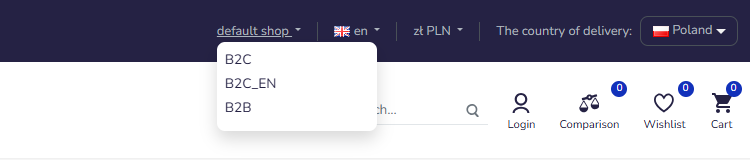
Screenshots from the Hummerce demo store in the Bootstrap 5 template.
¶ View switcher in the storefront
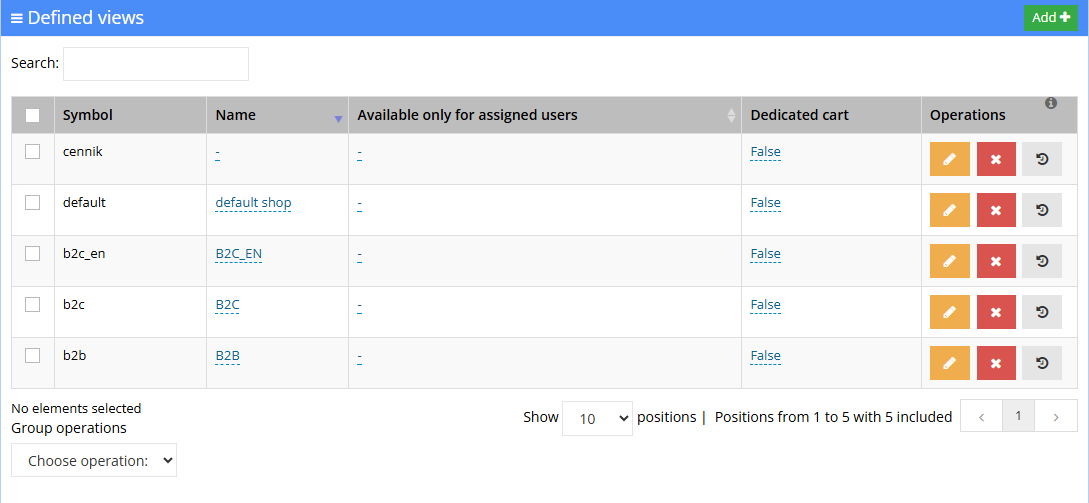
¶ List of views in the panel
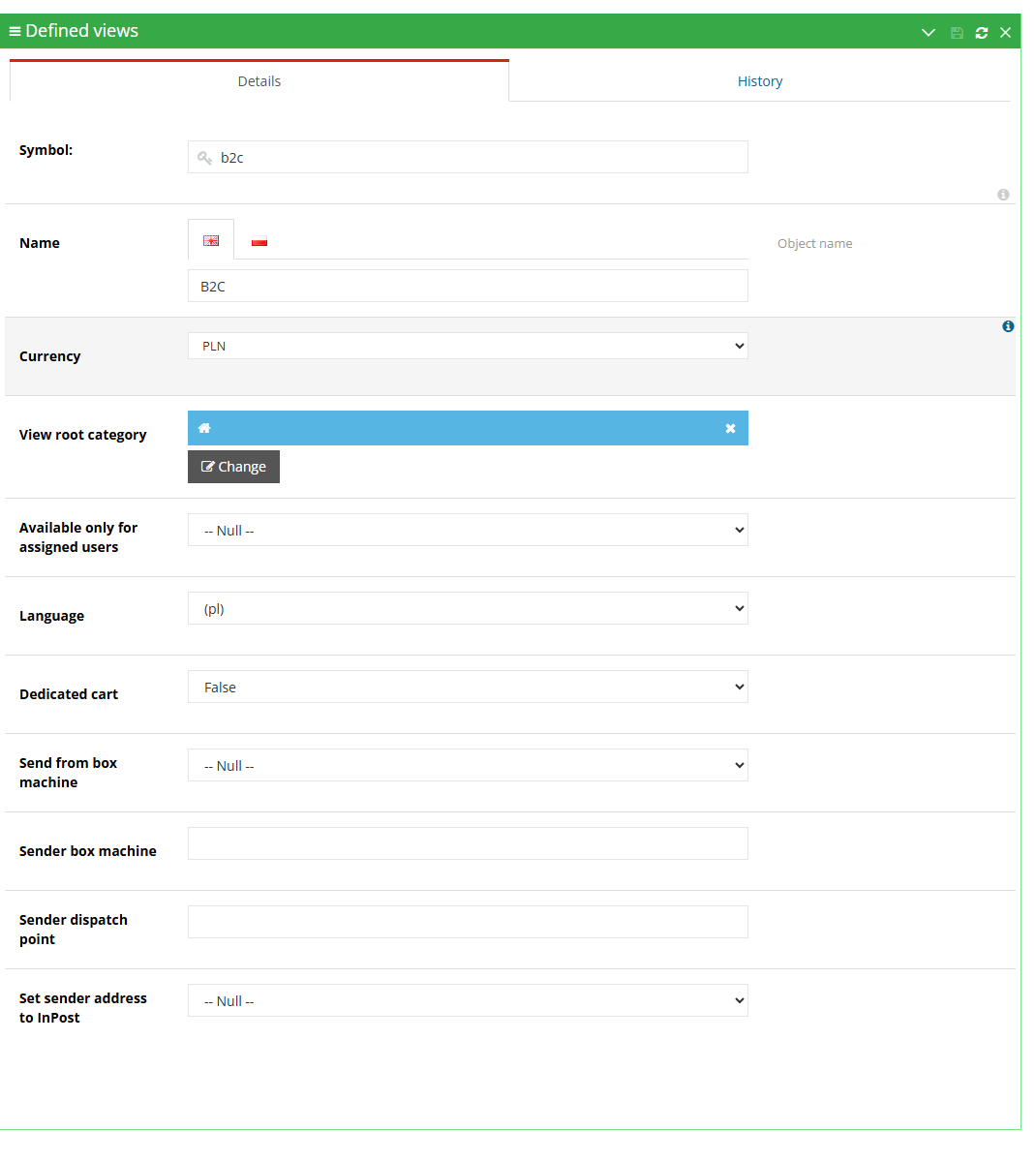
¶ View details
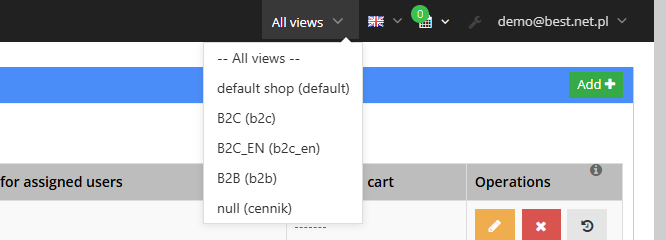
¶ Choosing a view in the panel
¶ View settings

¶ How it works
¶ What can be assigned to a view
- Items - an item is only visible in the views it has been assigned to. An item can be assigned to any number of views.
- Customers - a customer can be assigned to several views. This matters for views with the Available only to assigned users setting.
- Delivery and payment methods - the cart only shows those assigned to the current view (e.g. deferred payment only in the wholesale view).
- Price list rules, item price rules and cart promotions - apply in selected views, or For all views (Price Lists and Individual Prices for B2B Customers, Cart Promotions - Discounts Based on the Cart).
- Warehouses - once the Multi "viewable" warehouses setting is turned on, item availability is calculated only from the warehouses assigned to the view (Warehouse - stock, reservations and warehouse operations).
- Templates, redirects, configurable sets, offers, address book entries, saved carts - also have views assigned.
- An order always belongs to a single view - the one it was placed in.
- Categories are not assigned to views. A view can have its own Main category, so each view can show a different branch of the category tree.
- Multi-view properties - a property marked as Multiple view when created stores a separate value for each view (e.g. an item's name, description or photo, or a view's logo). When a view has no value of its own, the store shows the value from the default view (Properties and locations - flexible fields in Hummerce).
- A new object saved without a view goes into the default view. It has to be assigned to any other views separately.
¶ View settings
- Symbol and Name (in every store language).
- Currency - either one currency forced for the view, or several to choose from. Without a setting, the store uses the default currency.
- Language - either one language forced for the view, or several to choose from (a customer not on the list gets the first one). Without a setting, the view doesn't change the language.
- Main category of the view.
- Available only to assigned users - the view is only for logged-in customers assigned to it.
- Dedicated cart - a cart used only for this view (Carts - Cart Memory and Multiple Carts per Order).
- Additional parameters added during implementation (e.g. logo, view email address, shipment sender data).
¶ How a customer ends up in a view
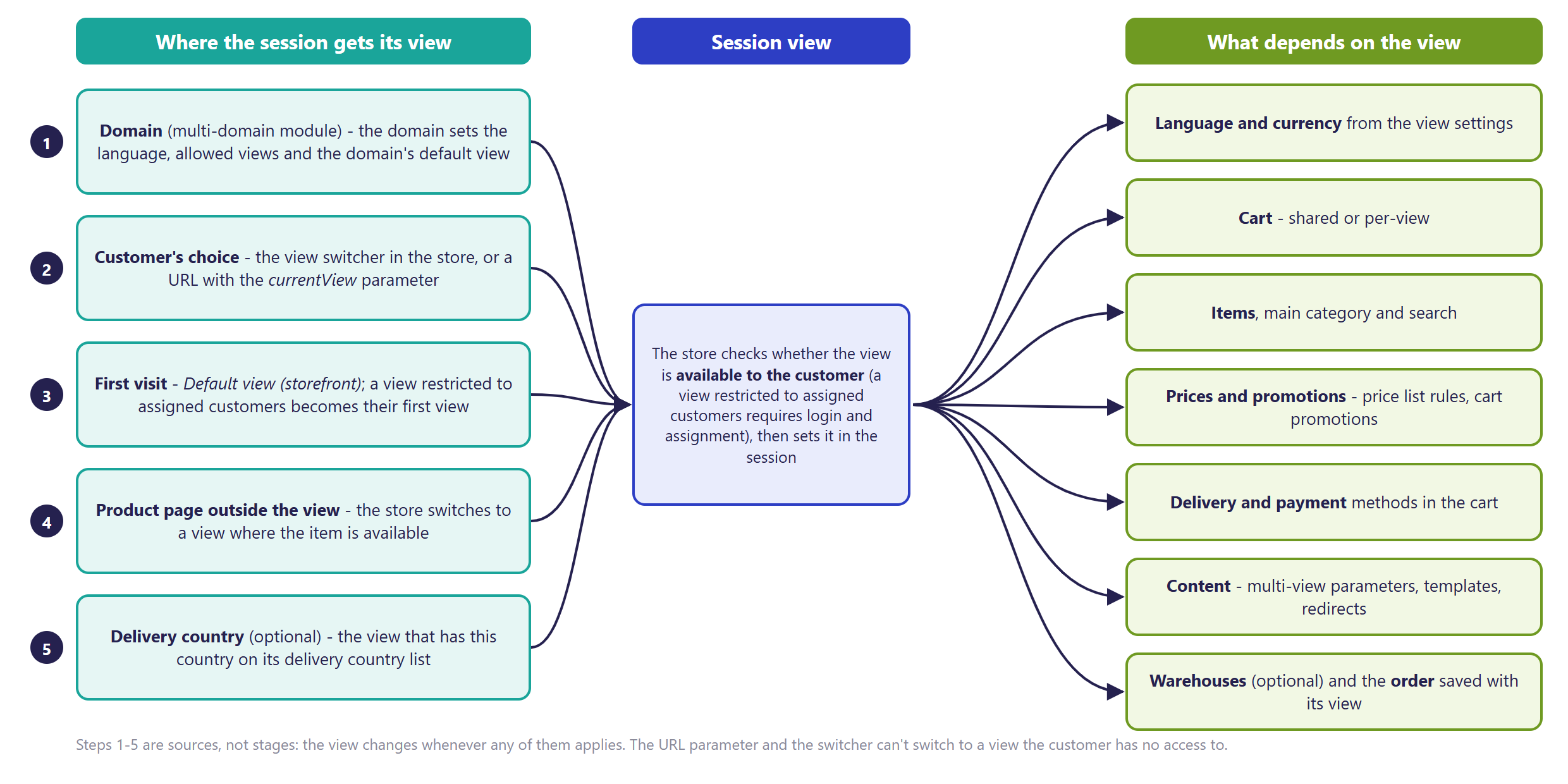
- First visit to the store - the view from the Default view (shop) setting. When the default view is only for assigned users and the customer isn't assigned to it, the store picks the customer's first view. When the customer has no view at all, the store denies access.
- Customer changes view - with the switcher in the store header, or by visiting an address with the
?currentView=<view symbol>parameter (e.g. a newsletter link to the wholesale version). - The address parameter and the switcher only work for a view available to the customer. A view Available only to assigned users cannot be opened by a guest or a customer without assignment.
- Item page outside the view - visiting an item page for an item not in the current view switches the session to a view where that item is available. When there is no such view, the customer gets a page error.
- Delivery country or domain - optionally, a view can follow the delivery country chosen by the customer (the view's Possible delivery countries parameter), or the domain the customer entered on (multiple domains module).
- When the view changes, the store sets the view's language and currency, and the matching cart:
- shared cart - the same one across all views; it's recalculated in the new view, and items not available in that view are removed from it,
- dedicated cart - separate, and does not carry over to other views (Carts - Cart Memory and Multiple Carts per Order).
¶ Views in the admin panel
- Every panel session also runs in a view. The admin selects it in the panel header - -- All -- or one view.
- Item and order lists in the panel, and data exports, show objects from the selected view.
- Multi-view property values are edited separately for the default view and for other views (the Other views tab when editing an item).
- An admin's role can restrict access to selected views - such an admin then only sees their own views, and has no -- All -- option.
- In the customer panel, the Show all orders placed in all views? setting decides whether a customer sees orders placed in views other than the current one (yes, by default).
¶ Wholesale and retail prices, promotions and search
- Price list rules, item price rules and cart promotions have a For all views setting, or a Views list - this is how, for example, wholesale prices are set only for the B2B view (Price Lists and Individual Prices for B2B Customers, Cart Promotions - Discounts Based on the Cart).
- With View propagation turned on, search only looks for items from the current view - items from one view don't appear in another view's results (Search and filters - fast way to find an item).
- Product recommendations can be limited to the customer's current view.
- In the criteria editor (e.g. virtual categories), items can be filtered by view.
¶ View addresses and SEO
- By default, all views run under one store address - the view is remembered in the customer's session, not in the page address.
- An address with the
?currentView=parameter works well for campaign links, but does not create a separate page version for search engines. - Separate addresses for views (e.g. a separate domain for a foreign version) require the multiple domains module.
¶ Multiple domains - separate domains for views
- The multiple domains module assigns a Hummerce store several domains - e.g. a separate domain for a foreign version, or for B2B sales. Full description of how it works, the division of work and implementation: Multiple domains - separate domains for languages and B2B.
- In short: every domain has a primary address and aliases (an alias redirects to the primary address), a starting language for a new session, a list of allowed views and a default view, and a domain group (domains in a group share customer login and cart).
- All domains are one application and one database - a shared panel, catalog, customers and orders.
¶ Version
- Views are a core Hummerce platform mechanism - available in all current store versions.
- Language and currency restricted to a view's list - from version 2.30.
- The view switcher in the Bootstrap 5 template - from version 2.33.
- Several views on one domain, a domain's default view, and shared login between domains in newer browsers - from version 2.34.
- Support for views through the AI assistant (MCP) - from version 2.35.
- Latest module changes: version 2.35.55.
¶ Dependencies
- The view switcher is in the base Bootstrap 5 and Bootstrap 4 templates - it appears once the store has more than one view.
- A view's language requires languages configured in the store (Multilanguage - One Domain, Several Store Languages).
- A view's currency requires a currency configured in Configuration -> Currencies (Multiple Currencies - Prices and Payments in Hummerce).
- A view's main category - the view main-category module (in the standard configuration).
- Warehouses per view - the Multi "viewable" warehouses setting and warehouses assigned to views (Warehouse - stock, reservations and warehouse operations).
- Choosing a view by delivery country - the country-selection module with view switching turned on (implementation configuration).
- Multiple domains - the multiple domains module and shared login between domains, plus domains, DNS and certificates on the server side.
- Restricting an admin's views - panel roles and permissions (Admin Permissions - Roles and Permissions in the Panel).
¶ Implementation
- Views work right after an update - they're part of the platform. A new view is created and configured in the panel. Scope of a typical new-view setup:
- creating the view, setting its language, currency, main category and cart,
- assigning items, customers, delivery, payments, price list rules and promotions,
- filling in multi-view property values (names, descriptions, logo) and translations,
- any view-dependent template changes (different styling, hidden elements, different content),
- testing on the test environment and going live.
- Multiple domains requires implementation - the module doesn't turn on by itself and has no panel settings. Scope: configuring domains in the store, setting up DNS, certificates and the web server (hosting), testing moving between domains, login and cart.
- Minimum estimated time:
- a new view with no template changes (Bootstrap 5 and Bootstrap 4) - from 4 h,
- multiple domains for two domains - from 8 h, excluding server- and hosting-side work.
- The time for a specific implementation depends on its scope - we quote it individually.
- What the time depends on:
- the number of views and the scale of assignments (items, customers, delivery, payments, price rules),
- view-dependent template changes (appearance, content, hidden elements),
- the number of languages and currencies, and content translations,
- the number of domains and aliases, and shared login between domains,
- warehouses per view, integrations (ERP, Baselinker, Allegro, product feeds) - quoted separately,
- the store's version - an older version needs an update first (quoted separately).
¶ Limitations
- Categories, pages and content are not assigned to views. A different set of categories per view comes from the view's main category, and different content from multi-view properties or template changes.
- A view does not change the store's appearance on its own. A different look, logo, or hidden elements in a view are template work.
- The view switcher shows every view, including those available only to assigned customers. A customer without access selecting such a view changes nothing - it's worth hiding such a view in the template.
- Without the multiple domains module, all views share the same address - search engines only index the default view. For the limitations of multiple domains itself (no hreflang or sitemap per domain, no panel settings, the requirement of a single server instance for shared login), see Multiple Domains.
- An order belongs to a single view - a customer cannot move an order or its history to another view.
- New items and other objects go into the default view - they have to be assigned to other views separately (manually, by import, through the API, or through the AI assistant).
- The AI assistant cannot create or change a view - it can list views and read/set object assignments.
- We do not verify the configuration for legal compliance - terms of service, prices and currencies for individual markets are set by the store.
¶ Future development
- Hreflang tags and a sitemap per domain, and domain configuration in the panel - see Multiple Domains.
- Assigning categories, pages and banners to views.
- Hiding views the customer has no access to in the switcher.
- Setting up and configuring views through the AI assistant.
- Sales reports broken down by view in the panel.
¶ Frequently asked questions
Can Hummerce run B2B and B2C sales in one panel?
Yes. The wholesale view can have different prices, deferred payments, and access limited to assigned companies, while the catalog, customers and orders stay shared with the retail view.
Can every view have its own domain?
Yes, with the multiple domains module. The module requires implementation, and DNS, SSL certificates and server configuration are prepared by hosting.
Can views have different prices, promotions, delivery and payments?
Yes. Price list rules, item price rules, cart promotions, delivery methods and payment methods are all assigned to selected views.
Can a view use its own warehouse?
Yes. Once the Multi "viewable" warehouses setting is turned on, item availability is calculated only from the warehouses assigned to that view.
Do search engines index every view separately?
Only with separate domains per view (the multiple domains module). Without it, all views share the same address, and only the default view is indexed. The multiple domains module does not generate hreflang tags.
How long does setting up a new view in Hummerce take?
A new view with no template changes - from 4 h. Multiple domains for two domains - from 8 h, excluding server- and hosting-side work.
¶ Related
- B2B and B2C Sales in One Store - Shared Hummerce Panel - how views connect to company accounts, price lists and offers.
- Price Lists and Individual Prices for B2B Customers, Warehouse - stock, reservations and warehouse operations, Multilanguage - One Domain, Several Store Languages, Multiple Currencies - Prices and Payments in Hummerce.
- On hummerce.com: B2B Platform (in Polish), B2C Platform (in Polish), Multilanguage (in Polish), Multi-Currency Support (in Polish).
Want to see how views could work in your store? Book a free demo (in Polish).
¶ Configuration details
¶ Access in the admin panel
- View list and details: Configuration -> Views - the Available views list (columns: Symbol, Name, Available only to assigned users, Dedicated cart), view details, change history.
- View settings: Configuration -> Settings, Views group:
- Show all orders placed in all views? - yes by default,
- Default view (shop) - the
defaultview by default.
- Other view-related settings (Configuration -> Settings):
- Warehouse group: Multi "viewable" warehouses (no by default), Move reservations after changing the view on an order (no by default),
- Search engine group: View propagation,
- E-mails group: View email address property - the view's property holding the address that order notifications for that view go to; Exclude views from order-related emails,
- Friendly URLs group: Template for views,
- Baselinker and Allegro API groups: the integration's item view and order view.
- Choosing a view in the panel: the panel header (-- All -- or a selected view).
- Objects: the Views field when editing an item, customer, delivery method, payment method, warehouse, template, redirect, price list rule and cart promotion. On an order - the view it was placed in.
- Properties: Multiple view - a property setting, chosen when the property is created (Properties and locations - flexible fields in Hummerce).
- Multiple domains: module configuration by the implementation team only - no panel settings.
¶ REST API and MCP
- REST API: read, create, change and delete views; operations on items, categories, pages, customers, repo objects, producers, sets and orders in the context of a specified view - e.g. an order placed through the API goes into that view (REST API - Integration with External Systems).
- MCP (AI assistant - MCP server):
ec2_views_list- the list of views, and whether the store is multi-view,ec2_object_views_get- which views an object is in (e.g. an item, customer, delivery method, payment method, warehouse, cart promotion),ec2_object_views_set- replaces an object's list of views; an empty list is rejected. Requires permission to edit that object.
¶ Store messages
View-dependent content is changed through multi-view properties (Properties and locations - flexible fields in Hummerce), and store messages through the message editor. The view's name, shown in the switcher, is set in the view's details, in every language. Default values are in Polish and English.
| Key | Default value |
|---|---|
msg.view.empty |
Select view |
¶ Parameters
| Symbol | Object | Label |
|---|---|---|
_currency |
view | Currency |
_language |
view | Language |
_availableOnlyForAssignedUsers |
view | Available only to assigned users |
_dedicatedCart |
view | Dedicated cart |
_viewRootCategory |
view | Main category of the view |
_possibleDeliveryCountries |
view | Possible delivery countries (when choosing a view by delivery country) |