¶ Quotes - request for quote (RFQ)
Quotes in Hummerce carry the whole conversation about the price of a non-standard product - made to order, configured, or ordered in bulk - inside the store. The customer sends products to a quote instead of the cart, store staff price them in the panel, and the customer then orders at the quoted price, without manually re-entering the data into an order.
As of Hummerce 2.35 (feature since version 2.29, last changes to the module: 2.35.0), updated 2026-09-28.
¶ Benefits and use cases
- No more quotes by email and spreadsheet - the whole conversation about a non-standard product's price stays in the store, with a history.
- The customer orders at the quoted price themselves - staff don't manually copy prices into the order.
- Quote validity guards against an outdated price - once it expires, the quote can't be added to the cart.
- Requesting explanations for a specific line item, instead of an email exchange about the whole order.
- For companies: the manager sees the quotes of all employees.
- Use cases: made-to-order furniture and joinery, windows and doors, construction elements, print and advertising, bulk orders with an individual price - in both B2B and B2C sales.
¶ How it works
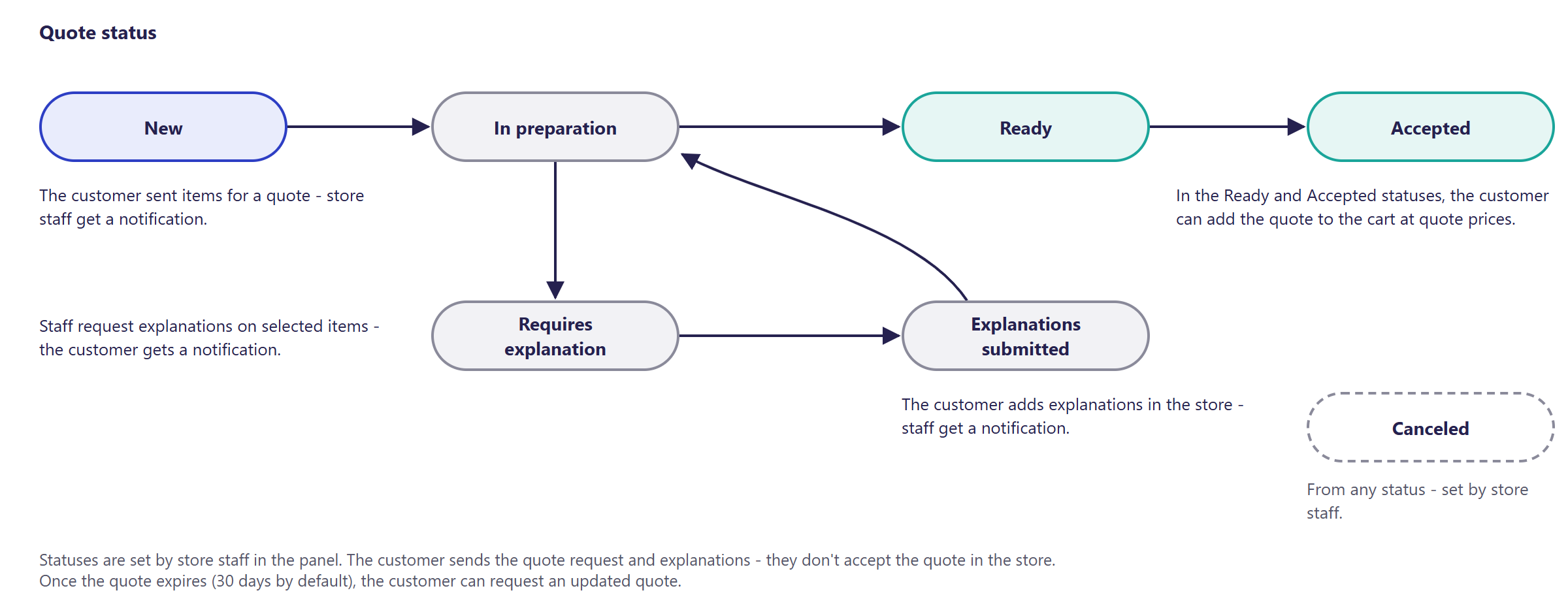
- A logged-in customer adds a product (usually configured) to a new or existing quote instead of the cart, and sends the quote to store staff. A non-logged-in customer sees a message that they need to log in.
- Panel users with the quote specialist role do the pricing: they set prices for line items, can ask the customer for explanations on selected items, and inform them by email of the prices set or of the quote's cancellation.
- The customer adds a ready or accepted quote (or individual priced line items) to the cart - at the quote's prices. The order item keeps its link to the quote item.
- A quote has a validity period - 30 days by default. After it expires, the customer can send a request to update the quote.
- A quote can specify a minimum order quantity for the product.
- A quote from a customer belonging to a company is assigned to the company - the company manager sees employees' quotes on the list of company quotes (Company accounts and roles).
- The Accepted status is set by store staff in the panel - the customer doesn't accept the quote in the store themselves.
¶ Version
- Quotes have worked since version 2.29 - the feature doesn't exist in older versions.
- Last changes to the module: version 2.35.0.
¶ Dependencies
- The BS5 or BS4 store template - both have quote views.
- A customer account - quotes are only available to logged-in customers.
- The quote specialist role for the panel users who do the pricing.
- A quote line item layout matched to the store's products - the module doesn't ship a ready-made one.
- Email notifications - active alerts and email templates.
- Company quotes - company accounts (Company accounts and roles).
¶ Implementation
- Requires implementation - the module doesn't turn on by itself after an update. Scope:
- turning on the module, the quote specialist role for people who price quotes,
- the quote line item layout and a quote button on selected product pages,
- email templates (request for a quote, explanations, status change, information about prices and cancellation),
- setting the quote's validity period,
- translating messages, if the store runs in languages other than Polish,
- testing in a test environment and going live.
- Minimum estimated time: BS5 and BS4 templates - from 16 h (mainly the quote line item layout for the store's products). The time for a specific implementation depends on its scope - we quote it individually.
- What the time depends on:
- product complexity (configurators, dimensions, technical properties),
- how much the quote views and product page are customized,
- the number of languages and email templates,
- the store version - a store on a version older than 2.29 needs an update first,
- additional requirements, e.g. passing quotes to the ERP (quoted separately).
¶ Limitations
- The customer doesn't accept the quote in the store - the "Accepted" status is set by staff.
- A quote has no ready-made line item layout - it has to be prepared for the store's products.
- Quotes are only for logged-in customers.
- A quote past its validity period doesn't change status - it only blocks adding to the cart; staff don't set the quote's expiry in the panel.
- REST API and MCP don't support quotes - passing them to the ERP requires a separate integration.
- Some messages have Polish-only values - other languages need to be filled in in the message editor.
- We do not verify the configuration for legal compliance - the terms binding quotes and the sales terms of service are set by the store.
¶ Future development
- Separate lists in the customer account: quote requests (not yet priced), quotes (ready and accepted), and priced products with the line items of active quotes.
- A conversation between the customer and staff, and a status change history, directly in the quote.
- Net and gross prices visible to the customer from the Ready status, with the line item's VAT rate.
- Automatically marking a quote as "Expired" once it passes its validity period, with a specific reason shown when it can't be added to the cart.
- Staff creating a quote in the panel, and a bulk price change for several line items at once - by margin or markup.
- Creating an offer for the customer's buyer directly from a ready or accepted quote.
- The customer accepting the quote in the store.
- Ready-made quote line item layouts for typical industries.
- Quote support in REST API and MCP, and passing quotes to the ERP.
¶ Frequently asked questions
Can only companies use quotes, or individual customers too?
Yes, quotes work for every logged-in customer - business and individual alike (B2B and B2C).
Can the customer accept a quote in the store themselves?
No. The "Accepted" status is set by store staff in the panel.
Does a quote have a set validity period?
Yes, 30 days by default. After that, the customer can send a request to update the quote.
What happens to a quote once it expires?
It loses validity only for adding to the cart - it can no longer be added to an order. The quote's status in the panel doesn't change automatically.
How long does implementing quotes take?
BS5 and BS4 templates - from 16 h, mainly building the quote line item layout for the store's products. The exact time depends on product complexity and the implementation scope.
Are quotes available in REST API or through the AI assistant (MCP)?
No. REST API and MCP currently don't support quotes.
¶ Related
- B2B and B2C sales in one store, B2B sales - overview
- Company accounts and roles
- Offers
- Email templates and alerts
- On hummerce.com: B2B platform (in Polish)
Want to see how quotes could work in your store? Contact the Hummerce team (in Polish).
¶ Configuration details
¶ Access in the admin panel
- Quotes in the panel: CRM -> Quotes - a list with search and status filter, pricing line items, requesting explanations, notifying the customer of prices or cancellation.
- Panel configuration: the Quote module group - Default offer validity (expressed as a number of days), 30 by default (applies to the quote).
- Customer account: "Quote list", for the company manager - "Company quote list".
- Quote: the "Assigned to" parameter (quote specialist); quote line item: "Requires explanation", "Description of required explanations"; order line item: "Quote item".
¶ REST API and MCP
- No operations on quotes in REST API and MCP (AI assistant - MCP server).
¶ Store messages
Messages are changed in the message editor, email templates - in email templates, properties and locations - in Properties and locations. Default values are in Polish, and most keys also have an English version.
| Key | Default value |
|---|---|
msg.valuation.askForValuation |
Ask for valuation |
msg.item.addToValuation, addToNewValuation |
Add to valuation, Add to new valuation |
msg.item.addToValuation.notLogged |
You must be logged in to add valuation |
msg.valuationList.title |
Valuation list |
msg.valuation.addToCart, addItemToCart |
Add to cart, Add item to cart |
msg.valuation.requestForValuationUpdate |
Send a request for valuation update |
msg.valuation.list.requiresExplanation |
Requires explanation |
Quote statuses: valuation.status.new/placed (New), inPreparation (In preparation), requiresExplanation (Requires explanation), explanationsSubmitted (Explanations submitted), ready (Ready), accepted (Accepted), canceled (Canceled).
¶ Parameters
| Symbol | Object | Label |
|---|---|---|
_assignedConstructor |
quote | Assigned to |
_valuationRequiresExplanation |
quote item | Requires explanation |
_valuationRequiresExplanationDescription |
quote item | Description of required explanations |
_valuationItem |
order item | Quote item |
Email templates: valuationPlaced, revaluationRequested, valuationExplanationsSubmitted (to staff - quote specialists), valuationRequiresExplanation, valuationInformAboutPrices, valuationInformAboutCanceled (to the customer), valuationStatusChanged (per alert settings).