¶ Email templates and alerts - store email content
Email templates and alerts in Hummerce are the content of emails the store sends automatically to customers and staff: order confirmation, status change, registration, a return, or a panel login code. An alert decides when an email should go out, and a template decides what's in it; the store changes both on its own in the panel, in every store language.
As of Hummerce 2.35 (latest module changes: 2.35.55), updated 2026-09-28.
¶ Benefits and use cases
- The store changes email content and subject lines itself (e.g. new terms of service, a shipping deadline change, a holiday campaign) with no request to a developer.
- Personalization: customer name, order number and status in the email subject - a higher open rate and fewer "what's happening with my order" questions.
- Splitting staff mail: orders, contact, returns to different mailboxes, or extra copies of emails for chosen departments.
- Multiple languages and stores (views): separate content and subject for each language and view.
- Turning off a single email (e.g. the registration email to staff) with no development work.
- One address failing (a customer's typo) doesn't hold up sending the remaining emails.
- The AI assistant (MCP) sends an email to a customer or re-sends an order email, e.g. when a customer lost the confirmation.
¶ What it looks like
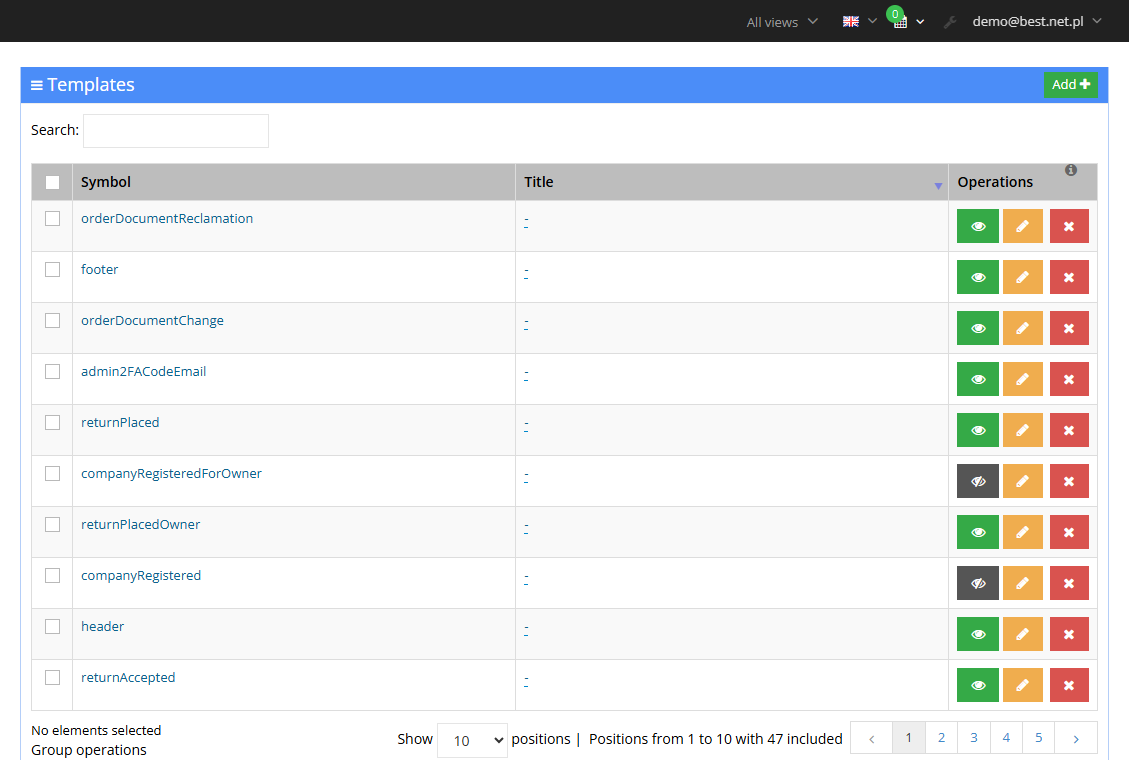
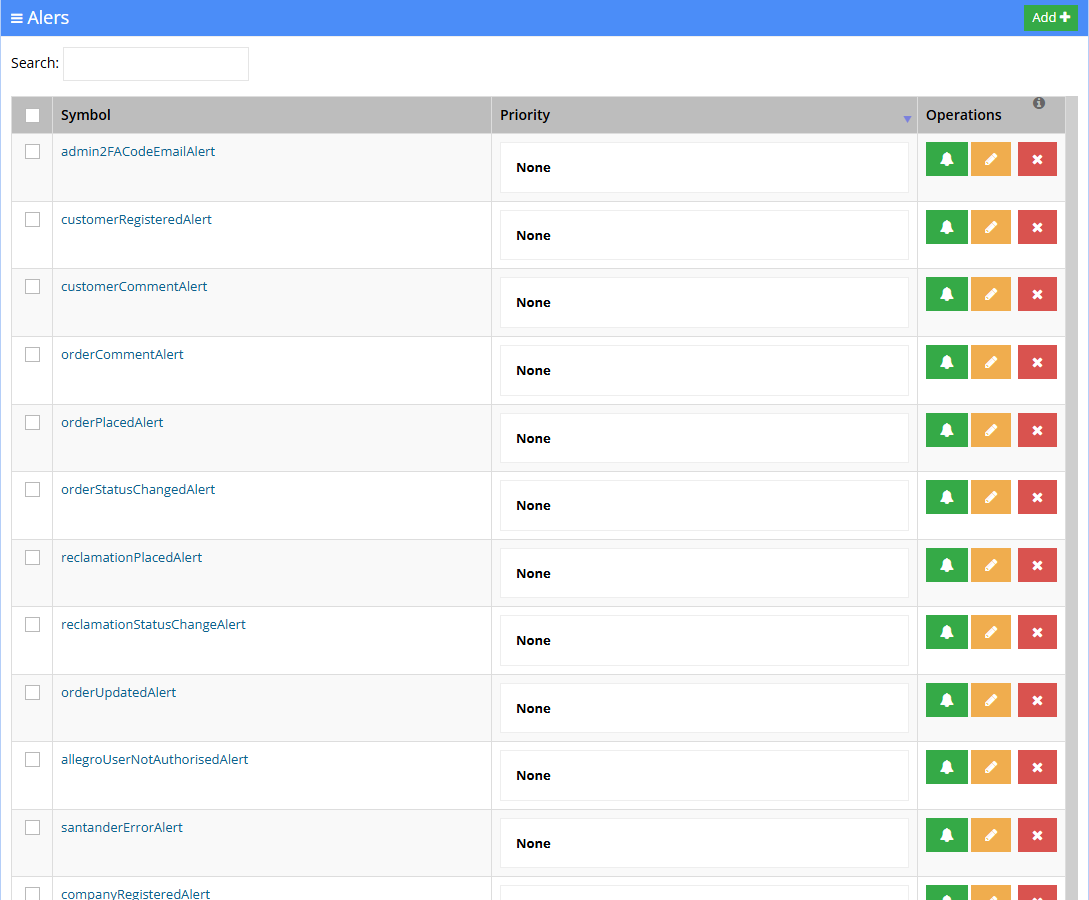
Screenshots from the Hummerce demo store panel.
¶ Template list
¶ Alert list
¶ How it works
¶ From event to a sent email
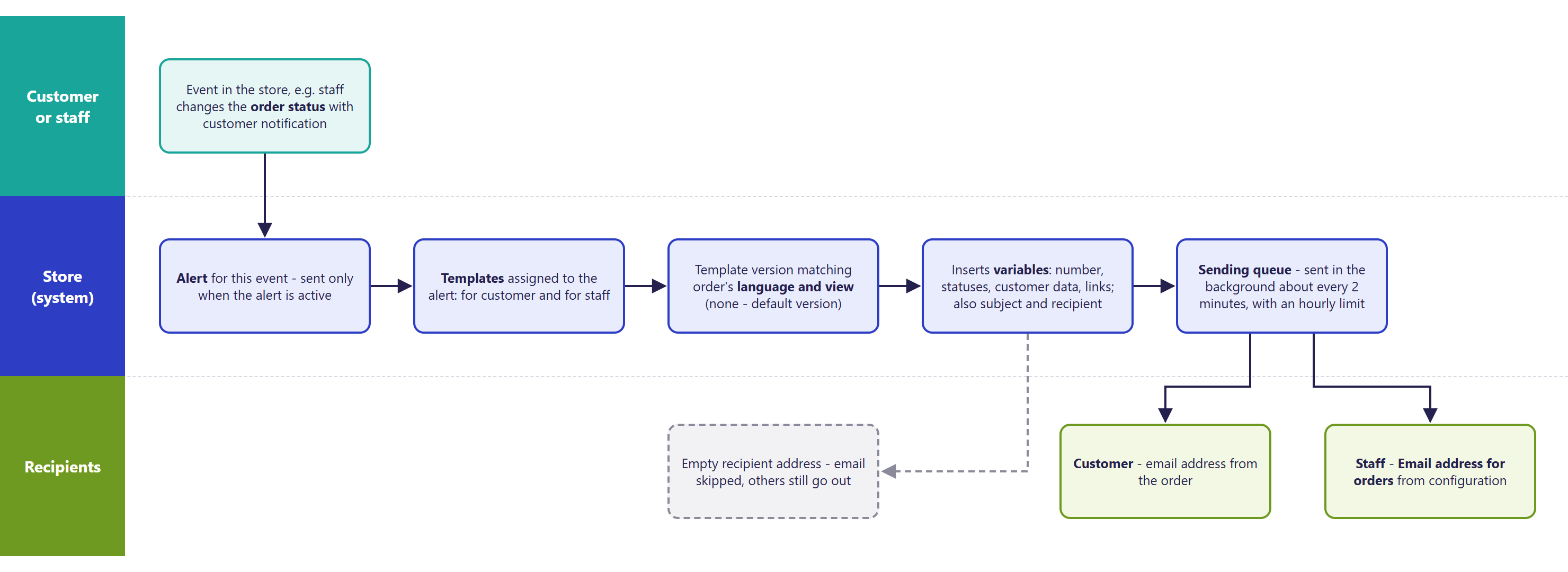
- An event (placing an order, a status change, registration, filing a return) triggers an alert with a fixed symbol. A disabled alert (Active = no) doesn't send any of its templates.
- An alert has a list of assigned templates - usually one for the customer and one for store staff. More can be added, e.g. a copy for the customer service team.
- A template with Display in web store = no is not sent - this turns off a single email without touching the alert.
- The email goes into a queue. Sending runs in the background about every 2 minutes, so an email goes out with a small delay. The queue sends emails in the order they were created.
- Mail server error - sending is retried. An error in the message itself (e.g. an invalid address) - the message is marked invalid and isn't retried, while the remaining emails go out normally.
- An address the mail server has repeatedly refused to deliver to is skipped on subsequent sends.
- The alert's sending history (recipient, date, whether sent, whether valid) is visible in the alert's Occurrences tab.
¶ Template elements
- Symbol - the identifier the store uses to call the template. Don't change it - the email will stop being sent.
- Display in web store - whether the template is used (yes / no).
- Notification type -
EMAILorPANEL(a panel notification);SMSappears when the store has the SMS gateway enabled. - Title - the email subject; separate for each language and, optionally, for other views (stores).
- Content (html) - the email content in HTML.
- Content (text) - a plain version for mail clients that don't display HTML.
- Recipient - an address or variable, e.g. customer data from the order, or the order email address from the configuration. Several addresses - comma-separated.
- Reply to - the address a customer's reply goes to.
- Name - the store name, in the standard templates.
- Sender - the email goes out from the Reply email address with the store name, unless the template has its own sender.
- The header and footer are shared across many emails (the
headerandfootertemplates) - a change in one place changes every email that includes them.
¶ Languages and views
- The title and content have a separate value for each store language. An email gets the version for the language and view the customer placed the order or created the account in.
- No version in a given language or view - the store sends the default version.
- The default content of the standard templates is in Polish and English. Another language (e.g. German) needs to be filled in during implementation.
¶ Variables and dynamic titles
- The subject, content and addresses can use store variables (e.g. store name, addresses from the configuration) and event-dependent variables, e.g. order number, customer data, the order's new and previous status, or a link to the order for the customer.
- Conditions and loops work in both the content and the subject - e.g. a different subject for a paid order, or a product list in the content.
- Example of a dynamic subject: "Anna, order status change no. 01349 in My Store. New status: In progress, previous: Placed" - the customer's name, order number and statuses are inserted automatically from variables.
- Shared elements (e.g. a footer) can be inserted into many templates in one edit - the store picks the right language version on its own.
¶ Store addresses
- Sender and staff addresses are set in Configuration -> Settings, group E-mails:
- Reply email address and "From:" field for reply emails - emails go out from this address,
- Email address for orders and "From:" field for order emails - order emails for staff arrive here,
- Contact email address and "From:" field for contact emails - contact forms and customer comments.
- Simply changing the address in the configuration works for templates whose Recipient refers to a configuration variable. A template with a hard-coded address needs a manual fix.
- Default customer notification - whether the customer notification option is checked by default when changing status in the panel. Without notification, no status-change email goes out, either to the customer or to staff.
¶ Test sending
- The panel has no "send test" button. A template is checked on a test order placed to your own email address - or by changing its status.
- The AI assistant (MCP) can re-trigger an email for an order or customer - the email goes to all of the alert's recipients, including store staff. Test on a test order and account.
- After changing a template, check the email in a few mail clients (e.g. Gmail, Outlook, phone) and in every store language.
¶ Payment reminder and review request
- The standard setup doesn't automatically send a reminder for an unpaid order or a review request after fulfillment.
- Such emails are prepared as an implementation extension (emails sent after a set time, for orders meeting given conditions, e.g. an unpaid online payment after 24 h).
- Review requests are also sent by external review services integrated with the store (Store reviews).
¶ Version
- From version 2.14 - editing emails in the panel.
- From version 2.24 - sending through alerts and a queue, notification types (email, panel, SMS).
- From version 2.29 - variables and conditions in email subjects (dynamic titles).
- From version 2.34 - emails without a valid recipient are skipped and don't block sending the rest; a new login-change confirmation template; sending emails via the AI assistant (MCP).
- From version 2.35 - return templates and the panel login code (2FA).
- Latest module changes: version 2.35.55.
¶ Dependencies
- A mail server (SMTP) and addresses in the E-mails group - configured when the store launches.
- Module emails work when the module is enabled: returns (Returns - withdrawal from the contract), company accounts and offers (B2B sales - overview), the panel login code (Panel and store security), Allegro (Allegro - direct integration), stock notifications (Stock notifications), the newsletter.
- SMS - a separate module (SMSAPI).
- Email content doesn't depend on the store's graphic template (BS5, BS4) - it's shared.
- Legal correctness of the content (seller data, consumer information) - the store's own responsibility.
¶ Implementation
- Works after updating - the standard templates and alerts install themselves, and content is changed in the panel. Development is needed in these cases:
- matching the email look to the store's branding (logo, colors, header, footer, product list layout),
- translating templates into another language (beyond Polish and English),
- a new email for an event that has no default template (e.g. a shipment number, a tracking link),
- time-delayed emails (payment reminder, review request) - an extension,
- when updating from a store older than 2.24 - moving custom emails onto alerts,
- testing on the test environment and production rollout.
- Minimum estimated time:
- content and subject changes in the panel - 0 h (done by the store on its own),
- customizing the look of the standard emails - from 4 h,
- another template language - from 3 h,
- a new email for an existing event - from 2 h.
- The time for a specific implementation depends on its scope - we quote it individually.
- What the time depends on:
- the number of emails and how customized their look is,
- the number of languages and views (stores),
- the number of the store's custom emails to move or fix,
- the store version - a store older than 2.34 needs an update first (quoted separately),
- emails dependent on integrations (ERP, couriers) - quoted separately.
¶ Limitations
- No preview or test send from the template editor - testing only on a test order or account.
- The editor is an HTML code field, with no visual editor - bigger look changes require HTML knowledge.
- The default content is in Polish and English; other languages must be translated. No translation - the customer gets the default version.
- The status-change and order-edit emails only go out when staff check the customer notification box - including the copy for staff.
- Emails about comments, order splitting, passwords, the newsletter and forms don't go through alerts: disabling the comment alert doesn't stop these emails, and their sending isn't visible in Occurrences. They're turned off with the template's Display in web store field.
- The shipment number email, tracking link and order link have no default template - they need to be prepared.
- No automatic time-delayed emails (payment reminder, review request, abandoned cart) in the standard setup.
- An email goes out with a delay of up to about 2 minutes (the queue).
- An invalid variable in a template (e.g. a typo) doesn't block saving - the result only shows up in the sent email.
- Changing a template's or alert's Symbol stops that email from being sent.
- The REST API doesn't support templates or alerts.
- We do not verify the configuration for legal compliance - email content (seller data, consumer information, marketing consents) is set by the store.
¶ Future development
- An email preview with data from a chosen order, and test sending from the editor.
- A visual email editor.
- Automatic time-delayed emails in the standard setup: payment reminder, review request, abandoned cart.
- Default templates for the shipment number and tracking link.
- Moving all emails (comments, password, newsletter) onto alerts - one place to enable them and see the sending history.
- Default template translations into further languages.
- Template support through the REST API.
¶ Frequently asked questions
Can the store change the content of an order email itself?
Yes. The content, subject and recipient are changed in the panel, separately for each language and view, with no request to a developer.
Can each store language have different email content?
Yes. Without its own version in a given language or view, the store sends the default version.
Can a single email be turned off without disabling the whole alert?
Yes, with the Display in web store field on the specific template - the other templates assigned to the alert keep working.
Does the store send a reminder for an unpaid order or a review request?
Not in the standard setup. Such time-delayed emails are prepared as an implementation extension.
How long does adding an email for a new event, e.g. a shipment number, take?
From 2 h - the template, attaching it to the alert, and testing.
Can a test email be sent directly from the template editor?
No. The panel has no test-send button - a template is checked on a test order or account, or through the AI assistant (MCP).
¶ Related
- Returns - withdrawal from the contract - dedicated return templates and alerts.
- B2B sales - overview - company registration and quote emails.
- Panel and store security - the panel login code email (2FA).
- message editor - store messages inserted into email content.
- On hummerce.com: Newsletter support (in Polish).
Want to see how email templates and alerts could work in your store? Contact the Hummerce team (in Polish).
¶ Configuration details
¶ Access in the admin panel
- Templates: Configuration -> Templates (Message template management) - a searchable list, editing, adding, a History tab of changes.
- Alerts: Configuration -> Alerts - Symbol, Active, Name, Priority, Assigned templates; Occurrences and History tabs.
- Panel configuration: Configuration -> Settings, group E-mails: addresses and "From:" fields, Default customer notification; the Email sending limit setting - emails per hour,
0- no limit.
¶ REST API and MCP
- MCP:
ec2_email_send- any email (subject, HTML or text content, copies) to an address, to a customer, or to the address on an order; sent immediately,ec2_email_send_order_notification- re-triggers an order email (placement, status change, update, shipment number) using the store's templates,ec2_email_send_customer_notification- a registration or account activation email using the store's templates.- Requires panel account permission to the Contact form module (AI assistant - MCP server).
- REST API: doesn't support templates or alerts (REST API).
¶ Store messages
View-dependent content is changed through multi-view parameters, and store messages inserted into emails - in the message editor.
¶ Parameters
¶ Email templates
The most important emails. The "staff" recipient defaults to the Email address for orders.
| Alert | Templates | Recipient | When |
|---|---|---|---|
orderPlacedAlert |
orderForCustomer, orderForOwner |
customer, staff | order placed |
orderStatusChangedAlert |
orderStatusChanged, orderStatusChangedForOwner |
customer, staff | order, payment or delivery status change with customer notification |
orderUpdatedAlert |
orderUpdate, orderUpdateForOwner |
customer, staff | order edited with customer notification |
customerRegisteredAlert |
customerRegistered, customerRegisteredForOwner |
customer, staff | account registration |
customerActivationAlert |
customerActivated |
customer | account activated by staff |
customerUnconfirmedLoginAssignedAlert |
unconfirmedLoginAssignedForCustomer |
new customer address | email (login) change - confirmation link |
returnPlaced, returnPlacedOwner |
returnPlaced, returnPlacedOwner |
customer, staff | return filed |
returnStatusUpdated, returnAccepted |
returnStatusUpdated, returnAccepted |
customer | return status change, return accepted |
admin2FACodeEmailAlert |
admin2FACodeEmail |
panel admin | panel login code (2FA email) |
| - | customerPasswordReminder |
customer | new password request - change link |
Templates with no alert (a dash in the first column) are sent directly - they're turned off with the Display in web store field.