¶ Company accounts - B2B account for multiple employees
A company account in Hummerce links the accounts of several employees of one company: shared prices, shared addresses, and order oversight through a company account manager. Built for stores selling to businesses - wholesalers, manufacturers, and stores with a separate B2B view.
As of Hummerce 2.30-2.35 (last changes to the module: 2.35.27), updated 2026-09-28.
¶ Benefits and use cases
- Multi-person company accounts without sharing one login between employees.
- Spending control on the company side - the manager sees who orders what and decides on employee orders (details: Approving company orders).
- One pricing policy for the whole company - a price list for products and deliveries assigned to the company, not to each employee separately.
- Shared company delivery addresses (e.g. branches, warehouses) available to all employees.
- One company view in the panel - store staff see the orders and customers of a given company in one place.
- Use cases: wholesalers, manufacturers and distributors, construction and installation trades, stores with a separate B2B view.
¶ What it looks like
Screenshots and a diagram from the Hummerce demo store (Bootstrap 5 template).
¶ Company account registration
¶ Company in the panel
¶ How it works
¶ Company account registration
- A company is a separate object in the store. Many customer accounts (employees) belong to one company, each with its own login.
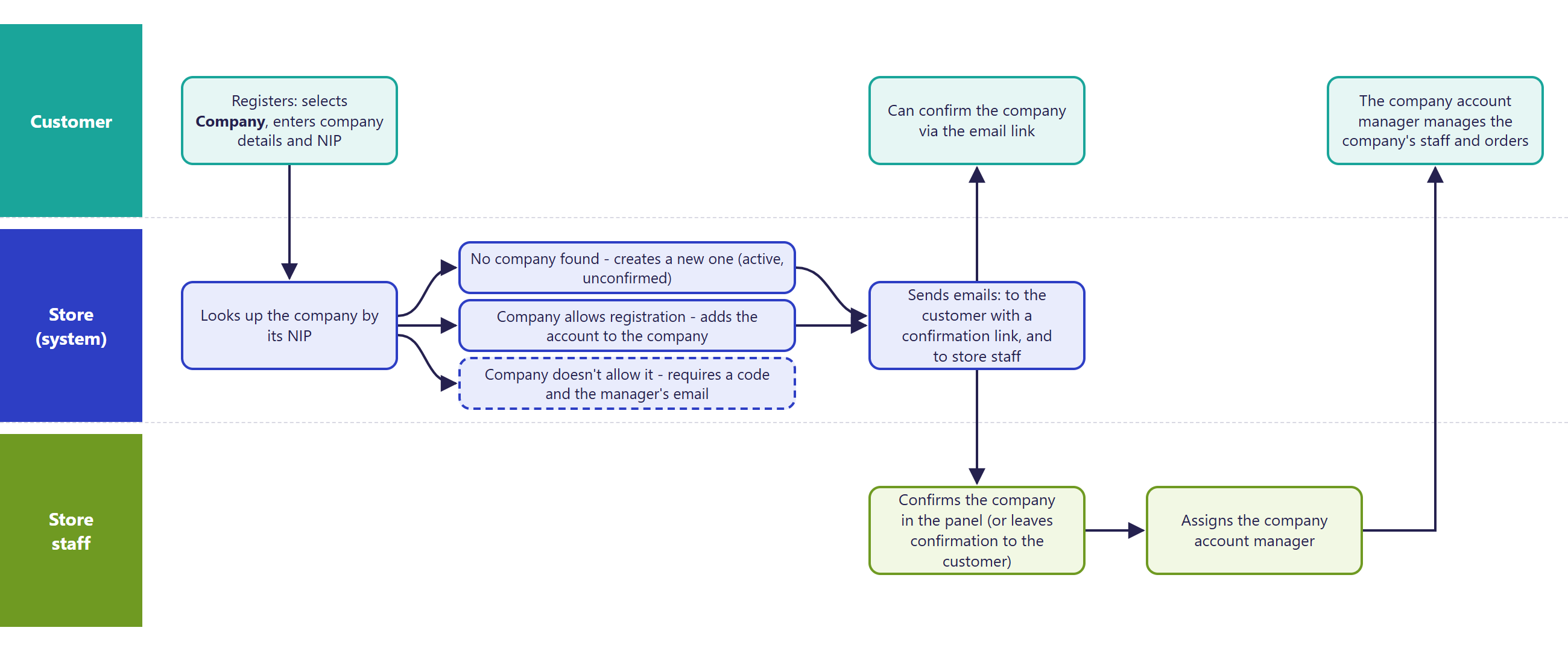
- Company registration uses the standard registration form: the customer selects "Company" or "Natural person" and enters the company's data with a tax ID (NIP). The form can fill in the company name and address from GUS (Company data from GUS and VIES verification).
- Joining a company that doesn't allow registration requires a code generated by the company's manager and their email address. The standard form templates don't have these fields - employees of such a company are added by the manager in the company account, or by store staff.
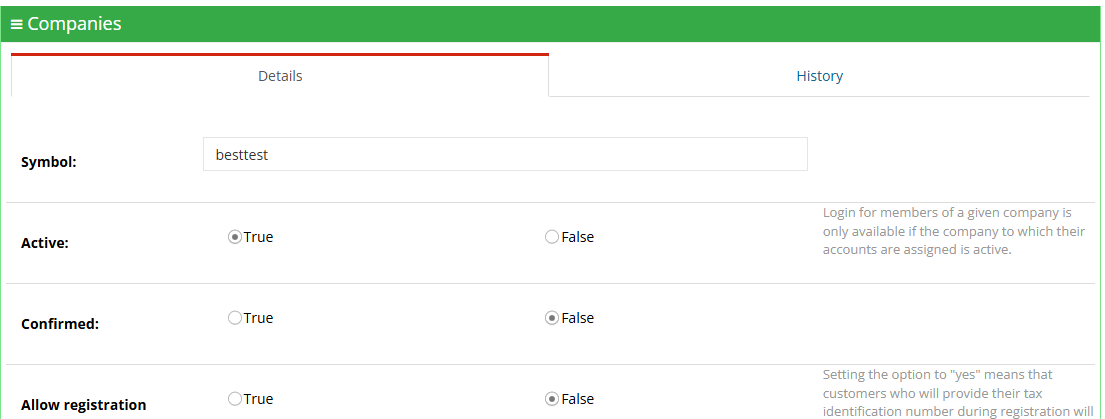
- A new company is active and unconfirmed by default. Members of an unconfirmed company can log in by default - the store can change this so login is only possible once the company is confirmed.
- Login for members of an inactive company is blocked.
¶ Roles in the company
- Two permission levels: the manager of the company account and the employee.
- Store staff assign the manager in the panel (the Manages the company account field in the customer's data). Company registration doesn't grant this role automatically.
- The company manager, from their customer account:
- sees the list of company employees, adds new accounts, blocks and unblocks employees,
- can log in as an employee (e.g. to finish their cart) and return to their own account,
- sees the orders, offers, and quotes of employees - approves and cancels their orders, and pays for them if the chosen payment method allows it (details: Approving company orders).
- An employee buys like a regular customer - the order is automatically assigned to their company.
¶ Company addresses
- The address book can hold company entries - visible to all employees of the company (Address book).
- A company entry is created and changed by store staff in the panel. An employee in the store only adds their own addresses.
- Deleting a company entry removes it for all employees of the company.
¶ Prices for the company
- A price list can be assigned to a company instead of a single customer - the price list price applies equally to all employees of the company (Price lists and individual prices).
- The delivery price list for companies works the same way - individual delivery prices for a specific company.
¶ Version
- Company accounts - from version 2.30, company registration in the registration form - from version 2.31, expanded company account in the store - version 2.35.
- Last changes to the module: version 2.35.27.
¶ Dependencies
- The Bootstrap 5 or Bootstrap 4 store template - both have company registration and company account views.
- Company price lists - the price list module (Price lists and individual prices); delivery price lists for companies - advanced delivery price lists.
- Shared company addresses - the new address book (Address book).
- Filling in company data by tax ID - the GUS module (Company data from GUS and VIES verification).
- Email notifications after company registration - active alerts and email templates.
- Sales terms for companies and counterparty verification rules - set by the store itself.
¶ Implementation
- Requires implementation - the module doesn't turn on by itself after an update. Scope:
- turning on the module and deciding whether company registration is open, and whether a company must be confirmed before login,
- moving the company fields into the registration form, validation rules for the tax ID and company name,
- email templates after company registration, confirmation and rejection pages for the company account,
- company registration error messages tailored to the store,
- optionally: price lists and delivery price lists for companies, company entries in the address book,
- translating messages, if the store runs in languages other than Polish,
- testing in a test environment and going live.
- Minimum estimated time:
- Bootstrap 5 template - from 8 h,
- Bootstrap 4 template - from 12 h.
- The time for a specific implementation depends on its scope - we quote it individually.
- What the time depends on:
- the store template - Bootstrap 5 needs the fewest adjustments, Bootstrap 4 more,
- how much the registration form and customer account are customized,
- joining a company with a code from the manager (fields in the form),
- the number of languages and email templates,
- the store version - a store on a version older than 2.35 needs an update first (quoted separately),
- additional requirements beyond the standard, e.g. passing companies to the ERP, custom roles in the company, purchasing limits (quoted separately, see B2B sales in Hummerce).
¶ Limitations
- Registration doesn't assign the company manager - store staff assign them in the panel. Until then, no one in the company manages the company account in the store.
- Two permission levels (manager and employee) - no custom roles and no spending limits.
- Joining a company without registration rights requires a code from the manager - there's no request to join with approval. The standard form templates don't have fields for the code.
- Company entries in the address book are only created by store staff in the panel.
- Some registration messages have Polish-only values - other languages need to be filled in in the message editor.
- REST API and MCP don't support companies - passing companies to the ERP requires a separate integration.
- We do not verify the configuration for legal compliance - sales terms for companies and counterparty verification rules are set by the store.
¶ Future development
- Custom roles in the company and purchasing limits (see also B2B sales in Hummerce).
- Automatically assigning the manager when a company registers.
- A request to join a company with approval by the manager.
- Shared company addresses managed by the manager in the store.
- Deliveries and payments available per company.
- Assigning a sales rep to a company and notifications for the company manager.
- Company support in REST API and MCP, and exchanging companies with the ERP.
¶ Frequently asked questions
Can one company account serve several employees?
Yes. Many customer accounts belong to one company, each with its own login, and the manager sees their orders and manages their accounts.
Who becomes the manager of a company account?
Company registration doesn't assign this role automatically - store staff assign it in the panel, in the customer's data.
Do company employees see the same prices?
Yes, if a price list is assigned to the company - it then applies equally to all employees.
Can a company have its own roles, e.g. an approver at several levels?
Not in the standard - the standard is two permission levels, manager and employee. Custom roles and purchasing limits are an individually implemented extension.
How long does implementing company accounts take?
From 8 h in the Bootstrap 5 template, from 12 h in the Bootstrap 4 template - the exact time depends on the implementation scope.
¶ Related
- Approving company orders - how the manager controls employee orders.
- B2B sales in Hummerce - the full journey of a business customer and individually implemented extensions.
- Price lists and individual prices, Address book, Company data from GUS and VIES verification.
- On hummerce.com: B2B platform (in Polish).
Want to see how company accounts could work in your store? Contact the Hummerce team (in Polish).
¶ Configuration details
¶ Access in the admin panel
- Companies in the panel: CRM -> Companies - list and editing of companies (company data, Active, Confirmed, Allow registration), the company's Customers and Orders tabs, change history.
- Customer in the panel: the Company and Manages the company account fields; a customer filter by company and by manager.
- Orders in the panel: a "Company" column on the orders list.
- Price lists: assigning a price list entry to a company (target Company) and a delivery price list for companies (Price lists and individual prices).
- Panel configuration:
- the E-mails group - Email subject after company registration, Email subject after company registration for store staff,
- company settings (company active / confirmed by default, login for members of an inactive / unconfirmed company).
- Customer account: the menu items "Company customers", "Company orders" (see Approving company orders), "Company offers", "Company quotes list" - for the company manager.
- REST API and MCP: no operations on companies. Customer MCP tools (e.g.
ec2_customers_details) show the company name from the customer's data (AI assistant - MCP server).
¶ Store messages
Company-dependent content is changed through properties (Properties and locations) and in the message editor. Default values are in Polish, and most keys also have an English version - exceptions described below.
Company registration:
| Key | Default value |
|---|---|
msg.editor.compayAccount.company |
Company |
msg.editor.compayAccount.naturalPerson |
Natural person |
msg.registration.companyData |
Company details |
msg.registration.commonData |
Common details |
msg.registration.customerData |
Customer details |
msg.profile.companyName |
Company name |
error.companyUnconfirmed.customer |
The company account has not been confirmed. Please click the link provided in the email you received after registration, or contact support for assistance. |
error.company.taxNumberCannotBeEmpty, taxNumberAlreadyExists, managerNotFound, hashInvalid |
content set during implementation |
error.companyAccountConfirmationError |
content set during implementation |
Company account:
| Key | Default value |
|---|---|
msg.profileMenu.company |
Company |
msg.profileMenu.companyCustomers |
Company customer |
msg.company.createCustomer |
Create customer |
msg.company.customerActive |
Active |
msg.company.companyMakeActive, companyMakeInactive |
Activate, Deactivate |
msg.company.customerLogin |
Log in as customer |
msg.company.customersList, customersNotFound |
Customers list, No customer found |
msg.company.operationNotAllowed |
No permission to perform this operation (when there's no companyManagementNotAllowed page) |
¶ Pages, contents and canvases
companyConfirmed- page shown after the company account is confirmed by the link from the email,companyUnconfirmed- page shown when confirmation failed,companyDenied- page shown after the company account is rejected,companyManagementNotAllowed- content shown when an employee tries to perform an operation reserved for the company manager (optional).
¶ Property locations
| Symbol | Object | Purpose |
|---|---|---|
companyShopRegister |
company | company fields in the registration form |
commonShopRegister |
customer and company | shared fields in the registration form |
customerShopRegister |
customer | personal fields in the registration form |
admin details, admin list |
company | company fields in editing and on the companies list in the panel |
orderAdminList |
order | "Company" column on the orders list |
¶ Parameters
| Symbol | Object | Label |
|---|---|---|
_companyName, _nip, _street, _streetNumber, _postcode, _city, _country |
company | company data |
_companyAccount |
customer | company account / natural person |
_companyFilter |
order | Company |
¶ Email templates
| Alert | Recipient | When |
|---|---|---|
companyRegistered |
customer registering the company | new company registration |
companyRegisteredForOwner |
store staff | new company registration |
Template variables: $company - the company, $companyManager - the customer setting up the company account, $companyUrlForAdmin - link to the company in the panel, $companyUrlForCustomer - link to managing the company account in the store, $companyAcceptUrl, $companyDenyUrl - links to confirm and reject the company account.