¶ Edrone - marketing automation integration
The Hummerce integration with Edrone sends this marketing automation system customer behavior in the store - page views, viewed products, cart contents - plus order data from the thank-you page. A newsletter subscription change made in Edrone (e.g. unsubscribing from an email) comes back to the store and updates the customer's consent. For stores that run email marketing and automation scenarios in Edrone.
As of Hummerce 2.34 (last module changes: 2.35.0), updated 2026-09-28.
¶ Benefits and use cases
- Edrone scenarios (abandoned cart, abandoned product, returning customer) get cart and viewed-product data without manually pasting tracking codes.
- Order data (number, value, coupon code, product list with categories) reaches Edrone right on the order thank-you page - no extra integration needed.
- A subscription change made in Edrone (e.g. unsubscribing from a received email) automatically updates the newsletter consent on the customer's store account.
- Newsletter consent status and customer group help segment customers in Edrone (e.g. wholesale customers, repeat customers).
- The store can share its product catalog with Edrone as an XML file, without a manual export.
¶ What it looks like
Screenshots from the Hummerce demo store panel.
¶ Configuration - consent and customer data
¶ How it works
¶ Tracking in the browser
- The Edrone script with an application identifier (App Id) runs on every store page. Without the identifier, the script doesn't display.
- The script passes the type of page view:
- product page - product ID and symbol, name, photo, address, main product category,
- add to cart - the same product data,
- order thank-you page - order number, value, coupon code, product list with categories,
- newsletter subscribe or unsubscribe confirmation - email address and subscription status,
- other pages (including category lists) - as a generic page view, without category data.
- For a logged-in customer, the script also passes email, first name, last name, phone, country, city, newsletter consent status and customer group (as a tag).
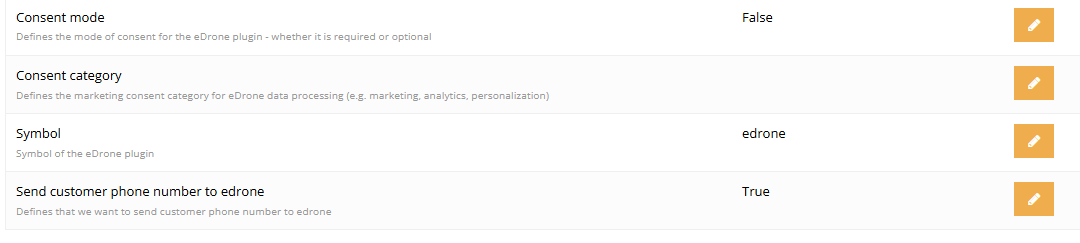
- The phone number can be switched off (Send customer phone number to edrone, on by default).
¶ Consent and cookies
- Consent mode (disabled by default) blocks the Edrone script until consent is given. The script is marked with a Marketing consent symbol (
edroneby default) and optionally a Consent category. - The script is started by a consent management tool (e.g. OneTrust, Cookiebot) once the customer consents in that category. Connecting the consent tool to the Edrone script is part of the implementation.
- Without consent mode, the script runs as soon as the page loads.
¶ From Edrone to the store
- When a customer changes their subscription in Edrone (e.g. unsubscribes from an email sent by Edrone), Edrone notifies the store. The store changes the newsletter consent on the customer's account.
- The store checks the notification's signature using the App secret - a notification without a valid signature is rejected.
- The notification address entered in Edrone: the store address with an ending for Edrone subscription updates.
¶ Product catalog
The store can share a product catalog file with Edrone (an XML feed in Edrone's format): symbol, name, address, price, availability, category, photo, description, manufacturer. The file is generated by the feeds module - see Automatic feed generation.
¶ Version
- Browser tracking (page views, products, cart, order, newsletter) - available since at least version 2.27.
- Consent mode and disabling phone number sending - since 2.32.
- Syncing subscription changes from Edrone back to the store - since 2.34.
- Last module changes: version 2.35.0.
¶ Dependencies
- An Edrone account with an application identifier (App Id) and key (App secret) - outside Hummerce, under Edrone's terms.
- The store's newsletter module - subscriptions, unsubscriptions and consent come from it.
- For consent mode - a consent management tool (e.g. OneTrust, Cookiebot), configured to run store scripts after consent - see Cookie Consent and Consent Mode Banner.
- For the product catalog - the feeds module.
- The store's notification address entered in Edrone - without it, subscription changes from Edrone don't come back to the store.
¶ Implementation
- Requires implementation - the module is enabled in the store configuration and needs Edrone account data. The BS5 and BS4 templates have ready-made places for the script (all pages, add to cart, thank-you page). Scope:
- enabling the module, entering App Id and App secret,
- entering the store's notification address in Edrone,
- consent mode: consent category and running the script through the consent tool,
- product catalog feed (optional),
- testing in the Edrone account: page views, cart, order, newsletter subscribe and unsubscribe, subscription changes from Edrone to the store.
- Minimum estimated time:
- BS5 template - from 6 h,
- BS4 template - from 6 h.
- The time for a specific implementation depends on its scope - we quote it individually.
- What the time depends on:
- consent mode and the consent tool (already in the store or to be implemented),
- custom product page, cart and order-flow views (the script needs access to product and order data),
- the store version - an update is quoted separately,
- the product feed and extra fields for Edrone (quoted separately).
¶ Limitations
- The integration doesn't show Edrone data in the store panel (campaign statistics, segments, email history) - these are only in Edrone.
- Only the newsletter subscription status comes back from Edrone to the store. A subscriber added in Edrone who doesn't exist in the store is not created in the store - the notification is rejected.
- The browser script always passes the order in Polish zloty (PLN) - in a multi-currency store, values in other currencies reach Edrone as PLN.
- Category lists aren't tracked as a category page view - Edrone gets them as a generic page view. The product page only passes the product's main category.
- Consent mode requires an external consent tool that runs blocked store scripts. The basic Hummerce cookie banner doesn't do this.
- We do not verify the configuration for legal compliance (GDPR, marketing consents, the store's terms of service and privacy policy, the data processing agreement with Edrone) - this is up to the store.
¶ Future development
- Sending orders, order cancellations and newsletter subscribe/unsubscribe events directly from the store server to Edrone - a complement to browser tracking for customers who blocked scripts or didn't consent to cookies. Extension in progress.
- Server-side sending of newsletter consent changes made in the panel, by import, and via the API.
- Tracking category list and search page views.
- Order currency in the browser script matching the store's currency.
- Creating subscribers added in Edrone within the store.
- A single panel view for the queue and errors of sending data to Edrone.
¶ Frequently asked questions
Does Edrone receive cart and viewed-product data automatically?
Yes. The browser script passes page views, cart additions and order data with no manual tracking code configuration.
Does unsubscribing from the newsletter in Edrone also unsubscribe the customer in the store?
Yes. The store receives a notification from Edrone and updates the newsletter consent on the customer's account.
Does the integration work without the customer's consent to cookies?
It depends on configuration. With consent mode enabled, the Edrone script waits for the customer's consent in the consent management tool; without consent mode, the script runs as soon as the page loads.
Does Edrone see orders and newsletter changes regardless of whether the customer blocked browser scripts?
Not fully yet. Currently, data is passed by the browser script. Sending data directly from the store server is an extension in progress.
How long does an Edrone integration take?
From 6 h - covers configuring the application data, notification address, consent mode and testing in the Edrone account.
Can the store share its full product catalog with Edrone?
Yes, as an XML file in Edrone's format, generated by the feeds module.
¶ Related
- Cookie Consent and Consent Mode Banner, Automatic feed generation, Discount coupons.
- B2C sales - marketing integrations support the retail customer's purchase path.
- Edrone on hummerce.com (in Polish).
Want to check how the Edrone integration could support your store's marketing? Contact the Hummerce team (in Polish).
¶ Configuration details
¶ Access in the admin panel
- Panel configuration: Configuration > Settings, group Edrone integration:
- App Id, App secret - application data from the Edrone panel,
- Trace URL - the tracking address passed to the script,
- Debug - prints Edrone data to the browser console (testing only),
- Remove the 'registered' tag when the user is not on the newsletter - No by default,
- Edrone API URL - the default Edrone API address for sending tracking data,
- Consent mode, Consent category, Marketing consent symbol - disabled by default, symbol "edrone",
- Send customer phone number to edrone - Yes by default.
¶ REST API and MCP
- REST API: no dedicated operations for Edrone.
- MCP: general module configuration tools (
ec2_module_describe,ec2_config_search,ec2_config_get,ec2_config_set); they require an account with admin permissions - see AI assistant - MCP server.
¶ Store messages
The module has no store-facing texts or email templates - Edrone sends the emails.
¶ Parameters
The module has no additional item or customer parameters visible in the standard configuration beyond the settings in the Edrone integration group.