¶ Coupons - discount codes for store customers
Coupons in Hummerce are codes that the customer enters in the cart (or receives in a link) to get a discount on the order. The store sets up a campaign with conditions and a type of discount, then issues any number of codes for it - one shared code for all customers, or thousands of one-time codes. Coupons support mailings, newsletters, seasonal campaigns, customer compensation, and partner collaborations.
As of Hummerce 2.35 (latest module changes: 2.35.67), updated 2026-10-07.
¶ Benefits and use cases
- One place to configure - a coupon campaign uses the same conditions and discount calculators as Cart promotions, so fewer configuration mistakes.
- Codes for a single person without creating an account - a coupon bound to an email address protects against the code being passed on (complaints, apologies, offers for regular customers, also for guests without an account).
- An exception in a campaign without creating a new promotion - one code with a higher discount (e.g. for a partner or influencer) in the same campaign.
- Control over campaign costs - a usage limit on a single code and on the whole campaign, e.g. "the first 500 orders".
- A coupon that doesn't combine with another promotion (e.g. free delivery or a sale) - without manual monitoring.
- Bulk codes for mailings, flyers, and partners - generating thousands of unique codes from a pattern, exporting to CSV, codes without easily confused characters.
- Codes in links (mailing, SMS, social media) - the customer doesn't have to retype anything.
- Quick management of the code list - search by code, a filter by campaign, and enabling or disabling many coupons at once (from version 2.35.67).
- Coupon handling through the AI assistant (MCP) - checking what a code gives and why it didn't work, and creating new codes.
¶ What it looks like
Screenshots from the Hummerce demo store (test data).
¶ Generating codes
¶ How it works
¶ Campaign and coupons
- A campaign is a cart promotion marked as a Coupon promotion. Such a promotion only applies when the customer enters a code from that campaign.
- A campaign sets: the type and amount of discount (Price calculator), for whom (logged-in or guest customers, customer criteria), on which products, cart conditions (minimum or maximum value, quantity, delivery or payment method), duration, the views (stores) it works in, whether it connects with further promotions, and the combined usage limit for all the campaign's coupons.
- A coupon is a code assigned to one campaign. A coupon can additionally set: Enabled, Maximum number of uses, its own Start date and End date (a coupon can be valid longer than the campaign), Customer (a coupon for only one, logged-in customer), Bound email, Discount calculator override, Excluded cart promotions, and Activation via URL.
- Active is a status calculated automatically: whether the coupon is enabled, within its validity period, and hasn't exceeded its limit. The system refreshes it every hour by default, and it can be refreshed immediately on the coupon.
¶ Types of discounts
- The discount is calculated by the calculator chosen in the campaign. For coupon campaigns, these are mainly useful: Percentage item discount (with an optional minimum price and unit limit), Amount items discount, Amount order discount, Fixed price, and delivery/payment calculators, e.g. Fixed delivery price.
- In the Discount calculator override on a coupon, only four calculators can be chosen: amount order discount, amount items discount, percentage item discount, fixed price. Parameters entered on the coupon replace the campaign's parameters.
- With a discount limited to part of the units (e.g. 1 of 2), the cart total is correct, and the unit price of the line shows the average.
- Stores with dedicated discounts may need an additional calculator - added like for other cart promotions.
¶ Limits and validity
- The limit on a coupon decides how many times a given code can be used (e.g.
1for a one-time code,10000for a campaign code). The limit on the campaign restricts the total number of uses across all its codes (e.g. "the first 500 orders"). - Usage is counted at the moment the order is placed, not when the code is entered in the cart.
- Validity is set by the coupon's dates, or by the campaign's dates if the coupon has none. Hours and days of the week are set on the campaign.
- By default, the cart can hold one coupon - a new code replaces the previous one. Support for multiple coupons at once is enabled in technical configuration.
- A "once per customer" coupon (the same code used only once from a given email address) is an additional module supporting both coupon mechanisms, enabled as part of an implementation.
¶ Coupon with a bound email address
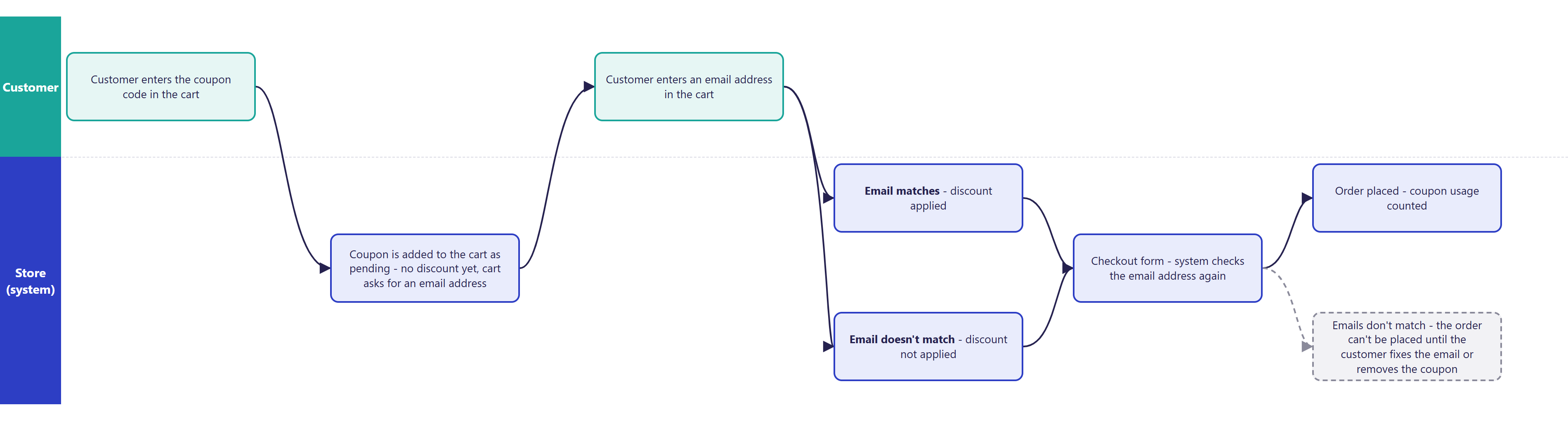
- A coupon with a Bound email only applies when the address on the order matches the address assigned to the coupon (case-insensitive).
- For a logged-in customer, the system compares the address with the account's address. For a guest, the coupon goes into the cart as pending, without a discount, and the cart asks for the address - once a matching address is entered, the discount is applied.
- When placing the order, the system checks the address again. If the customer changes the email in the order form, the order can't be placed until they correct the address or remove the coupon.
- The address bound to the coupon is partly masked in the cart.
¶ Generating codes
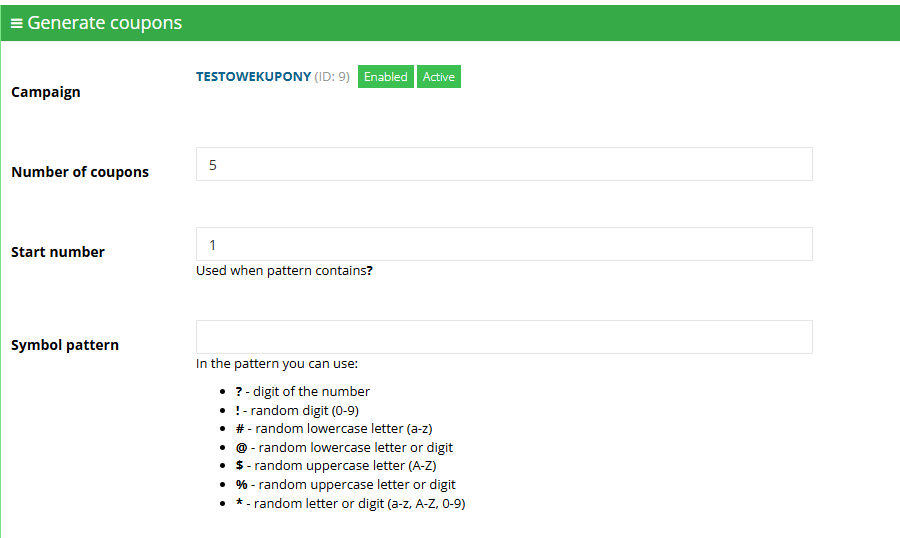
- Codes can be added one by one or generated in a batch from a pattern. A batch gets shared settings: usage limit, dates, bound email, calculator override.
- Special characters in the pattern:
?- next digit of the sequence number (e.g.SUMMER-???->SUMMER-001,SUMMER-002),!- random digit,#- random lowercase letter,@- random lowercase letter or digit,$- random uppercase letter,%- random uppercase letter or digit,*- random letter or digit. - The generator skips easily confused characters (by default
0 O o I l 1), so codes can be safely copied from paper or read out over the phone. - Codes are unique across the whole store. If the pattern doesn't give enough combinations, generation ends with a conflict message - the random part of the pattern then needs to be lengthened.
- A campaign's list of codes can be exported to a CSV file, e.g. for a mailing.
¶ Activating a coupon via link
- A coupon with Activation via URL enabled can be shared as a link, e.g.
https://shop.com/?coupon=SUMMER-001. The parameter works on any page of the store, including a link to a shared cart. - If a coupon from a link can't be used yet (e.g. an empty cart), the store remembers it and tries to add it on subsequent cart changes.
¶ Combining with promotions
- A coupon campaign is one of the cart promotions and goes through them in the same order as the others.
- Connects with further promotions on the campaign decides whether promotions further down the list still apply after the coupon's discount.
- Excluded cart promotions on a coupon disables the listed promotions while the coupon is in the cart - e.g. a -20% code doesn't combine with free delivery. An empty list on the coupon means the campaign's exclusion list applies.
- Prices in the cart first go through price list rules and product promotions, and only then through cart promotions, including coupons.
¶ Coupon list in the panel
- Coupons of the new mechanism have their own item in the panel menu - Coupons. The old lists carry the suffix "(inactive)" in the menu (Voucher codes list (inactive), Voucher campaigns (inactive)), and there is a button to switch between the old and new coupon lists.
- The list can be narrowed with the Filter by promotion filter (campaign), the Enabled and Active filters, and a search box by coupon code - case does not matter. The Cart Promotion column shows each coupon's campaign.
- The Export CSV export uses the same search phrase, so the file contains only the coupons visible after searching.
- The bulk operation changes the Enabled setting on the selected coupons (enabling or disabling). Other fields - e.g. dates - are not changed this way.
¶ Reporting - which orders used a coupon
- The order saves the coupons used: the order details in the panel show the "Coupon symbol" parameter.
- A coupon shows its Number of uses, and the campaign shows the total number of uses of its coupons.
- Orders with a given code can be filtered on the order list using the
_couponsparameter condition in the list criteria - together with the other filters (status, dates, payment). - Entering a code in the cart and using it are recorded in the store's history.
¶ Old and new mechanism
| Old mechanism (coupon campaigns) | New mechanism | |
|---|---|---|
| Conditions | its own set: categories, items, customer, order value, dates | full cart promotion conditions (customers, items, cart, delivery, payment, time, views) |
| Discount | percentage or amount, delivery discount | cart promotion calculators, discount override on the coupon |
| Inheritance | unfilled coupon data taken from the campaign - easy to get out of sync | the coupon inherits from the campaign, overriding only what's set on the coupon |
| Binding to email | no | yes |
| Excluding promotions via the coupon | no | yes |
| Newsletter coupon | yes | no (see below) |
- Both mechanisms can run in the store at the same time. After a code is entered, the store first looks for it among the old coupons, then among the new ones.
- The new mechanism doesn't migrate old coupons automatically. Migrating means creating matching coupon campaigns and generating new codes (or finishing old campaigns in the old mechanism).
- The old module can only be disabled once no active campaign or newsletter coupon uses it anymore.
¶ Newsletter signup coupon
- After confirming a newsletter signup, the store generates a unique code for the customer, assigns it to the customer's account, and emails it.
- The code is created in the campaign set in the configuration, according to a pattern, with a default usage limit and number of valid days.
- A customer who unsubscribes and resubscribes doesn't get a new code - they get the same one again, or a message that the promotion has already been used.
- The newsletter coupon works on the old coupon mechanism - a store using it must have the old module and an old-type campaign enabled.
¶ Version
- Since version 2.34 - older versions only have the old coupon mechanism.
- Since version 2.35, the old mechanism is disabled in the standard configuration of new stores. Stores that use it can keep using it, in parallel with the new one.
- The new mechanism's coupon list in its own menu, with a promotion filter, search and a bulk Enabled operation: from version 2.35.67.
- Latest module changes: version 2.35.67.
¶ Dependencies
- Cart promotions - a coupon campaign is a cart promotion.
- Store template: BS5 has full support, including coupons with a bound email. BS4 and older - entering codes works, but the cart doesn't show a coupon pending an email or a field to provide it (requires a template extension).
- "Once per customer" coupon - an additional module, enabled during implementation.
- Newsletter coupon - the old coupon module and newsletter signup with confirmation.
- Promotion terms and discount-combining rules - set by the store on its own.
¶ Implementation
- Works after the update to version 2.34 or newer - the module enables itself, and campaigns are created in the panel with no development work. Work is needed in these cases:
- migrating from the old mechanism: recreating active campaigns and codes in the new mechanism, testing, disabling the old module,
- coupons with a bound email in the BS4 template or older - extending the cart with an address field and a pending-coupon notice,
- "once per customer" coupon - enabling the module and parameters,
- a dedicated type of discount - a new calculator,
- testing on the test environment and production launch.
- Minimum estimated time:
- BS5 template, a store without old coupons - 0 h (campaign configuration on its own) or from 1 h, when we prepare the first campaign and testing,
- migrating from the old mechanism - from 4 h,
- coupons with a bound email in the BS4 template - from 6 h,
- "once per customer" coupon - from 2 h.
- The time for a specific implementation depends on its scope - we quote it individually.
- What the time depends on: the store template (BS5 support is complete, BS4 and older need the cart extended), the number and complexity of active old-type campaigns to recreate, individual changes to coupon handling, the number of languages for messages, the store's version (older than 2.34 needs updating first - quoted separately), dedicated discount calculators (quoted separately).
¶ Limitations
- Old coupons don't migrate to the new mechanism automatically - active campaigns have to be recreated or finished in the old mechanism.
- The newsletter coupon only works on the old coupon mechanism.
- One person can sign up for the newsletter several times from different email addresses and get several codes - there's no safeguard against repeated registration.
- Full support for coupons with a bound email only exists in the BS5 template. In BS4 and older, without a template extension, such a coupon goes into the cart without a discount and without an explanation why.
- One coupon in the cart by default - a new code replaces the previous one.
- Only four discount calculators can be overridden on a coupon; delivery and payment discounts can't be overridden on a single coupon (they're set in the campaign).
- Hours and days of the week are only set on the campaign, not on a single coupon.
- With a discount on part of the units, the cart line's unit price is an average - the total is correct.
- The "once per customer" coupon recognizes the customer by email address, so a different address lets the code be used again.
- The Active status refreshes every hour by default - a coupon that has become invalid may briefly still show as active on the list (in the cart, validity is checked in real time).
- No coupon usage report in the panel (order value, discount granted from the code) - the number of uses, the coupon's order parameter, and the order list filter are available.
- No import of codes from a file (e.g. codes from a partner).
- The bulk operation on the coupon list only changes the Enabled setting - dates, usage limits and other fields cannot be changed on many coupons at once.
- The AI assistant can't create a campaign or a code in the old mechanism - only a new code in an existing campaign.
- We do not verify the configuration for legal compliance - promotion terms, discount-combining rules, and disclosing the lowest price are set by the store.
¶ Future development
- A newsletter coupon in the new mechanism, with extended code generation rules.
- Coupon usage reports (number of orders, value, discount granted) in the panel or in Google Looker Studio.
- Importing codes from an external source.
- Further bulk operations on the coupon list (e.g. changing dates and usage limits).
- A discount down to a set price level and other new calculators.
- A tool migrating old campaigns and coupons to the new mechanism.
- Hours and days of the week on a single coupon.
¶ Frequently asked questions
Can a discount coupon in Hummerce be bound to one customer or email address?
Yes. A coupon with the Bound email setting only applies to an order with that address, including for a guest without an account. A coupon can also be assigned separately to one, logged-in customer.
Does a discount coupon combine with other promotions in the cart?
It depends on the campaign's and coupon's settings. The campaign decides whether it connects with further promotions, and the coupon can additionally exclude selected cart promotions.
Do old discount coupons migrate automatically to the new mechanism?
No. Active campaigns and codes have to be recreated in the new mechanism or finished in the old one - there's no automatic migration.
How long does launching discount coupons in Hummerce take?
In the BS5 template, without old coupons - 0 h, campaign configuration on its own, or from 1 h when we prepare the first campaign. Migrating from the old mechanism - from 4 h.
Does the newsletter signup coupon work in the new coupon mechanism?
No. The newsletter coupon only works on the old mechanism - to use it, the store must have the old coupon module enabled.
Can thousands of unique discount codes be generated at once for a mailing?
Yes. The generator creates codes from a pattern with special characters (sequence number, random digits and letters), skips easily confused characters, and lets you export the list to CSV.
¶ Related
- Cart promotions - the conditions and calculators coupon campaigns are based on.
- AI assistant - MCP server - handling and creating coupons through the AI assistant.
- B2C selling - overview - where coupons fit in the retail customer's purchase path.
- On hummerce.com: Coupons (in Polish), Newsletter handling (in Polish).
Want to see how coupons could work in your store? Book a free demo (in Polish).
¶ Configuration details
¶ Access in the admin panel
- Campaigns: Promotion -> Cart promotions, Coupon promotions filter. On the campaign: Coupon promotion, Maximum number of coupon uses in the promotion, Price calculator, Coupons (Preview coupons, Generate coupons).
- Campaign coupons: the Coupons menu (from 2.35.67) - a list with Filter by promotion, Enabled and Active filters, a Cart Promotion column, a search box by code, a bulk change of Enabled, Add coupon, Generate coupons, Export CSV and a link to the old list (Voucher codes list (inactive)).
- Coupon: Coupon code, Promotional campaign, Enabled, Active (with an Activate coupon refresh), Maximum number of uses, Number of uses, Customer, Bound email, Start date, End date, Excluded cart promotions, Discount calculator override, Activation via URL.
- Panel configuration: the New discount coupons group - Allow coupon activation via URL (yes by default), Enable automatic validation (yes by default), Validation interval (seconds) (3600 by default), Excluded characters (
0OoIl1by default), Allow multiple coupons (technical setting, no by default). - Newsletter coupon configuration: the Newsletter coupon group - Newsletter campaign symbol, Newsletter coupon template, Default maximum number of uses (1 by default), Default number of valid days (30 by default).
- Order: the "Coupon symbol" parameter in the order and order line details.
- History: "Selected coupon" and "Used coupon" entries.
¶ REST API and MCP
- MCP (AI assistant - MCP server):
ec2_promotions_list(cart promotions, including coupon ones),ec2_coupons_list(coupons from both mechanisms, marked with their origin),ec2_coupon_details(what a code gives and which conditions it must meet),ec2_coupons_create(a new code in an existing campaign - new mechanism only). Requires the same coupon permissions as in the panel.
¶ Store messages
New-mechanism messages have default values in Polish and English. Bound-email coupon messages have no German version. They're changed in the message editor.
¶ Code rejection
| Key | Default value |
|---|---|
coupon.invalid |
Invalid coupon code. |
coupon.disabled |
This coupon is disabled. |
coupon.inactive |
This coupon is not active. |
coupon.notYetValid |
This coupon is not yet valid. |
coupon.expired |
This coupon has expired. |
coupon.notValidHour |
This coupon is not valid at this time of day. |
coupon.notValidDay |
This coupon is not valid today. |
coupon.usageLimitExceeded |
This coupon has been used the maximum number of times. |
coupon.noPromotion |
This coupon has no associated promotion. |
coupon.promotionDisabled |
The promotion for this coupon is disabled. |
coupon.promotionInactive |
The promotion for this coupon is not active. |
coupon.promotionNotYetValid |
The promotion for this coupon has not started yet. |
coupon.promotionExpired |
The promotion for this coupon has expired. |
error.coupon.customerInvalid |
This coupon({0}) is for another customer. You can not use it. |
error.coupon.minOrderValue |
This coupon has a minimum value of {1}. Your order has a value of {0}. |
error.coupon.maxOrderValue |
This coupon has a maximum value of {1}. Your order has a value of {0}. |
error.coupon.noCoupon |
Invalid coupon code -{0}. |
error.coupon.empty |
Please give coupon code. |
error.coupon.oneTime |
You cannot use this voucher({0}) again. Voucher was deleted from your order! |
¶ Coupon with a bound email
| Key | Default value |
|---|---|
info.coupon.emailPending |
Coupon ({0}) is on hold - it is bound to a specific email address. Enter that address in the cart panel on the left to unlock the discount. |
error.coupon.emailMismatchOnOrder |
Coupon ({0}) is bound to a specific email address. The address you have entered on the order does not match - please correct the email or remove the coupon before submitting the order. |
msg.cart.couponEmail.title |
Coupon email address |
msg.cart.couponEmail.apply |
Save email |
msg.cart.couponEmail.matched |
Email verified - the coupon will be applied. |
msg.cart.couponEmail.mismatch |
The current email does not match the address the coupon is bound to. |
¶ Email templates
| Template | Recipient | When |
|---|---|---|
couponForNewsletter |
customer | newsletter signup confirmation - a new code, or a reminder of the code |
Variables in the template: $couponSymbol (coupon code), $customer (customer), $isFirstTime (whether the code was just generated), $isCouponStillValid (whether the code can still be used).