¶ PayPal - online payment with automatic order confirmation
PayPal in Hummerce is an online payment method where the customer pays with a PayPal account on PayPal's site, and the store automatically collects the funds and marks the order as paid - even if the customer never returns to the store after paying. The integration uses the current PayPal interface (Orders API v2), so it doesn't depend on the older mechanism PayPal is phasing out. It's a standard payment method for stores selling abroad.
As of Hummerce 2.34 (latest module changes: 2.34.39), updated 2026-09-28.
¶ Benefits and use cases
- Fewer orders "stuck" as unpaid - the store collects funds itself for payments approved by the customer, even when the customer didn't return to the store.
- Less manual checking in the PayPal panel to see if the customer paid - the store's status is reconciled with PayPal automatically.
- Abandoned payments end as an error after 3 hours - staff know which orders need contact or cancellation.
- The customer pays in the order's currency - convenient for multi-currency stores selling abroad.
- The PayPal page shows the store's brand name and the customer's language.
- Compliant with PayPal's current integration method - no risk of payments breaking once PayPal retires the old mechanism.
- Detailed log of communication with PayPal - faster resolution of payment disputes.
¶ How it works
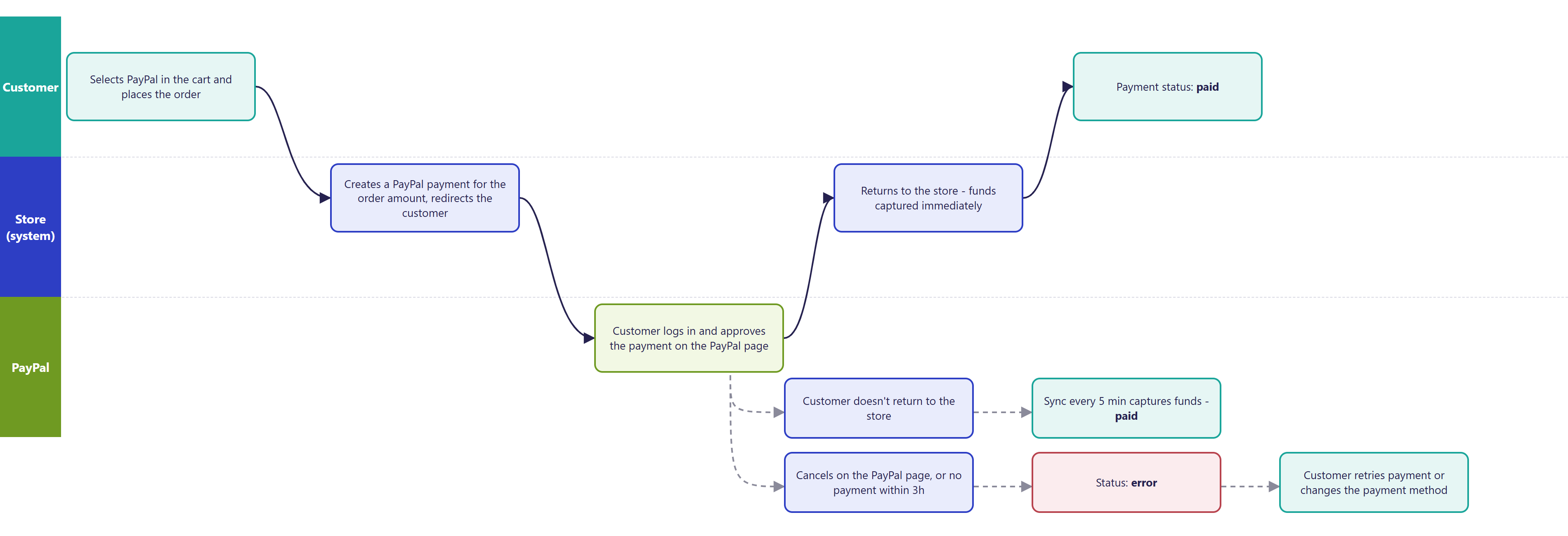
- The customer selects PayPal in the cart and places the order. The store creates a PayPal payment for the order amount in its currency and redirects the customer to PayPal's site after a few seconds.
- On PayPal's site, the customer logs in and approves the payment. The PayPal page is shown in the order's language if that language has a PayPal code assigned. Otherwise - in English.
- Funds are collected immediately after approval - there is no separate authorization and later capture.
- After returning to the store, the customer sees the order confirmation page with the payment status.
- Payment status in the store:
- pending - from placing the order until funds are collected,
- paid - funds collected,
- canceled - PayPal canceled the payment,
- error - PayPal rejected collecting the funds, or the payment wasn't completed within 3 hours.
- Background synchronization - every 5 minutes the store checks all still-pending payments with PayPal:
- a payment approved by the customer but not yet collected (e.g. the customer closed the browser before returning to the store) - the store collects the funds itself and marks the payment as paid,
- a payment paid in PayPal but not marked in the store - it gets marked as paid,
- a payment not completed within 3 hours of placing the order - it gets marked as an error.
- If the customer cancels the payment on PayPal's site, they return to the store's order error page. The payment still waits until the end of the 3-hour window (the customer can still pay), then gets marked as an error.
- After a failed payment, the customer can retry it or switch the payment method - according to the payment retry and change settings (Payments).
- On the order page, the customer has a "Check payment status" button - it shows the current status without reloading the whole page.
¶ Payment flow
¶ Migrating from the old integration
- The old integration (configured with the PayPal account's email address) stays in the platform - stores using it keep working unchanged until they migrate.
- Orders paid through the old integration don't change.
- Migration requires implementation (see Implementation) and the store preparing an app in the PayPal Developer panel - the account's email address alone is no longer enough.
- The character encoding setting in the PayPal profile, required by the old integration, is no longer needed.
- We recommend migrating - PayPal is retiring the mechanism the old integration relies on.
¶ Version
- Since version 2.34 - older versions only have the previous integration (configured with the PayPal account's email address).
- Latest module changes: version 2.34.39 (unchanged since the start of the 2.35 line).
¶ Dependencies
- The store's PayPal business account. The store sets up and verifies the account on its own.
- An app in the PayPal Developer panel (PayPal Developer, REST API apps section). The store provides from it:
- Client ID and Client Secret for the production (Live) environment,
- optionally Client ID and Client Secret for the test (Sandbox) environment - for testing before launch.
- Credentials are shared through a secure channel, not in the task description.
- The store's currencies must be supported by PayPal and enabled on the store's PayPal account.
- A "PayPal" payment on the store's payment list, linked to deliveries (Delivery methods - overview).
- Store terms of service with information about PayPal payment - updated by the store.
¶ Implementation
- Requires implementation - the module doesn't enable itself after an update. Scope:
- enabling the module in the store configuration (also when migrating from the old integration),
- entering the PayPal app data, brand name, return and cancel addresses, and PayPal page languages,
- creating or switching the PayPal payment on the payment list and linking it to deliveries,
- testing the payment in PayPal's test environment (paying, canceling, not returning to the store),
- switching to the production environment and a control payment.
- Minimum estimated time:
- BS5 template - from 3 h,
- BS4 template - from 3 h (the redirect page exists in both templates).
- The time for a specific implementation depends on its scope - we quote it individually.
- What the time depends on:
- whether the store provides the full set of data right away (test and production) - missing test data extends testing,
- the number of currencies and languages to check,
- matching the look of the redirect page and messages to the store,
- the store's version - a store older than 2.34 needs updating first (quoted separately).
¶ Limitations
- No refunds from the store panel - refunds (full and partial) are done in the PayPal panel, and the status in the store is set manually.
- Only a single capture of the full amount - no authorization with later capture, no partial payments, subscriptions or recurring payments.
- Only the amount and currency reach PayPal - no order number, description, or product list. In the PayPal panel, the transaction is matched to the order by amount, date, and PayPal payment ID.
- The store doesn't use PayPal notifications (webhooks) - status updates on the customer's return and through synchronization every 5 minutes.
- A payment not completed within 3 hours is marked as an error - the order isn't canceled automatically, staff decide.
- The PayPal page language must be assigned to each store language - without it, the PayPal page shows in English.
- The default Polish messages on the redirect page have no Polish diacritics - worth correcting in the message editor.
- One PayPal account per store.
- PayPal fees and commissions, account limits, and customer disputes (chargebacks) are handled by the store in PayPal.
- We do not verify the task for legal compliance - terms of service, payment information, and obligations to PayPal are the store's responsibility.
¶ Future development
- Payment refunds (full and partial) from the store panel, linked to the Returns module.
- Support for PayPal notifications (webhooks) - instant status change without waiting for synchronization.
- Passing the order number, description, and product list to PayPal.
- A PayPal button and express checkout directly in the cart (PayPal Checkout, Pay Later).
- Card payment without a PayPal account on PayPal's site.
- Support for currencies without a fractional part.
- Automatic cancellation or a reminder for an order with a failed PayPal payment.
¶ Frequently asked questions
Does the customer have to return to the store for the order to be marked as paid?
No. The store synchronizes the payment status with PayPal every 5 minutes and collects funds automatically, even if the customer closes the browser after approving the payment.
Can I refund a PayPal payment from the store panel?
No. Refunds (full and partial) are done in the PayPal panel, and the status in the store has to be set manually.
How long does implementing PayPal payment take?
From 3 h - for both the BS5 and BS4 templates. Time increases when the redirect page's look needs adjusting, or extra currencies and languages need checking.
Does PayPal support installment payments or subscriptions?
No. The integration captures the full order amount in a single payment - no authorization with later capture and no recurring payments.
Does the old PayPal integration (email address) still work?
Yes, it stays in the platform and stores can keep using it unchanged - but PayPal is retiring the mechanism it relies on, so we recommend switching to the current integration.
Does PayPal work for multi-currency stores?
Yes, as long as the store's currencies are supported by PayPal and enabled on the store's PayPal account.
¶ Related
- Payments - overview - configuration of other payment methods and linking them to deliveries.
- Returns - withdrawal from the contract
- InPost Pay - another online payment available in the Hummerce standard.
- On hummerce.com: B2C platform (in Polish), PayPal integration (in Polish).
Want to see how PayPal payment could work in your store? Book a free demo (in Polish).
¶ Configuration details
¶ Access in the admin panel
- Panel configuration: Configuration -> Settings, PayPal group:
- Client ID, Client Secret - PayPal app data,
- Environment - Test (Sandbox) or Production; test by default, must be switched before launch,
- Brand name - the store's name on the PayPal page; "Shop" by default, to be changed,
- Return URL from PayPal - return address after payment (store address +
/do/paypalReturn), - Cancel URL from PayPal - return address after canceling (store address +
/do/orderError).
- Technical settings in the same group: Sync interval (min) (5 by default), Verbose logging, Connection timeout (ms), Number of retries.
- Payment list: Configuration -> Payments - the PayPal payment with the PayPal online payment type; also success, error, and warning descriptions, and payment retry/change settings.
- Order in the panel: the Payments tab - payment attempts, their statuses, and the last status read from PayPal.
- Background task: "PayPal payment synchronization".
¶ Store messages
The redirect page texts are changed in the message editor. Success, error, and warning descriptions after payment are set on the PayPal payment in the payment list (Payments). Default values are in Polish (without Polish diacritics) and in English.
¶ PayPal redirect page
| Key | Default value |
|---|---|
payment.msg.onlinePayments.paypal.info |
In a moment you will be redirected to the PayPal site to complete the payment. |
payment.msg.onlinePayments.paypal.submit |
Pay with PayPal |
payment.msg.onlinePayments.paypal.autoRedirect |
You will be redirected automatically in 3 seconds... |
¶ Checking payment status - shared across online payments
| Key | Default value |
|---|---|
msg.orderInfo.payment.checkStatus.btn |
Check payment status |
msg.orderInfo.payment.checkStatus.checking |
Checking |
msg.orderInfo.payment.checkStatus.noChange |
Payment status has not changed. Please try again in a moment or contact customer service. |