¶ Delivery methods - pricing, couriers and tracking
Delivery methods in Hummerce cover everything that decides how an order gets delivered: which options the customer sees, how much they pay, when delivery is free, which payments they pair with, which countries you ship to, and how the shipment reaches the courier and the customer. One standard mechanism, configured in the panel, handles pricing, free shipping thresholds and courier integrations without a developer needed for every price list change.
As of Hummerce 2.35 (latest module changes: 2.35.55), updated 2026-09-28.
¶ Benefits and use cases
- Full control over delivery cost with no developer: store staff change the price, free shipping threshold, order and visibility themselves.
- A free shipping threshold with a "you're X short" progress bar increases average cart value.
- Threshold and zone pricing (postal code, country) - e.g. a higher price for islands or mountain regions, a lower one for larger orders.
- Individual delivery terms for wholesale customers and companies (B2B) - a separate price list, deliveries limited to selected customer groups.
- Oversized and heavy items don't end up going to a parcel locker - delivery groups and weight ranges hide methods that don't fit.
- Cross-border sales with deliveries and prices per country.
- Less shipping work: labels, tracking numbers, handover protocols and customer emails are created automatically after a status change.
- Fewer "where's my parcel" questions - a tracking link in the email and automatic delivery statuses.
¶ What it looks like
Screenshots from the Hummerce demo store (BS5 template).
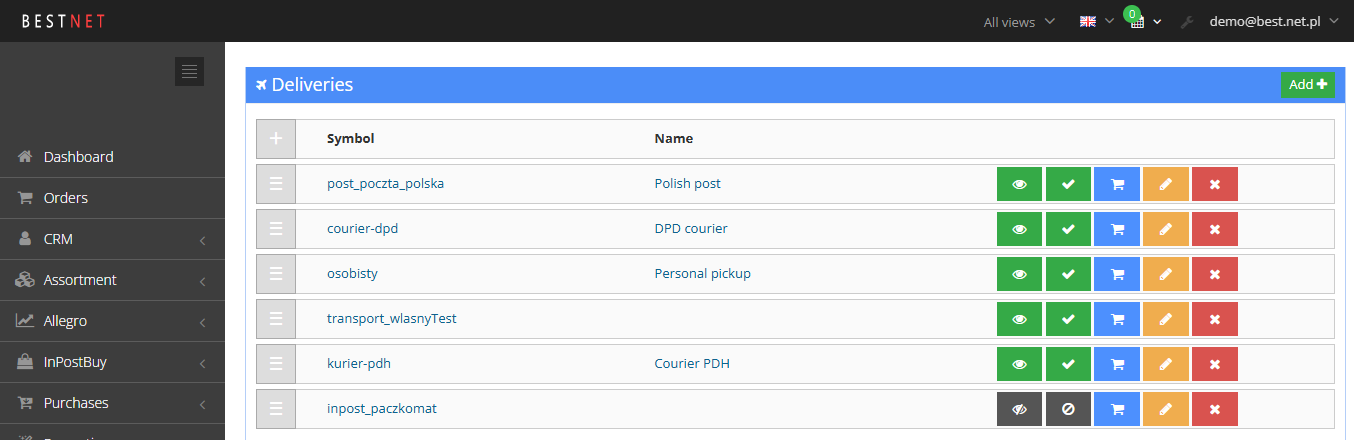
¶ Delivery list in the panel
¶ Editing a delivery method

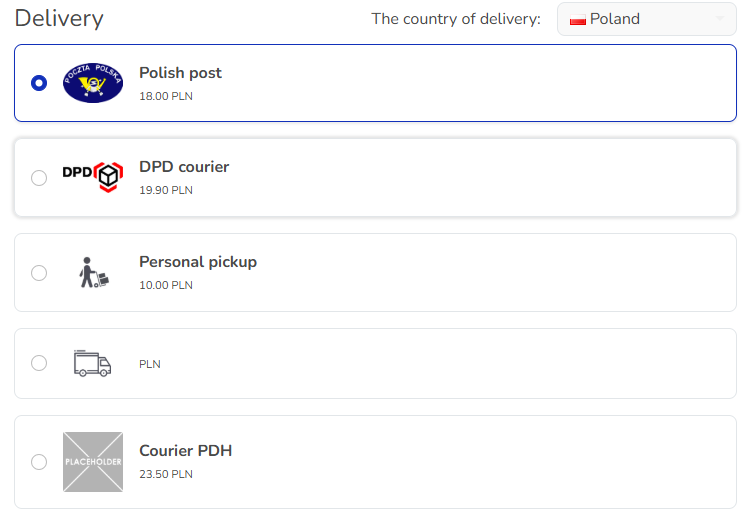
¶ Choosing a delivery method in the cart
¶ How it works
¶ Delivery method
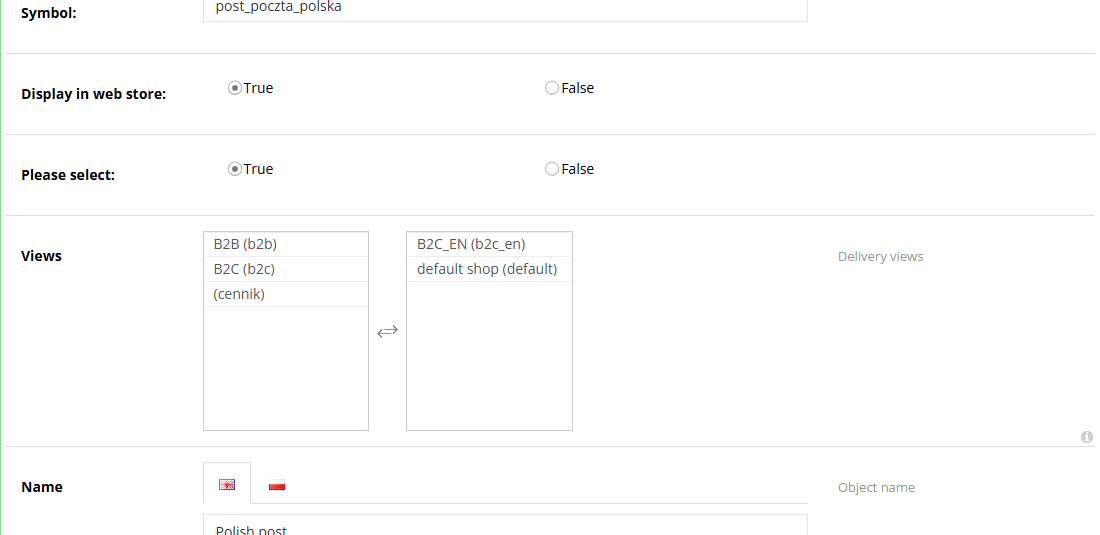
- A delivery method is an entry on the Configuration -> Deliveries list. It has a symbol (unique, no spaces or Polish diacritics), a customer-facing name and description, a price, a threshold price, possible payments and an image (logo).
- Two independent toggles:
- Display in web store - whether the customer sees the delivery method on the cart list,
- Selectable - whether the delivery method can be used in an order at all. An inactive delivery method won't go through, even if it's visible.
- The order on the panel list is the order in the cart. Delivery methods can be grouped: a parent delivery method with child delivery methods (e.g. one courier with domestic and international variants).
- A delivery method already used in an order can't be deleted - it's disabled instead (Selectable: No).
- Additional description - text shown next to the price when the delivery method is paid.
- The name, description and prices can be set separately for each language and store view.
¶ Default delivery method and remembered choice
- The customer sees the delivery method and payment pre-selected in the cart in this order:
- the one last chosen in this browser,
- the one remembered on the logged-in customer's account (from a previous order),
- the one set as Default delivery and Default payment in the store configuration,
- when no default is set - the first active and visible one on the list.
- The default delivery method and payment must form an allowed pair - otherwise the store changes one of them automatically.
¶ Delivery pricing
- Price - the base delivery price. An empty field means free delivery.
- Threshold price - the value of items in the cart above which delivery is free:
- only the value of the items counts, not the delivery or payment cost,
- the threshold must be exceeded (a cart equal to the threshold still pays),
- a value of
0is ignored - it doesn't mean "always free", - the same mechanism works for payments (e.g. free cash-on-delivery above an amount).
- In the BS5 template, the cart shows a bar: "Add items worth... and we'll deliver your order for free!" with the missing amount.
- Cart promotions can additionally lower or fix the delivery price (e.g. a coupon discount on delivery, a fixed delivery price for selected items) - Cart promotions, Coupons.
¶ Delivery price lists
- An add-on module (requires activation). It lets you set a different price for the same delivery method for different recipients: Configuration -> List of delivery price lists.
- An entry in the price list applies to one delivery method and one currency; it can be assigned to a specific customer or company. It has a list of prices, and each price can have conditions:
- Minimum order value - the price applies from this value of items,
- the delivery country,
- the postal code - the first characters of the code (1 or 2 characters, e.g. zone
6or60).
- The store picks the best-matching price: first a matching country and 2-character code, then 1 character, then just the country; among the matches, the one with the highest value threshold the cart has exceeded. This lets you build thresholds ("up to PLN 200 - PLN 15, from PLN 200 - PLN 9, from PLN 500 - PLN 0") and price zones.
- Automatically created price lists:
- Customer delivery price list - individual prices for logged-in customers,
- Company delivery price list - prices for company accounts (requires the Companies module).
- A logged-in customer with no entry in the customer price list gets the price from the company price list, if they belong to a company.
¶ Delivery availability conditions
A delivery method is only shown when it meets its conditions. The conditions are cumulative.
| Condition | How it works | Requires |
|---|---|---|
| Views | the delivery method is only available in selected store views (e.g. separate B2C and B2B stores, separate domains) | a store with multiple views (Views) |
| Country - Possible countries | the delivery method is only available for the selected delivery countries | country selection (see "Cross-border delivery" below) |
| Item groups - Delivery groups | an item has an assigned delivery group (e.g. "parcel", "oversized", "pallet"); the cart shows delivery methods for the largest group in the cart | the delivery groups module |
| Weight - Weight from / Weight to | the delivery method is only shown when the cart's total weight falls within the range | the delivery groups module and weight calculator, weight set on items |
| Customers - Available to customers | the delivery method is only for customers meeting the criteria (e.g. group, account type) | the delivery groups module with Use criteria enabled |
| Not logged in - For not logged in customers | checked = the delivery method is unavailable to a customer who isn't logged in | same as above |
- Delivery groups are a list in the panel, Delivery groups; each group has a Delivery group size. An item with no group is treated as belonging to the smallest group. When the customer removes the item from the largest group from the cart, the delivery list updates itself.
- With the weight filter active, a delivery method without Weight from and Weight to filled in isn't shown.
- The same customer conditions (Available to customers, For not logged in customers) also apply to payments.
¶ Linking deliveries with payments
- In the delivery method's edit screen, the Possible payments field determines which payments can be used with that delivery method. On the payment side, the Possible deliveries field shows the result of this configuration.
- In the cart, after choosing a delivery method, the customer only sees matching payments (and vice versa).
- When the selected pair isn't allowed (e.g. after a configuration or country change), the store automatically switches the payment or delivery method to an allowed one.
- The pair is also affected by payment settings: minimum and maximum order value, views, customer availability - Payments overview.
- A payment marked as cash-on-delivery is passed to couriers that support it (the COD amount appears on the label).
¶ Cross-border delivery and country selection
- Each delivery method has an assigned list of countries (Possible countries), e.g. a domestic courier - Poland, an international courier - EU countries.
- In the cart, the customer picks the Delivery country, and the delivery list narrows down to methods that support that country. The choice is remembered in the browser for a year.
- When the selected delivery method doesn't support the new country, the store picks a matching one itself - first among child delivery methods of the same parent, then from the whole list.
- Delivery countries can also switch the store view (e.g. a separate currency and prices for the chosen country) - an implementation setting.
- Delivery prices for different countries: separate delivery methods with their own price, or delivery price lists with a country condition.
- Items that can't be shipped to the selected country are flagged with the message "Some items cannot be shipped to the selected country."
¶ Personal pickup and pickup points
- Personal pickup is a regular delivery method, usually with a price of
0, an address and pickup hours in the description, and cash-on-delivery excluded from Possible payments. Full description: Personal pickup. - Courier pickup points:
- InPost parcel lockers and points - the customer picks a point on the map in the cart, it's saved to the order and remembered on the customer's account,
- Poczta Polska (the Polish national postal operator) and Orlen Paczka points - as part of the integration with these carriers.
- The delivery status "Ready for pickup" lets you inform the customer that the order is waiting at the store or pickup point.
¶ Couriers
- Courier integrations pass shipment data to the carrier, retrieve the label and tracking number, and - for some integrations - delivery statuses.
- By default, the shipment is created with the courier after the delivery status changes to "ready to ship." The integration works for a delivery method with the symbol assigned to that courier (e.g.
dpd,dhl24). - On an error (e.g. an incomplete address), the information appears in the order details; after fixing the data, the shipment can be sent again.
| Courier | What the integration does | Description |
|---|---|---|
| InPost (parcel lockers, courier) | choosing a parcel locker on the map, creating shipments, labels, tracking number, automatic delivery statuses, cash on delivery and insurance | - |
| DPD | creating shipments, labels (PDF, label printer), tracking number, a handover protocol for the courier from the order list, resending, several services (e.g. DPD 12:30) | DPD |
| DHL (DHL24) | creating shipments, labels, tracking number, add-on services (insurance, evening and Saturday delivery), reading the shipped and delivered status | - |
| UPS | creating shipments, labels, waybill number, cash on delivery | UPS - configuration |
| Other carriers | GLS, Poczta Polska, DB Schenker, Orlen Paczka - scope depends on the integration, quoted at implementation | - |
- Mapping store delivery methods to Allegro delivery methods: Allegro API. Payment with InPost delivery in one step: InPost Pay.
¶ Tracking numbers and tracking
- The waybill number is saved on the order (the "Waybill number" parameter) - automatically by the courier integration, or manually by staff. One order can have several numbers (several parcels).
- For couriers with link support (InPost, DPD, Poczta Polska), the store creates the tracking link itself, saves it on the order, and can send the customer an email with the link.
- Automatic shipment statuses: every few minutes, the store polls the carrier and sets the order's delivery status (in transit, ready for pickup, delivered, returned to sender). The delivery method's edit screen has a Delivery tracking API field - currently InPost. DHL24 reads shipped and delivered statuses on its own.
- Optionally, marking the delivery as delivered can automatically finish the order.
- Delivery set through shipment tracking also starts the return period - Returns - withdrawal from the contract.
¶ Version
- Delivery methods, pricing, free delivery above an amount and linking with payments - in all versions of the platform.
- Extensions added later:
- advanced delivery price lists (order value, country, postal code) - from version 2.27, the company price list - from 2.31,
- restricting delivery methods by cart weight range - from version 2.29,
- automatic shipment status polling - from version 2.30,
- shipment tracking links saved on the order and sent to the customer - from version 2.32,
- managing delivery methods through the AI assistant (MCP) - from version 2.35.
- Latest module changes: version 2.35.55.
¶ Dependencies
- Payments configured in Configuration -> Payments - without them, an order with delivery can't be placed (Payments overview).
- Contracts with carriers and access data for their systems (login, password, key) - the store arranges these on its own.
- Weight on items - for the weight filter and for shipment weights with couriers.
- The company price list - B2B sales overview.
- Multiple views - Views.
- Store template: in BS5, country selection, the InPost point map and the free-shipping bar are ready-made; older templates need adjustments.
- Terms of service with delivery methods and costs - kept up to date by the store.
¶ Implementation
- Works after an update - delivery methods, pricing, the threshold price, possible payments and views. Store staff do the configuration in the panel.
- Requires implementation - add-on modules and integrations. Scope:
- enabling the module (delivery price lists, delivery groups and weight, country selection and cross-border delivery),
- filling in data: groups and weights on items, price lists, delivery countries,
- courier integration: configuring access data and sender data, assigning delivery methods, testing on the carrier's test environment, email templates with the number and tracking link,
- adjusting the cart in the store template, if the store isn't running on BS5,
- testing and production rollout.
- Minimum estimated time:
- configuring delivery methods in the panel for you (no modules) - from 1 h,
- delivery price lists with thresholds and zones - from 4 h,
- delivery groups and weight ranges - from 4 h (not including filling in item data),
- country selection and cross-border delivery - BS5 template from 2 h, BS4 template from 4 h,
- one courier integration - from 4 h, InPost with a point map in the BS4 template - from 8 h.
- The time for a specific implementation depends on its scope - we quote it individually.
- What the time depends on:
- the store template - BS5 has cart elements ready-made, BS4 and older need adjustments,
- the number of delivery methods, countries, currencies and views,
- the number of carriers and add-on services (cash on delivery, insurance, several sender accounts),
- how customized the cart and emails are,
- the store version - an older version needs an update first (quoted separately),
- integration with an ERP or warehouse system for shipping (quoted separately).
¶ Limitations
- The threshold price is based on the value of items, not the order value with delivery, and only as a single amount - multi-step thresholds need delivery price lists.
- The delivery price doesn't depend on weight or the number of parcels by itself - weight can only hide a delivery method (via the weight range). Weight-based pricing needs separate delivery methods for weight brackets.
- Delivery price lists require a country and postal code in the order form; postal code zones only support the first 1 or 2 characters.
- Delivery groups, weight ranges and customer criteria only work once the delivery groups module is enabled - they aren't standard fields.
- The weight filter requires weight on every item; an item without weight throws off the calculation.
- Possible payments is only set on the delivery side - on the payment side, the field is read-only.
- The list of delivery countries doesn't change prices or currency on its own - that needs separate delivery methods, price lists or views.
- Courier integrations require a contract with the carrier; shipments created from the store aren't always visible in the carrier's own panel (e.g. DPD).
- Automatic shipment statuses are currently available for InPost (and, to a limited extent, DHL24); for other couriers, the delivery status is set by staff or an external system.
- Personal pickup has no dedicated support for store points in the standard setup (hours, time slot booking, choosing a location) - the point description is plain text.
- No management of delivery methods and price lists through the REST API; through MCP, only name, visibility, activity, order and deletion (not prices or payment links).
- The "Possible countries" field label ships in English - it can be changed in the parameters.
- We do not verify the configuration for legal compliance - delivery cost and timeline information in the terms of service and the cart is set by the store.
¶ Future development
- Delivery pricing calculated from the cart's weight and size (without separate delivery methods per bracket).
- Automatic shipment statuses for DPD, DHL, UPS and GLS.
- Map-based pickup point selection for further carriers (DPD Pickup, Orlen Paczka, Poczta Polska) in a single widget.
- Personal pickup at multiple store locations, with location and time slot selection.
- Managing delivery prices and payment links through the API and MCP.
- A report on delivery cost and methods (share, average cart value, the impact of the free shipping threshold) in Google Looker Studio.
¶ Frequently asked questions
Can the free shipping threshold be set without a developer's help?
Yes. The threshold price above which delivery is free is set in the delivery method's edit screen in the panel.
Can I have different delivery prices for retail and business (B2B) customers?
Yes, through delivery price lists - a separate price list for customers and for companies, with value thresholds, country and postal code.
Does the store create shipments with the courier and generate labels on its own?
Yes, for the supported integrations (InPost, DPD, DHL24, UPS) - after the delivery status changes to "ready to ship."
Does the customer see a shipment tracking link?
Yes, for couriers with link support (InPost, DPD, Poczta Polska) - the link is saved on the order and can be emailed to the customer.
How long does implementing one courier integration take?
From 4 h; InPost with a point map in the BS4 template - from 8 h. Configuring delivery methods alone in the panel, without add-on modules - from 1 h.
Can a delivery method be available only to selected customers or views?
Yes, through availability conditions: views, country, delivery group, cart weight range and customer criteria.
¶ Related
- Payments overview - linking deliveries with payments.
- B2B sales overview - delivery price lists for companies.
- Views - several stores in one panel - delivery methods available only in selected views.
- InPost Pay - payment and InPost delivery in one step.
- On hummerce.com: Integrations (in Polish), Delivery calendar (in Polish), InPost integration (in Polish), DPD integration (in Polish), DHL integration (in Polish), UPS integration (in Polish).
Want to see how deliveries could work in your store? Contact the Hummerce team (in Polish).
¶ Configuration details
¶ Access in the admin panel
- Delivery list: Configuration -> Deliveries - adding, editing, order (drag and drop), parent and child delivery methods, the list of orders with a given delivery method.
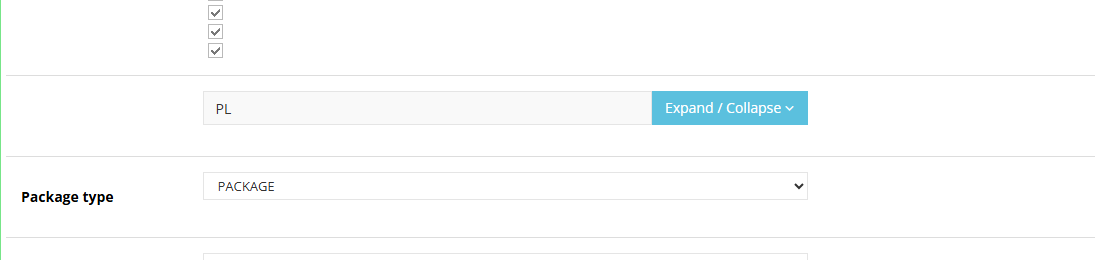
- Editing a delivery method: Display in web store, Selectable, Views, Name, Description, Additional description, Price, Threshold price, Possible payments, Small image; depending on the modules, also Possible countries, Delivery groups, Weight from, Weight to, Available to customers, For not logged in customers, Delivery tracking API, InPost delivery, InPost: Insurance.
- Price lists: List of delivery price lists - price lists, entries (delivery method, customer or company, currency), prices with conditions, bulk price changes.
- Delivery groups: the Delivery groups list (name, Delivery group size); the "Delivery group" parameter on the item.
- Panel configuration:
- Default delivery, Default payment,
- Delivery groups group: Use criteria,
- Remembering delivery and payment group: Deliveries always expanded, Deliveries expanded on first choice, Payments always expanded, Payments expanded on first choice,
- Orders group: Shipment tracking, Days to track shipment (default 30), Possible order statuses (for shipment tracking), Possible order delivery statuses (for shipment tracking), Automatically set order status to finished when delivery status changes to "delivered" (off by default),
- courier groups: InPost integration, InPostShipX, DPD2, DHL24, ups - access data, sender data, test mode, label format.
- Order: the "Waybill number" parameter, the tracking link, delivery status, courier integration errors; on the order list, a filter by delivery method and delivery status.
¶ REST API and MCP
- REST API: the order contains the delivery method, delivery status and delivery cost; the delivery status can be changed by updating the order (REST API). The API doesn't let you manage delivery methods or price lists.
- MCP:
ec2_delivery_methods(list of delivery methods),ec2_delivery_create,ec2_delivery_update(name, visibility, activity),ec2_delivery_move(order),ec2_delivery_delete(only delivery methods with no orders). Changes require delivery permissions and an admin account. Shipment status on orders:ec2_orders_status,ec2_orders_update_status.
¶ Store messages
Delivery method names, descriptions and prices are changed in the delivery method's edit screen, separately for each language. Cart messages - in the message editor; email templates - in the message templates; properties and locations - in properties and locations. Default values are in Polish and English. Courier integration messages (e.g. choosing a parcel locker) - on the courier pages.
¶ Cart - delivery, country, free delivery
| Key | Default value |
|---|---|
msg.delivery.change |
Change delivery type |
msg.delivery.cantSend |
Some items can't be sent to the chosen country |
msg.chooseCountry.countries |
The country of delivery |
msg.cartFreeDeliveryMessage.message1 |
Spend another |
msg.cartFreeDeliveryMessage.message2 |
to receive a free delivery for your order! |
msg.cartFreeDeliveryMessage.isFree |
Free delivery! |
¶ Parameters
| Symbol | Object | Label |
|---|---|---|
_price |
delivery | Price |
_borderPrice |
delivery | Threshold price |
_additionalDescription |
delivery | Additional description |
_possiblePayments |
delivery | Possible payments |
_possibleDeliveryCountries |
delivery | Possible countries |
_deliveryGroups |
delivery | Delivery groups |
_deliveryWeightMin, _deliveryWeightMax |
delivery | Weight from, Weight to |
_customerCriteria |
delivery, payment | Available to customers |
_notForNotLoggedCustomer |
delivery, payment | For not logged in customers |
_trackingApiType |
delivery | Delivery tracking API |
_deliveryGroup |
item | Delivery group |
_orderValue |
delivery price list price | Minimum order value |
_waybill |
order | Waybill number |
_waybillTrackingUrl |
order | Waybill Tracking URL |
_customersDelivery |
customer | Delivery last chosen by the customer |
¶ Email templates
| Alert | Recipient | When |
|---|---|---|
trackingUrlForOrderCreated |
customer | the shipment tracking link is saved on the order |
trackingUrlForPackageCreated |
customer | the tracking link is saved for a single parcel |
Variables in templates: $order - the order (in the order alert), $package - the parcel (in the parcel alert), $trackingUrlList - the list of tracking links.