¶ Cart promotions - discounts based on the cart
Cart promotions in Hummerce are rules that calculate a discount based on the contents of the whole cart: its value, quantity of items, chosen delivery and payment, the customer, and the time of purchase. They reduce the price of products, the order total, the cost of delivery, or payment - the store sets them up on its own in the panel, with no development work.
As of Hummerce 2.34 (latest module changes: 2.34.33), updated 2026-09-28.
¶ Benefits and use cases
- Typical promotions without a developer: free delivery above a threshold, a discount from the cart value, a discount for quantity, cheaper with online payment, a discount for business customers.
- Encouraging a bigger cart: value and quantity thresholds, with a message in the cart about exceeding a threshold.
- Time-limited promotions: dates, hours, and days of the week (e.g. "happy hours", free weekend delivery) - the promotion turns itself on and off.
- Promotions for selected groups: customer criteria (group, company account, newsletter consent) and views (separate rules for B2B and B2C, for language versions).
- A discount on part of the items: item criteria in the calculator and a quantity limit, e.g. "the cheapest of 3 books -50%" - the customer adds another book to the cart instead of buying two.
- Control over combining discounts: order and Connects with further promotions, minimum prices at the end of the list.
- Quick setup of a similar promotion: a copy of an existing promotion, disabled until checked.
- Checking the cart price through the AI assistant (MCP) without creating a cart or a test order.
¶ What it looks like
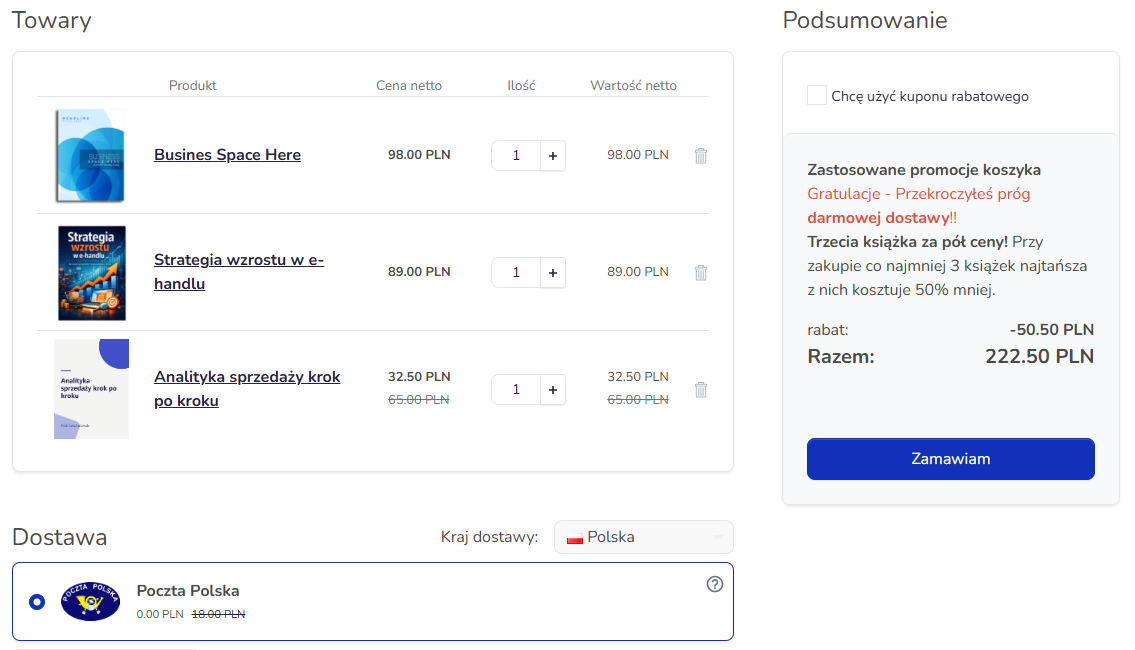
Screenshots from the Hummerce demo store (Bootstrap 5 template) and its panel. The cart condition, calculator, and cart show the "third book at half price" example.
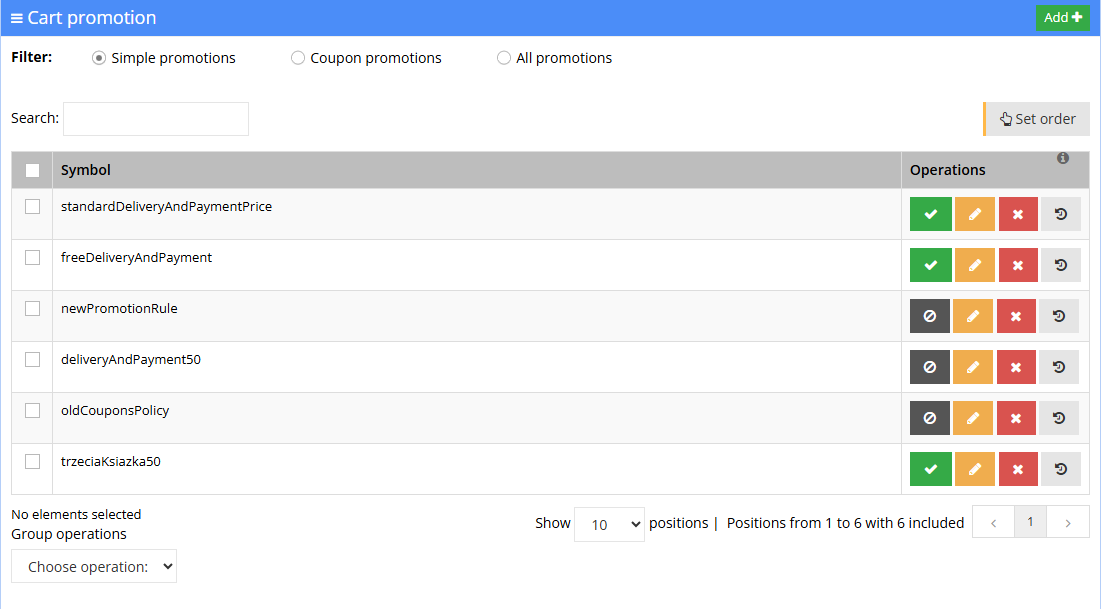
¶ Cart promotions list
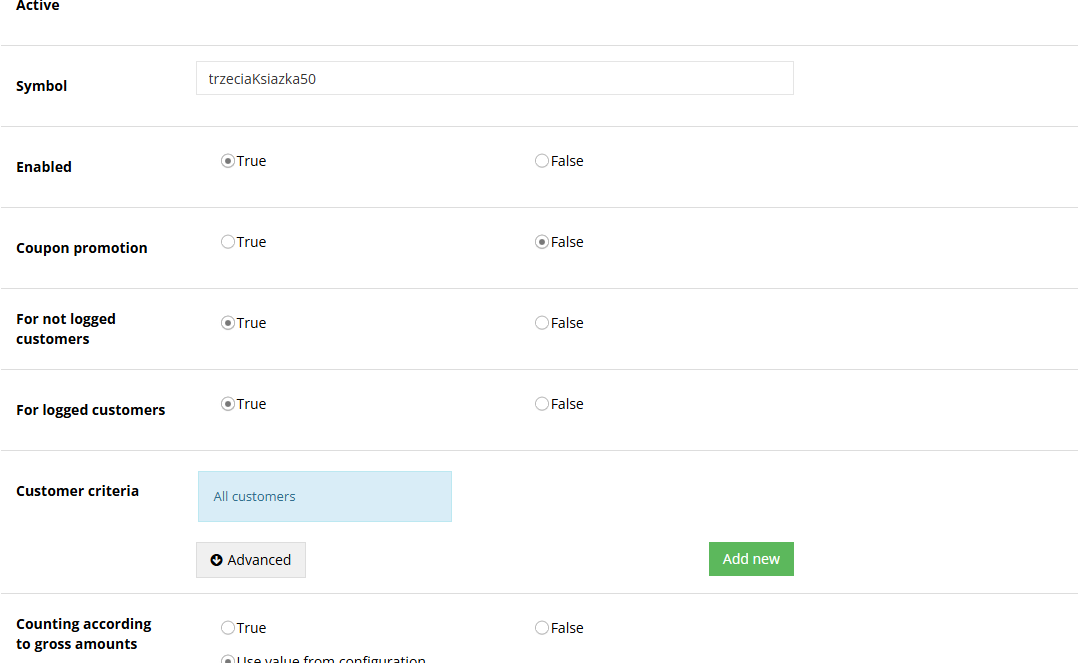
¶ Promotion - general conditions
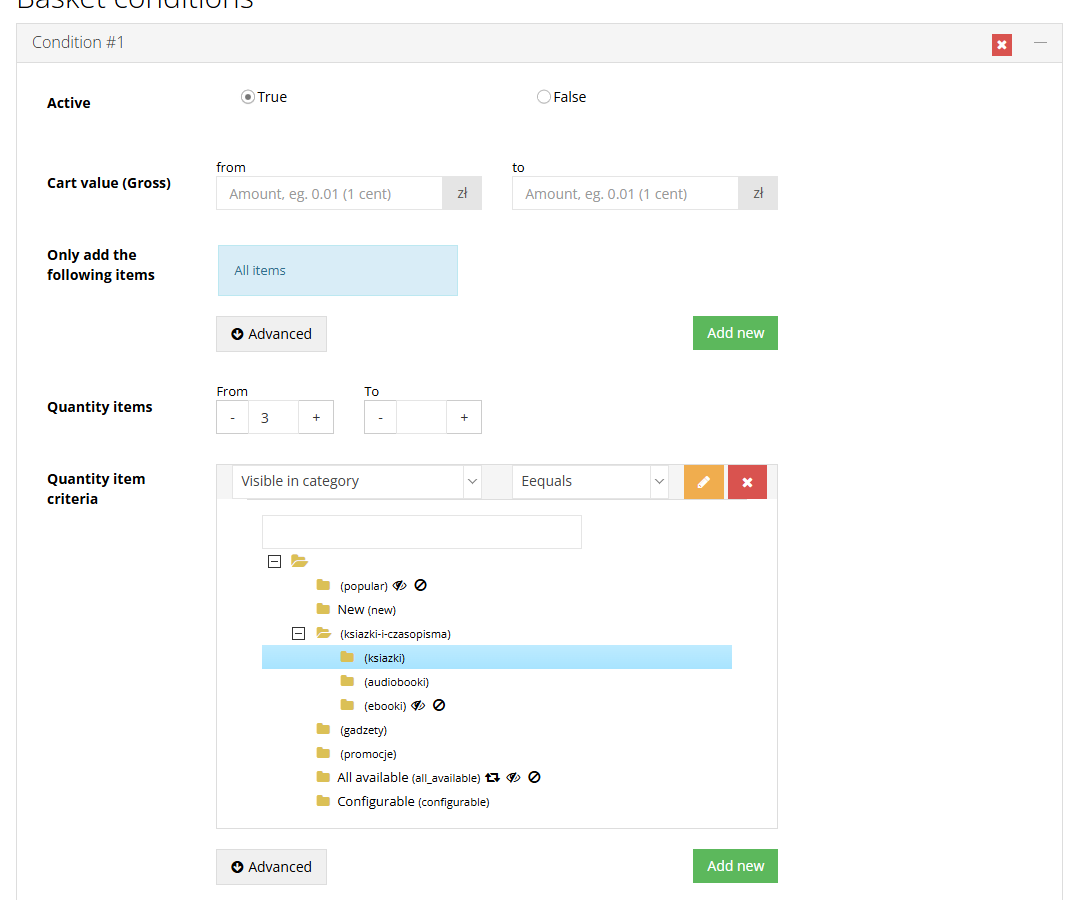
¶ Cart condition - at least 3 books
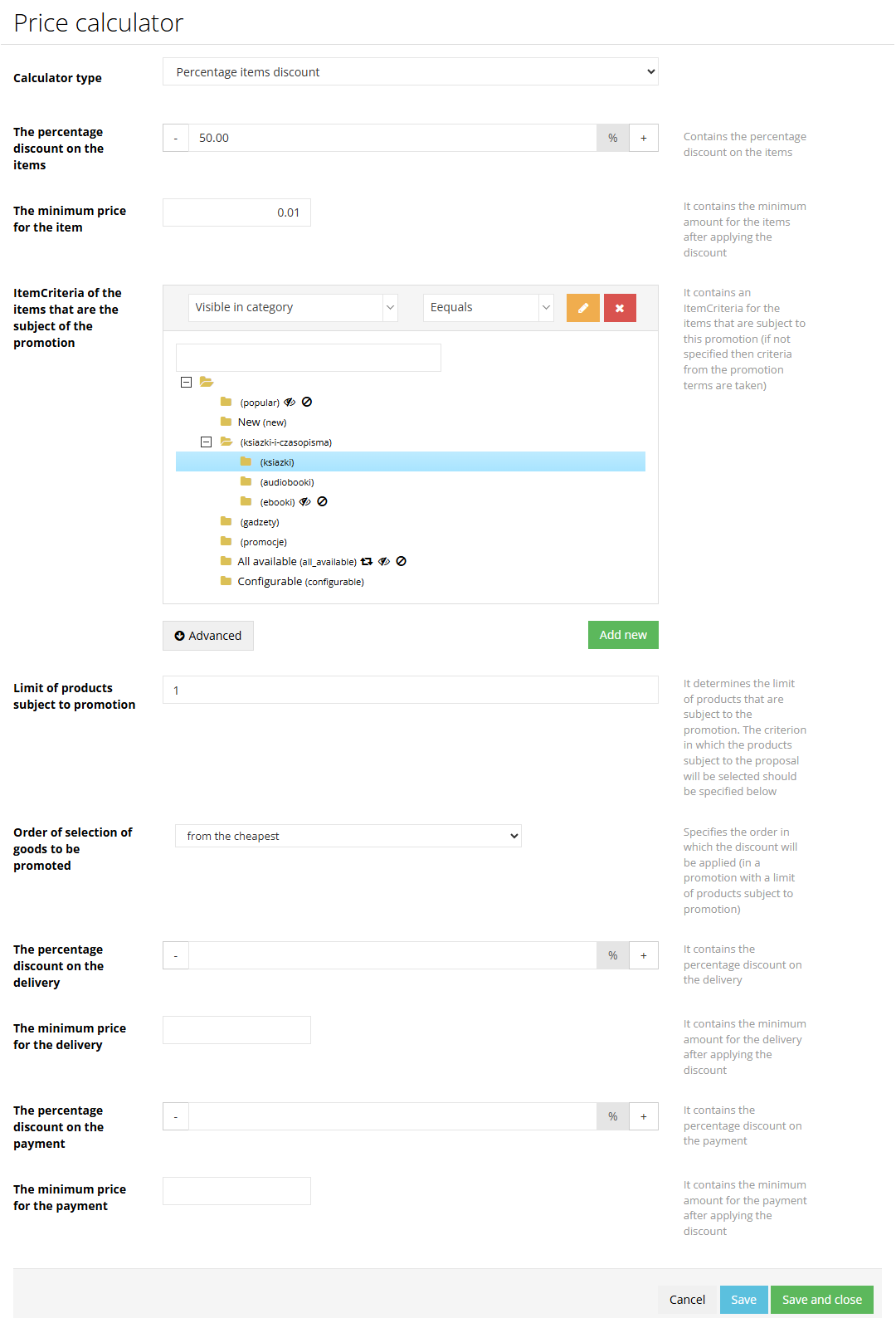
¶ Calculator - cheapest book 50% off
¶ Applied promotions in the cart - book at half price and free delivery
¶ How it works
¶ What a promotion consists of
- Symbol - a unique promotion name in the panel.
- Enabled - manual on/off switch. A disabled promotion doesn't apply, but keeps its whole configuration.
- Active - a status calculated automatically: the promotion is enabled and within its Duration. The system refreshes it every 5 minutes. In the cart, dates and hours are checked in real time.
- Coupon promotion - the promotion only applies after entering a code from its campaign (see Coupons).
- General conditions - all must be met:
- For guest customers, For logged-in customers,
- Customer criteria (for logged-in customers) - e.g. customer group, company account, newsletter consent, last visit date. Criteria combine (each additional one narrows the group),
- Item criteria - the promotion applies when the cart has at least one matching item (category, manufacturer, price, property, availability, and others),
- Criteria apply to - all products, single products and sets, or set components,
- Duration - Date from, Date to, Promotion availability hours, Days of week. Empty fields mean no restriction,
- For all views or selected Views (stores, language versions, B2B and B2C).
- Calculate using gross amounts and Calculate in currency - whether the promotion's thresholds and amounts are gross or net, and in which currency. Defaults to the store configuration.
- Cart conditions - extra thresholds (below). A promotion without cart conditions applies whenever the general conditions are met.
- Price calculator - what and by how much the promotion reduces (below).
- Connects with further promotions - whether promotions further down the list should still apply after this one.
¶ Cart conditions
- Each condition can include:
- Cart value from - to, optionally only for items meeting criteria, e.g. "above PLN 300 for plants, excluding manufacturer X",
- Item quantity from - to, optionally only for selected items, e.g. "at least 3 units from the Coffee category",
- Order value from - to - the value of items together with delivery and payment cost,
- Payment method and Delivery method - the promotion only applies with selected methods.
- Within one condition, all filled-in fields must be met at the same time.
- Conditions are combined with the AND or OR operator, set on the condition - e.g. "cart value from PLN 200 OR at least 5 units".
- A condition can be marked inactive instead of deleted.
- The cart value is calculated after discounts from promotions higher up the list.
¶ Types of discounts - calculators
| Calculator | What it does |
|---|---|
| Percentage item discount | Reduces items by a percentage. Optional: criteria for items covered by the discount, minimum price after the discount, a limit on the number of discounted units (chosen from the cheapest, from the most expensive, or in cart order), percentage discount on delivery and payment |
| Amount items discount | Reduces items by a fixed amount. Optional: item criteria, minimum price, fixed-amount discount on delivery and payment |
| Amount order discount | Subtracts an amount from the whole order, with a minimum price for items, delivery, and payment |
| Fixed price | Sets a fixed price for items covered by the promotion |
| Price from a property | Item price taken from a selected item property |
| Price from a selected price list | Item price from a price list (see Price lists and individual prices) |
| Service price calculator | Service price (e.g. assembly, insurance) calculated as a percentage of the items' price |
| Fixed delivery / payment price | A fixed price for delivery or payment, e.g. free delivery |
| Delivery / payment price from a property | Delivery or payment price from a property |
| Free delivery / payment threshold from a property | Free delivery or payment above the Border price set on the given delivery or payment method |
| Standard delivery and payment price | The base delivery and payment prices from their configuration |
| Minimum price per unit / delivery / payment | Makes sure the combined discounts don't go below the minimum price. Runs as the last promotion on the list |
| Old coupon mechanism calculator | Applies discounts from the old coupon mechanism (see Coupons) |
- Item criteria in the calculator decide which items get the discount. Item criteria in the general conditions decide whether the promotion applies at all. Both criteria must overlap - if they exclude each other, the promotion matches but gives no discount.
- New stores get three starter promotions: standard delivery and payment prices, the free-delivery threshold, and the old coupons calculator.
¶ Example: third book at half price
A promotion in the demo store: when buying at least 3 books, the cheapest one costs 50% less.
| Promotion element | Setting |
|---|---|
| General conditions | Item criteria: items in the Books category; for logged-in and guest customers; For all views; no end date |
| Cart condition | Item quantity from 3, summed for the Books category - socks or a bag in the cart don't count toward the threshold |
| Calculator | Percentage item discount 50%, criteria for discounted items: Books category, limit of 1 discounted product, selection order: from the cheapest |
| Order | at the end of the list, after the free-delivery threshold; Connects with further promotions = Yes |
| Cart description | promotion description: "Third book at half price! When you buy at least 3 books, the cheapest one costs 50% less.", show in cart = Yes |
- A cart with books at PLN 98, PLN 89, and PLN 65: the cheapest one costs PLN 32.50. The value also exceeds the free-delivery threshold - the cart shows both promotions (screenshot above).
- With 2 books, the promotion doesn't match. With 6 books, only one unit still gets the discount - the "every third unit cheaper" rule needs a new calculator.
¶ Order and combining promotions
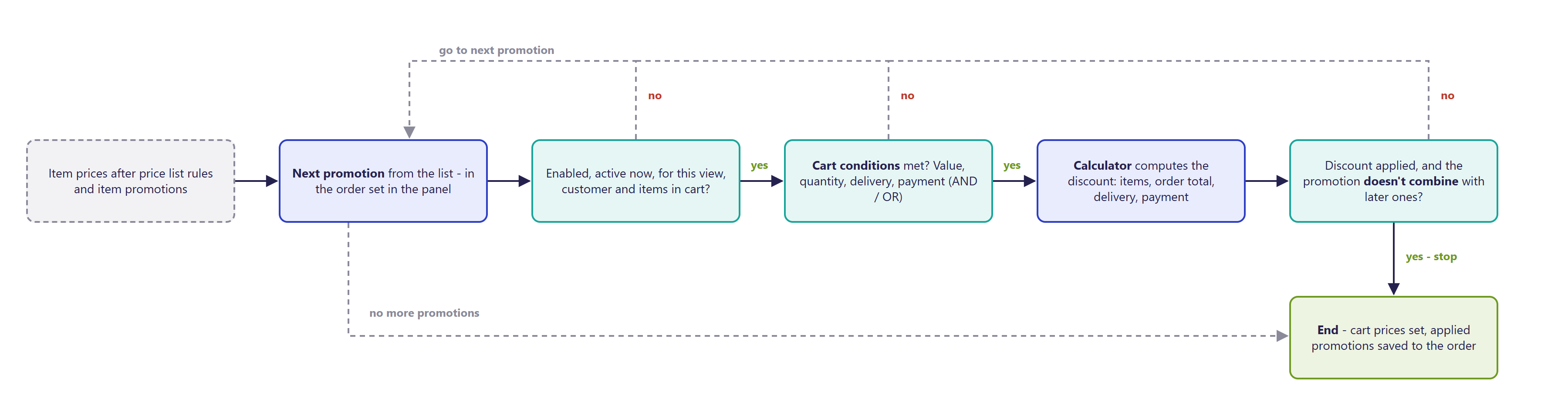
- Promotions run in turn, in the order set on the cart promotions list (Set order). Each subsequent one calculates from the result of the previous ones.
- The promotion with standard delivery and payment prices should be at the start of the list - subsequent promotions reduce these prices.
- Connects with further promotions = No - if this promotion applied a discount, subsequent promotions on the list no longer apply. If it didn't match or changed nothing, the system checks the next ones.
- Promotions with a minimum price are placed at the end of the list.
¶ Copying a promotion
- Any promotion can be copied from its edit view (Operations -> Copy cart promotion).
- The copy gets a symbol with a
Copysuffix (Copy1,Copy2for further copies) and is disabled - it won't apply until the store checks and enables it. - The copy carries over the general conditions, views, the calculator with its parameters, and all cart conditions.
¶ Applied promotions in the cart and the order
- The cart in the Bootstrap 5 template can show an Applied cart promotions section in the summary, with a description of each promotion that changed the price - e.g. "Third book at half price!".
- The Bootstrap 4 template doesn't support presenting promotions in the cart - discounts are still calculated, but the cart doesn't show promotion descriptions.
- The description is set in the promotion's Promotion description field (HTML editor, separately per language) and enabled with the Show in cart field. A promotion without these settings still works, but has no description in the cart.
- With several promotions, descriptions appear in the order the promotions are on the list.
- The order saves the cart promotions: the order details in the panel show Cart promotion rules - matched and applied (those that changed the order value).
- Product promotion descriptions on the product page and at the cart line are set in product promotions.
¶ Special promotions (limited free gifts)
- An additional module: a promotion where the customer adds a promotionally priced product (e.g. a free gift) to the cart from a separate place in the store.
- The promotion sets a maximum quantity of one product covered by the promotion and a maximum quantity of different products in the promotion. Once the limit is exceeded, the cart shows a message and asks to remove the excess items.
- The module is enabled as part of an implementation. The place in the store where the customer adds the promotional item is prepared in the template.
¶ Version
- Since version 2.25 - older versions used the previous pricing policy, without cart promotions.
- Since version 2.30 - improved criteria (a category tree in several criteria of one promotion) and disabling promotions on the list without losing cart conditions.
- Since version 2.32 - copying promotions.
- Since version 2.33 - presenting applied promotions in the cart (Bootstrap 5 template).
- Since version 2.34 - new coupon campaigns as cart promotions.
- Latest module changes: version 2.34.33.
¶ Dependencies
- The new pricing policy (price list rules, product promotions, cart promotions) - see Pricing policy - overview. A store on the old pricing policy must switch to the new one first.
- Item prices from Price list rules and product promotions - cart promotions calculate from them.
- Delivery and payment methods - free-delivery thresholds (Border price) are set on the delivery method (see Delivery methods - overview).
- Coupons - coupon campaigns are cart promotions (see Coupons).
- Store template: Bootstrap 5 - discounts and the Applied cart promotions section in the cart; Bootstrap 4 and older - discounts work, presenting promotions in the cart isn't supported.
- Special promotions - an additional module and a place in the template.
- Promotion rules (terms of service, disclosing the lowest price) - set by the store on its own.
¶ Implementation
- Works after the update - a store on the new pricing policy creates and changes promotions in the panel on its own. Work is needed in these cases:
- migrating from the old pricing policy to the new one (recreating existing discounts, delivery and payment prices in rules, testing),
- preparing promotions and testing them on the test environment on the store's request,
- descriptions of applied promotions in the cart (Bootstrap 5 template only) - setting up the promotion description and show-in-cart parameters, if the store doesn't have them,
- special promotions - enabling the module and a place in the store to add promotional items,
- a dedicated type of discount - a new calculator,
- production launch.
- Minimum estimated time:
- promotion configuration on the store's own - 0 h,
- preparing and testing promotions on request - from 1 h,
- descriptions of applied promotions in the cart, Bootstrap 5 template - from 1 h,
- presenting promotions in the cart, Bootstrap 4 template - not supported; requires an individual cart view implementation, quoted separately,
- a new calculator - from 4 h,
- migrating from the old pricing policy - from 8 h.
- The time for a specific implementation depends on its scope - we quote it individually.
- What the time depends on:
- the number and complexity of promotions to prepare or recreate,
- the store template - Bootstrap 5 has promotion presentation ready in the cart, Bootstrap 4 doesn't,
- the type of discount - whether the standard calculators are enough,
- the number of languages for promotion descriptions,
- the store's version - older than 2.25 or on the old pricing policy needs updating first (quoted separately),
- integrations that pass discounts onward (ERP, marketplace) - quoted separately.
¶ Limitations
- No preview of a promotion's effect in the panel - the result is checked in the cart on the test environment or through the AI assistant (
ec2_cart_price_preview). - A promotion whose calculator criteria exclude the promotion's item criteria matches but gives no discount - the panel doesn't warn about this.
- Connects with further promotions = No only stops subsequent promotions when this promotion actually applied a discount.
- Mixing AND and OR operators across several conditions can easily produce an unexpected result - complex rules are better split into separate promotions.
- The cart value in conditions is calculated after discounts from promotions higher up the list - changing the order can change whether the customer crosses a threshold.
- Minimum-price calculators only work correctly at the end of the list.
- The Bootstrap 4 template doesn't support presenting promotions in the cart - discounts are calculated, but the customer doesn't see descriptions of applied promotions. Presentation only works in the Bootstrap 5 template.
- The promotion description and show-in-cart parameters need to be set up in the store.
- The discounted quantity limit is fixed - "the cheapest of 3 books -50%" still discounts only one unit with 6 books.
- The cart only shows promotions that changed the price - it doesn't say how much is missing to reach a promotion's threshold.
- Promotion messages have no German version.
- Copying a promotion doesn't carry over extra parameters saved on individual cart conditions - worth checking the conditions after copying.
- Cart promotions can't be managed through REST API. Through MCP, we can't change cart conditions, duration, views, the cart description, or connecting with further promotions, and we can't delete a promotion - that's done in the panel.
- A promotion created through MCP has no views set - it doesn't work until For all views or selected views are checked in the panel.
- Every active promotion adds to cart calculation time - with many promotions, it's worth disabling the finished ones.
- We do not verify the task for legal compliance (e.g. licenses of submitted materials, GDPR, store terms of service).
¶ Future development
- A preview of a promotion's effect in the panel (pricing a sample cart while editing).
- Information in the cart on how much is missing to reach a promotion's threshold (e.g. "PLN 30 more to free delivery").
- New calculators, e.g. "buy X, get Y", "every third unit cheaper", a discount down to a set price level.
- Support for cart conditions, duration, and views through the AI assistant and REST API.
- Presenting applied promotions in the Bootstrap 4 template.
- A panel warning when a promotion's and calculator's criteria exclude each other.
¶ Frequently asked questions
Does Hummerce support free delivery above a cart value threshold?
Yes, with the free-delivery threshold calculator linked to the Border price set on the delivery method.
Do cart promotions combine with coupons?
Yes - coupon campaigns are also cart promotions, set up as a coupon promotion with its own code.
Does a cart promotion only apply to selected customers or views?
Yes. Customer criteria (group, company account, newsletter consent) and views (B2B, B2C, language versions) narrow down who the promotion applies to.
Does the customer see in the cart which promotion lowered the price?
Yes, in the Bootstrap 5 template - the Applied cart promotions section shows a description of each applied promotion. This presentation isn't supported in the Bootstrap 4 template.
How long does preparing a new cart promotion take?
Configuration on the store's own - 0 h. Preparation and testing on our request - from 1 h. Migrating from the old pricing policy to the new one - from 8 h.
Can cart promotions be managed through REST API?
No. Cart promotions are created and changed in the panel, or partly through the AI assistant (MCP) - REST API has no operations on them.
¶ Related
- Price lists and individual prices and Price list rules - earlier stages of calculating the customer price.
- Coupons - coupon campaigns as cart promotions.
- Delivery methods - overview - the free-delivery and free-payment threshold.
- On hummerce.com: B2C platform (in Polish), Product and cart promotions (in Polish), Coupons (in Polish).
Want to see how cart promotions could work in your store? Book a free demo (in Polish).
¶ Configuration details
¶ Access in the admin panel
- Panel: Promotion -> Cart promotions - a list with a Standard promotions / Coupon promotions / All promotions filter, search, enabling and disabling, Set order, change history, and a bulk delete operation.
- Editing a promotion: general conditions, Cart conditions (Add condition), Price calculator (Calculator type and its parameters), Promotion description, Show in cart, the History tab, Operations -> Copy cart promotion.
- Delivery and payment method: Border price - the free-delivery or free-payment threshold.
- Order: Cart promotion rules (matched / applied) in the order details.
¶ REST API and MCP
- REST API: no operations on cart promotions.
- MCP (AI assistant - MCP server):
ec2_promotions_list- list of cart promotions with coupon promotions marked,ec2_price_rules_list,ec2_price_rule_details(withrule_type=cart_promotion) - order, conditions, duration, the calculator and its parameters,ec2_price_calculators_list- available calculators and their parameters,ec2_price_rule_create,ec2_price_rule_update,ec2_price_rule_set_parameter,ec2_price_rule_delete_parameter,ec2_price_rule_reorder- a new promotion, changing general conditions (customers, criteria, calculator), calculator parameters, order,ec2_cart_price_preview- pricing a cart for a customer or guest through the same rules as the store, without saving,- permissions the same as for price list rules, product promotions, and cart promotions in the panel; pricing a cart requires permission to customer carts.
¶ Store messages
Promotion descriptions in the cart are changed in the promotion itself (the Promotion description field, separately per language). Store messages are changed in the message editor. Messages have default values in Polish and English, without a German version.
¶ Cart
| Key | Default value |
|---|---|
msg.cart.cartPromotions |
Applied cart promotions |
¶ Special promotions
| Key | Default value |
|---|---|
error.cartPromotion.differentItemsMaxQuantityReached |
Unfortunately, the limit of the different products in the promotion has been reached. Remove excess items from your cart to qualify for the promotion: |
error.cartPromotion.singleProductMaxQuantityReached |
Unfortunately, the limit for a single product specified in the promotion has been reached. Remove excess items from your cart to qualify for the promotion: |
error.specialCartPromotion.cannotAddItem |
The item "{1}" ({0}) cannot be added |
¶ Parameters
| Symbol | Object | Label |
|---|---|---|
_promotionDescription |
cart promotion | Promotion description - text in the cart |
_showOnCartPage |
cart promotion | Show in cart |
_borderPrice |
delivery method, payment method | Border price - free-delivery or free-payment threshold |
_cartPromotionRulesThatMatch |
order | Matched cart promotion rules |
_cartPromotionRulesThatChangedPrices |
order | Cart promotion rules that changed the order value |
_specialCartPromotion |
cart promotion | Special promotion |
_singleItemMaxQuantity |
cart promotion | Maximum quantity of one product (covered by the promotion) |
_maximumDifferentItemsQuantity |
cart promotion | Maximum quantity of different products in the promotion (covered by the promotion) |