¶ Price lists and individual prices for B2B customers
Price lists in Hummerce let you sell the same item at different prices: one for a chosen customer, company, customer group, store view, or when buying a larger quantity. The store keeps prices in price lists, and price list rules decide who gets the price from which price list - without creating separate items and without manually changing the price on an order.
As of Hummerce 2.35 (latest module update: 2.35.63), updated 2026-10-07.
¶ Benefits and use cases
- Prices negotiated with a B2B customer are visible right after login - in the catalog, the cart and the order, with no manual corrections.
- Quantity discounts ("cheaper from 10 units", "cheaper by the box than by the piece") without creating separate items and without promotions.
- Separate prices for a wholesale, foreign or marketplace store (view) on a shared catalog.
- A wholesale price list for a customer group - just add a new wholesaler to the group.
- Bulk price updates from Excel (e.g. from a producer's price list) and a bulk percentage price increase.
- A quick answer to "why does the customer see this price" - through the AI assistant, without going through the rules.
- The price list price as the basis for promotions and coupons - discounts are calculated from the customer's price, not the catalog price.
¶ What it looks like
Screenshots from the Hummerce demo store's panel.
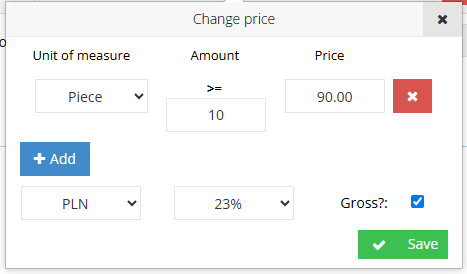
¶ Price list entries and quantity thresholds
¶ The item's price for a customer - the AI assistant's answer
Result of the ec2_price_for_customer tool in the demo store (an item with no price in the price lists):
Item: digital-marketing - Digital Marketing
Customer: demo@best.net.pl, quantity: 1
Item base price: PLN 84.00
Price lists checked (10): Customer price lists, General item price list, Company price lists,
  wholesale, Price Group Standard and others - no price for this customer and item
What the customer pays (the full pricing engine, with promotions):
  customer price:      PLN 84.00 gross
  after promotions:     PLN 84.00 gross
Nothing was saved.
¶ How it works
¶ Types of price lists
- General item price list - one price list for all customers (or those selected in a rule), most often for quantity-dependent prices ("cheaper from 10 units").
- Named price lists - any number of price lists set up by the store, e.g. wholesale, for a customer group, for a view (a separate store or country).
- Customer price lists - individual prices: for a given item and a given customer. All individual prices sit in one Customer price lists price list, and in the panel they're opened from the customer's card.
- Company price lists - prices for a company account, shared by all of the company's employees (with the Company accounts module).
- Item price lists are different from delivery price lists - delivery method prices are described in Delivery methods - overview.
¶ Price list entry
- An entry is the price of one item in a price list (in a customer's or a company's price list - for one customer or one company).
- An entry has one or more prices with quantity thresholds ("from quantity" and price, separately for each sale unit), its own currency (defaulting to the item's price currency), its own VAT rate (defaulting to the item's rate), and whether the amount is gross.
- The price from the highest threshold that doesn't exceed the cart quantity applies. Example: thresholds 1 pc - PLN 50, 10 pcs - PLN 45; at 12 pieces the price is PLN 45 per piece.
- When an item has no entry in the price list, the price list returns no price and the store checks the next rule - in the end, the item's base price remains.
- Set the first threshold from 1 unit.
- Currency and net/gross are set on the entry, not on the whole price list.
¶ Assigning a price list - price list rules
- A price list isn't assigned directly to a customer, group or view. The assignment is a price list rule with the Price from selected price list calculator and a chosen Price list.
- The rule determines who the price list applies to and where: for logged-in and guest customers, a customer criterion (e.g. customer groups, specific customers, a company), an item criterion (e.g. producer, category, item group), for all views or selected views (e.g. a separate price list for a wholesale or foreign store).
- Once the module is enabled, the store has ready-made rules for the standard price lists: individual customer prices, the general item price list, company prices (with the Companies module) and the base price.
- A named price list (e.g. wholesale) starts working only once a rule is added that points to it. A price list without a rule doesn't change any price.
- The same Price from selected price list calculator is also used in product promotions, and its equivalent is in Cart promotions. A price list price can therefore also be a promotional price (with a struck-through price).
¶ Customer groups and item groups
- Customer groups (CRM) combine customers with the same terms, e.g. wholesalers, partners, VIPs. A group is a condition in a price list rule - every customer in the group gets the whole price list.
- Item groups combine items with the same pricing rules. A group is an item criterion in a rule, and its property can be the source of a discount (price list rules).
- A customer group can also narrow down a bulk price-change operation in price lists.
¶ Price calculation order
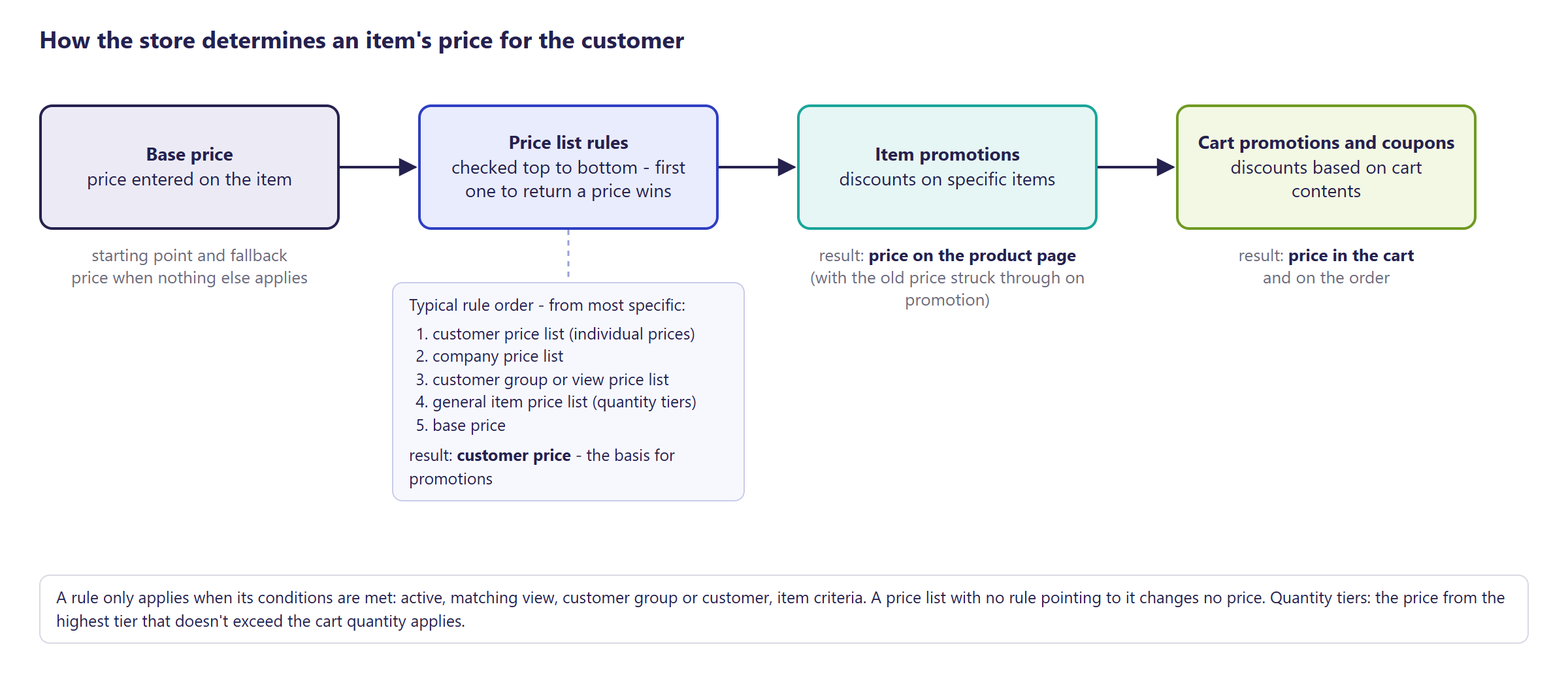
- Price list rules run in the order of the Price list rules list (the store sets the order). By default, the first rule that returns a price wins - so more specific rules (customer, company) should be above general ones.
- The Continue iteratively counting prices in price list rules setting (off by default) makes the store check every rule in turn - needed when a discount rule should apply on top of a price list price.
- The result of the rules is the customer price. Product promotions (the price on the item's card) are calculated from it, followed by Cart promotions (the price in the cart).
- A price list price in price list rules is treated as a regular customer price - the store doesn't show it as a promotion (no struck-through price).
¶ Currencies, net and gross
- Store currencies have an exchange rate, which can be updated automatically.
- Every price list entry has its own currency - defaulting to the item's price currency. For a given item and customer, a price list has one entry, so one currency.
- Whether the customer sees net or gross prices is decided by the store's settings. A price list entry remembers whether the entered amount was gross, and the store converts it using the entry's VAT rate.
¶ Lowest price in 30 days (Omnibus)
- Price history records the price seen on the item's card by a logged-out customer - after price list rules and product promotions, without cart promotions.
- A price list price in price list rules is treated as the base price, so it doesn't show the lowest-price information. The information appears with a struck-through price (a promotion). Details: Lowest price in 30 days (Omnibus).
- Individual customer and company prices (a logged-in customer) don't get recorded in the price history.
¶ Entering and changing prices
- Manually in the panel - price list entries with thresholds, individual prices from the customer's card.
- Import from an Excel file (Transfers -> Price lists (xls - Excel)) - columns: Item, Customer, Price, Threshold, Unit (further thresholds as Price1/Threshold1/Unit1, Price2/Threshold2...), VAT Rate, Currency, Amount includes VAT. The same transfer exports price lists to Excel.
- A bulk price change (Transfers -> Price list price changes) - raising or lowering prices by an amount or a percentage, in one or all price lists, narrowed to a customer group, item criteria and a quantity threshold.
- On the price list entry list - bulk operations to change a customer's price (markup or amount).
- Through the AI assistant (MCP) - reading and writing individual prices.
- Calculated prices are stored in a cache. Changes to prices and rules are cleared by a scheduled task or in Cache.
¶ Version
- Since version 2.21 - price lists and quantity-dependent prices; since version 2.22 price lists are assigned through Price list rules.
- Since version 2.35 - price list support through the AI assistant (MCP).
- From version 2.35.63 - the AI assistant refuses to save a price in a price list of the wrong scope (instead of saving an entry that would not be taken into account in the price).
- Latest changes to the module: version 2.35.63.
¶ Dependencies
- The price list module and the price list rule module - not enabled by default, we turn them on as part of implementation.
- Price list rules - without an active rule pointing to a price list, price list prices don't work.
- Company prices - the Company accounts module.
- A quantity-threshold price table on the item's card - an additional module for showing price list prices (Bootstrap 5 and Bootstrap 4 templates).
- Prices in other currencies - currencies configured in the store.
- The lowest price in 30 days - the price history module (Omnibus).
- Customer groups, item groups and sale units - filled in by the store if they're meant to be a condition for prices.
¶ Implementation
- Requires implementation - price lists aren't part of the standard store configuration. Scope:
- enabling the price list and price list rule modules, checking the standard rules and their order,
- setting up named price lists and rules for groups, views or companies,
- optionally, a quantity-threshold price table on the item's card,
- optionally, a first price import from Excel,
- clearing the price cache, testing on the test environment and the production rollout.
- Minimum estimated time:
- Bootstrap 5 template - from 3 h,
- Bootstrap 4 template - from 3 h.
- The time for a specific implementation depends on its scope - we quote it individually.
- What the time depends on:
- the number of price lists and rules and the complexity of their conditions (groups, views, companies, discounts calculated on top of a price list price),
- preparing and importing data (the number of price lists, customers, thresholds, currencies),
- the quantity-threshold price table and how it looks on the item's card, the number of languages,
- integration with an ERP that sends prices (quoted separately),
- the store's version - a store on an older version needs an update first (quoted separately).
¶ Limitations
- A price list has no validity dates - a price list price works as long as the entry exists. Time-limited prices are set in price list rules (the rule's active status) or through promotions.
- Price lists don't support articles (variants sold as separate configurator entries) - import rejects prices for articles.
- A price list isn't assigned directly to a customer or a group - always through a price list rule. The wrong rule order gives the customer a different price than the store expects.
- When there's more than one entry for the same item and customer in a price list, the price list returns no price (the store moves to the next rule).
- Currency and net/gross are set on the entry - there's no setting for the whole price list.
- Price changes may be visible with a delay because of the price cache - until it's cleared.
- Every active price list rule adds to the store's load - a large number of rules may require more server capacity.
- No operations on price lists in the REST API. Through MCP, you can't create a new price list - only save a price in an existing one, and a customer price goes only to a price list for customers, a company price only to a price list for companies, and a general price only to a general price list.
- The quantity-threshold price table on the item's card requires an additional module.
- Excel import doesn't delete price lists (deletion mode isn't supported).
- We do not verify the task for legal compliance (e.g. licenses of submitted materials, GDPR, store terms of service).
¶ Future development
- Validity dates for a price list and its entries (e.g. a new price list from January 1st).
- Currency and the way prices are given (net/gross) set for the whole price list, prices for the same item in several currencies in one price list.
- Price list operations in the REST API - e.g. to sync prices from an ERP without files.
- Assigning a price list to a customer group or a view directly, without creating a rule.
- A panel view of "where the price comes from" for a chosen customer and item.
- Copying a whole price list (e.g. as the basis for a new wholesale price list).
¶ Frequently asked questions
Does Hummerce support different prices for different B2B customers?
Yes. Customer and company price lists give individual prices, and price list rules decide who gets them - without creating separate items.
Do price lists support quantity discounts?
Yes. A price list entry can have several quantity thresholds - the price from the highest threshold that doesn't exceed the cart quantity applies.
Can a price list be assigned directly to a customer?
Not directly. The assignment is a price list rule that points to the price list and the conditions (customer, group, view) - a price list without such a rule doesn't change any prices.
Can prices be updated in bulk from a file?
Yes, through Excel import (Transfers - Price lists) or a bulk price change by amount or percentage.
How long does setting up price lists take?
Price lists require implementation - the minimum estimated time is from 3 h, in both the Bootstrap 5 and Bootstrap 4 templates.
Does a price list have validity dates?
No. A price list price works as long as the entry exists - time limits have to be set in a price list rule or through a promotion.
¶ Related
- Price list rules - assigning price lists to customers, groups, views and items.
- Cart promotions and Lowest price in 30 days (Omnibus) - the next stages of calculating the price.
- Company accounts - company prices.
- On hummerce.com: B2B platform (in Polish).
Want to see how price lists could work in your store? Contact the Hummerce team (in Polish).
¶ Configuration details
¶ Access in the admin panel
- Price lists: Assortment -> Price lists - the list of price lists (Symbol, Name), price list entries (Price, Price list price with thresholds, unit, currency, VAT rate and Gross?).
- Individual customer prices: the customer list (CRM) - a price list icon next to the customer opens the Customer price list. Company prices work the same way, opening the Company price list.
- Price list rules: Promotion -> Price list rules - the Price from selected price list calculator, the Price list field, rule order (Set order).
- Groups: Customer groups, Item groups.
- Currencies: Currencies - the list of currencies and rates.
- Panel configuration: Continue iteratively counting prices in price list rules (off by default), Gross prices in the store, Gross prices in admin, Taxed by default.
- Transfers: Price lists (xls - Excel) - import and export, Price list price changes - bulk price changes.
- Scheduled task: clearing the price list price cache.
¶ REST API and MCP
- REST API: no operations on price lists - prices are saved through Excel import or through MCP.
- MCP (AI assistant - MCP server):
ec2_pricelists_list- the list of price lists with their scope (general, for customers, for companies - both scope flags shown separately) and number of entries,ec2_pricelist_entries- price list entries with thresholds, filterable by price list, item and customer,ec2_products_prices- all prices of a given item across all price lists,ec2_pricelist_entry_set- saving a price (individual, company or general) with a quantity threshold, in an existing price list; refuses to save when the price list scope does not match the price (a customer price in a general price list, a company price in a list not marked for companies) - such an entry would not be taken into account in pricing,ec2_pricelist_entry_delete- removing a threshold or an entry (also one of the wrong scope),ec2_price_for_customer- what the customer pays and which price list the price comes from, together with the price after promotions,ec2_diagnose_price- the price calculated for a customer (or a guest) and the rules that may be responsible for it,ec2_price_rules_list,ec2_price_calculators_list- price list rules and the available calculators,ec2_cart_price_preview- pricing a whole cart for a customer.- Permissions: the price list list -
priceList, entries and a customer's prices -priceListEntry(read or write), rules - price list rule permissions. Writing prices and listing entries without a customer filter - admin only.
¶ Store messages
The quantity-threshold price table's messages have default Polish and English values. They're changed in the message editor.
¶ Quantity-threshold price table on the item's card
| Key | Default value |
|---|---|
msg.item.priceList.title |
Price list |
msg.item.priceList.quantity |
Quantity |
msg.item.priceList.minimumQuantity |
Minimum quantity |
msg.item.priceList.from |
from |
msg.item.priceList.saleUnits |
Unit |
msg.item.priceList.taxedPrice |
Taxed price |
msg.item.priceList.nonTaxedPrice |
Non taxed price |