¶ Address book - saved customer and company addresses
The address book in Hummerce lets a customer save addresses on their account and pick one at checkout, without retyping the data every time. Since version 2.34, a store can use the new address book: delivery, billing and invoice addresses, no limit on the number of addresses, and addresses shared across a whole company.
As of Hummerce 2.35 (latest module changes: 2.35.30), updated 2026-09-28.
¶ Benefits and use cases
- Faster checkout - the customer picks a saved address instead of typing it in.
- Fewer delivery address errors for repeat customers.
- B2B with branches - shared company addresses available to every employee, without retyping.
- Separate delivery, billing and invoice addresses (new address book).
- Custom address fields - e.g. goods-receiving hours, a site contact person.
¶ What it looks like
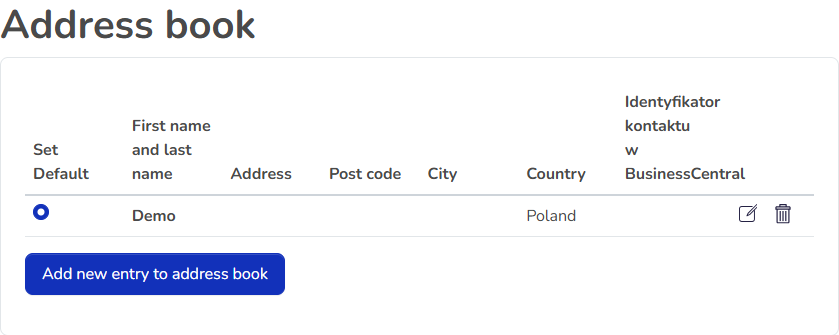
Screenshot from the Hummerce demo store (BS5 template).
¶ Address book in the customer account (standard)
¶ How it works
¶ Standard address book
- The customer saves delivery addresses on their account and picks one at checkout.
- In the standard configuration, up to 5 addresses, one default address.
¶ New address book
- Address types: delivery, billing, invoice (plus contact and other). A new address added in the store is by default a delivery address.
- No limit on the number of addresses.
- Default address - one for the customer and one for the company. When the default address is deleted, the store automatically picks the oldest remaining one.
- Every address has its own name and a fixed identifier. The store checks on every operation whether the address belongs to the customer or their company.
- Address fields are properties - the store can add custom fields (e.g. goods-receiving hours).
- Works on its own, without multiple carts. Multiple carts in one order requires the new address book (see Carts).
¶ Company addresses
- Customer addresses and company addresses: a company address is seen and used by every user of that company in the store (see Company accounts and roles).
- Only store staff add a company address, in the panel. In the store, a customer can only add their own addresses.
- A new company employee can order to company addresses right away, without copying them into their own account.
¶ Version
- Standard address book - an old feature, part of the store's standard configuration.
- New address book - since version 2.34. Older versions use the standard address book.
- Latest module changes: version 2.35.30.
¶ Dependencies
- Standard address book - part of the store's standard configuration.
- New address book - a module enabled during implementation, store version 2.34 or newer.
- Company addresses - company accounts (see Company accounts and roles).
- Multiple carts in one order use the new address book (see Carts).
¶ Implementation
- The standard address book works right after an update.
- The new address book requires implementation - the module isn't enabled in the standard configuration. Scope:
- enabling the module and updating the database,
- migrating addresses from the standard address book (they don't migrate automatically),
- setting up address fields, validation and translations,
- checking the checkout form and customer account pages in the store template,
- testing in a test environment and going live.
- Minimum estimated time:
- new address book (BS5 or BS4 template) - from 6 h.
- The time for a specific implementation depends on its scope - we quote it individually.
- What the time depends on: the number of addresses to migrate and their quality, custom address fields and their validation, how much the checkout form and customer account are customized, the number of languages, ERP integrations passing addresses (quoted separately), the store version (older than 2.34 needs an update first - quoted separately).
¶ Limitations
- The standard address book has an address limit (5 in the standard configuration) and no company addresses or address types.
- Only store staff add a company address, in the panel - a business customer can't add one themselves in the store.
- Addresses from the standard address book don't migrate to the new one automatically.
- The new address book doesn't validate the address itself (e.g. that a postal code exists) beyond required fields.
- Choosing a billing and invoice address for the cart is supported by the store but isn't in the base templates.
- The address book isn't available through the REST API or the AI assistant (MCP).
- We do not verify the configuration for legal compliance - the store decides how long addresses are kept and what data is collected (GDPR, privacy policy).
¶ Future development
- Adding company addresses by an authorized company user in the store.
- Address validation (postal codes, place-name dictionaries).
- Automatic migration of addresses from the standard address book.
- Address book support in the REST API and MCP tools.
¶ Frequently asked questions
Can a Hummerce customer have more than one saved delivery address?
Yes. The standard address book allows up to 5 addresses in the standard configuration, and the new address book (since version 2.34) has no limit.
Can a B2B company have addresses shared by all employees?
Yes, in the new address book. Store staff add the company address in the panel, and every assigned employee uses it, without retyping.
Is the new address book available right after a store update?
No. The module isn't enabled in the standard configuration and requires implementation, including migrating addresses from the old address book.
How long does implementing the new address book take?
From 6 h, depending on the number of addresses to migrate, custom fields and how much the checkout form is customized.
Can a separate billing and invoice address be chosen for an order?
Partially. The store supports such addresses in the data, but there's no choice for it in the cart in the base templates - it requires template customization.
Are customer addresses available through the REST API or the AI assistant?
No. The address book isn't supported by the REST API or MCP - address data is managed only in the panel and the customer account.
¶ Related
- Carts - the cart uses address book addresses, including with multiple carts in one order.
- Company accounts and roles - the companies that shared addresses are assigned to.
- B2B and B2C sales in one store - where the address book fits in serving business and individual customers.
- On hummerce.com: B2B platform (in Polish).
Want to check whether the new address book makes sense for your store? Contact the Hummerce team (in Polish).
¶ Configuration details
¶ Access in the admin panel
- Customer: CRM -> Customers, customer card - Address book tab. With the new address book, the customer card also sets Address type and Scope (Customer or Company).
- Customer account in the store: Address book - adding, editing, deleting and the default address.
¶ REST API and MCP
- No address book operations in the REST API (see REST API) and no MCP tools (see AI assistant - MCP server).
¶ Store messages
Messages are changed in the message editor. Default values are in Polish and English.
| Key | Default value |
|---|---|
msg.abookList.title |
Address book |
msg.abookList.addNewEntry |
Add new entry to address book |
msg.abookList.setDefault |
Set Default |
msg.abookList.confirmDelete |
Really want to delete this entry? |
msg.abookAdd.addNewABook |
Add new address |
msg.abookAdd.editABook |
Edit entry |
label.abookAdd.addNewAddress |
Add new address |
label.abookEdit.updateAddress |
Edit address |
¶ Parameters
Address fields are changed according to properties and locations.
| Symbol | Object | Label |
|---|---|---|
_delivery_firstName, _delivery_lastName |
address book entry | first name, last name |
_delivery_street, _delivery_postcode, _delivery_city, _delivery_country |
address book entry | street, postal code, city, country |
_delivery_phone |
address book entry | phone |
_addressBookEntryType |
address book entry | address type |