¶ WYSIWYG content editor - formatting without HTML
The WYSIWYG content editor in Hummerce is a built-in rich-text editor (CKEditor) that store staff use to format static pages, content, item and category descriptions, and email templates - without knowing HTML code, with a live preview of the result.
As of Hummerce 2.35, migrated to CKEditor from version 2.28.
¶ Benefits and use cases
- Formatting content without knowing HTML - bold text, lists, alignment, colors, tables, links and images, with a live preview.
- Inserting images straight from the store's file manager, without leaving the editor.
- Pasting ready-made content from Word - keeping basic text formatting.
- A "Document source" mode for people who know HTML - viewing and manually editing the generated code.
- Custom styles ready to pick from a list (e.g. badges, buttons, a highlighted background) - configured once by the implementation team and then available every time content is edited.
- One editor used everywhere the store shows formatted content - static pages, content, item and category descriptions, email templates.
¶ What it looks like
¶ Setting custom CSS classes in the editor
¶ How it works
¶ Where the editor appears
The WYSIWYG editor appears wherever a text field accepts formatted HTML content - among others in static page content, in HTML content items (Canvases and contents), in item and category descriptions, and in email templates. The Document source toggle in the toolbar shows and lets you edit the raw HTML code generated by the editor - handy when pasting ready-made content (e.g. terms of service from a *.doc file, see Store terms of service) or making manual code fixes.
¶ Custom styles (CSS classes)
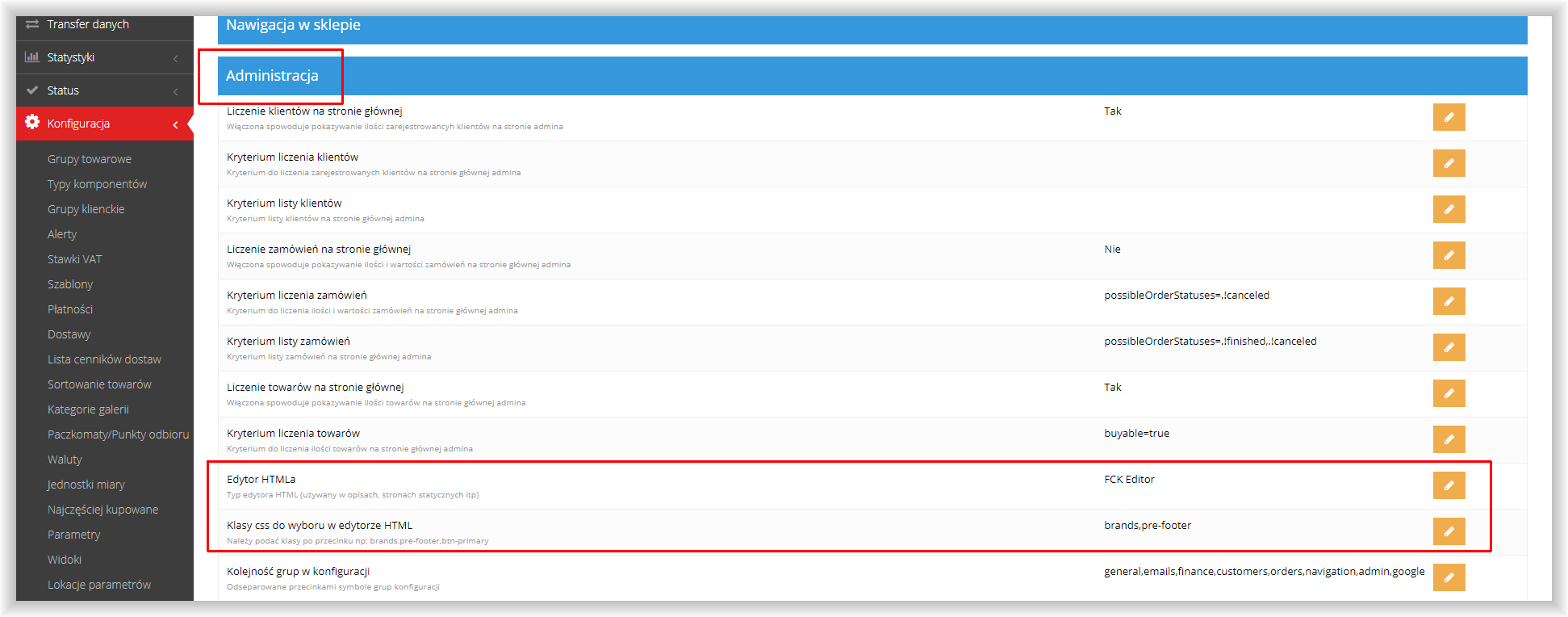
The CSS classes to choose from in the HTML editor setting (Configuration -> Settings, the Administration group) lets you add the template's own CSS classes to the editor's style list - entered comma-separated (e.g. badges,img-fluid,pi-over-layer). Once added, the classes become selectable from the Style list in the editor toolbar, everywhere the editor is available.
Besides custom classes, the editor has a built-in set of ready-made styles (content visibility by device, left/right alignment, highlighted messages, a button) - these built-in styles match older Bootstrap classes (e.g. visible-xs, hidden-md, pull-left) and don't overlap with the utility classes of the Bootstrap 5 template (e.g. d-none, float-start). For styling content in the BS5 template, custom classes added in the setting are recommended instead of the built-in list.
¶ Version
- The content editor - a core platform feature, available in all current versions.
- Migration to CKEditor (currently version 4.15) and the custom editor CSS classes setting - from version 2.28.
¶ Dependencies
- The editor is part of the admin panel - it doesn't require a separate installation or module.
- Inserting images in the editor uses the store's File and image manager.
- Custom CSS classes added in the setting only work when the matching styles are defined in the store's template - the editor only makes the classes selectable, it doesn't create the styles.
¶ Implementation
- The editor works right after the store is installed - it doesn't require implementation or configuration to start using it.
- Adding custom CSS classes to the editor's style list works right away after saving the setting; preparing the matching styles in the template (if they don't exist yet) requires implementation.
- We quote the time for new template styles individually, after reviewing the scope.
¶ Limitations
- The editor's built-in ready-made styles (device visibility, alignment, messages) match older Bootstrap classes and aren't matched to Bootstrap 5 classes - in the BS5 template we recommend using custom classes added in the setting instead of the built-in list.
- The editor formats content and inserts images, but doesn't check whether the resulting look matches the store's visual style - responsibility for the final look stays with the person editing the content.
- We do not verify content entered in the editor for legal compliance - the store is responsible for content (e.g. terms of service or item descriptions) published through the editor.
¶ Future development
- A ready-made style set matched to Bootstrap 5 classes, complementing the built-in list currently based on older Bootstrap.
¶ Frequently asked questions
Do you need to know HTML to edit content in Hummerce?
No. The WYSIWYG editor formats content visually, with a live preview. Document source mode is available optionally, for people who know HTML.
Can I add custom styles (e.g. a highlighted background or a badge) to the editor's list?
Yes. In the CSS classes to choose from in the HTML editor setting you can add custom CSS classes - they become selectable from the editor's style list.
Does the editor work the same way in the Bootstrap 5 and Bootstrap 4 templates?
Partly. The editor itself works the same way in both templates, but the built-in ready-made styles (visibility, alignment) match the older Bootstrap - in the BS5 template it's better to use custom classes.
Can I paste ready-made content from a Word file?
Yes. The editor has a paste-from-Word option that keeps basic formatting - it's worth checking and cleaning up the result in document source mode.
How long does it take to set up the WYSIWYG editor?
The editor works right away, without implementation. Adding and preparing custom CSS styles in the template is quoted individually after reviewing the scope.
Where else in the panel do I use this same editor?
Everywhere a field accepts formatted content - static pages, HTML content, item and category descriptions, email templates.
¶ Related
Want to see how content management could work in your store? Contact the Hummerce team (in Polish).
¶ Configuration details
¶ Access in the admin panel
- Settings: Configuration -> Settings, the Administration group: HTML editor (default value "FCK Editor" - a historical setting name, the actual engine is CKEditor) and CSS classes to choose from in the HTML editor (comma-separated CSS classes).
- The editor appears with no extra configuration in these fields: static page content, HTML content, item and category description, email template content.
- Toolbar: undo/redo, paste (including from Word), links, images, tables, special characters, fullscreen mode, lists, indents, blockquote, alignment, bold/italic/underline/strikethrough, text and background color, font style/format/size, document source mode.
¶ Parameters
| Setting symbol | Panel name | Meaning |
|---|---|---|
admin.html.editor |
HTML editor | The HTML editor type used in descriptions and static pages (engine: CKEditor) |
admin.html.editorClass |
CSS classes to choose from in the HTML editor | Custom CSS classes (comma-separated) added to the styles selectable in the editor |