¶ Legal guarantee - EU harmonised notice in your store
The legal guarantee feature in Hummerce is a ready-made way to show customers the European Union's harmonised notice about the legal guarantee (the seller's legal obligation to supply goods that conform to the contract), required from 27 September 2026 before a contract is concluded. The store shows a short "Your legal guarantee rights" link on the product page, in the cart and in the order, and after a click - the official EU graphic in a pop-up window, on a separate page and in the order confirmation email. Everything runs on existing panel content blocks, with no coding.
Last updated: 2026-10-02. Valid for Hummerce version 2.35.
¶ Benefits and use cases
- EU requirement met without development work - configuration on content blocks, canvases and pages in the panel, in any store on a standard template.
- The notice at every step of the purchase - product page, cart, order form, the page after placing the order, footer and email.
- A short form that doesn't cover the offer - one link in the "Price includes VAT | delivery cost" line, the full graphic only after a click.
- Official European Commission files, unchanged - with a QR code and a link to the Your Europe portal in the store's language.
- Ready content to copy in Polish and English, and a skill for an AI assistant that enters the configuration by itself, with a preview before saving.
¶ What it looks like
Screenshots from the Hummerce demo store.
¶ Product page
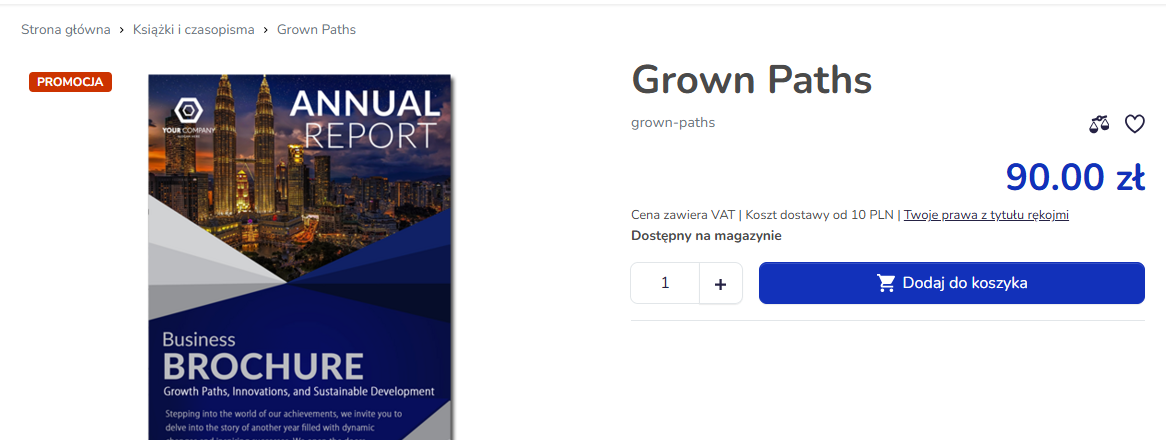
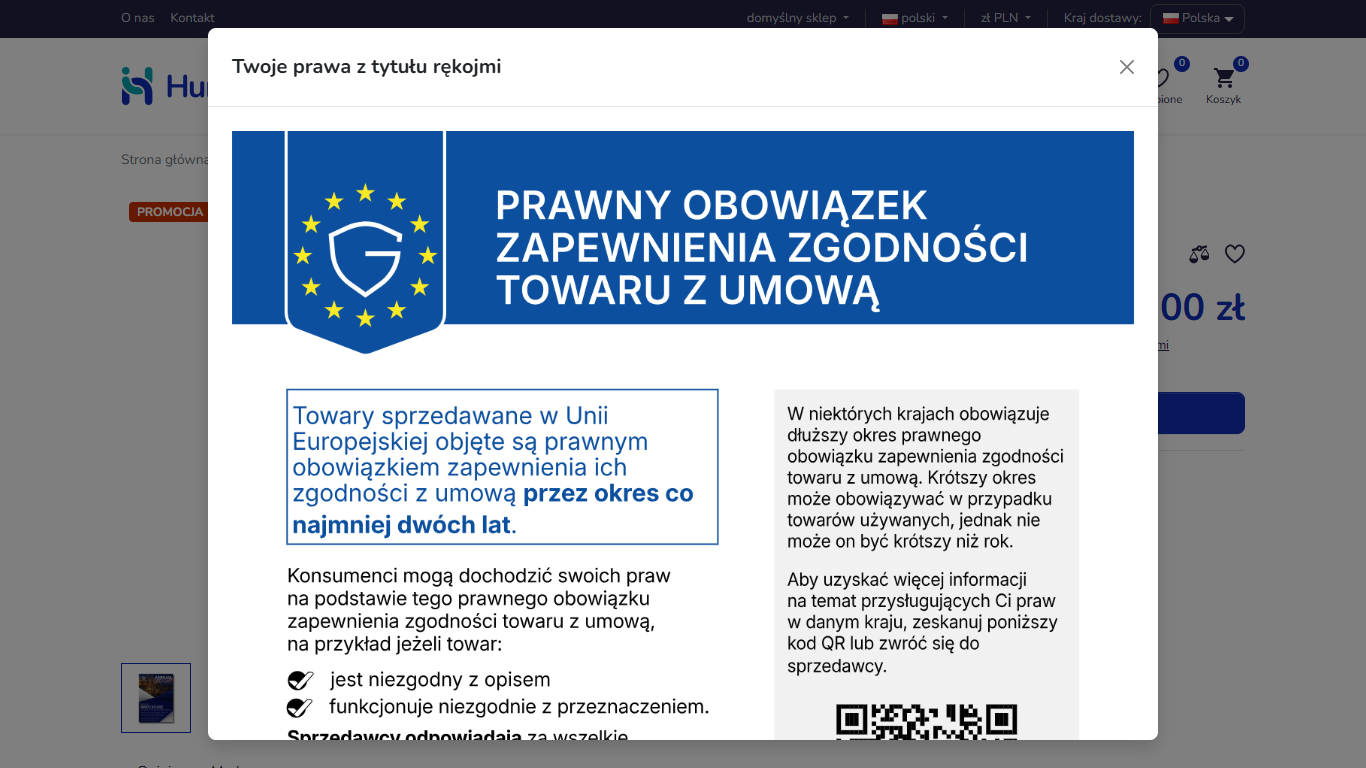
¶ Pop-up window with the EU notice
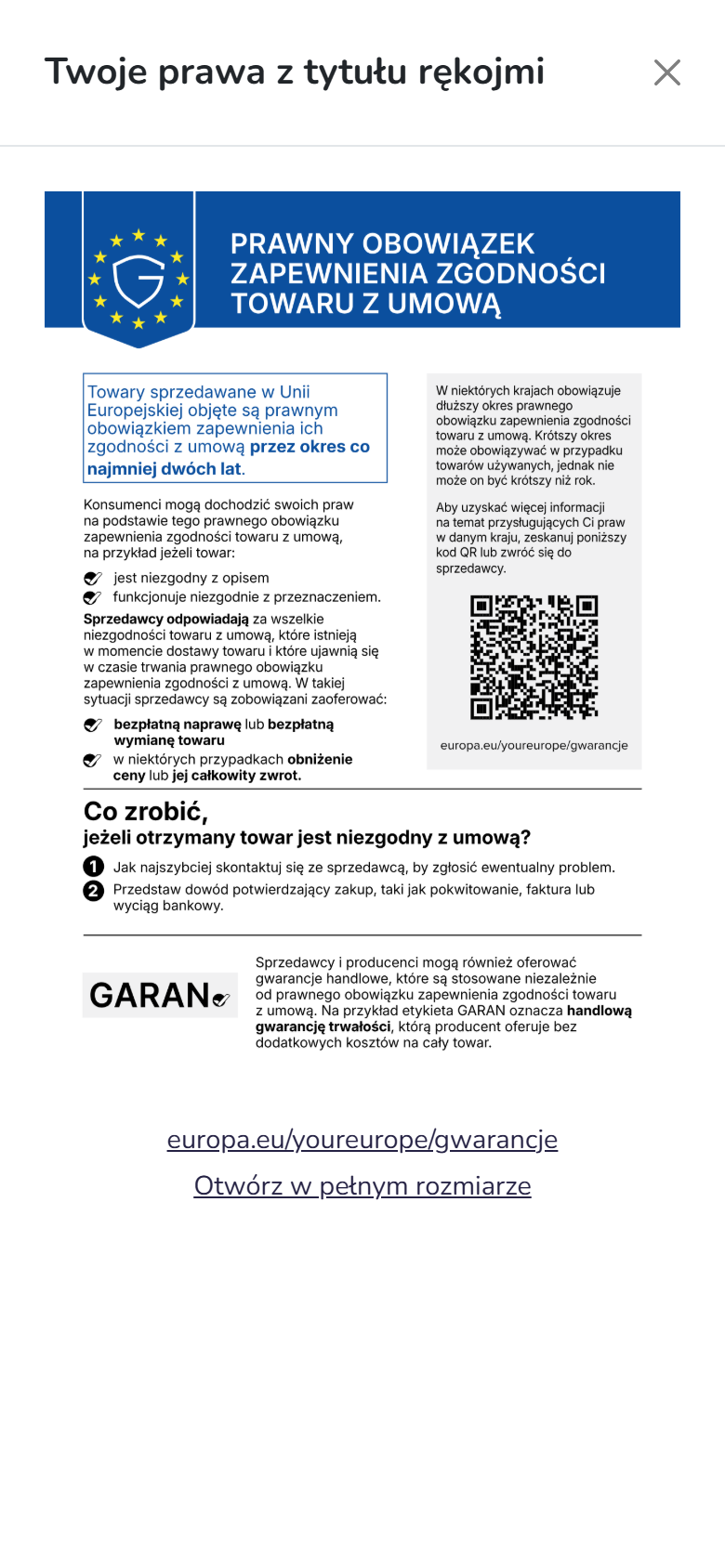
¶ Phone
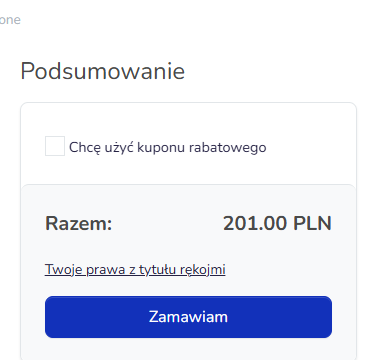
¶ Cart
¶ Order form
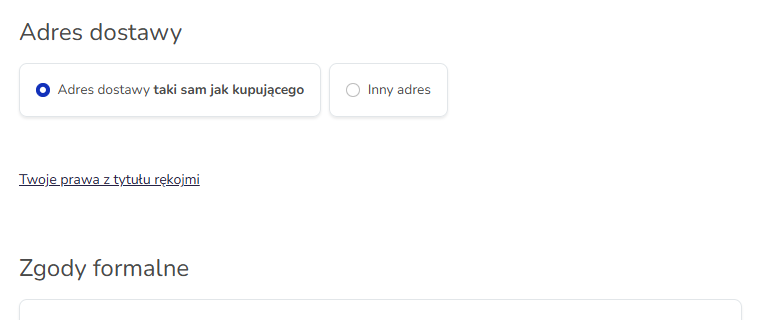
¶ Order confirmation page

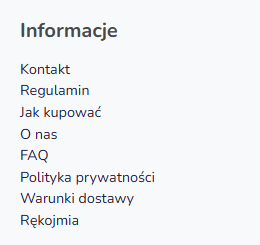
¶ Footer
¶ How it works
¶ What the store shows
- The "Your legal guarantee rights" link in the purchase path:
- product page - in the line below the price, after "Price includes VAT | delivery cost",
- cart - below the total amount,
- order form and the summary before placing the order - below the delivery details,
- the page after placing the order - below the confirmation text.
- A pop-up window with the full notice opens on the first click of the link: the official EU graphic in the store's language, a link to the Your Europe portal (the same address as in the QR code) and an "Open full size" link. The window closes with the button, the Esc key or a click outside it; on a phone it takes the whole screen.
- The "Legal guarantee" page - the graphic displayed directly and a link to Your Europe. The link in the purchase path also leads to this page, so the notice is available without the window too.
- Footer - a "Legal guarantee" item in the information block (next to the terms of service, delivery and privacy policy).
- Order confirmation email - a "Legal guarantee" block with the graphic and a link to Your Europe, in the HTML and text versions.
¶ How it is built
- Two content blocks with a link and one with the pop-up window, in every store language (Canvases and contents).
- The window is placed once, in the footer - so it works on every page, including the order pages, and isn't duplicated on the summary, where the link appears twice.
- The link is attached to canvases that are already in the store template. A canvas that is missing in the panel (e.g. the cart summary) is created in the panel with the same symbol - no template changes.
- The "Legal guarantee" page is an ordinary static page. If the footer's information block is a page menu, the new page appears in the footer automatically as its subpage.
- The graphics are official European Commission files, uploaded to the store unchanged. The graphic in the window loads only after it is opened.
- Every graphic has alternative text with the full content of the notice - for screen readers.
¶ The expandable version
A short link that opens the full notice on the first click is the example given in the European Commission's guidelines (the phrase "Your legal guarantee rights"). The regulation does not describe it explicitly - the store decides how to present the notice. The graphic can also be shown directly, without the window - e.g. only on the "Legal guarantee" page and in the email, with a link in the purchase path.
¶ Version
The configuration was prepared and tested on Hummerce version 2.35 with the Bootstrap 5 template. For stores on the Bootstrap 4 template there is a separate window variant (section "Configuration details").
¶ Dependencies
- A store template with places for content in the purchase path: the line below the price on the product page, the cart summary, the delivery details in the order form, the page after placing the order, the footer. The standard Bootstrap 5 and Bootstrap 4 templates have them.
- The official legal guarantee notice files from the European Commission website ("Practical guidelines and high-resolution vector files", 24 languages).
- Email templates - the order confirmation template for the customer.
- For configuration by an AI assistant - the store's MCP server and an account with permissions for content.
¶ Implementation
- Implementation requires no coding - it is a configuration of content blocks, canvases, a page and an email template in the panel or through an AI assistant.
- Minimum estimated time: from 2 h (content in two languages, attachments to canvases, the page, the email, a check in the store). The time for a specific implementation depends on its scope - we quote it individually.
- What the time depends on:
- the number of store languages (each language is a separate graphic and content block),
- custom store templates - a missing place for content means adding it in the template (a separate development task),
- the Bootstrap 4 store template - the window variant needs checking during the first implementation,
- the number and look of email templates,
- the store version - an older version needs an update first (quoted separately).
- Before implementation, it is worth confirming with the store's lawyer that the expandable version (link and window) is acceptable for the store.
¶ Limitations
- The configuration does not change store templates - places that the template lacks (e.g. configurator templates without a line below the price) require a separate task.
- The notice is common to the whole store - it does not depend on the product. The durability commercial guarantee label (GARAN) assigned to a product is a separate feature.
- Ready content is in Polish and English. Further languages - from the official European Commission files, following the same pattern.
- The configuration covers the order confirmation email. Other emails, sales documents (invoice, order PDF) and channels outside the store (Allegro, apps) do not get the notice automatically.
- The email needs a PNG graphic - email clients do not display SVG. A store on version 2.35 accepts PNG, JPG, GIF, WEBP and AVIF graphics.
- The cookie consent bar may cover the bottom of the window until cookies are accepted.
- The window variant for the Bootstrap 4 template has not yet been tested in a store on that template. If the window does not work, the link leads to the "Legal guarantee" page.
- We do not verify the task for legal compliance - the way the notice is presented, the content of the terms of service and the rules for handling complaints are set by the store.
¶ Future development
- The legal guarantee notice in further emails (status change, invoice) and in sales documents.
- Ready content in further EU languages.
- The GARAN label on the product page - a separate feature for the durability commercial guarantee.
¶ Frequently asked questions
Does Hummerce support the EU legal guarantee notice without coding?
Yes. The link, the window, the "Legal guarantee" page and the email block are panel content and settings - in a store on a standard template there is no need to change code.
Can the EU graphic be changed, e.g. to match the store's colours?
No. We use the official European Commission files unchanged - colours included.
Does the notice have to be in a pop-up window?
No. A window opened by a short link is an example from the European Commission's guidelines, not a requirement of the regulation. The store can show the graphic directly - the decision is the store's.
How long does implementing the legal guarantee notice take?
From 2 h in a store on a standard template, in Polish and English. Custom templates without the needed places for content and additional languages make it longer.
Does it work in a store with a custom template?
Partly. The content works in every place the template has; a missing place has to be added in the template as a separate task.
Does the legal guarantee notice go into the order confirmation email?
Yes. The order confirmation template gets a block with the graphic and a link to Your Europe, in the HTML and text versions.
¶ Related
- Complaints
- Returns - withdrawal from the contract
- Canvases and contents
- Email templates and alerts
- AI assistant - MCP server
- On hummerce.com: Returns and complaints (in Polish)
Want to see how the legal guarantee notice could work in your store? Contact the Hummerce team (in Polish).
¶ Configuration details
¶ Map of places
| Place in the store | Canvas (symbol) | Content block |
|---|---|---|
| Product page, line below the price | plusShippingCost |
rekojmiaLinkCena - as the second content block next to the delivery cost, canvas limit 2 |
| Cart, amounts summary | cartTextBelowPrice |
rekojmiaLink |
| Order form and summary before placing the order | orderBelowDelivery |
rekojmiaLink |
| Page after placing the order | orderFinished |
rekojmiaLink |
| Footer (every page) | footerLeft |
rekojmiaModal - the window, as the second content block, canvas limit 2 |
| Footer, "Information" block | footerBox2 |
the "Legal guarantee" page as a subpage of the page menu, or a link in the block's content |
Whether a given place is in the store template can be checked in the canvas placement preview (Canvases and contents). For a store with custom templates that lack one of the places - raise a separate task to add the canvas in the template.
¶ Access in the admin panel
- Graphics: the official European Commission files in every store language, as PNG (about 1200 px wide), uploaded unchanged (File and image manager). Copy the address of each file.
- The "Legal guarantee" page: Content -> Pages - a new page with the graphic and a link to Your Europe, in every language; if the "Information" block in the footer is a page menu, set Parent page to the page of that menu.
- Content blocks: Content -> Contents - three HTML content blocks:
rekojmiaLink,rekojmiaLinkCena,rekojmiaModal(templates below), in every language. - Attachments: Content -> Canvases - attach the content blocks according to the map of places; in
plusShippingCostandfooterLeftset the limit to 2, so the existing content block stays. Add a missing canvas (e.g.cartTextBelowPrice) with exactly that symbol. - Email: Configuration -> Templates - the order confirmation template for the customer, HTML and text version, every language; the "Legal guarantee" block before the email footer. Do not change the shared footer of all emails.
- Cache: Status -> Cache - clear it after the changes, otherwise the product page and footer show the old version (Cache).
- Check: product page, window (computer and phone), cart, form, the page after placing the order, footer, email - in every language.
¶ Content to copy
In the addresses, replace /pl/rekojmia.html and /en/legal-guarantee.html with the address of the "Legal guarantee" page in your store (the friendly address appears after saving the page and clearing the cache), and [GRAPHIC-PL] and [GRAPHIC-EN] with the addresses of the uploaded graphics. Fill in the alternative text (alt) with the full content of the graphic in the given language.
Link - rekojmiaLink (EN):
<span class="rekojmia-link small d-inline-block mt-1 mb-3"><a href="/en/legal-guarantee.html" data-bs-toggle="modal" data-bs-target="#rekojmiaModal" data-toggle="modal" data-target="#rekojmiaModal">Your legal guarantee rights</a></span>
Link in the line below the price - rekojmiaLinkCena (EN):
| <a href="/en/legal-guarantee.html" data-bs-toggle="modal" data-bs-target="#rekojmiaModal" data-toggle="modal" data-target="#rekojmiaModal">Your legal guarantee rights</a>
The Polish version of both links uses the Polish link text and the Polish page address. The link has the attributes of both Bootstrap versions - it works in the Bootstrap 5 and Bootstrap 4 templates.
Window - rekojmiaModal, Bootstrap 5 (EN):
<div class="modal fade" id="rekojmiaModal" tabindex="-1" aria-labelledby="rekojmiaModalTitle" aria-hidden="true">
  <div class="modal-dialog modal-lg modal-dialog-centered modal-dialog-scrollable modal-fullscreen-sm-down">
    <div class="modal-content text-dark" style="color:rgb(33,37,41)">
      <div class="modal-header">
        <h2 class="modal-title fs-5 text-dark" id="rekojmiaModalTitle" style="color:rgb(33,37,41)">Your legal guarantee rights</h2>
        <button type="button" class="btn-close" data-bs-dismiss="modal" aria-label="Close"></button>
      </div>
      <div class="modal-body text-center">
        <img src="[GRAPHIC-EN]" loading="lazy" class="img-fluid" width="1200" height="1697" alt="LEGAL GUARANTEE. Minimum two-year legal guarantee protection for goods sold in the European Union. ...">
        <p class="mt-3 mb-1"><a href="https://europa.eu/youreurope/guarantees" target="_blank" rel="noopener">europa.eu/youreurope/guarantees</a></p>
        <p class="mb-0"><a href="[GRAPHIC-EN]" target="_blank" rel="noopener">Open full size</a></p>
      </div>
    </div>
  </div>
</div>
The Polish version uses the Polish title, the Polish button label in aria-label, the Polish graphic, the link https://europa.eu/youreurope/gwarancje and the Polish "Open full size" text. The window has its own text colour because the store footer is sometimes dark with light text - without it the window title is invisible.
Window - rekojmiaModal, Bootstrap 4 (EN):
<div class="modal fade" id="rekojmiaModal" tabindex="-1" role="dialog" aria-labelledby="rekojmiaModalTitle" aria-hidden="true">
<div class="modal-dialog modal-lg modal-dialog-centered" role="document">
<div class="modal-content text-dark" style="color:rgb(33,37,41)">
<div class="modal-header">
<h2 class="modal-title h5 text-dark" id="rekojmiaModalTitle" style="color:rgb(33,37,41)">Your legal guarantee rights</h2>
<button type="button" class="close" data-dismiss="modal" aria-label="Close"><span aria-hidden="true">×</span></button>
</div>
<div class="modal-body text-center">
<img src="[GRAPHIC-EN]" loading="lazy" class="img-fluid" width="1200" height="1697" alt="LEGAL GUARANTEE. Minimum two-year legal guarantee protection for goods sold in the European Union. ...">
<p class="mt-3 mb-1"><a href="https://europa.eu/youreurope/guarantees" target="_blank" rel="noopener">europa.eu/youreurope/guarantees</a></p>
<p class="mb-0"><a href="[GRAPHIC-EN]" target="_blank" rel="noopener">Open full size</a></p>
</div>
</div>
</div>
</div>
Email block - HTML (EN):
<hr style="border: 0; border-top: 1px solid #e1e1e1; "/>
<h2 style="font-size: 20px; font-weight: bold; margin: 20px 0 10px 0; font-family: Arial, sans-serif; ">Legal guarantee</h2>
<p style="margin: 0 0 10px 0;">Your legal guarantee rights (legal guarantee of conformity):</p>
<p style="margin: 0 0 10px 0; text-align: center;"><a href="$!{ctx.shop.configuration.url_Shop}/en/legal-guarantee.html"><img src="$!{ctx.shop.configuration.url_Shop}[GRAPHIC-EN]" width="600" style="display: block; margin: 0 auto; max-width: 100%; height: auto; border: 0;" alt="LEGAL GUARANTEE. Minimum two-year legal guarantee protection for goods sold in the European Union. More: europa.eu/youreurope/guarantees"/></a></p>
<p style="margin: 0 0 10px 0; text-align: center;">More information: <a href="https://europa.eu/youreurope/guarantees">europa.eu/youreurope/guarantees</a></p>
Email block - text (EN):
Legal guarantee
Goods sold in the European Union are covered by a minimum two-year legal guarantee of conformity.
Information about your rights: $!{ctx.shop.configuration.url_Shop}/en/legal-guarantee.html
More information: https://europa.eu/youreurope/guarantees
The Polish version of the email uses the Polish heading and texts, the Polish graphic, the address of the Polish page and https://europa.eu/youreurope/gwarancje. Always use a PNG graphic in the email.
¶ REST API and MCP
All the configuration except the email template can be entered through the AI assistant (the store's MCP server): uploading the graphics, content blocks, the page and attachments to canvases in a single XML import with a preview before saving.
A ready skill for Claude Code - save the file below as .claude/skills/rekojmia-ue/SKILL.md in your working directory and ask the assistant: "Implement the legal guarantee notice in the store". The skill:
- checks the state of the canvases and keeps existing content (importing attachments to a canvas replaces all of its attachments, so the skill repeats the existing ones),
- asks about the store front (Bootstrap 5 / 4) and picks the window variant,
- shows a preview before every save and waits for approval,
- clears the cache through MCP, and if the server does not confirm clearing the page cache - asks for it to be cleared in the panel,
- provides the block to paste into the email template and a list of places to check.
The skill's instructions are in Polish and work in any language of conversation, so the file below is kept exactly as in the Polish documentation.
---
name: rekojmia-ue
description: Konfiguruje w sklepie Hummerce zharmonizowaną informację UE o rękojmi (legal guarantee notice, rozporządzenie 2025/1960) bez programowania - przez serwer MCP sklepu - grafiki, link "Twoje prawa z tytułu rękojmi" w ścieżce zakupowej, okno z pełną grafiką, strona "Rękojmia", podpięcia do obszarów, z podglądem przed zapisem. Użyj, gdy użytkownik prosi o wdrożenie informacji o rękojmi, legal guarantee notice albo "Twoje prawa z tytułu rękojmi" w sklepie Hummerce.
---
# Rękojmia - zharmonizowana informacja UE w sklepie Hummerce
Wprowadzasz konfigurację opisaną na stronie dokumentacji "Rękojmia - zharmonizowana informacja UE" (docs.hummerce.com, obszar Obsługa zamówień). Pracujesz wyłącznie narzędziami serwera MCP sklepu. Nie zmieniasz szablonów stron ani kodu.
## Zasady
- **Przed każdym zapisem pokaż podgląd i poczekaj na zatwierdzenie.** Import XML zawsze najpierw z `apply=false`.
- **Nie usuwaj istniejących treści.** Import podpięć do obszaru (`<contentLink>`) zastępuje wszystkie podpięcia tego obszaru - w XML powtarzasz każde istniejące podpięcie z jego `ord` i widocznością, a nowe dopisujesz za nimi.
- Sklep produkcyjny tylko na wyraźne polecenie użytkownika. Zacznij od sklepu testowego.
- Grafik UE nie zmieniasz (kolory, proporcje, treść). Używasz oficjalnych plików Komisji Europejskiej.
- Klucze i hasła tylko ze zmiennych środowiskowych - nie proś o ich wklejenie.
## Dane wejściowe (zapytaj, jeśli brak)
| Dane | Przykład |
|---|---|
| Serwer MCP sklepu | `sklep-test` |
| Języki sklepu | `pl`, `en` |
| Wygląd frontu | Bootstrap 5 (domyślnie) albo Bootstrap 4 |
| Pliki grafik | PNG z oficjalnych plików KE (PL, EN), np. `rekojmia-ue-pl.png`, `rekojmia-ue-en.png`, szerokość ok. 1200 px |
Wygląd frontu rozpoznasz na stronie sklepu: Bootstrap 5 ma atrybuty `data-bs-toggle`, Bootstrap 4 - `data-toggle` i jQuery.
## Kroki
### 1. Sklep
`ec2_system_info` - nazwa, wersja. Potwierdź z użytkownikiem, że to właściwy sklep.
### 2. Stan obszarów i stopki
- `ec2_canvas_list` - czy są obszary `plusShippingCost`, `cartTextBelowPrice`, `orderBelowDelivery`, `orderFinished`, `footerLeft`.
- `ec2_canvas_details` dla każdego z nich - zapisz podpięte treści (symbol, `ord`, widoczność) i limit (`shows at most`).
- `footerBox2` (blok "Informacje" w stopce): `ec2_content_details` podpiętej treści. Jeśli to menu stron (`_contentMenuStaticPage`, np. `informations_menu;...`), nową stronę "Rękojmia" dodasz jako podstronę tej strony - link w stopce pojawi się sam.
- Brak obszaru w liście nie oznacza braku miejsca w szablonie - import go założy. Jeśli po imporcie link się nie wyświetla, szablon sklepu nie ma tego miejsca: zgłoś to użytkownikowi (to osobne zadanie dla programisty).
### 3. Grafiki
- `ec2_config_search` z zapytaniem `rozszerz` - sprawdź dozwolone rozszerzenia zdjęć. PNG jest zawsze potrzebny (maile nie wyświetlają SVG); SVG tylko, jeśli sklep go dopuszcza.
- `ec2_image_upload`: `property="_contentImage"`, `locale` = język, `resize=false`, `fileName` = nazwa pliku. Adres grafiki w sklepie: `/images/_contentImage/<plik>`.
- Plik w base64 może być za duży na argument narzędzia. Wtedy wyślij go krótkim skryptem przez ten sam endpoint MCP (JSON-RPC: `initialize`, potem `tools/call` z nazwą `ec2_image_upload`), z kluczem ze zmiennej środowiskowej, której używa konfiguracja MCP.
- Sprawdź, że grafika otwiera się pod pełnym adresem sklepu (HTTP 200).
### 4. XML
Zbuduj plik według wzoru niżej:
- treści `rekojmiaLink`, `rekojmiaLinkCena`, `rekojmiaModal` dla każdego języka (`locale`),
- strona `rekojmia` (z `parent`, jeśli stopka to menu stron),
- obszary: istniejące podpięcia z kroku 2 + nowe, limity (`plusShippingCost` i `footerLeft` muszą pokazać co najmniej 2 treści),
- wariant okna Bootstrap 5 albo Bootstrap 4.
Adres strony "Rękojmia" w linkach: przyjazny adres (np. `/pl/rekojmia.html`) pojawia się dopiero po zapisaniu strony i wyczyszczeniu cache. Na pierwszy import użyj standardowego adresu strony statycznej sklepu; po kroku 6 możesz zamienić go na przyjazny i powtórzyć import samych treści.
### 5. Podgląd i zapis
- `ec2_extension_xml_import` z `apply=false` - pokaż wynik i XML użytkownikowi. Ostrzeżenie o "numerycznych id" przy limicie obszaru to fałszywy alarm.
- Po zatwierdzeniu: `apply=true`, `saveAs` = nazwa kopii pliku.
- Sprawdź: `ec2_canvas_details` (każdy obszar - stare i nowe podpięcia), `ec2_content_details` (treści), `ec2_pages_get` (strona, oba języki).
- Import obcina spację na początku wartości - separator w `rekojmiaLinkCena` to `| ` bez spacji przed nim (szablon rozdziela treści obszaru sam).
### 6. Pamięć podręczna (cache)
- Wywołaj `ec2_cache_clear` i przeczytaj odpowiedź. Sprawdź też opis narzędzia na liście narzędzi serwera.
- Jeśli odpowiedź potwierdza wyczyszczenie cache stron sklepu (obszarów, fragmentów stron) - przejdź dalej.
- Jeśli nie potwierdza albo wymienia cache, których nie wyczyściła (np. "Not cleared: module caches ... use the admin panel's clear-cache button") - poproś użytkownika: "Wyczyść cache w panelu: Status -> Cache" i poczekaj na potwierdzenie. Bez tego karta produktu i stopka mogą pokazywać starą wersję.
### 7. Mail z potwierdzeniem zamówienia
MCP nie zmienia szablonów maili. Podaj użytkownikowi blok do wklejenia (wzór niżej) i miejsce: **Konfiguracja -> Szablony**, szablon potwierdzenia zamówienia dla klienta (`orderForCustomer`), wersja HTML przed stopką maila i wersja tekstowa, w każdym języku. Wspólnej stopki maili nie zmieniaj.
### 8. Sprawdzenie
Podaj listę do sprawdzenia w sklepie (komputer i telefon, każdy język):
1. karta zwykłego produktu - link w wierszu pod ceną, okno po pierwszym kliknięciu,
2. okno - grafika czytelna, link Your Europe, "Otwórz w pełnym rozmiarze", zamykanie przyciskiem, Esc i kliknięciem obok,
3. koszyk - link pod kwotą łączną, odstęp od przycisku zamówienia,
4. formularz zamówienia - link pod danymi dostawy,
5. podsumowanie przed złożeniem (jeśli sklep ma ten krok) - jedno okno,
6. strona po złożeniu zamówienia,
7. stopka - link "Rękojmia", strona z grafiką,
8. mail z potwierdzeniem zamówienia.
Jeśli okno ma niewidoczny tytuł albo tekst - obszar w stopce ma jasny tekst na ciemnym tle; okno ustawia własny kolor tekstu (`text-dark` i `color:rgb(33,37,41)` we wzorze).
## Wzór XML (Bootstrap 5, PL i EN)
Zamień: `[ADRES-STRONY-PL]`, `[ADRES-STRONY-EN]`, `[GRAFIKA-PL]`, `[GRAFIKA-EN]` (np. `/images/_contentImage/rekojmia-ue-pl.png`), `[ALT-PL]`, `[ALT-EN]` (pełny tekst grafiki - przepisz go z pliku KE), `[RODZIC-STOPKI]` (strona menu stopki albo usuń atrybut `parent`), istniejące podpięcia obszarów.
```xml
<?xml version="1.0" encoding="UTF-8"?>
<extension>
<object target="content" symbol="rekojmiaLink">
<attribute name="visible" value="true" />
<property symbol="_contentType">static</property>
<property symbol="_contentHTML" locale="pl"><![CDATA[<span class="rekojmia-link small d-inline-block mt-1 mb-3"><a href="[ADRES-STRONY-PL]" data-bs-toggle="modal" data-bs-target="#rekojmiaModal" data-toggle="modal" data-target="#rekojmiaModal">Twoje prawa z tytułu rękojmi</a></span>]]></property>
<property symbol="_contentHTML" locale="en"><![CDATA[<span class="rekojmia-link small d-inline-block mt-1 mb-3"><a href="[ADRES-STRONY-EN]" data-bs-toggle="modal" data-bs-target="#rekojmiaModal" data-toggle="modal" data-target="#rekojmiaModal">Your legal guarantee rights</a></span>]]></property>
</object>
<object target="content" symbol="rekojmiaLinkCena">
<attribute name="visible" value="true" />
<property symbol="_contentType">static</property>
<property symbol="_contentHTML" locale="pl"><![CDATA[| <a href="[ADRES-STRONY-PL]" data-bs-toggle="modal" data-bs-target="#rekojmiaModal" data-toggle="modal" data-target="#rekojmiaModal">Twoje prawa z tytułu rękojmi</a>]]></property>
<property symbol="_contentHTML" locale="en"><![CDATA[| <a href="[ADRES-STRONY-EN]" data-bs-toggle="modal" data-bs-target="#rekojmiaModal" data-toggle="modal" data-target="#rekojmiaModal">Your legal guarantee rights</a>]]></property>
</object>
<object target="content" symbol="rekojmiaModal">
<attribute name="visible" value="true" />
<property symbol="_contentType">static</property>
<property symbol="_contentHTML" locale="pl"><![CDATA[<div class="modal fade" id="rekojmiaModal" tabindex="-1" aria-labelledby="rekojmiaModalTitle" aria-hidden="true">
<div class="modal-dialog modal-lg modal-dialog-centered modal-dialog-scrollable modal-fullscreen-sm-down">
<div class="modal-content text-dark" style="color:rgb(33,37,41)">
<div class="modal-header">
<h2 class="modal-title fs-5 text-dark" id="rekojmiaModalTitle" style="color:rgb(33,37,41)">Twoje prawa z tytułu rękojmi</h2>
<button type="button" class="btn-close" data-bs-dismiss="modal" aria-label="Zamknij"></button>
</div>
<div class="modal-body text-center">
<img src="[GRAFIKA-PL]" loading="lazy" class="img-fluid" width="1200" height="1697" alt="[ALT-PL]">
<p class="mt-3 mb-1"><a href="https://europa.eu/youreurope/gwarancje" target="_blank" rel="noopener">europa.eu/youreurope/gwarancje</a></p>
<p class="mb-0"><a href="[GRAFIKA-PL]" target="_blank" rel="noopener">Otwórz w pełnym rozmiarze</a></p>
</div>
</div>
</div>
</div>]]></property>
<property symbol="_contentHTML" locale="en"><![CDATA[<div class="modal fade" id="rekojmiaModal" tabindex="-1" aria-labelledby="rekojmiaModalTitle" aria-hidden="true">
<div class="modal-dialog modal-lg modal-dialog-centered modal-dialog-scrollable modal-fullscreen-sm-down">
<div class="modal-content text-dark" style="color:rgb(33,37,41)">
<div class="modal-header">
<h2 class="modal-title fs-5 text-dark" id="rekojmiaModalTitle" style="color:rgb(33,37,41)">Your legal guarantee rights</h2>
<button type="button" class="btn-close" data-bs-dismiss="modal" aria-label="Close"></button>
</div>
<div class="modal-body text-center">
<img src="[GRAFIKA-EN]" loading="lazy" class="img-fluid" width="1200" height="1697" alt="[ALT-EN]">
<p class="mt-3 mb-1"><a href="https://europa.eu/youreurope/guarantees" target="_blank" rel="noopener">europa.eu/youreurope/guarantees</a></p>
<p class="mb-0"><a href="[GRAFIKA-EN]" target="_blank" rel="noopener">Open full size</a></p>
</div>
</div>
</div>
</div>]]></property>
</object>
<object target="page" symbol="rekojmia" parent="[RODZIC-STOPKI]">
<attribute name="type" value="html" />
<attribute name="visible" value="true" />
<property symbol="_title" locale="pl">Rękojmia</property>
<property symbol="_title" locale="en">Legal guarantee</property>
<property symbol="_contents" locale="pl"><![CDATA[<p>Kupując w naszym sklepie, korzystasz z ustawowej rękojmi (prawnego obowiązku zapewnienia zgodności towaru z umową). Poniżej zharmonizowana informacja Unii Europejskiej o Twoich prawach.</p>
<p class="text-center"><img src="[GRAFIKA-PL]" class="img-fluid" width="1200" height="1697" style="max-width:640px;width:100%;height:auto" alt="[ALT-PL]"></p>
<p class="text-center">Więcej informacji: <a href="https://europa.eu/youreurope/gwarancje" target="_blank" rel="noopener">europa.eu/youreurope/gwarancje</a></p>]]></property>
<property symbol="_contents" locale="en"><![CDATA[<p>When you buy in our shop, you are protected by the legal guarantee of conformity. Below is the harmonised European Union notice about your rights.</p>
<p class="text-center"><img src="[GRAFIKA-EN]" class="img-fluid" width="1200" height="1697" style="max-width:640px;width:100%;height:auto" alt="[ALT-EN]"></p>
<p class="text-center">More information: <a href="https://europa.eu/youreurope/guarantees" target="_blank" rel="noopener">europa.eu/youreurope/guarantees</a></p>]]></property>
</object>
<object target="canvas" symbol="plusShippingCost">
<property symbol="_contentDisplayLimit">2</property>
<contentLink symbol="[ISTNIEJĄCA-TREŚĆ]"><attribute name="ord" value="1" /><attribute name="visible" value="true" /></contentLink>
<contentLink symbol="rekojmiaLinkCena"><attribute name="ord" value="2" /><attribute name="visible" value="true" /></contentLink>
</object>
<object target="canvas" symbol="cartTextBelowPrice">
<attribute name="visible" value="true" />
<contentLink symbol="rekojmiaLink"><attribute name="ord" value="1" /><attribute name="visible" value="true" /></contentLink>
</object>
<object target="canvas" symbol="orderBelowDelivery">
<contentLink symbol="rekojmiaLink"><attribute name="ord" value="1" /><attribute name="visible" value="true" /></contentLink>
</object>
<object target="canvas" symbol="orderFinished">
<contentLink symbol="rekojmiaLink"><attribute name="ord" value="1" /><attribute name="visible" value="true" /></contentLink>
</object>
<object target="canvas" symbol="footerLeft">
<contentLink symbol="[ISTNIEJĄCA-TREŚĆ]"><attribute name="ord" value="0" /><attribute name="visible" value="true" /></contentLink>
<contentLink symbol="rekojmiaModal"><attribute name="ord" value="1" /><attribute name="visible" value="true" /></contentLink>
</object>
</extension>
```
W obszarach najpierw istniejące podpięcia (z `ec2_canvas_details`), potem nowe. Obszar, który ma już inną treść z `ord`, dostaje nową treść z wyższym `ord`. Obszar bez podpięć - tylko nowa treść. Gdy `footerLeft` ma limit 1, ustaw `_contentDisplayLimit` na 2.
## Okno - wariant Bootstrap 4
Ten sam link (`rekojmiaLink`, `rekojmiaLinkCena` - mają oba zestawy atrybutów). Zamiast okna Bootstrap 5 w `rekojmiaModal`:
```html
<div class="modal fade" id="rekojmiaModal" tabindex="-1" role="dialog" aria-labelledby="rekojmiaModalTitle" aria-hidden="true">
<div class="modal-dialog modal-lg modal-dialog-centered" role="document">
<div class="modal-content text-dark" style="color:rgb(33,37,41)">
<div class="modal-header">
<h2 class="modal-title h5 text-dark" id="rekojmiaModalTitle" style="color:rgb(33,37,41)">Twoje prawa z tytułu rękojmi</h2>
<button type="button" class="close" data-dismiss="modal" aria-label="Zamknij"><span aria-hidden="true">×</span></button>
</div>
<div class="modal-body text-center">
<img src="[GRAFIKA-PL]" loading="lazy" class="img-fluid" width="1200" height="1697" alt="[ALT-PL]">
<p class="mt-3 mb-1"><a href="https://europa.eu/youreurope/gwarancje" target="_blank" rel="noopener">europa.eu/youreurope/gwarancje</a></p>
<p class="mb-0"><a href="[GRAFIKA-PL]" target="_blank" rel="noopener">Otwórz w pełnym rozmiarze</a></p>
</div>
</div>
</div>
</div>
```
Wariant Bootstrap 4 nie był sprawdzony na sklepie - przy pierwszym wdrożeniu przejdź całą listę z kroku 8 i powiedz o tym użytkownikowi.
## Blok do maila (orderForCustomer)
HTML (PL; EN analogicznie: "Legal guarantee", grafika EN, europa.eu/youreurope/guarantees):
```html
<hr style="border: 0; border-top: 1px solid #e1e1e1; "/>
<h2 style="font-size: 20px; font-weight: bold; margin: 20px 0 10px 0; font-family: Arial, sans-serif; ">Rękojmia</h2>
<p style="margin: 0 0 10px 0;">Twoje prawa z tytułu rękojmi (prawnego obowiązku zapewnienia zgodności towaru z umową):</p>
<p style="margin: 0 0 10px 0; text-align: center;"><a href="$!{ctx.shop.configuration.url_Shop}[ADRES-STRONY-PL]"><img src="$!{ctx.shop.configuration.url_Shop}[GRAFIKA-PL]" width="600" style="display: block; margin: 0 auto; max-width: 100%; height: auto; border: 0;" alt="[ALT-PL]"/></a></p>
<p style="margin: 0 0 10px 0; text-align: center;">Więcej informacji: <a href="https://europa.eu/youreurope/gwarancje">europa.eu/youreurope/gwarancje</a></p>
```
Tekst (PL):
```
Rękojmia
Towary sprzedawane w Unii Europejskiej objęte są prawnym obowiązkiem zapewnienia ich zgodności z umową przez okres co najmniej dwóch lat (rękojmia).
Informacja o Twoich prawach: $!{ctx.shop.configuration.url_Shop}[ADRES-STRONY-PL]
Więcej informacji: https://europa.eu/youreurope/gwarancje
```
W mailu tylko PNG.